

What is Qianwen Office
Qianwen Office is a one-stop AI Agent office tool launched by Alibaba, formed by the integrated upgrade ofQoderWork、Wukong、MuleRunthree intelligent agent products. Qianwen Office is based on the Qianwen series of large models, and its positioning goes beyond conversation, with a greater focus on delivery. Users can complete complex tasks such as data analysis, PPT generation, video editing, and web page building with a single sentence, directly obtaining usable results. Qianwen Office already covers desktop and web platforms, and is deeply integrated into the DingTalk ecosystem.
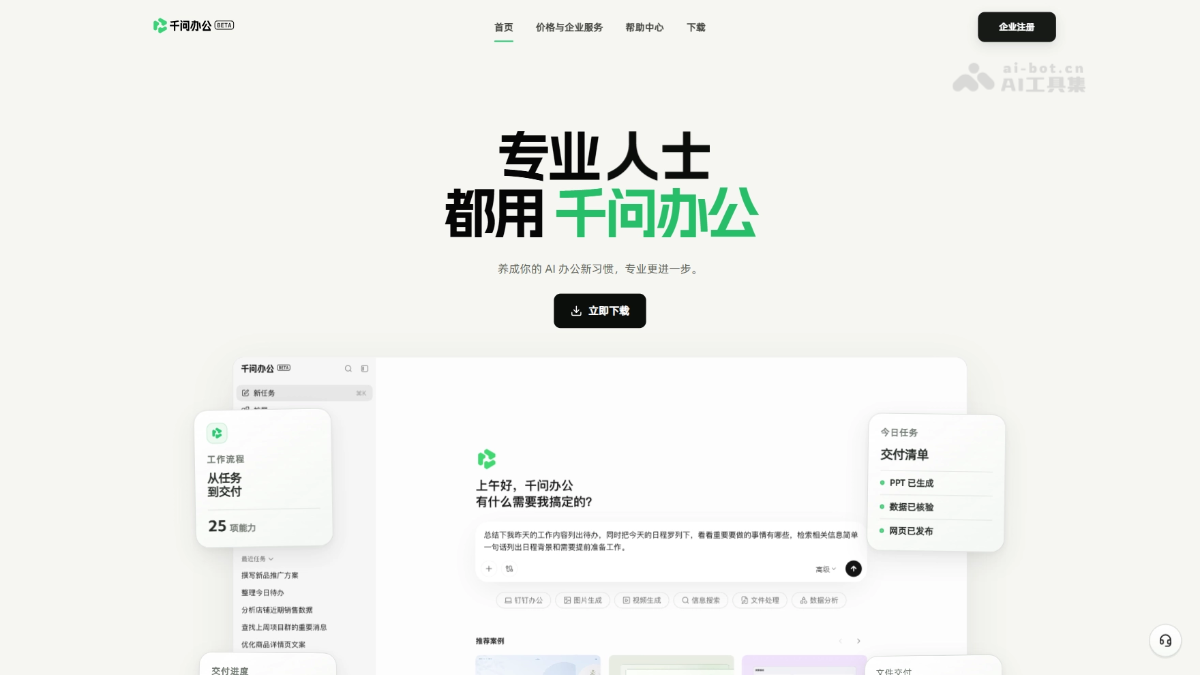
Main features of Qianwen Office
-
Intelligent task execution: Supports breaking down multi-step complex tasks from a single sentence and directly delivering results such as PPT, Word, Excel, web pages, and code.
-
Full-modal content creation: Covers multimodal office needs such as AI image generation, video production, information search, file processing, and data analysis.
-
Full-stack web page creation: Supports creating interactive web pages that can connect to databases and be used without complex deployment.
-
Cloud scheduled tasks: Tasks run automatically in the cloud at set times, and results are pushed to specified channels such as DingTalk messages.
-
Browser automation: Performs operations such as web page clicks, input, and information collection, suitable for data organization and repetitive operation scenarios.
How to use Qianwen Office
- Choose an entry point: Visit the Qianwen Office official website https://qwenwork.cn/ , download the desktop client or web client, or directly launch Qianwen Office from the DingTalk workspace.
- Initiate a task: Describe the task requirements in natural language in the input box, or enter "/" to add files, images, and other content as task materials.
- Invoke capabilities: Click tags such as "Office", "Image", "Video", "Query", "File Processing", and "Apps" below the input box to select the corresponding capability module to assist task execution.
- Advanced settings: Use "Skills" to invoke preset expert suites, set "Scheduled Tasks" to let AI run automatically in the cloud, or choose a "Working Directory" to specify a local file path.
- Obtain results: AI automatically breaks down and executes tasks, directly delivering usable results such as PPT, Word, Excel, web pages, and code within the platform, with support for multiple rounds of iterative optimization.
- In-DingTalk collaboration (DingTalk users): Directly process documents, extract information, and generate content within the DingTalk interface. All operations are completed in a closed loop, and results can be synced to DingTalk messages or cloud drive.
Core advantages of Qianwen Office
-
Full-chain delivery closed loop: From conversational instructions to finished output completed in one stop, with no need to switch tools, truly achieving what you generate is what you get.
-
Native integration within DingTalk: Deeply integrated into the DingTalk ecosystem, AI can directly operate thousands of capabilities such as DingTalk documents, schedules, and approvals, enabling execution through communication.
-
Enterprise-grade security and compliance: Inherits the enterprise permission system, runs in a secure sandbox, and ensures controllable use of AI within organizational boundaries through multi-level controls.
-
Seamless multi-platform connection: The desktop client connects to the local file system, and the web and DingTalk clients can be switched at any time, responding to office needs anytime and anywhere.
-
Capabilities can be accumulated and reused: Solidify high-frequency processes into reusable workflows through skills, memory, and scheduled tasks, avoiding repeated input of instructions.
Usage examples of Qwen Office
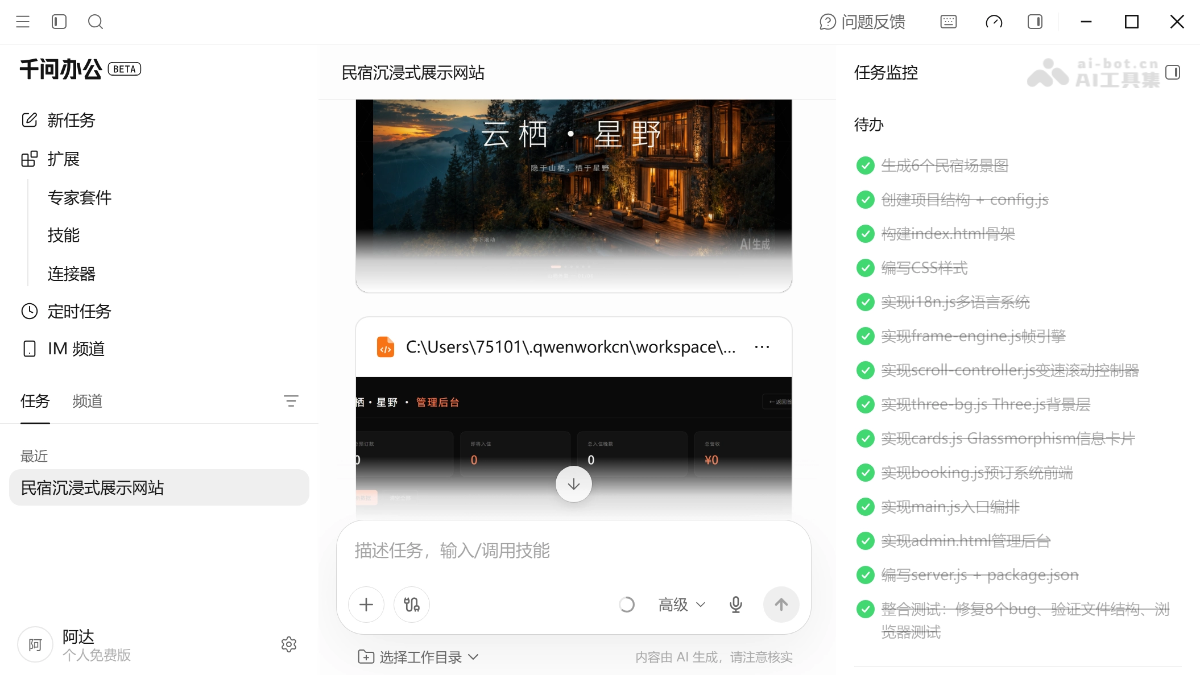
- Website building
Prompt:
You need to upload a landscape video of a homestay/hotel (10-30 seconds, 4K is best) to create a scroll-driven immersive showcase website.
[Video cropping → frame sequence]
ffmpeg -i input.mp4 -ss start second -to end second -vf "scale=2560:-2" -c:v libwebp -quality 85 -r 20 frames/%04d.webp
ffmpeg -i input.mp4 -vn -acodec libmp3lame -q:a 4 bgm.mp3Parameters: 2560px width ensures Retina clarity, 20fps balances smoothness and file size, quality 85 balances clarity and size. Crop out useless intro and outro.
[Anchor marking]
Watch the video and note the seconds at which each room appears, then convert to frame numbers: (seconds - starting crop second) × 20 = anchor frame number[Website construction]
Canvas renders the frame sequence (do not use the video tag), and scroll position maps to frame number. Key: the canvas backing is fixed at 2560px, do not multiply by devicePixelRatio, let the GPU handle display scaling, and avoid software upscaling blur.Variable-speed scrolling: slow down to 0.12x near anchors so users can see the content clearly, and use normal speed in transition sections. Precompute a LUT + binary search.
Progressive loading: first load keyframes every 5 frames (interactive in 3 seconds), then fill in the remaining frames in the background. Use the nearest loaded frame as a substitute for unloaded frames.
Visual layers: frame Canvas (z1) + Three.js wireframe sphere (z2, opacity 0.035) + brand-color particles (z3) + Glassmorphism cards (z15)
Card design: backdrop-filter:blur(40px) saturate(1.6), fade in within ±30 frames of the corresponding anchor, appearing alternately left and right. Place 3 room thumbnails captured from the video inside the card.
Booking system: Express + sql.js, calendar selection + date overlap detection + admin backend.
Multilingual: store Chinese and English in an i18n object, remember the selection with localStorage, and switch font families via html[lang] (Chinese Noto Serif SC/Sans SC, English Cormorant Garamond/Inter).
Color scheme: deep black background (#0a0a0a) + warm white text (#F4F5F2) + orange accent (#F27348), letting the video imagery be the absolute protagonist.
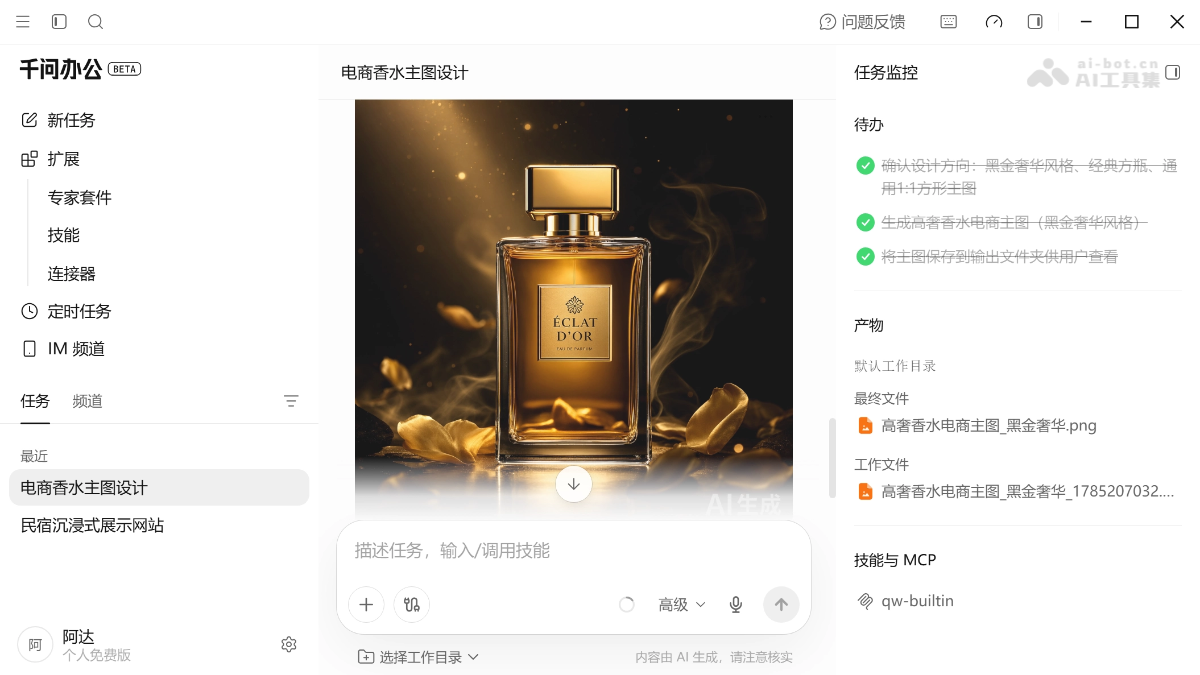
- AI image generation
Prompt: Help me design an e-commerce main image for [xx platform], the product is [high-end luxury perfume].
Comparison of Qwen Office with similar competitors
| Comparison dimension | Qwen Office | TRAE Work | WorkBuddy |
|---|---|---|---|
| Provider | Alibaba | ByteDance | Tencent |
| Core positioning | One-stop AI office platform, "conversation is delivery" | AI-native workbench covering office work and development | All-scenario AI agent desktop workbench |
| Model foundation | Qwen series large models (million-level context, native multimodal) | Built on ByteDance's technology foundation | Flexible switching among multiple models (Hunyuan/DeepSeek/GLM/Kimi/MiniMax) |
| Ecosystem foundation | Deep integration with the DingTalk ecosystem (20 million+ enterprise organizations) | Deep integration with the Feishu ecosystem, real-time synchronization across three platforms | Supports remote control via WeChat/WeCom/QQ/Feishu/DingTalk |
| Entry form | Desktop + web + embedded in DingTalk | Web version + desktop version + mobile version | Desktop (Mac/Windows) + WeChat/WeCom remote |
| Task Execution | Break down multi-step tasks from a single sentence and deliver results directly | Automatically decompose steps and invoke tools to execute | Autonomous planning, multi-Agent parallel collaborative execution |
| Content Delivery | PPT, Word, Excel, web pages, code, video, images | Documents, spreadsheets, presentations, code, reports | Documents, spreadsheets, PPT, data analysis reports, Markdown |
| Featured Capabilities | Full-stack web page creation (interactive + database), browser automation, cloud scheduled tasks | Work/Code dual mode, unified Workspace, real-time preview iteration | Local file batch operations, one-click WeChat direct connection, AI payment loop, expert team mode |
| Remote Control | Directly invoked within DingTalk, no extra redirects | Mobile remote task dispatch and progress monitoring | Send commands from your phone, computer executes automatically, 7×24 response |
Application scenarios of Qwen Office
-
Daily office work in DingTalk: In-DingTalk collaboration scenarios such as email editing, weekly report generation, and automatic meeting to-do extraction.
-
E-commerce operations efficiency: Obtain e-commerce backend data, automatically generate product materials, and analyze campaign performance and reasons for negative reviews.
-
Financial business analysis: Upload data files, automatically complete complex analysis, and generate visualized reports and reimbursement ledgers.
-
Marketing material production: Batch-generate high-quality posters, graphics and text, short videos, and other official media operation materials.
-
Market research and investigation: Conduct in-depth research on competitor information or market trends, and automatically output structured research reports.


