

What is TraeWork
TraeWork is an AI-native workspace launched by ByteDance. TraeWork and TraeCode have now officially merged into a brand-new TRAE. It offers Work / Code dual modes. Work mode is designed for non-technical users such as product managers, operations staff, and content creators, who only need to describe their needs in natural language and AI will automatically break down tasks, invoke tools, and deliver complete results; Code mode retains professional development capabilities. It supports real-time synchronization across web, desktop, and mobile, covering daily office scenarios such as document writing, data analysis, PPT creation, and prototype design, enabling everyone to bypass the barriers of complex tools and rapidly move ideas into a visible, editable, and usable state.
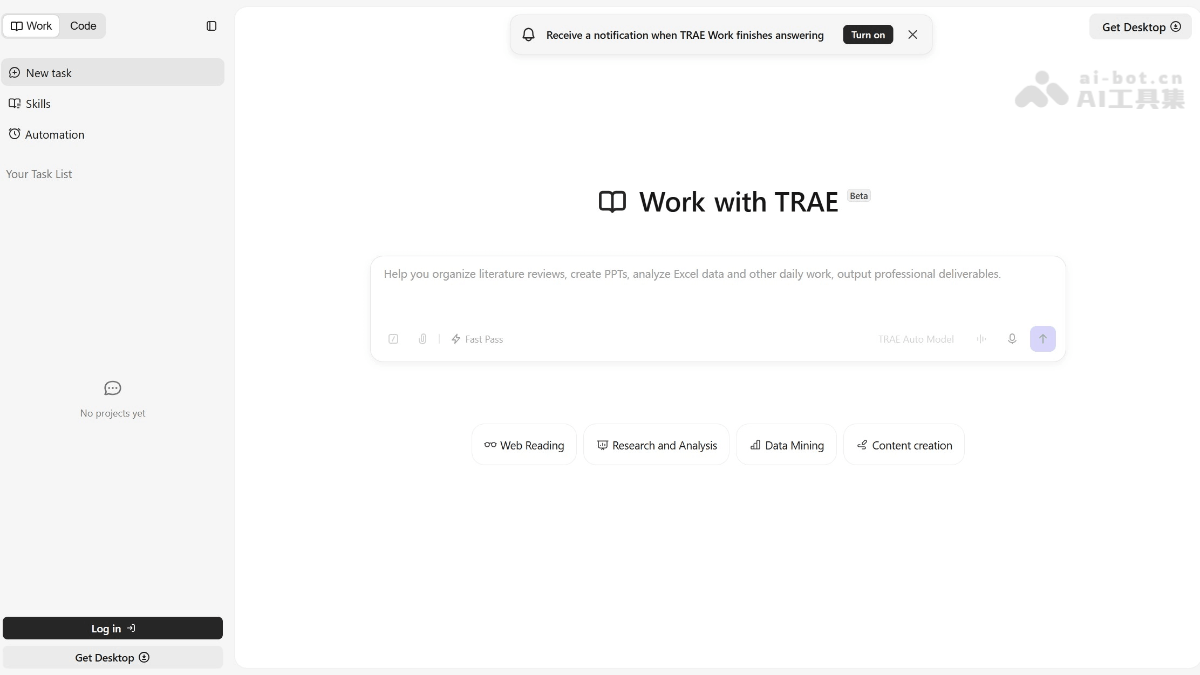
Main features of TraeWork
-
Work / Code dual modes: Work mode is designed for non-technical users, using natural language to drive AI to complete daily work; Code mode retains professional programming capabilities, supporting complex development, debugging, and codebase management.
-
AI agent automatic execution: Based on SOLO Auto Model, it automatically breaks down tasks, plans steps, invokes tools, and drives execution. Users only need to describe their needs and wait for delivery.
-
Multi-format content generation: Supports generating documents, PPTs, Excel files, data analysis reports, web prototypes, interactive pages, etc., covering the complete chain from idea to deliverable.
-
Data visualization analysis: Automatically cleans data, performs statistical analysis, generates charts, and outputs interactive visualization reports, suitable for scenarios such as market research and user analysis.
-
Skills system: Encapsulates work specifications and process standards into reusable skill packages, injecting business context into AI to improve task completion quality.
-
MCP protocol extension: Supports connecting external tools and data sources, expanding AI capability boundaries, and connecting enterprise internal systems or third-party services.
-
Cloud-based agent execution: Code analysis, running, and debugging are completed in a cloud sandbox, so non-technical users do not need to configure a local development environment.
-
Real-time synchronization across three platforms: Supports web, desktop (macOS/Windows), and mobile, with full real-time synchronization of task data, allowing task management anytime and anywhere.
-
Voice task submission: Mobile supports voice input of requirements, cloud Agent executes, and desktop verifies results.
-
Web search and information integration: Automatically retrieves online information and integrates multi-source data to provide real-time references and background knowledge for tasks.
- Design mode: Supports generating design drafts through natural language conversation, modifying them in real time on the canvas, and seamlessly connecting to development with one click, realizing a one-stop AI workflow from design to code.
-
Built-in professional image generation and video generation models: TraeWork has built-in Seedream 5.0 and the Seedance series models, freely available to all users.
-
Full-chain creative capability coverage: Supports three modes: text-to-video, image-to-video, and text-to-image. Videos can be 5s/10s/15s in length, in landscape/portrait/square aspect ratios, and at 720P resolution.
-
Seamless workflow connection: Generated images and videos are presented as independent cards, can be directly previewed and played, and remain in the current task as context to continue subsequent work such as writing proposals and preparing reports.
How to use TraeWork
-
Choose an entry point: Visit the TraeWork official website trae.cn or trae.ai to download the desktop client (macOS/Windows) or mobile app, with real-time data synchronization across all three platforms.
-
Switch modes: Choose according to your needs Work mode(for daily work such as documents, data, and PPTs) or Code mode(for professional programming and development).
-
Describe your needs: Use natural language in the central input box to clearly describe the task, for example, “Help me write an article on personal growth aimed at young people aged 20-30, with the theme of overcoming procrastination, in a relaxed style that doesn’t preach.”
-
View the breakdown: AI automatically breaks the task down into multiple substeps and displays execution progress in real time in the task panel on the right (such as topic analysis → framework generation → first draft writing).
-
Confirm the framework: First have AI output the article framework, PRD structure, or data analysis approach. After confirming the direction, continue generating the complete content to avoid rework.
-
Iterate and optimize: Based on the first draft/prototype/report generated by AI, add your own real experiences, business data, or revision suggestions, and have AI continue adjusting.
-
Use skill packs: For repetitive work, load or configure Skills skill packs to inject business standards into AI and improve output quality.
-
Multi-device collaboration: Use voice on mobile to quickly assign tasks, and the cloud Agent executes automatically; return to the desktop to view, edit, and accept the final results.
-
Export and deliver: Directly download the generated documents, HTML pages, data charts, or interactive prototypes for subsequent discussion and publishing.
TraeWork's core advantages
-
AI-native execution, not simple generation: It does not “spit out watered-down text from a title”; instead, it first automatically breaks down tasks, plans steps, and calls tools, then advances step by step to deliver complete, usable results, covering the entire chain from idea to delivery.
-
Work / Code dual modes, covering all roles: Work mode lets non-technical users such as product, operations, and content creators drive work with natural language; Code mode retains professional development capabilities. One core capability serves two groups of people.
-
Inherits hardcore Agent DNA: Derived from contextual understanding, file management, tool calling, and progress tracking capabilities in AI programming scenarios, evolving from “can chat” to “can continuously execute tasks.”
-
Cloud sandbox execution, zero environment threshold: Code analysis, running, and debugging are all completed in the cloud. Non-technical users can generate web prototypes, data analysis reports, and more without configuring any development environment.
-
Real-time synchronization across three platforms, voice-driven: Full data synchronization across web, desktop, and mobile. Supports voice task assignment on mobile, cloud Agent execution, and desktop result acceptance.
-
Skills system injects business context: Encapsulate work standards and process specifications as reusable skill packs, enabling AI to understand enterprise/personal business logic and greatly improve output quality.
-
MCP protocol breaks capability boundaries: Supports connecting to external tools, data sources, and internal enterprise systems, continuously expanding the range of tasks AI can handle.
Comparison of TraeWork with similar competitors
| Comparison Dimension | TraeWork | WorkBuddy | QoderWork |
|---|---|---|---|
| Developing Company | ByteDance | Tencent Cloud (CodeBuddy team) | Alibaba Cloud |
| Core Positioning | AI-native workbench (Work + Code dual mode) | All-scenario workplace AI agent desktop workbench | Desktop AI agent + customizable workbench (design/slides/writing) |
| Target Users | Product managers, operations, content creators, developers | Workplace users in all roles, with a focus on non-technical staff | Designers, product managers, marketing operations, content creators, developers |
| Task Execution Method | Driven by natural language; AI automatically decomposes, plans, calls tools, and advances delivery | Driven by natural language; autonomously plans and executes multi-step tasks on the local computer, supports parallel multi-agent execution | Driven by natural language/voice; executes on the local computer, supports structured follow-up questions (Questions) + design plan (Design Plan) + parameter fine-tuning (Nudge) |
| Support for Non-technical Users | Strong: Work mode is designed specifically for non-technical users, enabling zero-code completion of documents, PPTs, data analysis, and prototype design | Strong: Designed for people with non-technical backgrounds; documents, spreadsheets, PPTs, and data analysis can be completed in one sentence | Strong: No programming background required; professional designs can be generated from voice descriptions, and the interface is simple and easy to get started with |
| Programming and Development Capabilities | Strong: Code mode retains professional IDE features, supports codebase management, Git workflows, and multi-file editing | Medium: Based on the CodeBuddy architecture, supports code generation and debugging, but its core positioning leans toward office work | Medium: Design outputs can be delivered to the Qoder IDE with one click, supporting code project export (React + Vite, etc.) |
| Content Delivery Types | Documents, PPTs, Excel, data charts, web prototypes, interactive pages, code projects | Documents, spreadsheets, PPTs, data charts, posters, automation scripts, industry research reports | Runnable design outputs (HTML/code), slides (PDF/HTML/PPTX), editable documents (PDF), high-fidelity prototypes |
| Execution Environment | Cloud sandbox (Work mode) + local/cloud (Code mode) | Local computer execution (operations within authorized folders) + cloud-based 7×24 digital employee (Enterprise Edition) | Local computer execution(core data processed locally) + sandbox environment, with finely controllable permissions |
| Three-Platform Synchronization | Web + desktop + mobile, real-time full synchronization, supports voice-issued tasks | Primarily desktop, supports remote control of computer task execution via mobile IM (WeCom/QQ/Feishu/DingTalk) | Primarily desktop (Windows 10+ / macOS 13+), supports Qoder mobile, with Qoder CLI and JetBrains plugin |
| Context Understanding | Injects business specifications based on the Skills system, supports MCP protocol to extend external tools | Based on the Skills skill system + enterprise knowledge base + MCP protocol, supports multi-Agent parallel collaboration | Based on the Skills skill system + custom Skill ecosystem, supports over a hundred style references and dozens of design skills |
| Ecosystem Integration | Relatively independent, supports MCP extensions | Deep integration with the Tencent ecosystem: Tencent Docs, Tencent Drive, Tencent Lexiang, WeCom, QQ, ima, etc. | Deep integration with the Alibaba ecosystem: Qoder IDE, Qoder CLI, Qoder JetBrains Plugin, QoderWake Digital Employee, Cloud Agents, etc. |
| Security Mechanisms | Cloud sandbox isolation | Local high-risk command interception + security gateway proxy + authorized folder-scope operations + operation behavior auditing | Core data processed locally, only text instructions are uploaded to the model API, supports sandbox environments, with fine-grained controllable permissions |
| Pricing Model | Basic features are free, advanced features require a Pro membership (Beta stage) | Basic features are free, new users receive 5000 Credits, advanced features require subscription/pay-as-you-go, enterprise edition supports private deployment | The free version has basic features and a monthly quota; paid versions offer higher quotas, support advanced models, custom Skills, and multi-task concurrency; the China version grants tens of billions of credits for free |
TraeWork Application Scenarios
-
Self-media Content Creation: from topic planning, article framework building, and first-draft writing to image and cover design, the entire process is assisted by AI, creators only need to inject real experiences and personal style, greatly compressing the time from inspiration to publication.
-
Product Solutions and Prototype Validation: quickly advance scattered product ideas into a discussable first version, including user analysis, MVP feature design, PRD document writing, product introduction pages, and interactive web prototype generation.
-
Data Analysis and Visualization Reports: upload raw data (such as CSV survey data), automatically complete data cleaning, field interpretation, statistical analysis, and chart generation, and output interactive visualization reports and topic angles.
-
Daily Office Document Processing: generate PPTs, Excel spreadsheets, Word documents, meeting minutes, and industry research reports in one sentence, replacing repetitive document organization work.
-
Cross-device Task Collaboration: quickly issue tasks by voice on mobile, cloud Agents execute automatically, and results can be viewed, edited, and accepted on desktop or web, enabling workflow management anytime and anywhere.
-
Professional Programming Development: in Code mode, supports complex coding, codebase management, bug debugging, multi-file refactoring, and Git workflows, meeting developers' full-cycle needs from prototypes to production-grade projects.


