What is DeepSeek Harness
DeepSeek Harness is an open-source AI Agent product from DeepSeek, built on the Cordis "everything is a plugin" architecture, and it has launched out-of-the-box macOS/Windows desktop clients. DeepSeek Harness can help users organize documents, analyze spreadsheets, write code, verify information, and execute time-consuming tasks. It supports extending capabilities through plugins and creating custom plugins via conversation. DeepSeek Harness is open-source and free, and supports a third-party plugin ecosystem.
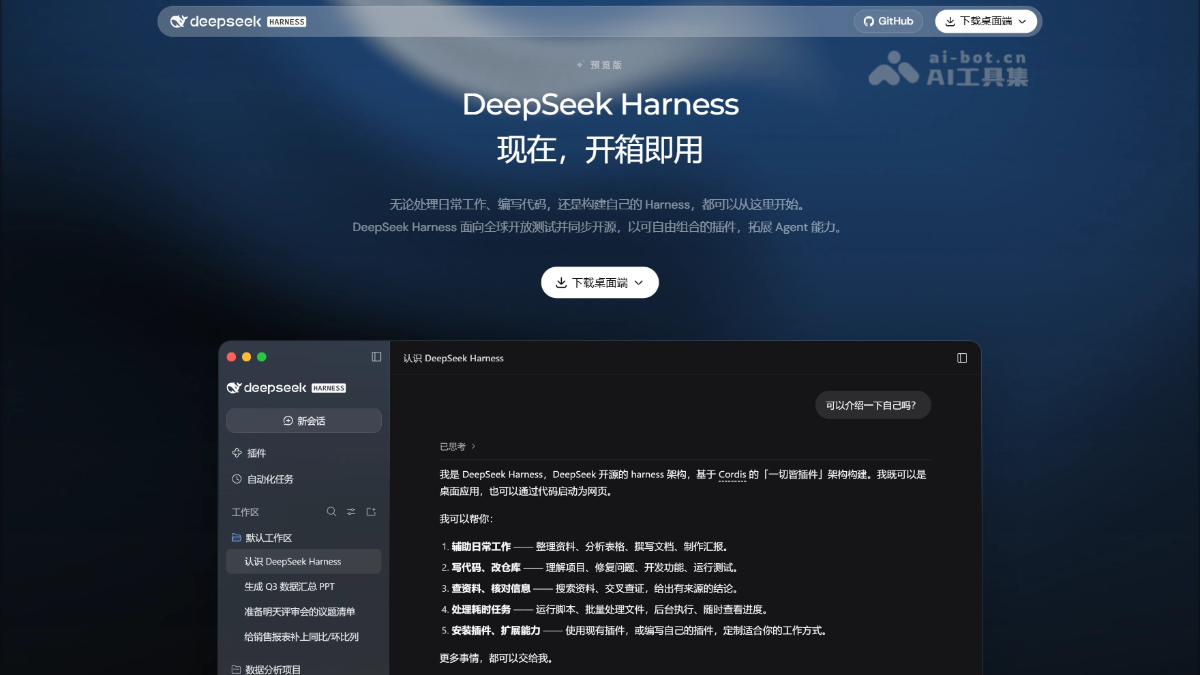
Main features of DeepSeek Harness
-
Everyday office work: Can organize materials, analyze spreadsheets/PDFs, generate charts, and create presentations.
-
Code development: Can understand projects, modify code, run tests, and show the code change diff for each round in the conversation.
-
Information verification: Supports searching for materials, cross-verifying, and providing reliable conclusions with sources.
-
Time-consuming tasks: Scripts and batch file processing can run in the background, with progress viewable at any time.
-
Automated tasks: Built-in scheduled task plugin allows repetitive work to run automatically on a schedule.
-
Plugin extension: Enter an npm package name to install a plugin, and you can also create custom plugins through conversation in creation mode.
-
Interface customization: Flexibly choose how Agent steps are displayed and how detailed the interface information is, adapting to personal work habits.
How to use DeepSeek Harness
-
Download and install: Visit the DeepSeek Harness official website https://www.deepseek.com/harness/ , download the macOS or Windows installer, and complete the installation.
-
Log in to your account: After launching the desktop client, log in with your DeepSeek account.
-
Submit a task: Describe your needs in the conversation, such as organizing documents, analyzing spreadsheets, modifying code, etc., and upload related files.
-
View and refine results: Preview generated files in the sidebar, view code diffs, and continue to provide revision suggestions through the conversation.
-
Install plugins: On the plugin management page, enter the npm package name to install the required plugin, and enable, disable, or uninstall it as needed.
-
Create custom plugins: In creation mode, describe your needs through conversation and let Harness automatically write and save the plugin.
-
Set up automated tasks: Enable the automated task plugin, set repetitive work as scheduled tasks, and manage execution records.
Core advantages of DeepSeek Harness
-
Out of the box: Provides macOS/Windows desktop installers with preset features commonly used for everyday office work and development, with no complex configuration required.
-
Completely open source: Open-sourced under the MIT license, with transparent code that can be freely customized and further developed.
-
Everything is a plugin: From tools to the interactive interface, everything can be pluginized, freely combining capabilities with extremely strong extensibility.
-
Conversational plugin creation: In creation mode, natural language can be used to have Harness write plugins itself, taking effect immediately and being saved persistently.
-
Dual scenarios of office work + development: Can handle documents, spreadsheets, and presentations, as well as understand projects, modify code, and run tests.
-
Transparent task process: View Agent work steps, execution traces, and code change diffs, making it easier to troubleshoot issues.
-
Automation capabilities: Supports scheduled task plugins, so repetitive work can be automatically executed in the background according to a schedule.
-
Deep model collaboration: Co-evolves with DeepSeek models, continuously optimizing and adapting for new models.
DeepSeek Harness project address
- Project official website:https://www.deepseek.com/harness/
- GitHub repository:https://github.com/deepseek-ai/deepseek-harness
Comparison of DeepSeek Harness with similar competing products
| Comparison dimensions | DeepSeek Harness | Codex(OpenAI) | Claude Code(Anthropic) |
|---|---|---|---|
| Open source license | MIT fully open source | Open source (Apache 2.0 CLI) | Open source (some components; core comes with subscription) |
| Underlying model | DeepSeek series (V4.1 Flash, etc.), co-evolving deeply with the models | GPT-6 series (Sol/Astra/Luna) | Claude Opus 5 / Sonnet 5, native 1M context |
| Product form | Desktop (macOS/Windows) + Web UI (launched via npx) | CLI/TUI + desktop app + Cloud | CLI + desktop app + Web version + IDE plugin |
| Core architecture philosophy | Cordis "everything is a plugin", from the interface to tools, everything can be pluginized | Plugin + Skills + Hooks + MCP integration | Plugin system + sub-agents + MCP |
| Featured functions | Conversational plugin creation (creation mode), scheduled automation tasks, dual scenarios of office work + development | Voice conversation /voice, managed worktrees, Guardian security review
|
Multi-agent orchestration (Projects), Computer Use, Auto permission mode |
| Ecosystem expansion | npm packages are plugins; about 60% of users use third-party plugins; an official plugin marketplace is planned | Remote plugin marketplace + workspace sharing | Plugin marketplace + Claude Code marketplace (Codex can also be integrated) |
| Pricing model | DeepSeek API pay-as-you-go, highly cost-effective; open source and self-deployable | ChatGPT subscription (Plus/Pro) or API credits | Claude subscription (Pro/Max/Team/Enterprise) |
DeepSeek Harness application scenarios
-
Smart office: Organize materials, analyze spreadsheets and PDFs, generate charts, and create presentations, completing daily document work in one stop.
-
Software development: Understand project structure, fix bugs, develop new features, run tests, and view code change diffs directly in the conversation.
-
Research: Search for and cross-verify information, and output reliable conclusions with sources, suitable for report writing and decision-making reference.
-
Automated operations: Through scheduled task plugins, set repetitive work such as data synchronization and report generation to execute automatically according to a schedule.
-
Personalized tool development: In creation mode, describe requirements through conversation and let Harness write custom plugins to build exclusive tools and workflows.