

What is Renoise
Renoise was launched by Ming Chaoping, former head of Moonshot AI's Noisee AI video creation platform, integrating multiple underlying models such as Seedance, Minimax, and Kling, providing a one-stop workflow from script generation, asset management, and multi-model scheduling to final video editing. Renoise includes the built-in Renoise Agent and a desktop timeline editor, supporting natural language-driven end-to-end creation, character consistency locking, and automated quality inspection, and can be embedded via CLI into Codex and other Agents to achieve batch production.
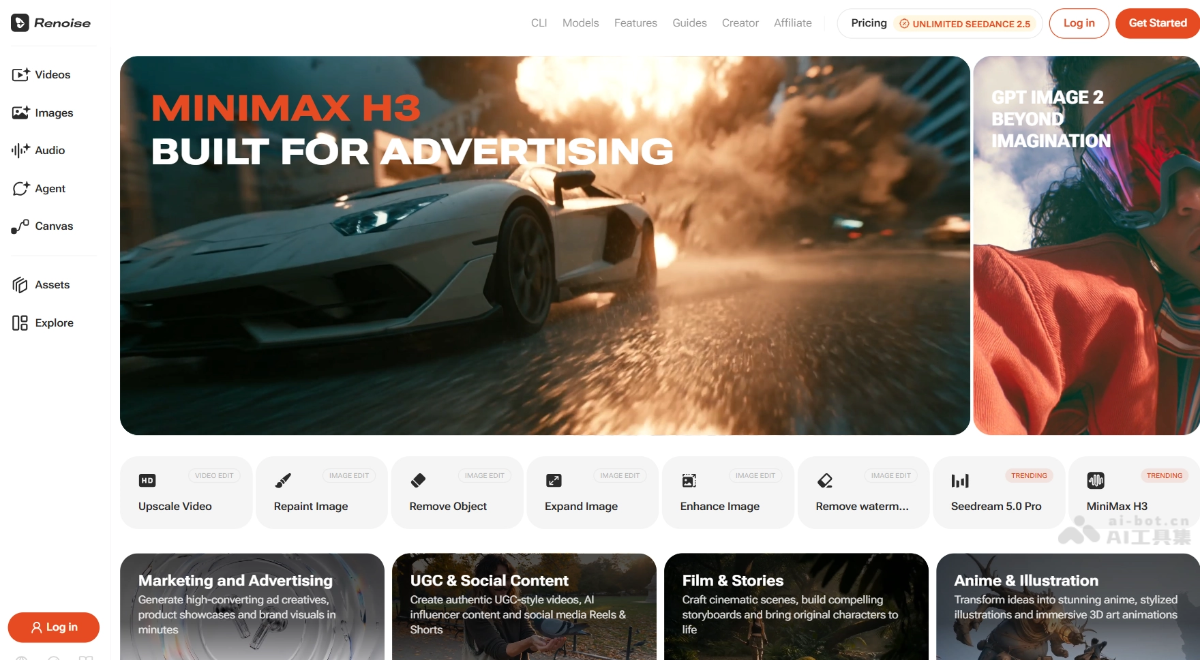
Renoise's main features
-
Renoise Agent: Conversational AI Agent; users describe their needs in one sentence, and it automatically asks clarifying questions, writes storyboard-level prompts, and selects and schedules the best model from multiple models.
-
Canvas: A node-based workspace that integrates asset upload, multi-model generation, and version iteration in the same interface, supporting multimodal reference input.
-
Multi-model video generation: Integrates Seedance 2.5, Kling 3.0 Omni, Gemini Omni Flash, etc., supporting text/image/video-to-video.
-
FacePass portrait authorization: For face restrictions in models such as Seedance, provides a one-time real portrait review mechanism; once authorized, it can be used in generation.
-
Desktop timeline editing: Supports drag-and-drop assembly of video and audio tracks; Canvas and Agent features are limited to the desktop web version.
-
Multi-aspect-ratio native output: A single task can simultaneously output multiple aspect ratios such as 9:16, 1:1, and 16:9, all natively generated rather than cropped.
-
CLI / MCP integration: Provides Claude Code、Codex、OpenClaw plugins and MCP protocol, supporting direct generation calls from the terminal.
-
Product video generation: Upload a single product image to generate commercial-style short videos such as e-commerce ads and brand stories within 3–5 minutes.
-
Image and audio generation: Supports image models such as GPT Image 2, Midjourney V8.1, andNano Banana , as well as Seed Audio 1.0 audio generation.
-
Video super-resolution and editing: Supports post-processing capabilities such as quality enhancement, local repainting, and object erasure.
How to use Renoise
-
Register an account: Visit the Renoise official website https://renoise.ai/ , register an account and log in.
-
Choose a creation mode: On the homepage, choose video, image, audio, or Canvas to enter the corresponding workspace.
-
Enter a creative description: Describe your needs in natural language in the dialog box, or upload a reference image/video as an asset.
-
Call the Agent to generate: Renoise Agent automatically breaks down tasks and schedules models to generate scripts and storyboards.
-
Confirm characters and style: After locking the story framework, confirm that characters, scenes, and visual style remain consistent.
-
Edit and assemble: Drag and adjust video and audio tracks in the desktop timeline to complete fine editing.
-
Quality inspection and export: After the system automatically completes quality inspection, export the final video with one click.
Renoise's core advantages
-
Agent-first generation: Unlike traditional manual parameter tuning, Renoise Agent automatically breaks down requirements, optimizes prompts, and selects the optimal model, lowering the barrier to use.
-
Flexible multi-model aggregation: Switch freely between over 20 models within the same canvas, balancing quality, speed, and cost as needed, avoiding vendor lock-in.
-
Compliant real-face channel: The FacePass mechanism unlocks commercial use of real human portraits in AI videos while ensuring compliance.
-
End-to-end integration: Scriptwriting, generation, editing, and quality control are integrated into a single product, reducing tool switching and file export costs.
-
Developer-friendly: CLI and MCP protocol support allow direct embedding into existing workflows, suitable for batch production and automated pipelines.
Comparison of Renoise with similar competitors
| Comparison dimension | Renoise | LibTV |
|---|---|---|
| Product positioning | Multi-model aggregation + Agent-driven professional AI video creation platform | Multi-model aggregation + community ecosystem AI video creation platform |
| Core workflow | Agent-first generation → Canvas orchestration → desktop timeline editing | Script and storyboard → multi-model generation → asset management → integrated final-cut editing |
| Model strategy | Aggregates 20+ third-party models (Seedance, Kling, Gemini, etc.) | Aggregates multiple mainstream video models, emphasizing first-access capability |
| Agent capability | Built-in Renoise Agent automatically breaks down requirements, writes storyboards, and schedules optimally | Supports Agent collaboration, but the degree of automation is relatively limited |
| Character consistency | FacePass one-time authorization supports compliant reuse of real human portraits | Relies on the model's own capabilities; consistency control is weaker |
| Desktop support | Provides a desktop web timeline editor and Windows client | Mainly web-based; desktop editing capability is weaker |
| CLI / automation | Official CLI + MCP protocol, supporting Codex and Claude Code integration | Automation integration capability is relatively limited |
| Community ecosystem | Creator program + template revenue sharing ($1.65 per unlock) | Strong community-sharing attributes; active template and model ecosystem |
| Pricing model | Transparent monthly credit system ($20–$140/month), no pay-per-use | Membership subscription + credit consumption, with heavy subsidies and ad spending |
| Customer acquisition strategy | Focuses on product experience and developer ecosystem; the founder personally runs Discord | Large-scale performance ad placement, subsidies in exchange for growth |
Renoise application scenarios
-
Batch short video production: Quickly generate e-commerce ads and marketing short videos for platforms such as TikTok and Reels, with support for native output in multiple aspect ratios.
-
Brand product videos: Upload a single product image to generate commercial-style short films such as lifestyle UGC and brand stories within minutes.
-
Narrative short film creation: Through multi-shot composition and FacePass character locking, produce short and medium-length films with coherent plots.
-
Social media content operations: One-stop generation of high-quality images, videos, and AI soundtrack assets for brands and individual creators.
-
Automated content pipeline: Integrate Agents such as Codex via CLI and the MCP protocol to achieve unattended, large-scale batch output.


