

What is Digen AI
Digen AI is a one-stop AI video creation platform, integrating ByteDance Seedance、Google Veo 3.1 and other mainstream video large models, providing text-to-video, image-to-video, AI video super-resolution,watermark removal, FPS acceleration,lip syncandtext-to-speechand other tools. Users can quickly generate short videos through a browser without professional editing skills, suitable for social media creators, marketers, and educators to quickly produce visual content.
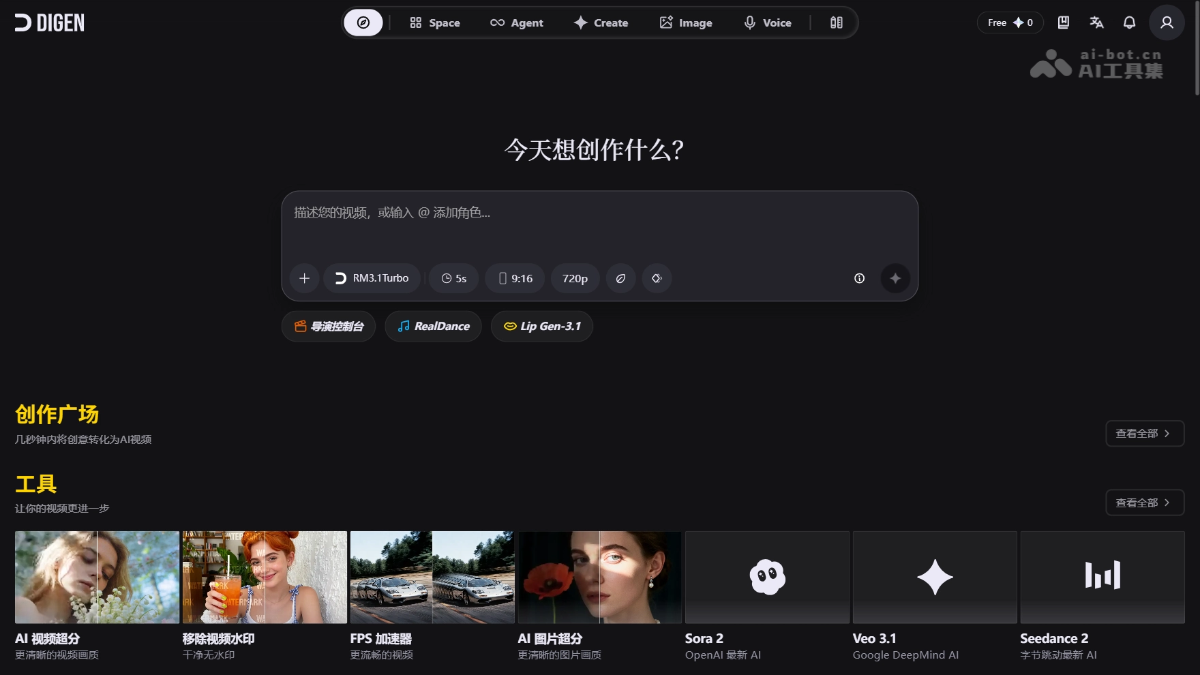
Digen AI's main features
- Multi-model text-to-video/image-to-video: Integrates Veo 3.1, Seedance 2, Kling 3.0, Runway, Grok Video, etc., supporting short video generation from text or images.
- AI video enhancement: Provides video super-resolution, watermark removal, and FPS accelerator to improve image quality and smoothness.
- AI image enhancement: Supports image super-resolution to improve the clarity of static materials.
- Digital human and lip sync: Upload a portrait image and pair it with audio or text to generate a talking video with precisely synchronized lip movements.
- AI sound effects and voice: Built-in text-to-speech and AI sound effect generation, automatically matching the video's mood and rhythm.
- Creation plaza and templates: Provides a community work feed and industry templates, supporting one-click prompt optimization.
How to use Digen AI
- Register an account: Visit the Digen AI official website https://digen.ai/ to complete registration and log in.
- Choose a creation mode: On the homepage, choose entries such as "Text to Video," "Image to Video," or "Digital Human."
- Enter your idea: Enter a text prompt or upload an image, and use the built-in AI Prompt Enhancer to automatically optimize the description.
- Choose model and parameters: Select from models such as Sora 2, Veo 3.1, Seedance 2, etc., and set the aspect ratio and duration.
- Generate and export: Click generate, preview, then download or post directly to social platforms.
Digen AI's core advantages
- Multi-model aggregation: One-stop access to top models such as Sora, Veo, Seedance, Kling, etc., with no need to switch between multiple platforms.
- Zero-threshold onboarding: Ready to use in the browser, no professional software installation required, and AI automatically optimizes prompts to reduce operational difficulty.
- Friendly free quota: Get 300 credits upon registration, and with daily rewards, you can experience basic features at zero cost for a long time.
- Full-chain tools: In addition to generation, it integrates post-production tools such as super-resolution, watermark removal, FPS acceleration, and speech synthesis, covering the complete workflow.
Comparison of Digen AI with similar competitors
| Comparison dimension | Digen AI | Runway |
|---|---|---|
| Core positioning | Multi-model aggregation platform, integrating mainstream third-party video large models | Creative video and image tool suite from the self-developed Gen-4 series |
| Model source | Third-party models such as Sora 2, Veo 3.1, Seedance 2, Kling 3.0, etc. | Mainly self-developed Runway Gen-4/Gen-4.5 |
| Video duration | Generate 5–10 second short videos per run | Supports up to 10–16 seconds (Gen-4 Turbo) and longer narration |
| Free Quota | 300 credits + daily rewards, basic models free | The free version has a limited quota, and some features require payment |
| Featured Features | AI video super-resolution, watermark removal, FPS boost, digital human lip sync | Motion brush, video-to-video style transfer, advanced camera control |
Digen AI Application Scenarios
- Social Media Operations: Quickly generate 9:16 vertical short videos for TikTok, Instagram Reels, and YouTube Shorts to maintain high-frequency updates.
- E-commerce Marketing: Create dynamic product displays, talking-head ads, and promotional materials to reduce filming costs.
- Education and Training: Transform text and image courseware into dynamic explanatory videos, and use digital humans to enhance the learning experience.
- Content Creation: Generate B-roll, opening sequences, or animated illustrations for self-media and podcasts to enrich visual expression.
- Internal Enterprise Communication: Produce announcement, training, and brand promotion videos with a unified visual style.


