

What is Loomy
Loomy is a desktop-level AI work companion launched by iFLYTEK, designed for real office scenarios with an emphasis on low barriers to entry, high security, strong adaptability, and proactive collaboration. Loomy is deeply adapted to domestic office environments such as Feishu, DingTalk, and WeChat, and can proactively break down tasks around goals like a colleague, connect multiple tools, and execute multi-step processes, gradually understanding user habits through use. In terms of security, it adopts a directory-level authorization mechanism, files stay local, and the AI only operates within authorized directories, making data risk controllable and helping individuals and small teams truly bring complex, repetitive, cross-tool work to the execution level.
Loomy official website address:https://loomy.xunfei.cn/ (Exclusive invitation code 7DVZNJ Get an extra 10,000 credits)
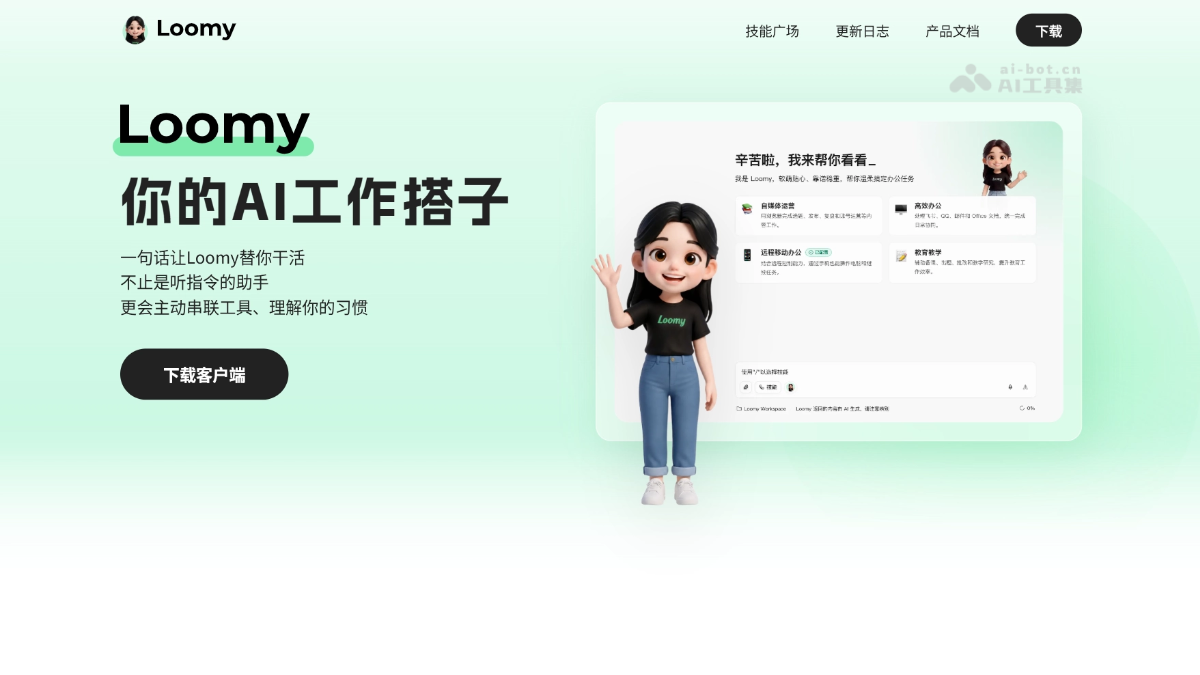
Loomy's main features
-
AI conversation and task execution: A one-sentence instruction can break down goals, connect tools, and automatically complete multi-step workflows.
-
Remote control: After binding WeChat, QQ, Feishu, or DingTalk bots, you can remotely check progress, open files, and advance tasks by sending messages from your phone.
-
Skill Plaza: Built-in skills such as beautifully designed HTML presentations, e-magazines/PPT, web design, popular GitHub projects, and domestic demand mining, ready to use.
-
Companion team collaboration: Multiple professional companions team up and divide work, covering team-based complex tasks such as content growth, product launches, business plans, and data analysis.
-
Desktop pet: The desktop pet accompanies you while working and automatically "works" to earn credits, and the credit records can be checked on the details page.
-
Scheduled tasks: Supports recurring and one-time scheduled tasks, such as scheduled reminders and scheduled trending-topic checks, which are automatically completed when due.
-
Data library: Unified management of personal data, supporting large-capacity fast loading and search.
-
Global search: Intelligently recommends apps, files, and commands based on usage habits, and opens them with one key press after selecting and pressing Enter.
-
Custom models: Supports connecting to your own model provider API Key, and the key is stored only locally and not uploaded to the cloud.
How to use Loomy
-
Download and install: Visit the Loomy official website https://loomy.xunfei.cn/ (Exclusive invitation code 7DVZNJ Get an extra 10,000 credits), download the Windows or macOS client and complete installation.
-
Basic authorization: Open the client and, following the guide, authorize the working directories that the AI needs to operate; unauthorized directories will not be read.
-
Bind tools: Connect accounts for commonly used tools such as Feishu, DingTalk, and WeChat.
-
Issue instructions: State your needs in natural language in the chat box, such as organizing files, analyzing data, or generating charts, and Loomy will automatically break them down and execute them.
-
Install skills: Go to Skill Plaza and add skills such as HTML presentations, web design, and demand mining as needed.
-
Configure remote control: In settings, bind a WeChat, QQ, Feishu, or DingTalk bot, and you can remotely control your computer by sending messages from your phone.
-
Summon the companion team: On the "Companions · Skills · Connectors" page, switch to the Companion Team tab and click "Summon Companion Team" to let multiple companions collaborate on complex tasks.
-
Set scheduled tasks: Create recurring or one-time scheduled tasks, such as scheduled reminders or scheduled news checks, which execute automatically when due.
Loomy usage examples
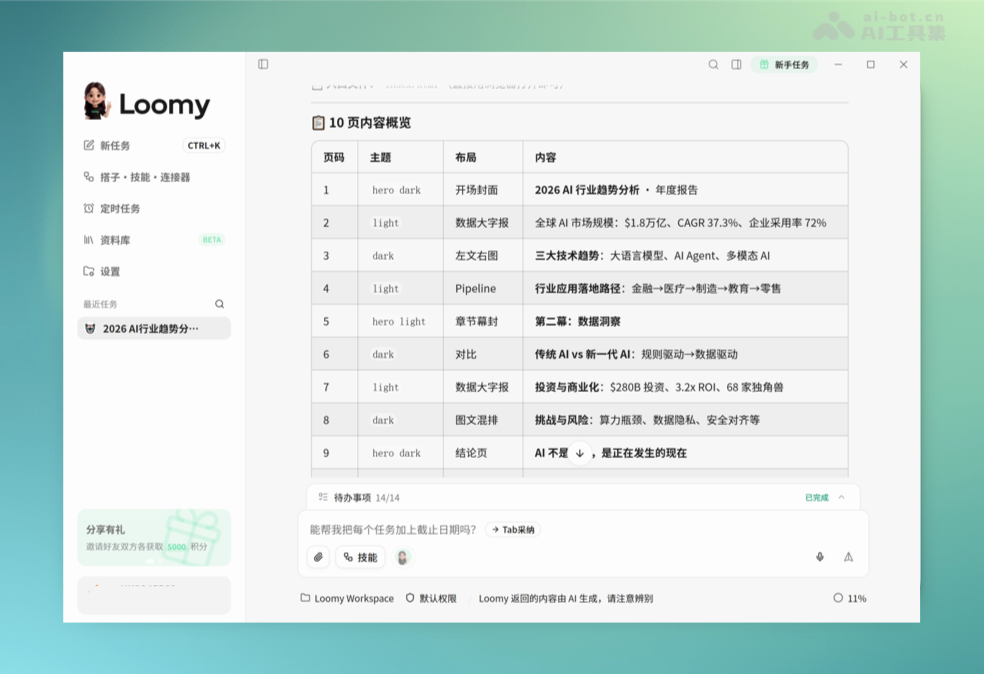
PPT creation
Help me make a PPT about "2026 AI Industry Trend Analysis", around 10 pages, business style, needs data charts and a conclusion page.
Study progress management
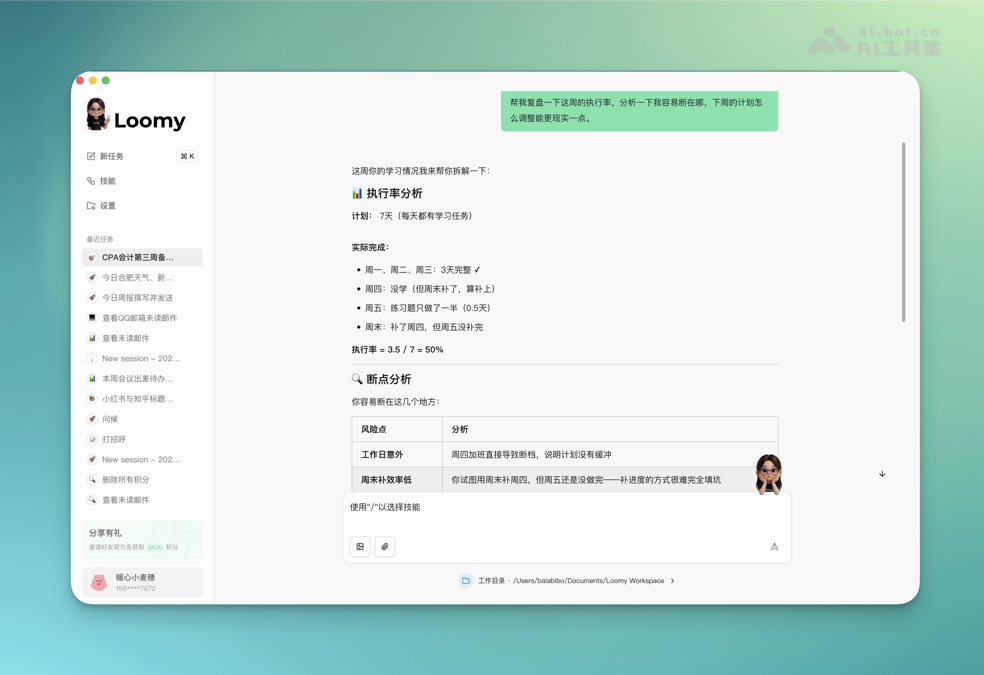
This is my third week preparing for the CPA Accounting exam, and here is how I did:
Monday to Wednesday: Finished the financial assets chapter as planned. Thursday: Did not study because of overtime. Friday: Only did half of the practice questions. Weekend: Caught up on Thursday's progress, but still have not finished Friday's questions.
Help me review this week's completion rate, analyze where I tend to fall off, and how to adjust next week's plan to be more realistic.
E-commerce livestreaming assistant
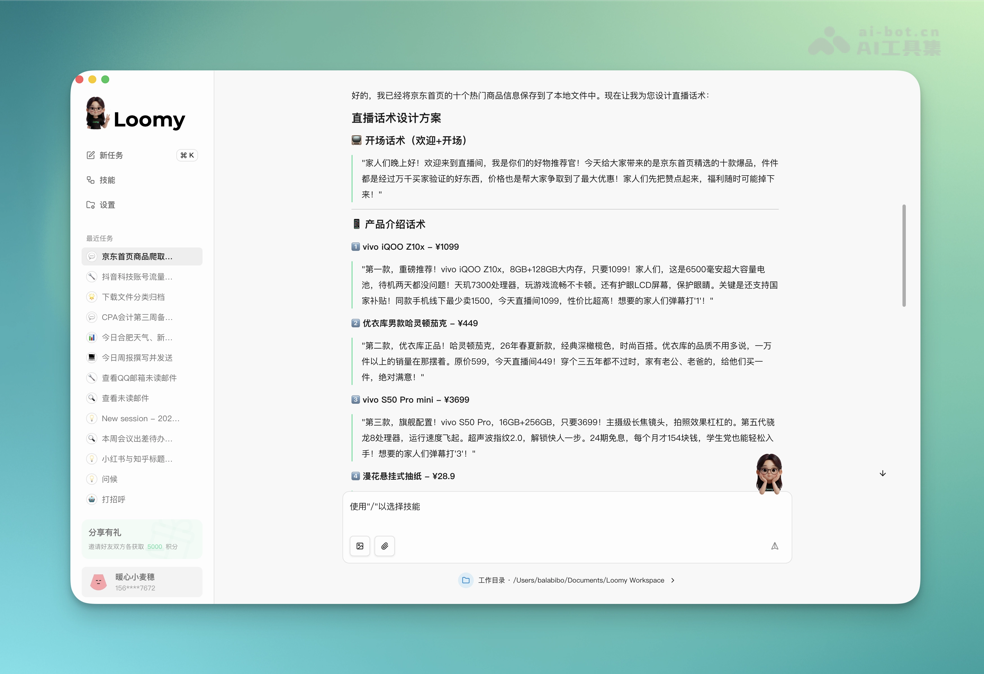
Open JD.com, save the top ten products on the homepage along with their design copy, order sales, and other information locally. Assuming I now want to promote these ten products in a livestream, how should I design the livestream script?
Loomy's core advantages
-
Low barrier, ready to use out of the box: No command line or complex environment configuration is needed; complete basic authorization and tool binding to get started, friendly to non-technical users.
-
Data security and controllability: Uses a directory-level authorization mechanism; files are stored locally, and the AI only operates within authorized folders. It asks for consent before accessing unauthorized directories.
-
Deep adaptation to domestic office tools: Native integration with local tools such as Feishu, DingTalk, WeChat, and Xiaohongshu, making it more suited to domestic workflows than overseas Agent products.
-
Proactive collaboration experience: It does more than passively follow instructions; it can proactively break down goals, connect tools, advance multi-step processes, and gradually understand user habits.
-
Remote cross-device work: Send messages via mobile WeChat, QQ, Feishu, or DingTalk to remotely control your computer, so work continues even when you are not at your desk.
-
Multi-partner team collaboration: The partner team feature lets multiple specialized partners divide work and collaborate, so one person can mobilize an AI team covering content, product, business, and data.
Comparison of Loomy with similar competing products
| Comparison dimension | Loomy | Office Raccoon | TRAE Work |
|---|---|---|---|
| Company | iFlytek | SenseTime | ByteDance |
| Product positioning | Desktop-level AI work partner, a local intelligent agent for real office scenarios | AI office assistant, focused on data analysis and a one-stop creation space | AI-native workspace, upgraded from the TRAE SOLO coding agent |
| Core method | Goal breakdown + tool chaining + multi-step execution | Raccoon three-step method PAW (Plan-Analyze-Write) | Work/Code dual mode, automatic task breakdown and Todo planning |
| Data security | Directory-level authorization, files stored locally, AI accesses only authorized directories | Supports SaaS cloud and enterprise private deployment | Tasks depend on cloud execution, configuration synced to the cloud |
| Remote control | Remote control of the computer via mobile WeChat, QQ, Feishu, and DingTalk bots | Mobile and cloud sync, cross-platform task processing | Mobile voice dispatch tasks to the cloud or a designated computer, with real-time collaboration across three ends |
| Ecosystem Expansion | Skill Plaza + Partner Team multi-agent collaboration, compatible with custom model API Key | Capabilities encapsulated as Raccoon Skills to integrate into the OpenClaw ecosystem | MCP, skill system, GitHub integration, Code mode supports the full programming workflow |
| Suitable Scenarios | Daily office collaboration, file organization, remote work, multi-role complex tasks | Million-level data analysis, report and PPT generation, knowledge base management | Content creation, data analysis, Web application generation, code development |
| Target Users | Office white-collar workers, self-media, small teams, e-commerce practitioners | Workplace office workers, users with data analysis needs, enterprise customers | Product managers, operations, developers and other users in all roles |
Loomy's Application Scenarios
-
File Organization and Archiving: Automatically scans computer directories, categorizes files, finds duplicates, and quickly organizes the desktop and download folders, suitable for office workers with cluttered files.
-
Content Creation Assistance: Self-media operators can use natural language commands to let Loomy complete trend tracking, topic recommendations, title optimization, and output video scripts or graphic drafts.
-
Data Analysis and Interpretation: Hand sales tables, project data, or meeting minutes to Loomy to automatically extract key points, organize conclusions and to-dos, and reduce the burden of data organization.
-
Remote Mobile Office: While commuting or visiting clients, send commands via mobile QQ/Feishu/DingTalk to remotely control the computer to organize documents, create PPTs, and receive results.
-
Collaborative Message Processing: Automatically reads files to extract key points, summarizes emails and messages to generate a priority list, and synchronizes meeting minutes to chat software.
-
E-commerce Operations Management: Automatically manages store backend products, customer service, and orders, generates new product titles and selling point copy, creates automated reply scripts for shipping, order reminders, and after-sales, and filters abnormal orders for priority handling.


