

What is Tencent Hunyuan AI Video
Tencent Hunyuan AI Video is a powerfulAI video generationtool launched by Tencent, featuring a high degree of innovation and practicality. Users can generate high-quality video content through the platform, supporting creative video production, special effects generation, animation and game development, meeting diverse needs. Users can upload an image and provide a brief description to make the image move and generate a 5-second short video. It supportslip sync, motion-driven and automatic background sound effect generation and other functions. It can generate corresponding video content based on text prompts. It performs excellently in image quality, object motion, camera transitions and other aspects, can understand and follow complex prompts, and generate videos with a blockbuster feel.
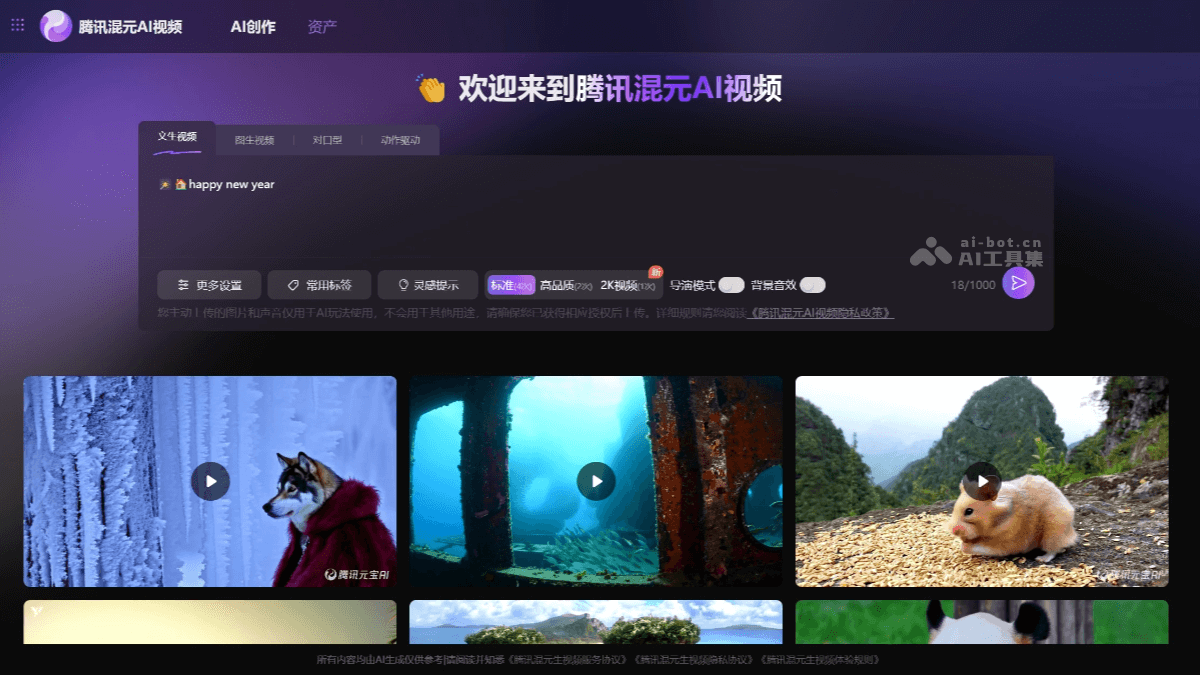
Main functions of Tencent Hunyuan AI Video
- Image-to-video generation: Users upload an image and enter a brief description, and the platform can transform a static image into a 5-second short video, while also supporting automatic generation of background sound effects.
- Text-to-video generation: Generates corresponding video content based on text prompts, supports multilingual input, and can understand and generate Chinese and English videos.
- Audio-driven function: Users upload a portrait image and enter text or audio, and the model can precisely match lip movements, making the person in the image "speak" or "sing".
- Motion-driven function: After users upload an image, they select a motion template, and the model can make the person in the image perform actions such as dancing and waving.
- Multi-shot generation and natural transitions: It can generate multiple shots based on text prompts and achieve natural switching between shots.
- High-quality video output: Supports 2K high-definition image quality, suitable for various characters and scenes such as realistic, anime and CGI.
How to use Tencent Hunyuan AI Video
- Visit the official website: Visit the Tencent Hunyuan AI Video official website https://aivideo.hunyuan.tencent.com/ 。
- Register/Log in: Click "Log in", enter the corresponding account information and complete login.
- Start creating: After logging in, enter the creation page and select functions such as "Image-to-video" or "Text-to-video".
- Image-to-video: Upload an image, enter a brief description, and the platform will generate a 5-second short video, while also supporting automatic generation of background sound effects.
- Text-to-video: Enter a text prompt, and the platform will generate corresponding video content based on the text, supports multilingual input, and can generate high-definition videos.
- Adjust parameters(optional):
- Style: Select the style of the video (such as realistic, anime, CGI, etc.).
- Camera movement: Set the camera movement method (such as panning, rotating, etc.).
- Object motion: Specify the object's action (such as dancing, waving, etc.).
- Resolution: Select the resolution of the generated video (such as high definition, standard definition, etc.).
- Generate video: Click the "Generate" button and wait for the platform to complete video generation.
- Download video: After generation is complete, you can download the generated video locally.
- Using Tencent Cloud API Interface (Developers)
- Apply for API Interface: Enterprises and developers can apply for API access through Tencent Cloud.
- Development Integration: According to the API documentation provided by Tencent Cloud, integrate the Hunyuan AI video generation capability into your own application or service to achieve more efficient video generation and customized development.
- Local Deployment (Advanced Users)
- Environment Preparation:
- Hardware requirements: NVIDIA GPU, CUDA support, minimum 60GB VRAM (for generating 720p video), recommended 80GB VRAM.
- Operating system: Linux (official testing environment).
- CUDA version: CUDA 11.8 or 12.0 recommended.
- Clone Source Code: Visit the GitHub repository to clone the code.
- Install Dependencies: Install the required environment dependencies.
- Download Pre-trained Model: Download the pre-trained model file from the official link provided.
- Run Inference: Use the script provided by the platform to run the model and generate videos.
- Environment Preparation:
Application Scenarios of Tencent Hunyuan AI Video
- Short Video Creation: Users can quickly generate personalized short video content by uploading images or entering text descriptions, for sharing on social media. For example, entering the description “a Chinese beauty wearing Hanfu, hair fluttering in the wind, with Zhangjiajie in the background” will generate the corresponding video.
- Animation Production: It can generate animated videos with coherent movements and rich scenes, supporting multiple styles such as realistic, anime, CGI, etc., suitable for animation short films, animated advertisements, and other creations. For example, generating an animated scene of “a penguin wearing a red scarf walking in a sea of flowers.”
- Special Effects Production: It can generate various special effects videos, such as sci-fi scenes, magical effects, particle effects, etc., providing special effects materials for film and television, games, and more.
- Advertising Promotion: Based on the characteristics of a product or service, generate attractive advertising videos to enhance the appeal and effectiveness of advertisements.


