
What is PixVerse V6
PixVerse V6 is the latest AI video generationmodel launched by Aishi Technology. The model achieves breakthroughs in camera control, character performance, and multi-shot audio-video generation, with more precise camera movement, coherent character emotions across frames, more realistic physical interactions, and a maximum generation duration of up to 15s; it supports generating multi-shot short films with native audio from a single prompt, without post-production editing. It also adds multilingual text generation capabilities and supports Claude Code、Codex and other programming Agents through a CLI interface, meeting creative and automated production needs. The model is now open to all users.
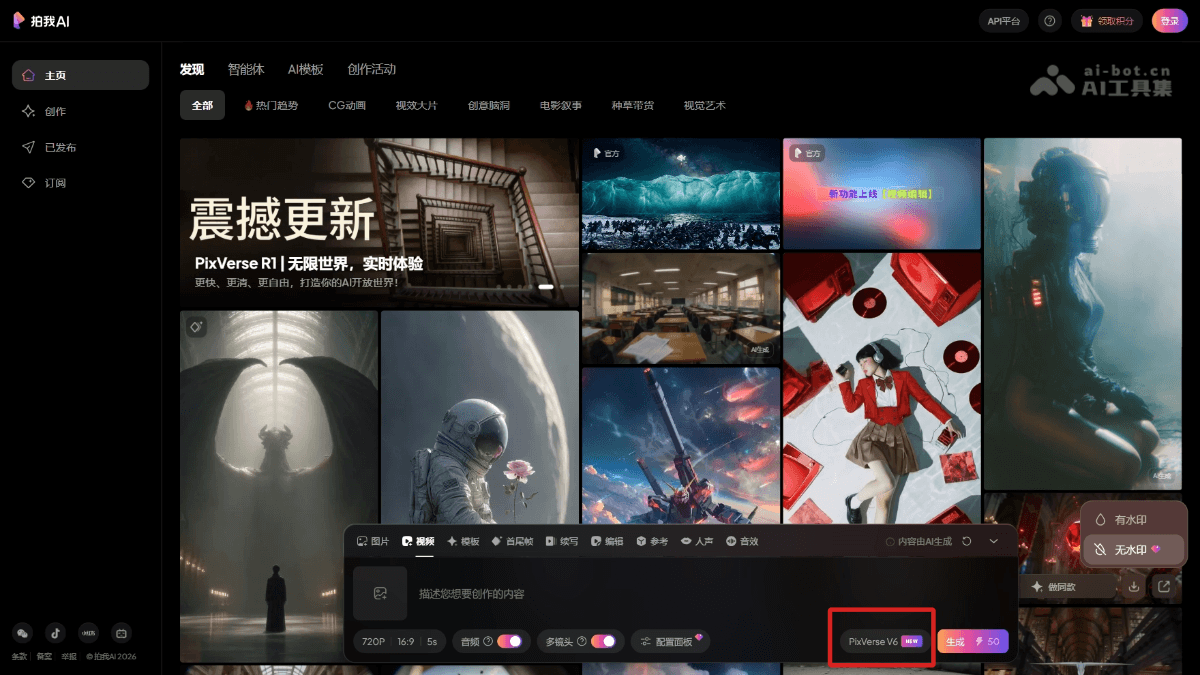
Main features of PixVerse V6
- Precise camera movement control: The model supports smoother camera movements such as tracking, perspective changes, and environmental reveals, with fewer artifacts.
- Coherent character emotions: Facial expressions and body language remain consistent across frames, and scene transitions are more natural.
- Realistic physical interactions: Makes object collisions, motion, and spatial relationships render more accurately.
- Multi-shot audio-video generation: A single prompt can generate a complete short film (such as a product advertisement), with synchronized audio and video and no post-production required.
- Multilingual text generation — Supports precise presentation and stylistic consistency of languages such as Chinese and English in the image.
- Developer CLI interface: Compatible with Claude Code, Codex,Cursor、OpenClaw and other Agents, supporting automated workflow integration.
How to use PixVerse V6
- Ordinary users:
- Visit the international official websitePixVerseor the domestic official websitePaiwo AI, download the clientApp, and complete account registration and login.
- Select the PixVerse V6 model in the creation interface.
- Enter a prompt to generate a video, supporting one-click output of multi-shot short films and native audio.
- Developers (CLI method): Supports programming Agents such as Claude Code, Codex, Cursor, and OpenClaw, and can embed video generation into automated production workflows to achieve batch or programmatic content creation
Key information and usage requirements of PixVerse V6
-
Release date: March 30, 2026
-
Core upgrades: Camera movement precision, character emotional coherence, physical interaction realism, and synchronized multi-shot audio-video generation
-
Featured functions: Generate a complete short film with native audio from a single prompt; multilingual text generation; CLI support for Agent integration
-
Supported Agents:Claude Code、Codex、Cursor、OpenClaw
-
Ordinary users: Visit pixverse.ai to register/log in, select the V6 model, and use it
-
Developers: Integrate into automated workflows through the CLI command-line interface
Core advantages of PixVerse V6
-
Professional-grade camera language: Camera movement is precise and smooth, complex camera movements (tracking, perspective changes) have fewer artifacts, and the image is more cinematic.
-
Coherent and consistent emotions: Character expressions and body language remain stable across frames, and the character state does not break during scene transitions.
-
Realistic and credible physics: Object collisions, motion trajectories, and spatial relationships conform to real-world logic, making action interactions more natural.
-
Integrated audio and video: Generate a complete multi-shot short film with native audio directly from a single prompt, eliminating the need for post-production editing and dubbing.
-
Globalized Production Capabilities: Supports the precise rendering of multilingual text within the frame, making it suitable for the batch production of localized content.
Comparison of PixVerse V6 with Similar Competing Products
| Comparison Dimensions | PixVerse V6 | Runway Gen-4 | Veo 3 (Google) |
|---|---|---|---|
| Core Advantages | One-click generation of multi-shot short films + native audio; CLI supports Agent integration | Precise control with Motion Brush; outstanding character consistency | Native audio generation, delicate image quality, Gemini ecosystem integration |
| Generation Mode | Generate a complete multi-shot short film from a single prompt | Mainly single-shot; requires storyboard editing and assembly | Mainly single-shot; long videos require segmented generation |
| Audio Capabilities | Native synchronized audio-video generation | Requires post-production dubbing | Native audio generation |
| Developer Support | CLI interface, compatible with Claude Code/Codex/Cursor/OpenClaw | Has an API but a weak Agent integration ecosystem | Enterprise-level API, focused on the Google Cloud ecosystem |
| Control Precision | Precise camera movement, character emotions, and physical interactions | Fine motion brush and regional control | Strong prompt understanding and rich image details |
| Multilingual Support | Multilingual on-screen text generation, including Chinese and English | Mainly English | Strong multilingual support |
| Applicable Scenarios | Automated batch production, Agent workflows, global localization | Artistic style exploration, advertising creativity, fine control | Applications within the Google ecosystem, advertising and marketing, multilingual content |
Application Scenarios of PixVerse V6
- Film and Advertising Production: Quickly generate multi-shot commercial short films such as product ads and brand promotional videos, with synchronized audio-video output, greatly reducing production cycles.
- Social Media Content: Creators can efficiently produce short videos with professional camera movement and vivid character expressions, adapted to the dissemination needs of multiple platforms.
- Global Content Localization: Enterprises use multilingual text generation capabilities to mass-produce localized video content adapted to different regional markets.
- Game and Animation Previsualization: Through precise physical interactions and character performances, quickly generate action scene previews to assist early-stage creative decision-making.
- Automated Content Production: Developers use the CLI interface to integrate into Agent workflows, achieving programmatic, large-scale video generation and deployment.