
What is Otty
Otty is a native macOS terminal app launched by the Typora team, designed for developers who frequently use AI Agents. On top of a traditional terminal, the tool natively integrates features such as multi-Agent panel management, session recovery, conversation branching (Fork), and Prompt queues, allowing users to run and monitor Claude Code、Codex、OpenCode and other tools in a single interface, with conversation context fully preserved after shutdown and restart.
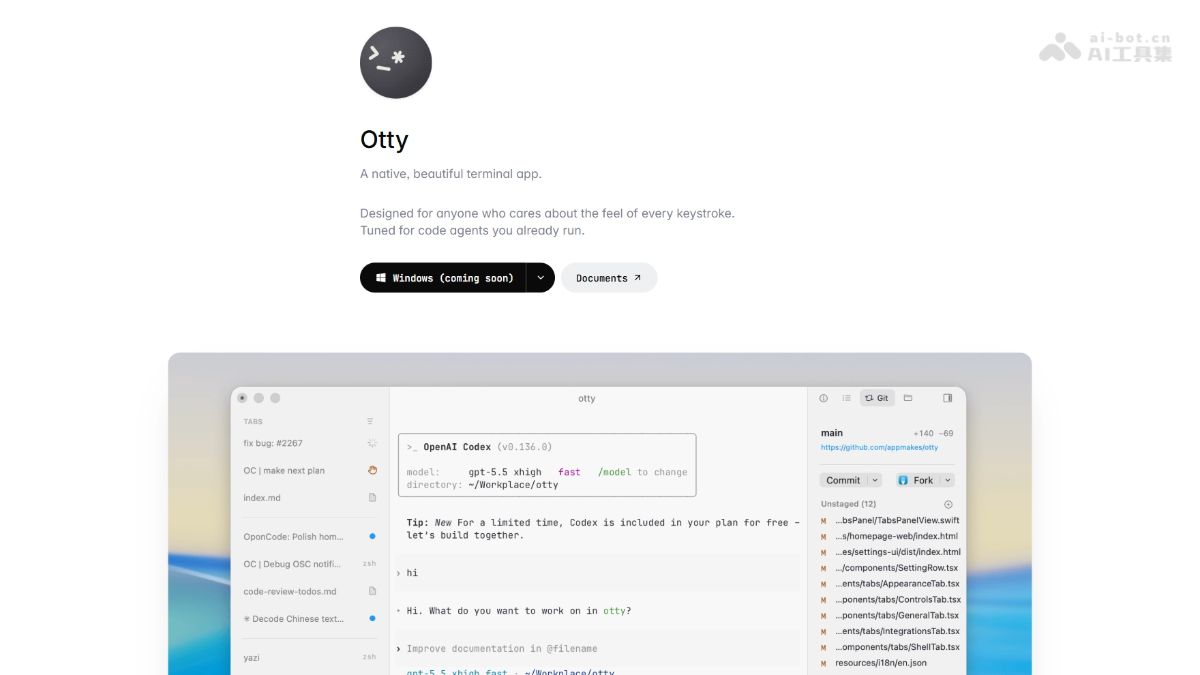
Otty's main features
-
Multi-Agent panel management: Vertical tabs support freely dragging, splitting, and combining multiple panels, allowing multiple AI Agents to run simultaneously with real-time preview of code changes.
-
Session recovery: After closing the lid and reopening, the panel layout, scroll history, running Agent tasks, and AI conversation context are all automatically restored.
-
Fork & Branch: Create branches at AI conversation nodes, exploring solutions in different directions like Git branches without losing the original context.
-
Composer and Prompt queue: Write multiple Prompts in advance and queue them for execution, with the Agent automatically completing batch tasks in order.
-
Send to Chat: Select errors or output in the terminal and send them to the Agent for analysis with one click, no copy-pasting needed.
-
GPU-accelerated rendering: The underlying layer uses native Rust + Metal rendering, supporting smoothness above 60fps, 24-bit true color, programming ligatures, and inline images.
-
Markdown rendering: Render Markdown documents directly in the terminal, with headings, code blocks, and links displayed normally.

Follow WeChat and reply "open source" to join theAI open source project communication group
Otty's technical principles
-
Native Rust development: The underlying layer is written in the Rust language, avoiding the performance overhead of cross-platform frameworks such as Electron, ensuring the app is lightweight, secure, and efficient.
-
Metal GPU-accelerated rendering: Directly calls the Metal framework on macOS for GPU-accelerated rendering, maintaining smoothness above 60fps during high-frequency log output or multi-Agent parallel work.
-
AI Agent native architecture: AI Agent integration has been a core capability since the initial design. The session management and panel layout of traditional terminals are deeply bound to the context state of AI conversations, achieving seamless collaboration.
-
Shutdown-level session persistence: By uniformly persisting and storing the panel layout, scroll history, running Agent tasks, and AI conversation context, it achieves complete state recovery after closing the lid or even shutting down and restarting.
-
Git-style conversation branching model: The conversation branching (Fork) feature draws on Git's branching mechanism, supporting the creation of independent context copies at any node of AI interaction, and supporting parallel exploration and comparison of multiple solutions.
How to use Otty
-
Download and install: Visit the Otty official website https://otty.sh/,下载 macOS version, supporting Apple Silicon and Intel, free installation, no account registration required.
-
Launch the terminal: Open Otty; it is itself a terminal, and you can directly enter commands.
-
Run an Agent: Launch an AI Agent such as Claude Code, Codex, or OpenCode and start a normal conversation.
-
Split-screen management: Drag panels to split, and run and monitor multiple Agent tasks simultaneously.
-
Create Branch: Right-click Fork on a conversation node to create branches and explore solutions in different directions.
-
Queue Execution: Use Composer to write multiple Prompts in advance, and queue them for the Agent to execute automatically in order.
-
One-Click Send: Select the error output in the terminal, right-click Send to Chat to send it directly to the Agent for analysis.
Otty's Core Advantages
-
Made by the Typora Team: Continuing the clean and beautiful design language, with a refined UI and intuitive interactions.
-
Native Performance: Rust + Metal architecture, not Electron, maintaining smoothness above 60fps.
-
Native AI Agent Integration: Designed from the ground up for tools like Claude Code, Codex, and OpenCode, not a later plugin.
-
Session Persistence: After shutdown and restart, all Agent states and conversation contexts are fully restored, with no need to re-explain the project background.
-
Conversation Branch Management: A rare industry feature that brings Git branching thinking into AI conversations, facilitating solution A/B testing.
Otty's Comparison with Similar Competitors
| Dimension | Otty | Warp |
|---|---|---|
| Positioning | Native terminal + AI Agent management | Modern terminal + AI assistant |
| Tech Stack | Rust + Metal (native macOS) | Rust + GPU acceleration |
| AI Integration | Multi-Agent panel management, session recovery, conversation branching | AI command completion, natural language search, collaboration |
| Session Persistence | Supports shutdown-level recovery, including Agent context | Supports cloud history, but Agent context recovery is limited |
| Interface Style | Minimal and native, similar to Typora | Modern but with many function panels |
| Price | Free | Free version + paid Pro plan |
| Target Users | Developers who run multiple AI Agents every day | Terminal users and teams pursuing efficiency |
Otty's Application Scenarios
-
Multi-Agent Parallel Development: Run Claude Code on the left to refactor code, Codex on the right to write tests, and view log output below.
-
Long-Cycle AI Tasks: Need to close the lid for a meeting or shut down and leave work, then open it the next day and directly continue yesterday's Agent conversation.
-
Solution A/B Exploration: The Agent provides two refactoring solutions, Fork two branches to verify them separately, and finally choose the better solution to merge.
-
Batch Task Automation: Submit tasks such as fixing bugs, optimizing queries, updating docs, and running tests all at once through the Composer queue.
-
Quick Troubleshooting: When you see a terminal error, one-click Send to Chat to send it to the Agent to locate the problem, with no need to switch windows.