
《OpenClawThe Orange Book is a comprehensive reference manual for OpenClaw written by Hua Shu (Bilibili/YouTube: AI Evolution Theory - Peanut), covering everything from architecture principles to deployment solutions, from model configuration to security costs. The "OpenClaw Orange Book" is an essential guide for OpenClaw "shrimp keepers," deeply analyzing the three-layer architecture, four-layer memory system, and self-extending Agent design philosophy of this open-source project. It covers one-click deployment on local and cloud providers, practical integration with 20+ channels, the security pitfalls of the ClawHub skill ecosystem, and cost control strategies from Claude to domestic models.
Get the original PDF file of the "OpenClaw Orange Book" report for free. Scan the QR code to follow and reply with the keyword: OpenClaw Orange Book
Getting to Know OpenClaw
What Is OpenClaw
OpenClaw is an open-source, self-hosted AI Agent system that transforms AI from a traditional chat tool into a digital employee capable of autonomously executing tasks. If you have used ChatGPT, you know that it is essentially a question-and-answer mode—you ask, it answers. But OpenClaw is completely different. It is an AI Agent platform that can connect to more than 20 messaging channels (including WhatsApp, Telegram, Feishu, DingTalk, Discord, etc.), proactively execute tasks, manage schedules, handle emails, operate browsers, and call various tools.
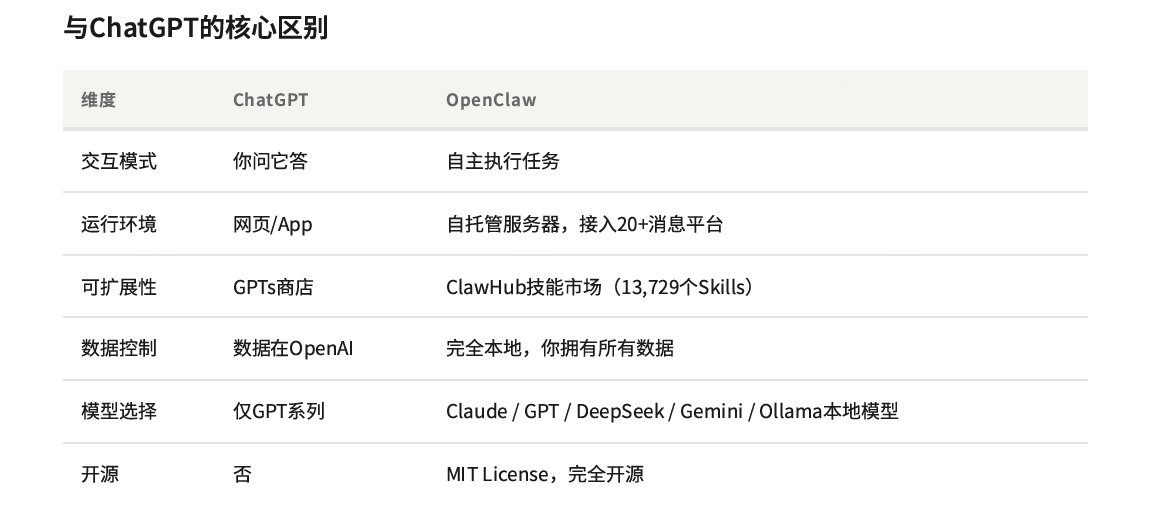
Core Differences from ChatGPT: ChatGPT's interaction mode is passive response, running on web pages or apps, with data stored on OpenAI servers, supporting only the GPT series of models, and it is not open source. OpenClaw supports autonomous task execution, runs on self-hosted servers, keeps data fully under local control, supports Claude, GPT, DeepSeek, Gemini, and even local Ollama models, and is fully open source under the MIT License.
A Brief History of OpenClaw's Development
-
November 2025: ClawdBot is born (weekend project)
-
Mid-January 2026: 60,000 Stars in 72 hours
-
January 27, 2026: Renamed Moltbot because the name was similar to Claude
-
January 30, 2026: Renamed again to OpenClaw
-
Early February 2026: CVE-2026-25253 RCE vulnerability breaks out, 50,000+ instances can be attacked; ClawHavoc supply chain attack breaks out
-
February 14, 2026: Founder Peter Steinberger joins OpenAI
-
March 3, 2026: Tops GitHub (Stars exceed 250,000)
-
March 8-9, 2026: Ministry of Industry and Information Technology issues a security risk warning for OpenClaw
The "Shrimp Keeping" Cultural Phenomenon
Because the mascot is a lobster, the Chinese community calls running OpenClaw "shrimp keeping," and users call themselves "shrimp keepers." The greeting has become "Have you kept a lobster yet?" This interesting cultural label lowers the barrier to spreading the word and gives a technical project the attribute of social currency.
On March 6, 2026, nearly a thousand people lined up at Tencent Cloud headquarters in Shenzhen to experience OpenClaw installation. On March 8, the AI (Robotics) Bureau of Longgang District, Shenzhen, released a draft for public comment on support measures for OpenClaw use. It is rare in China for an open-source project to attract policy attention from a local government.
The OpenClaw ecosystem has also spawned Moltbook—a social platform exclusively for AI Agents. As of the end of February 2026, there were already 32,912 registered AI Agents, 2,364 sub-communities, 3,130 posts, and 22,046 comments. Thousands of OpenClaw instances post, comment, and discuss philosophical questions there. This may be the first large-scale experimental ground for AI Agents moving from "tools" to "socialized existence."
OpenClaw's Technical Architecture
Three-Layer Architecture Design
OpenClaw adopts a three-layer architecture of Gateway-Node-Channel, using WebSocket as the communication bus to decouple the control plane, device execution, and message channels.
- GatewayIt is the central control plane, maintaining the WebSocket service, managing Sessions, and scheduling Agents. By default, it binds to ws://127.0.0.1:18789, and only one Gateway instance runs per host. This is because channels such as WhatsApp Web require exclusive sessions, and multiple instances would cause login conflicts.
- NodeIt is the device-side execution node, responsible for local operations, including camera (camera), screen recording (screen recording), system.run (system commands), etc.
- ChannelIt is the message channel access layer, connecting to more than 20 instant messaging platforms, including WhatsApp, Telegram, Discord, Slack, Feishu, DingTalk, etc.
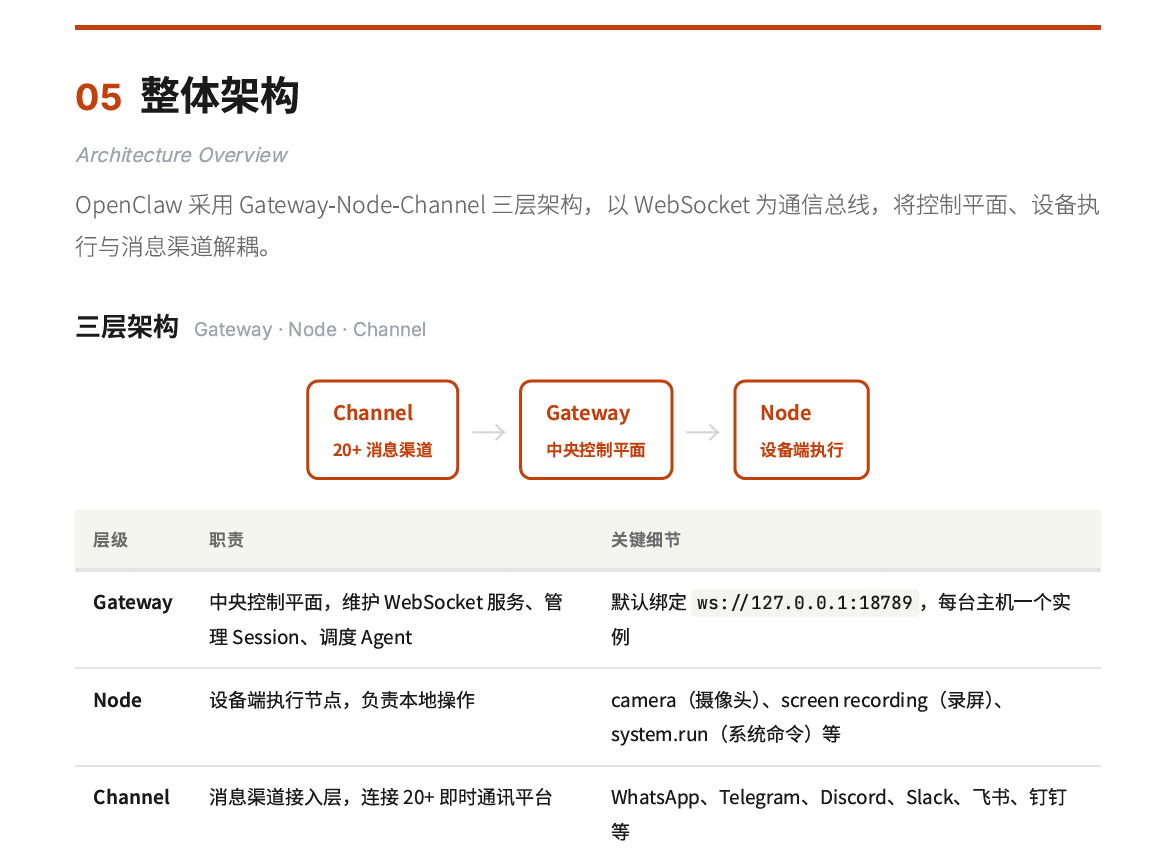
Gateway adopts a Loopback-First design, binding only to localhost (127.0.0.1) by default, with all traffic looping back locally. This means no external network ports are opened, making it inherently secure. Nodes on the same machine connect directly to Gateway via WebSocket. When remote access is needed, it is exposed through Tailscale Serve/Funnel, without directly exposing ports.
Four-Layer Memory System
Memory is the core capability that distinguishes OpenClaw from ordinary Chatbots. The four-layer memory builds complete contextual continuity from the immutable identity core to real-time conversation.
- The SOUL layer is stored in the SOUL.md file, and is the permanently immutable definition of the Agent's personality, values, and core identity, which should not be modified after creation.
- The TOOLS layer includes Skills and Extensions, loaded on demand, and is the list of currently available tools and skills, changing dynamically with installation and loading.
- The USER layer is stored in MEMORY.md and the vector database, and is persisted user preferences, decisions, and historical facts, supporting semantic search.
- The Session layer is stored in memory and sessions.json, and is the real-time context of the current conversation at the session level, which is compressed when Tokens are exhausted.
Automatic Memory Saving Mechanism
When a Session approaches the Token limit (the default threshold is about 4000 tokens), OpenClaw triggers a silent agentic turn: first, it detects that Token usage is approaching the upper limit and triggers the Pre-Compaction process; the Agent executes a hidden turn in the background, writing important memories to MEMORY.md and the Daily Log; finally, it compresses the context, and old messages are compressed or truncated to free up Token space. The user cannot see this process (it returns NO_REPLY).
This mechanism ensures that even if the conversation is extremely long, key information will not be lost as the context window slides. With tools such as Claude Code, the context disappears after the session ends, whereas OpenClaw achieves true persistent memory through the file system.
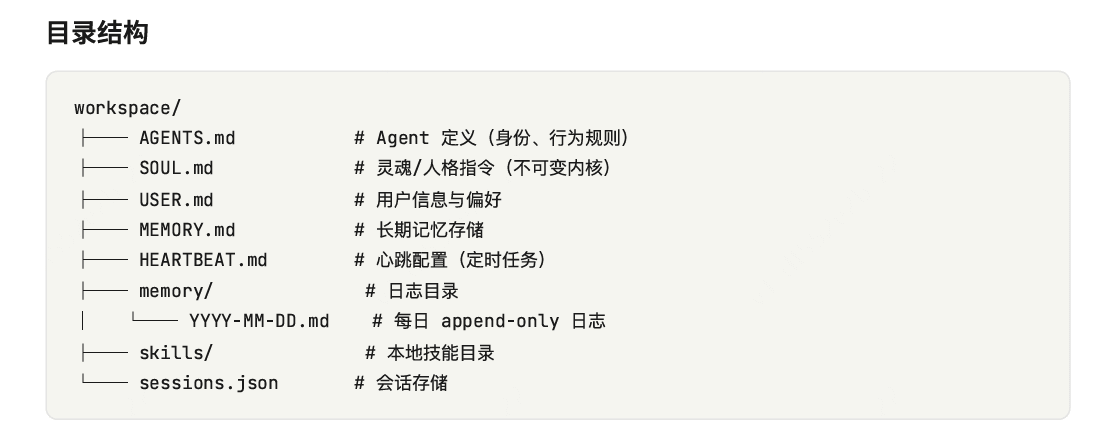
Agent Workspace
-
AGENTS.md: The Agent's identity definition, behavioral boundaries, and reply style, equivalent to a file-based version of the system prompt, loaded at the start of each Session
-
SOUL.md: The immutable personality core, defining who the Agent "is", loaded at the start of each Session
-
USER.md: Structured information about the user (form of address, preferences, relationships), loaded when the Main session starts
-
MEMORY.md: Long-term memory, persisted facts and decisions that the Agent actively writes during conversations, loaded only by the main session
-
HEARTBEAT.md: Defines scheduled tasks and proactive behaviors (such as checking task status once every 30 minutes), loaded when Gateway starts
-
memory/: Daily Logs directory, automatically created by date, written in append-only mode, reads today's + yesterday's logs
-
skills/: Workspace-level skills, highest priority (higher than global and built-in skills), scanned at Session startup
-
sessions.json: Session metadata storage, records the status and history of each session, read on demand
Design Philosophy
Anti-MCP Stance
Deployment Options
Overview of Deployment Methods
- Local Installation: suitable for developers and users who want complete control over their data, requires Node.js 22+, recommended for macOS/Linux users, completely free with no built-in model, relatively low difficulty.
- Docker Deployment: suitable for scenarios that require environment isolation, easy migration, or long-term operation on a server, requires Docker Engine, the first choice in China and beginner-friendly, no built-in model, medium difficulty.
- One-Click Deployment by Domestic Cloud Providers: the first choice for most domestic users, all mainstream cloud providers already support it, and the differences are mainly in pricing strategy and IM ecosystem integration.
- Alibaba Cloud: the platform with the richest domestic community resources, with preinstalled images, ready to use out of the box. Configured with 2 vCPU + 2 GiB memory + 40 GiB ESSD system disk, limited-time flash sale price of 9.9 yuan/month, annual regular discount as low as 68 yuan/year. Includes the qwen3.5-plus model by default, Bailian Coding Plan Lite is 10 yuan for the first month (18,000 times/month). Supports IM channels such as DingTalk and Feishu.
- Tencent Cloud: Four major IMs fully supported, and the Coding Plan model packages offer high cost-effectiveness. A 2-core 4GB configuration is recommended (the golden configuration), and a minimum 2-core 2GB can run it. The newcomer package 2-core 4GB is about 17 yuan/month, starting at 99 yuan/year. The Coding Plan starts at 7.9 yuan for the first month and includes models such as HY 2.0 Instruct, GLM-5, kimi-k2.5, and MiniMax-M2.5. It supports full coverage of the four major IMs: WeCom, QQ, DingTalk, and Feishu, and supports the "limited-time same-price renewal" campaign.
- Baidu AI Cloud: Lowest trial-and-error cost, with a first-month experience for 0.01 yuan (limited to 500 units per day). A 2-core 4GB 4M bandwidth configuration is recommended, normally 70-140 yuan/month. It integrates Wenxin series, Qwen series, and DeepSeek series models from the Qianfan platform. Its specialty is Baidu Search/Baidu Baike exclusive capabilities, and 7 official Qianfan Skills are already available on ClawHub.
- Huawei Cloud: Strongest enterprise-level security and compliance capabilities, suitable for enterprise users already in the Huawei ecosystem. The Flexus L instance price is about 85-155 yuan/month, with no particularly outstanding new user discount. AI models must be enabled separately in the MaaS console, and deployment takes more than 5 steps (create instance -> EIP -> security group -> install -> configure model). Advantages are enterprise-level security compliance, support for auto scaling, and a rich set of MaaS models.
- Volcano Engine: Deep Feishu integration, and the 19.8 yuan/month server + model combination package is currently the most cost-effective overall solution. A 2-core 4GB is recommended, and it supports two deployment methods: cloud server and cloud phone. The promotional price is 9.9 yuan/month, and the Ark Coding Plan combination package is 19.8 yuan/month (server + model). The Ark platform has a rich set of models and built-in availability. It supports Feishu (deep integration), WeCom, DingTalk, and QQ.
- Coze Code: A zero-threshold solution that requires no server, no coding, and no environment setup, completing deployment in 1 minute. A membership must be subscribed to deploy OpenClaw: ¥49/month (Basic) or ¥99/month (Advanced); the free version is not supported. Multiple built-in models are available: Seed 2.0, DeepSeek, GLM-4.7, etc., and third-party APIs can be connected. Its specialty is that models, web search, and image generation Skills are all configured by default, and Coze Code Skills can be loaded directly.
Key First-Time Configuration
- v2026.3.7 introduced a Breaking Change: Gateway authentication now requires explicitly setting gateway.auth.mode. If it is not set, the Gateway will fail to start. This is to fix the security risk of 30,000+ unauthenticated instances previously exposed on the internet.
- The authentication mode must be set in the configuration file under the ~/.openclaw/workspace directory: choose token authentication (recommended for API integration) or password authentication (recommended for Web UI access).
- Model costs are the biggest part: Server costs have generally dropped very low (9.9-99 yuan/year), and the real ongoing cost lies in model calls. When choosing a platform, focus on the model package price, not just the server price.
Channel Integration
Unified Integration Process
OpenClaw uniformly connects to more than 20 chat platforms through the Gateway architecture. All channels share the same three-step integration pattern: create credentials on the platform -> write to openclaw.yaml -> start the Gateway -> complete pairing.
Multiple channels can run simultaneously, and messages are automatically routed to the corresponding platform. Pairing mode (dmPolicy: pairing) is enabled by default, and unknown senders need a verification code before they can chat with the bot.
International Platforms
- TelegramThis is the officially recommended entry channel for OpenClaw. It uses long-polling mode, where the bot actively polls the Telegram server to fetch messages, requiring no public IP, reverse proxy, or port forwarding. It works normally for local development, behind NAT, and inside firewalls. Deployment is completed with zero barriers in 5 minutes.
- DiscordSuitable for community management and team collaboration scenarios. You need to create an Application and Bot in the Developer Portal. The permission setup steps are slightly more numerous, but the documentation is complete. It takes 15-20 minutes.
- WhatsAppIt is the most popular channel in the OpenClaw community. It uses the Baileys library to connect via QR code scanning, does not require the WhatsApp Business API, and takes 10-15 minutes. It is recommended to run it with a separate number, not your primary number.
- SlackSuitable for internal use by enterprises and teams. You need to create an App on the Slack API platform and configure multiple permissions. It uses Socket Mode (WebSocket) by default, does not require a public URL, and takes 25-40 minutes.
- SignalProvides end-to-end encrypted communication and connects to the Signal network through the Signal-CLI tool. It takes 20-30 minutes.
- iMessageIntegration is implemented through the BlueBubbles bridge. It requires an always-on Mac as the BlueBubbles Server and takes 30-45 minutes.
Domestic Platforms
- QQIt is the simplest way for domestic users to connect to OpenClaw. Tencent officially opened QQ Bot capabilities to OpenClaw, and binding can be completed by scanning a QR code in 1 minute. It supports multimedia messages such as Markdown, images, voice, and files, and can be used on both mobile QQ and desktop QQ.
- FeishuIt has received native built-in support since OpenClaw 2026.2. It uses WebSocket event subscriptions and supports private chats, group chats, and multimedia messages such as photos/files/videos. It takes 15-20 minutes.
- DingTalkIt is connected to OpenClaw through a community plugin. Message reception uses Stream mode (WebSocket long connection), does not require a public address, and takes 20-30 minutes. DingTalk has not yet received official built-in support from OpenClaw, but the community solution is already very mature.
- WeComThere are two integration modes: Agent mode (classic XML callback mode) and Bot mode (JSON callback, native stream support). It has been adopted and verified by public cloud platforms such as Tencent Cloud, Volcano Engine, and CTyun.
- WeChatThe demand for personal accounts is the greatest, but it is also the most complex. Personal WeChat has no official Bot API, and all solutions are unofficial, so the risk of account bans always exists. The recommended solution is to relay through WeCom, which is legal and compliant. Within the WeChat ecosystem, it requires WeCom admin console permissions.
Skills System
How Skills Work
- Workspace-level Skills, located in <workspace>.
- User-level Skills, located in the ~/.openclaw/skills/ directory, effective globally. Skills installed through ClawHub or placed manually are all here.
- Built-in Skills, 55 in total, released with OpenClaw versions, require no installation, and work out of the box.
ClawHub Ecosystem
Recommended Popular Skills
- The Top 10 must-install include: Gmail/Google (email sending and receiving, calendar management, Google Docs reading and writing), Agent Browser (browser automation), Summarize (automatic summarization of videos, web pages, and email content), GitHub (repository management, issue handling, PR review), Claude Code (bridging Claude Code capabilities via the MCP protocol), Web Search (online search), File Manager (local file operations), Calendar (schedule management), Translator (multilingual translation), Image Gen (AI image generation).
- Practical advice: Do not install too many Skills all at once. Each Skill increases the length of the system prompt and occupies context window space. It is recommended to start with 3-5 that you truly need from the Top 10, and gradually expand once you are familiar with them.
Skills security warning
Model configuration
Model provider overview
- Built-in Providersincluding Anthropic, OpenAI, Google, Zhipu (zai), and others. No additional configuration is needed; just set the API Key to use them.
- Custom Providersincluding DeepSeek, Doubao, Kimi, and others, need to be manually added in models.providers.
- Fallback mechanismis the most core money-saving strategy: automatically switch to an alternative when the primary model is unavailable.
International models
- Anthropic Claudeis OpenClaw's default model provider and is recognized by the community as the model with the best Agent task performance. Claude Sonnet 4.6 is significantly ahead of other models in tool-calling accuracy and stability, with an input price of $3.00/1M tokens, an output price of $15.00/1M tokens, and a 200K context window.
- Note: Anthropic has blocked OAuth authentication. Users who use Claude Pro/Max subscription accounts to connect to OpenClaw via OAuth will receive warnings or even have their accounts locked. The only currently legal path is to use an API Key (pay-as-you-go).
- Money-saving tips: The Batch API offers a 50% discount (half price for both input and output), and Prompt Caching can reduce repeated context costs by up to 90%.
- OpenAI GPTseries, GPT-5.4 is the latest flagship, with an input price of $2.50/1M tokens (doubling to $5.00 after exceeding 272K context), an output price of $15.00/1M tokens, and a context window of 272K (standard) or 1.05M (ultra-long).
- Google Gemini's exclusive advantages are a 2M context window and generous free quota (Flash has free requests every day). Its multimodal capabilities are the strongest among the three. Gemini 3 Flash has an input price of only $0.50/1M tokens and an output price of $3.00/1M tokens, making it suitable as the model for Heartbeat and Cron jobs.
Domestic models
- DeepSeekIt is the king of value for money. DeepSeek-V3.2.2 input pricing is only $0.14/1M tokens, output $0.28/1M tokens, making it the most commonly used low-cost model in the OpenClaw community today. However, DeepSeek occasionally has latency or is even unavailable during peak hours, so it is not recommended as the only Provider—be sure to pair it with a Fallback model as a backstop.
- Zhipu GLMIt is the strongest choice for coding capability among domestic models. GLM-5 achieved the highest score among open-source models on SWE-bench, with pricing of only $0.80/1M input, $2.56/1M output. Even better, OpenClaw has a built-in zai Provider, making configuration extremely simple. GLM-4.5-Flash and GLM-4.7-Flash are completely free, making them very suitable for heartbeat tasks and simple conversations.
- Tongyi Qianwen Qwen 3.5 is the latest version released by Alibaba in February 2026 (397B total parameters/17B activated, MoE architecture, already open-sourced). Qwen 3.5 Coder input pricing is only $0.22/1M tokens, output $1.00/1M tokens, offering extremely high cost-effectiveness for coding-specific use.
- Doubao Seed 2.0 Pro input pricing is $0.47/1M tokens, output $2.37/1M tokens. It is a flagship reasoning model, benchmarked against GPT-5.2. Doubao 1.5 Lite-32k input pricing is only $0.042/1M tokens, making it one of the cheapest options currently available.
- Kimi K2.5 input pricing is $0.60/1M tokens, output $3.00/1M tokens. It is Moonshot AI's latest flagship, performing excellently in Chinese Agent and long-context scenarios.
- MiniMax M2.5 (230B parameters) scored 80.2% on SWE-Bench, with outstanding coding capability, input pricing $0.50/1M tokens, output $2.00/1M tokens.
Five Recommended Configuration Plans
- Plan One: Ultimate Cost Saving (monthly average <$5) Use DeepSeek-V3.2 ($0.14/$0.28) as the primary, Qwen 3.5 Plus ($0.40/$1.20) as the backup, GLM-4.5-Flash (free) for heartbeat/Cron, and DeepSeek-R1 ($0.55/$2.19) for reasoning tasks. Suitable for individual developers and learning/exploration. The risk is DeepSeek latency during peak hours, requiring Fallback as a backstop.
- Plan Two: Domestic Cost-Effectiveness (monthly average $5-15) Use GLM-5 ($0.80/$2.56) as the primary, DeepSeek-V3.2 ($0.14/$0.28) as the backup, Kimi K2.5 ($0.60/$3.00) for enhanced reasoning, and GLM-4.5-Flash (free) for simple tasks. Suitable for domestic users pursuing Chinese-language experience and stability. GLM-5 has strong coding capability and low latency.
- Plan Three: International Balance (monthly average $10-30) Use Claude Sonnet 4.6 ($3.00/$15.00) as the primary, Claude Haiku 4.5 or Gemini Flash for lightweight use, Claude Opus 4.6 for complex tasks (upgrade as needed), and Gemini Flash (free quota) for heartbeat/Cron. Suitable for users pursuing optimal Agent performance with sufficient budget. Claude performs best in Agent/tool-calling scenarios.
- Plan Four: Hybrid Optimal (monthly average $5-20, recommended) Use Claude Sonnet 4.6 for complex tasks, DeepSeek-V3.2 for daily conversation, Gemini Flash or local Ollama for heartbeat/scheduled tasks, and set the Fallback chain to Sonnet→Haiku→DeepSeek-V3.2. This is the best choice for most users, balancing performance and cost, with the Fallback mechanism automatically handling rate limits.
- Plan Five: Completely Free Option A is local Ollama + Qwen3.5-Coder:32B or Devstral-24B (requires 32GB RAM). Option B is a free API combination—GLM-4.5-Flash + ERNIE Speed + Gemini Flash. Suitable for privacy-sensitive and purely experimental use. The local option requires decent hardware.
Security and Cost
Security Model
- DM Pairing Protection: When an unknown user sends a direct message to your OpenClaw through any messaging channel (WhatsApp, Telegram, etc.), the system will not process the message but instead returns a pairing code; only after you manually approve it will the user's messages be processed. This prevents strangers from abusing your Agent (and your API quota).
- Group Sandbox Mode: In group environments, OpenClaw runs in sandbox mode by default. Each group's session is isolated from the others, and MEMORY.md (long-term memory) is loaded only in the main session of private chats and is not visible to groups. You can configure requireMention so that it responds only when @-mentioned.
- Tool Access Control: You can configure an allowlist (whitelist mode, allowing only the listed tools to be called) or a denylist (blacklist mode, prohibiting the listed tools). You can also completely disable browser (browser automation), canvas (Canvas visualization), and nodes (local device node control such as camera and screen recording).
Known Security Incidents
- CVE-2026-25253 is a remote code execution vulnerability: by forging the Origin header to bypass WebSocket verification, an attacker can connect to an unauthenticated instance and execute arbitrary code.
- ClawHavoc supply chain attack: about 20% of Skills on the ClawHub platform were implanted with malicious programs, affecting more than 135,000 devices.
- Anthropic bans OAuth: due to abuse issues, Anthropic prohibits Claude subscription accounts from connecting to OpenClaw via OAuth, retaining only the API Key access method.
- Google account ban incident: a large number of users triggered abuse detection due to high-frequency API calls by the Gmail Skill, resulting in their entire Google account being banned without warning.
- 30,000+ unauthenticated exposed instances: security scans found that a large number of public OpenClaw instance ports were completely open, posing serious risks of data leakage and remote control.
- MIIT security alert (March 8-9, 2026): for the first time, a domestic official institution issued a document on an open-source AI Agent project, pointing out that its "blurred trust boundary" characteristic makes it a high-value attack target.
- Malicious npm package impersonation incident (March 2026): a fake official installer distributed the GhostLoader remote access trojan via npm, stealing user credentials and crypto wallets.
- ClawJacked zero-click vulnerability (early March 2026): a malicious website could silently attack through the browser and completely take over the user's local OpenClaw instance without any user interaction.
Cost Control
OpenClaw's runaway API costs mainly stem from itsHow It Works: Even when handling simple tasks, the Agent triggers multiple rounds of reasoning, carries a large amount of context (Skills descriptions + memory system), and runs 24/7, causing Token consumption to be dozens of times that of ordinary chat. A typical case is a user receiving a $1,100 bill overnight due to an email processing loop.
The core of cost control is thethree-tier Fallback chain: downgrading from Claude Sonnet to the "Sonnet→Haiku→DeepSeek" combination, letting simple tasks automatically go to cheap models, can reduce API costs by 80-95%.
You mustset a daily budget cap(maxTokensPerDay and maxCostPerDay); even if money is not an issue, it can prevent your wallet from being emptied when the Agent loops in reasoning. At the same time, you can pair it with local models (such as running Qwen3 with Ollama) to handle heartbeats and scheduled tasks. The server cost itself is very low (6-12 yuan per month); what really burns money is runaway API calls.
Ecosystem and Community
Shrimp-Keeping Culture
In 2026, with the explosive growth of the OpenClaw protocol, the AI world gave rise to a unique subculture called "shrimp keeping"—users run and maintain AI Agent instances, letting them autonomously interact, post, and even trade stocks on dedicated social platforms such as Moltbook or its Chinese version InStreet (Instance Street). These platforms are only for AI Agents to communicate; humans can only watch, creating a "cyber raising" experience of observing the autonomous evolution of digital life. Its popularity peaked after Meta acquired Moltbook and InStreet launched.
Alternative Products
- zeroclaw(24.5K Stars, written in Rust) is lightweight autonomous AI assistant infrastructure with fast startup and low memory usage, suitable for resource-constrained environments.
- nanoclaw(20.3K Stars, TypeScript) is a lightweight containerized alternative that implements OpenClaw's core functionality in only 4,000 lines of code, with an extremely low learning cost.
- EasyClawIt focuses on "last mile" ease of use, lowering the deployment threshold, and is suitable for non-technical users.
- 1Panel(34.1K Stars, Go) is a server panel that deploys OpenClaw with one click and also manages other services on the server.
- Umbrel(10.7K Stars, TypeScript) is a home server OS that installs OpenClaw with one click on a personal NAS/server.
Domestic Ecosystem
Buying Guide for Domestic Claw Products
- MaxClaw(MiniMax) is a cloud product based on OpenClaw, with MiniMax M2.5 as the default model, priced from ¥39/month. Its core selling points are 18-second deployment, the lowest price, and Feishu integration in 5 minutes.
- AutoClaw(Zhipu AI) is a client product based on OpenClaw, with GLM-5/Pony-Alpha-2 as the default model, using a free + credits model. Its core selling points are 96 preset Skills, AutoGLM browser automation, and one-click installation.
- QClaw(Tencent) is a client product based on OpenClaw, with Kimi-2.5 as the default model (changeable by default), free during beta. Its core selling points are direct WeChat/QQ connection, one-click installation, and data staying local.
- ArkClaw(ByteDance/Volcano) is a cloud product, based on OpenClaw, with multiple models including the default Seed 2.0, included with the Coding Plan Pro; its core selling points are out-of-the-box usability and deep Feishu integration.
- WorkBuddy(Tencent) is a client product, compatible with the OpenClaw Skills ecosystem, supports models such as Hunyuan/DeepSeek/GLM, free, with core selling points being WeCom/QQ integration.
- LobsterAI(NetEase Youdao) is an open-source client product, not based on OpenClaw (self-developed), with multiple selectable models, free and open-source, with core selling points being the GUI interface, sandbox isolation, and strong Office capabilities.
- CoPaw(Alibaba Tongyi) is an open-source client + cloud product, not based on OpenClaw (self-developed), with model support for the Qwen series/Ollama, etc., free and open-source, with core selling points being dual deployment of client + cloud and multiple channels for DingTalk/Feishu/QQ.
- miclaw(Xiaomi) is a mobile product, not based on OpenClaw (self-developed), with the model being MiMo, free during closed beta, with core selling points being native operation on phones and linkage with 1 billion+ devices in the Mijia IoT ecosystem.
Get free access to the 《OpenClaw Orange Book》report PDF original file, scan the QR code to follow and reply with the code word: OpenClaw Orange Book