

What is AutoClaw
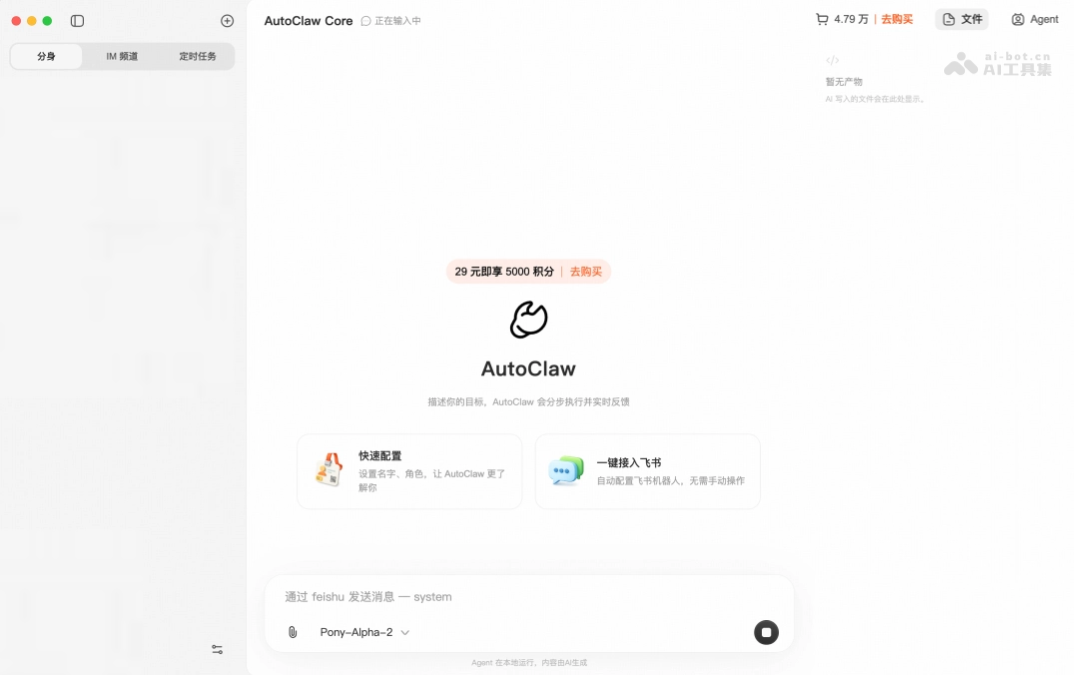
AutoClaw (Chinese name: Aolong) is Zhipu's first one-click install local version in ChinaOpenClaw, supporting macOS and Windows. Users can complete deployment in 1 minute and assign tasks directly to AI in IM tools such as Feishu. AutoClaw comes with 50+ prebuilt Skills, covering scenarios such as office work, code, and marketing; it integrates Pony-Alpha-2 exclusive models and AutoGLM-Browser-Agent browser operation capabilities, and can execute complex multi-step tasks. AutoClaw is open to integrating third-party model APIs such as DeepSeek, Kimi, and MiniMax, truly realizing the AI equality vision of "everyone raising lobsters".

Main features of AutoClaw
- One-click deployment: Supports both macOS and Windows systems, and users can complete installation in 1 minute without any complex configuration.
- Deep IM integration: Supports seamless embedding into mainstream instant messaging tools such as Feishu, and users can directly assign tasks and receive execution results in the chat dialog box.
- 50+ prebuilt skills: Built-in ready-to-use skill library covering high-frequency office scenarios such as programming and development, document processing, data analysis, and content creation.
- Browser automation: Based on AutoGLM technology, it enables intelligent browser control and can automatically complete complex web task chains across pages and multiple steps.
- Free model switching: Open access to third-party model APIs such as DeepSeek, Kimi, MiniMax, and GLM, allowing users to choose flexibly as needed.
- Local execution: All tasks run on the local computer, and data does not need to be uploaded to the cloud, ensuring user privacy and data security.
-
Self-evolution mechanism: AutoClaw can automatically identify user corrections, preferences, and failure lessons after conversations, and after user approval, solidify them into permanent memory, achieving personalized evolution that understands the user better with use.
-
Skill store (GLM Office Skills): Provides five office skills: PPT, DOCX, XLSX, PDF, and Charts, supports detailed scenario design, intelligent self-checking, and format conversion, and can generate complete office documents with accompanying scripts in one click.
How to use AutoClaw
- Download and install: Visit the AutoClaw official website https://autoglm.zhipuai.cn/autoclaw , download the macOS or Windows version, and install it with one click.
- Configure models: Choose the built-in Pony-Alpha-2 model, or enter third-party API keys such as DeepSeek, Kimi, and GLM.
- Connect Feishu: Follow the instructions to bind a Feishu account, and you can directly @AutoClaw in the chat box to assign tasks, with execution results automatically flowing back into the conversation.
Core advantages of AutoClaw
- Zero-threshold deployment: China's first true one-click install local OpenClaw, supporting both macOS and Windows systems, with deployment completed in 1 minute and no technical background required.
- Cost-friendly: Provides a certain free quota, allowing users to experience it at zero cost; compared with cloud solutions, no monthly rent prepayment is required, and on-demand use is more flexible and economical.
- Privacy and security: All tasks are executed on the local computer, and data does not need to be uploaded to the cloud, fundamentally ensuring the security of user privacy and sensitive information.
- Open ecosystem: Not bound to a single model, supports access to any third-party API such as DeepSeek, Kimi, MiniMax, and GLM, and users can independently choose the most suitable model.
- Closed-loop scenarios: Deeply integrates with IM tools such as Feishu, allowing you to assign tasks and receive results directly in a familiar chat interface, with no need to switch between multiple platforms and a seamless fit into your workflow.
AutoClaw Application Scenarios
- Content Creation: The tool can automatically generate social media copy, complete image and text layout, and publish to multiple platforms with one click, achieving full-process automation from ideation to distribution.
- Programming and Development: Directly writes website code based on product requirement documents, supporting the full development process including architecture design, code review, and bug fixing.
- Office Automation: Supports handling various repetitive document processing tasks such as Excel data analysis, intelligent PPT creation, and automatic meeting minutes organization.
- Financial Investment Research: The tool can automatically scrape listed company financial report data, generate in-depth research reports, track market dynamics in real time, and output professional analytical conclusions.
- Browser Tasks: Supports automatically completing complex long-chain web operation processes across multiple web pages, such as information gathering, form filling, and order processing.


