

What is AStudio
AStudio is a new-generation all-scenario AI productivity workspace launched by iFLYTEK, withSpark X2.5large model as its core and ACode Harness as its execution kernel, supporting multi-model switching. AStudio is divided into Daily and Project dual spaces, can connect to local files and real projects, automatically plans tasks, calls tools, modifies files, and verifies results, covering office, Coding, data analysis, and other scenarios, with full-process transparency and control and local data security.
Main Features of AStudio
-
Dual-space work: The Daily space handles office tasks, while the Project space connects to local folders to directly read and write code and run commands.
-
Multi-model switching: With Spark X2.5 as the core, it supports free switching to open-source models such as DeepSeek.
-
Three execution modes: Simple tasks are executed directly; for complex tasks, you can choose Planning mode (confirm the plan first) or Goal mode (continuously advance autonomously).
-
Fully automatic task loop: Automatically plans, calls tools, modifies files, and verifies results, delivering documents, web pages, code, and other outputs.
-
Transparent and controllable process: Task progress is fully visible throughout, file modifications can be viewed as Diff, and key operations require user approval.
-
Rich tool ecosystem: Built-in iFLYTEK capabilities such as translation, OCR, and PPT; the plugin market connects to Alipay, Amap, and Feishu; and it supports MCP and Skills extensions.
-
Deep search and research: Built-in web-search plugin, which can search papers and patents and generate visualized research reports.
-
Mobile collaboration: The iFLYTEK Spark APP is upgraded with a dual "dialogue + work" mode, enabling urgent tasks to be handled anytime, anywhere.
How to Use AStudio
-
Download and install: Visit the AStudio official website https://agent.xfyun.cn/ , download and install the desktop client.
-
Register and log in: Log in to your account, and new users automatically receive 1,000 credits.
-
Choose a space: For daily tasks, enter the "Daily space"; for code projects, enter the "Project space" and connect a local folder.
-
Describe the task: Enter requirements by text or voice; simple tasks are executed directly, while complex tasks can use Planning or Goal mode.
-
Confirm execution: In Planning mode, first review the plan generated by AI, and approve key operations as needed.
-
Accept the results: View progress and Diff in real time, and check the delivered documents, web pages, or code.
Core Advantages of AStudio
-
Harness execution kernel: The ACode framework coordinates context, task flow, and toolchain, truly translating model capabilities into task completion.
-
Full-process loop: From understanding tasks and making plans to calling tools and verifying results, complex work is delivered smoothly in one go.
-
Transparent and controllable process: Progress is fully visible throughout, modifications can be viewed as Diff, and key operations require approval, turning "AI says it is done" into "users can check it."
-
Free multi-model switching: Spark X2.5 paired with open-source models such as DeepSeek automatically matches the best solution according to task characteristics.
-
Dual-space coverage: Daily office work and professional Coding projects have clear division of labor, all handled by one workbench.
-
Enterprise-grade security: Core data stays local and does not leave the domain, supports direct connection to production databases and private knowledge bases, worry-free security and compliance.
-
Open ecosystem expansion: The plugin marketplace integrates Alipay, Amap, and Feishu; MCP and Skills can connect to any business system.
AStudio usage examples
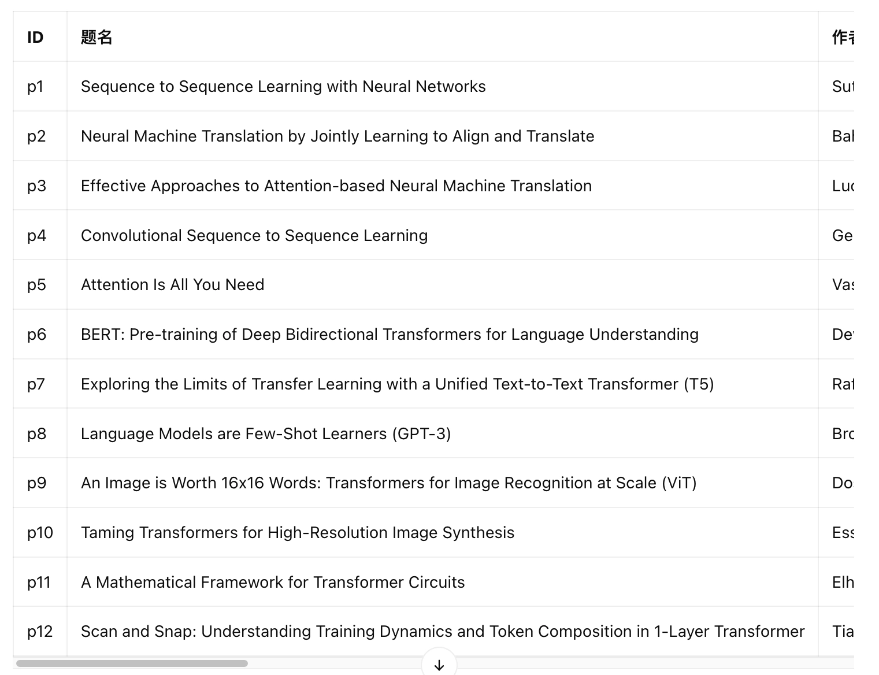
Literature search and screening
Prompt: I want to understand the causes and consequences of Transformer theory. Search for some related papers for me, requiring strongly relevant papers in the corresponding direction and widely noticed by academia and industry.
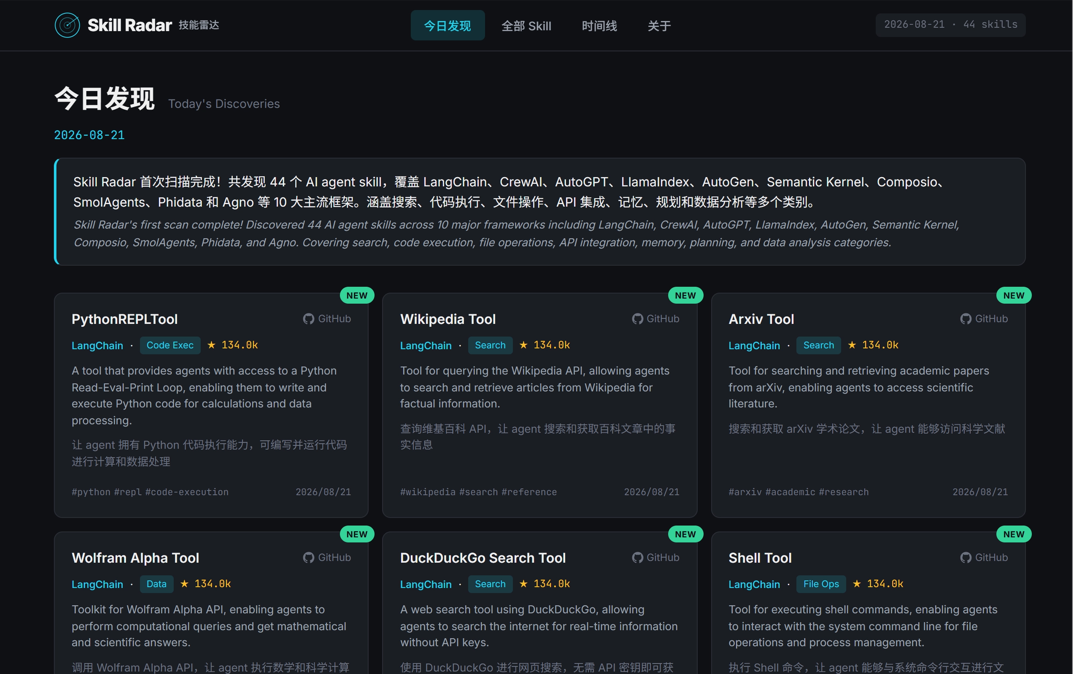
Website building
Prompt: I want to make a personal website focused on the Skill discovery of AI Agent, and implement daily updates (using planning mode).
Comparison of AStudio's similar competitors
| Comparison dimension | iFlytek AStudio | Tencent WorkBuddy |
|---|---|---|
| Provider | iFlytek | Tencent Cloud CodeBuddy team |
| Product positioning | Desktop AI productivity workbench, dual scenarios of Coding + office work | Desktop-level AI office agent, pure office scenarios |
| Underlying architecture | Spark X2.5 + ACode Harness execution kernel | CodeBuddy same-origin architecture, compatible with the OpenClaw skill ecosystem |
| Core models | Spark X2.5 (self-developed) + DeepSeek, etc. | Five models—Hunyuan, DeepSeek, GLM, Kimi, and MiniMax—freely switchable |
| Task modes | Three modes: direct/planning/goal, Diff review | Multi-Agent parallel decomposition, high-risk operation interception |
| Ecosystem connections | Alipay, Amap, and Feishu plugins, MCP+Skills | WeCom/QQ/Feishu/DingTalk integration, SkillHub 70,000+ skills |
| Mobile capabilities | Spark APP's dual modes of "conversation + work" | Control the computer from a phone to get work done, complete configuration in 1 minute |
| Security mechanisms | Data stays local and does not leave the domain, risk approval | Folder-level authorization, Level 3 classified protection, supports private deployment |
AStudio application scenarios
- Overseas marketing website building: Generate a multilingual marketing workbench in one sentence, support professional terminology proofreading and currency conversion, and produce an exclusive webpage that can be edited online.
- Operations data analysis: Read local operations source tables, automatically calculate metrics such as PV, DAU, and retention, and generate a 2×2 interactive Chart.js data dashboard.
- Academic research investigation: Search papers and patents, screen strongly relevant literature, follow along with detailed explanations of PDF papers, and output a visualized research context webpage.
- Coding project development: Connect to a local project folder, understand the code structure, modify files, run commands, and complete development tasks according to plan.
- Mobile office emergency: Through the Spark APP work mode, take photos to recognize whiteboard content, and generate meeting minutes Word and to-do tracking Excel on site.


