

What is DuMate
DuMate is a desktop-level AI agent launched by Baidu, positioned as an "office sidekick." Driven by natural language instructions, DuMate can automatically operate software, process files, analyze data, and connect business systems, achieving full-process automation from requirements to delivery. DuMate supports intelligent file management (automatic classification/format conversion/information extraction), multi-source data analysis (cleaning/pivoting/automatic PPT generation), and office automation (web form filling/system inspection/email processing). DuMate supports one-click installation with zero barrier to entry, letting AI handle repetitive work and improving office efficiency.
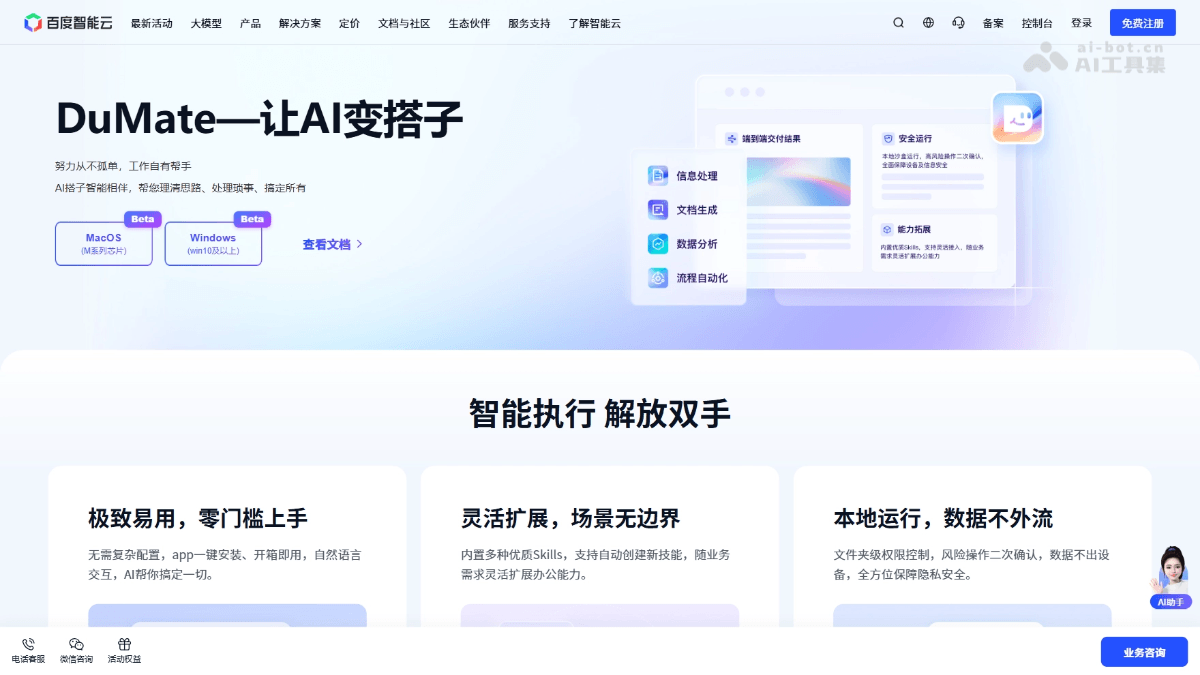
Main features of DuMate
-
Intelligent classification and archiving: Supports automatic identification of file type, associated project, creation time, and other attributes, precisely classifying and organizing files and cleaning up duplicate and invalid files.
-
Batch format processing: Supports bidirectional batch conversion between Word/Excel/PPT and PDF, and rapid cross-document reading and content parsing.
-
Key information extraction: Supports automatically capturing core clauses, key data, and important conclusions from contracts, meeting minutes, and work reports, and generating structured summaries.
-
Data preprocessing: DuMate can automatically identify and clean null values, duplicates, and outliers in multi-source data, and unify data formats.
-
Multi-dimensional correlation analysis: Supports data correlation calculations across tables and files, automatically completing pivoting, summarization, and trend analysis, and generating visual dashboards.
-
Intelligent report generation: Based on analysis results, automatically integrates core conclusions, completes content organization and layout design, and generates ready-to-use presentation PPTs.
-
Web automation operations: DuMate can simulate human browser behavior and automatically complete tasks such as web form filling, information queries, batch downloads of materials, and page screenshots.
-
Business system inspection: Supports automatically logging into OA, reimbursement, approval, data reporting, and other systems to complete data entry, information synchronization, status queries, and feedback.
-
Intelligent email processing: Supports automatically classifying emails, summarizing core content, generating standardized replies for routine emails, and quickly clearing unread emails.
Key information and usage requirements of DuMate
- Product name:DuMate
- Producing company: Baidu AI Cloud
- Product positioning: Desktop-level AI agent / "office sidekick" for individuals and teams
- Core capabilities: Screen perception, software operation, file processing, business system connection, and full-process automated execution
- Operating mode: Runs in a local secure sandbox, with data never leaving the device throughout the process
- Interaction method: Driven by natural language instructions, with no complex configuration required
- Extensibility: Built in with multiple skills and supports users in custom-creating workflows
- Security assurance: Folder-level permission control, secondary confirmation for risky operations, and no access without authorization
- Installation method: One-click app installation, ready to use out of the box
- Usage barrier: Zero barrier, natural language interaction, no need to write code or configure the environment
- Permission requirements: Access to device resources requires explicit user authorization, and sensitive operations require secondary confirmation
- Data requirements: Data is processed locally and does not need to be uploaded to the cloud
DuMate's core advantages
-
Instruction-driven, intelligent closed loop: With natural language instructions as the core interaction, no cumbersome configuration is required. The AI can autonomously complete task planning, skill scheduling, and full-process execution, achieving closed-loop delivery from idea to result.
-
Flexible expansion, boundless scenarios: The tool has built-in high-quality skills covering high-frequency office scenarios such as file management, data analysis, and operation automation. It also supports users in independently creating exclusive skills based on business characteristics, adapting to the diverse needs of different industries and positions.
-
Local operation, safe and controllable: It adopts a local secure sandbox mode. All data and operations are isolated and flow within the user's device. No resources are accessed without authorization, fundamentally safeguarding data privacy and office security.
How to use DuMate
-
Install and start: Visit the DuMate official website https://www.dumate.cn/, download the installation package, and use it out of the box after one-click installation, with no need to configure any runtime environment.
-
Set up the workspace: After opening the application, set the workspace scope and clarify the operation boundaries DuMate can access through folder-level permission control.
-
Issue instructions: In the dialog box, describe the task objectives and related scope in natural language, with no need to learn a specific command format.
-
Automatic execution: DuMate can autonomously complete requirement analysis, task decomposition, and skill scheduling, running automatically throughout and displaying processing progress in real time.
-
Review and delivery: After the task is completed, view the generated results. Sensitive operations require secondary confirmation to ensure the final outcome meets expectations.
-
Extended capabilities: Call built-in skills on demand or create custom workflows to flexibly expand personalized office capabilities.
Comparison of DuMate with similar competing products
| Comparison dimension | DuMate | Tencent QClaw | Alibaba JVS Claw |
|---|---|---|---|
| Producing company | Baidu AI Cloud | Tencent | Alibaba Cloud |
| Product positioning | Desktop-level AI office assistant | AI Agent based on OpenClaw | AI Agent platform |
| Core entry point | Standalone desktop application | WeChat Mini Program + desktop client | Cloud platform |
| Interaction method | Natural language dialogue | WeChat remote control + multimodal | Invitation code application system |
| Operation mode | Local secure sandbox | Local + remote control | Cloud operation |
| Data security | Data never leaves the device throughout the process | Sandbox security mechanism | Cloud processing |
| Featured functions | Intelligent file management, data analysis, office automation | Inspiration Square, WeChat file transfer, remote computer operation | 8000 Credits free quota, 14-day validity period |
DuMate's application scenarios
-
Personal File Governance: Supports automatically and intelligently classifying and archiving cluttered desktop files by type, project, and time, turning local files into reusable intelligent assets.
-
Data Analysis Reporting: The platform can automatically clean anomalies and duplicates in multi-source heterogeneous data, complete cross-table correlation analysis and visualization, and automatically generate ready-to-use professional reporting PPTs based on the results.
-
Business Process Automation: Supports simulating manual operations to automatically log in to enterprise OA, reimbursement, approval, and other systems, completing data entry, status queries, and information synchronization, replacing high-frequency repetitive mechanical labor.
-
Intelligent Email Processing: Automatically reads mailboxes to complete email classification and summarization of core content, generates standardized replies for routine types such as inquiries and notifications, and quickly clears backlogged unread emails.
-
Web Information Acquisition: Supports automatically completing web form filling, information retrieval, batch download of materials, and screenshots of specified pages, adapting to various office scenarios that require frequent browser operations.


