
What is Ardot
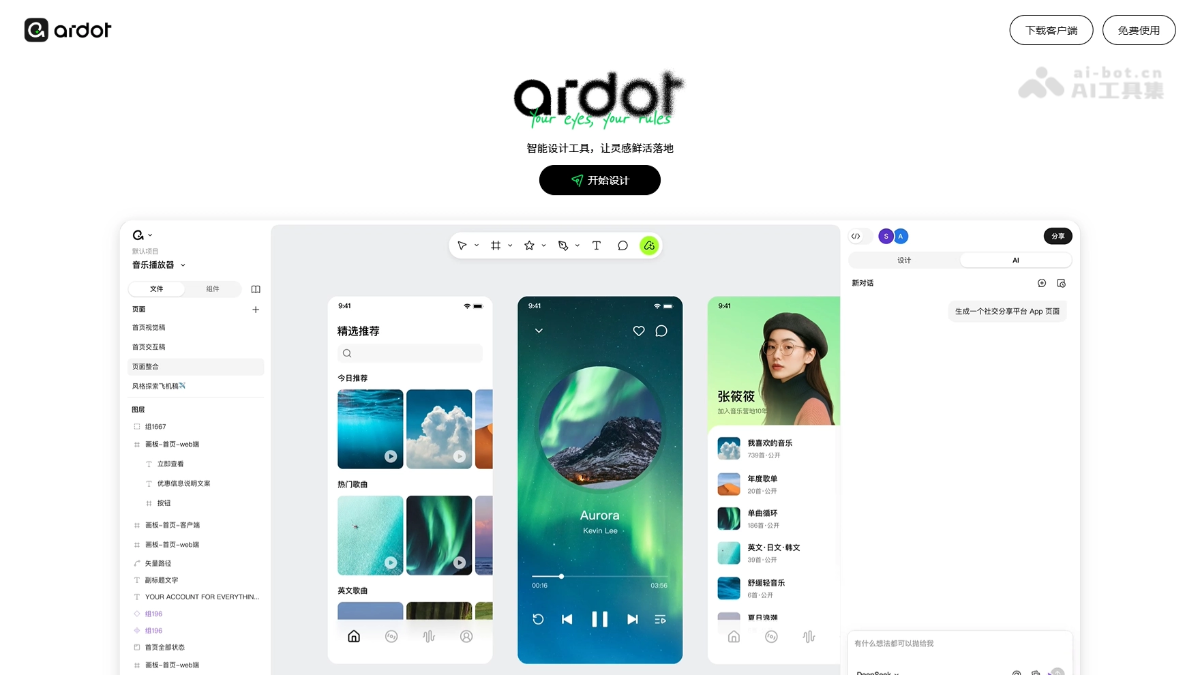
Ardot is an AI-powered intelligent design tool launched by Tencent, positioned as a "Figma + Lovart" combination. Ardot uses features such as text-to-UI, image-to-design, and instant generation to let users quickly generate editable interface prototypes with natural language, while retaining professional vector editing, component library management, and development handoff capabilities. Ardot's core advantage lies in reshaping the design workflow with AI, achieving an "AI inspiration → manual refinement" loop, suitable for rapid prototyping, high-frequency revisions, and agile development by small and medium-sized teams.
Ardot's main features
-
Text-to-UI: Supports automatically generating a complete interface prototype including layout, images, and text by entering a natural language description.
-
Image-to-UI: Upload any image to quickly convert it into an editable design file, making secondary creation easy.
-
Instant drawing: Supports calling AI directly within the canvas to generate the needed illustrations, with no need to switch to other tools.
-
Dynamic layout: The tool uses Grid grid and percentage positioning technology to achieve adaptive adjustment of interfaces across different screen sizes.
-
Component library management: Supports saving elements such as colors, fonts, and buttons as local styles, so that modifying one place updates them globally in sync.
-
Vector editing: Provides W3C-standard transformation tools such as skewing and 3D rotation to meet professional graphic drawing needs.
-
Development annotations: Automatically generates CSS code snippets and provides precise dimension annotations, eliminating communication barriers between design and development.
-
Permission management: Supports separation of permissions for multiple roles such as administrators, editors, and viewers, and is equipped with operation log tracking and automatic recovery upon departure to ensure project security.
-
MCP design-to-code: Through the Model Context Protocol, directly extracts variables, components, and layout data from design files into the IDE, compatible with CodeBuddy、Cursor、Claude Code and other development environments.
Ardot's key information and usage requirements
- Product positioning: An AI automated design platform launched by Tencent, combining Figma's professional design capabilities with Lovart's AI generation experience, and focusing on an "AI-driven + manual refinement" design workflow.
- Core capabilities: Text-to-UI, image-to-design, instant AI drawing, dynamic layout system, component library management, vector editing, automatic development code generation, and team collaboration permission management.
- Technical foundation: The underlying layer integrates large language models such as DeepSeek to provide AI capability support.
- Current status: Fill out the Tencent Design Ardot experience qualification reservation form to unlock a new efficient design experience in advance.
- Platform: Used on the Web, supporting access through mainstream browsers.
Ardot's core advantages
-
AI-native design workflow: Unlike the AI pluginization of traditional design tools, Ardot reconstructs the "description is generation" creation model from the ground up, making AI the starting point of design rather than an assistant.
-
Generated means editable: The results of text-to-UI and image-to-design go directly into a professional editor, breaking the breakpoint of "redrawing after AI generation" and achieving seamless iteration.
-
Professional-grade design depth: Retains Figma-level vector editing, component systems, and layout capabilities, avoiding the weakness of pure AI tools of "generating stunning results but being difficult to modify."
-
Development handoff loop: Automatically generates CSS code and precise annotations, allowing design files to directly connect with front-end development and reducing communication losses across roles.
-
Domestic ecosystem adaptation: Optimized for Chinese design scenarios, better fitting the collaboration habits and delivery standards of domestic teams.
How to use Ardot
- Visit the official website: Visit the Ardot official website https://d.qq.com/ to complete account login and registration.
- Create a project: Click "Start Designing" to create a new project.
- AI-generated design: Describe your requirements in the bottom input box (such as "generate a music player interface, dark mode"), select a model such as DeepSeek, and click send; the AI will automatically generate an editable UI framework.
- Manual refinement: Select canvas elements and drag them directly to adjust their positions, modify properties such as color, font, and spacing in the right panel, or use vector tools to draw custom graphics.
- Component reuse: Right-click commonly used elements to save them as "Local Styles" or "Components." After modifying the master, all instances are automatically synchronized to maintain design consistency.
- Development handoff: Click "Share" in the upper right corner to generate a collaboration link. After developers enter, they can view annotation information and copy CSS code, achieving seamless design-to-development handoff.
Comparison of Ardot with similar competitors
| Comparison dimension | Ardot | Figma | MasterGo |
|---|---|---|---|
| Product positioning | AI automated design platform | Online collaborative design tool | Domestic design collaboration platform |
| Core model | AI generation + professional editing | Multiplayer real-time collaboration | Team collaboration + prototyping |
| AI capabilities | Text-to-UI, image-to-design, instant drawing | No native AI, relies on plugins | Basic AI-assisted features |
| Design depth | Complete vector editing, component system, dynamic layout | Most comprehensive professional-level design features | Features approach Figma |
| Collaboration features | Permission management + development code handoff | Benchmark for real-time multiplayer collaboration | Suitable for domestic team workflows |
| Development integration | Automatically generates CSS, precise annotations | Requires third-party plugins | Basic annotation features |
| Use cases | Rapid prototyping, AI-assisted design, agile development | Complex projects for large teams | Routine design for domestic enterprises |
Ardot's application scenarios
-
Rapid prototyping: Product managers or designers can generate interface frameworks from text descriptions in just a few minutes, for requirement reviews and early communication, greatly shortening the cycle from idea to visualization.
-
High-frequency revisions for e-commerce: Operations staff can upload product images to automatically generate promotional posters, meeting the large-volume and urgent material production needs during major promotions, and reducing dependence on professional designers.
-
Agile development for small and medium-sized teams: Startup teams use AI to generate foundational interfaces and combine built-in component libraries to quickly build product prototypes, enabling integrated design and development and saving labor costs.
-
Design Inspiration Exploration: Designers use the text-to-UI feature to input keywords in different styles, generate multiple options in batches for visual divergence, break through creative bottlenecks, and then manually refine the final version.
-
Cross-role Collaborative Delivery: After design is completed, CSS code and development annotations are generated directly, so front-end engineers do not need to repeatedly confirm sizing details, reducing communication friction between design and development.


