
What is Nano Banana
Nano Banana (Gemini 2.5 Flash Image) is an image generation and editing model launched by Google, comprising the Nano Banana model and the Nano Banana Pro (Gemini 3 Pro Image) model. Nano Banana, based on the Gemini 2.5 Flash Image architecture, is known for generating fun 3D figurine-style images and is suited for fast creative editing. Nano Banana Pro, based on the more advanced Gemini 3 Pro architecture, has been significantly improved in multiple aspects, including high-resolution image generation (supporting 2K and 4K), clearer text rendering, multilingual support, enhanced editing features (such as multi-image fusion and context-aware editing), and richer world knowledge. In addition, the Pro version supports more aspect ratios, 16-bit color rendering, and studio-level controls. Nano Banana Pro is suited for professional design, complex compositions, and high-quality image generation, and is widely used in advertising, design, architecture, education, and many other fields.
Main features of Nano Banana
Nano Banana model: Nano Banana (Gemini 2.5 Flash Image) is an image generation and editing model developed by Google, with main features including:
-
Natural language editing: Image editing can be completed through simple text instructions, such as removing stains or replacing backgrounds.
-
Multi-image fusion: Multiple images can be seamlessly fused into one composite image, supporting up to 14 images.
-
Character consistency: Maintains the distinctive appearance of people or objects during editing to avoid distortion.
-
High-quality output: Generates high-resolution, photo-grade images suitable for a variety of application scenarios.
-
World knowledge and style application: Uses understanding of the real world to apply the style of one image to another image.
Nano Banana Pro model: Nano Banana Pro (Gemini 3 Pro Image) is an upgraded version of Nano Banana, with main features including:
-
Deep reasoning and real-time information: Combined with Google Search, it can generate images based on real-time data, such as generating scenes based on current weather.
-
High-quality text rendering: Supports clear text rendering in multiple languages such as Chinese and English, including calligraphy and artistic fonts.
-
High resolution and multiple ratios: Supports 1K, 2K, and 4K resolution output, and allows specifying multiple aspect ratios.
-
Multi-image fusion and character consistency: Can fuse up to 14 images while maintaining the consistency of up to 5 characters.
-
Studio-level controls: Provides advanced photographic controls such as depth of field, lighting angle, and lens focal length.
Nano Banana Pro has significantly improved image quality and features, making it suitable for professional users who need high-precision image generation and editing.
How to use Nano Banana
-
Choose a platform: Visit a platform that supports the Nano Banana model, such as Google AI Studio.
-
Choose a model: Find and select the Nano Banana model on the platform, displayed as "Gemini 3 Pro Image".
-
Upload images: Upload the images you want to edit or generate, which can be a single image or up to 14 reference images.
-
Enter instructions: Enter detailed editing or generation instructions in the text box, describing the changes you want to make or the content you want to generate.
-
Set parameters: Set parameters as needed, such as resolution (1K, 2K, 4K), aspect ratio (e.g., 16:9), lighting, depth of field, etc.
-
Generate image: Click the generate button, and the model will process the image according to your instructions.
-
Adjust and optimize: Review the generated results, and if needed, further optimize through iteration or variant features.
-
Save and download: After completing editing or generation, save or download the final image.
Platforms for free use of Nano Banana
- Flowith: Available in China, free for a limited time.
- Below the dialog box, select image generation mode, and choose the image generation model as Nano Banana 2 (Nano Banana Pro).
- You can adjust various image generation ratios, with up to 4K selectable. Generating a single image takes about one minute.
- LMArena: AI model evaluation platform, completely free.
-
Visit LMArena。
-
On the homepage, switch to Direct Chat mode, select the Gemini 3 Pro model, and click the generate image button in the input box.
-
- Gemini official website: Google official platform.
-
Visit Geminiofficial website.
-
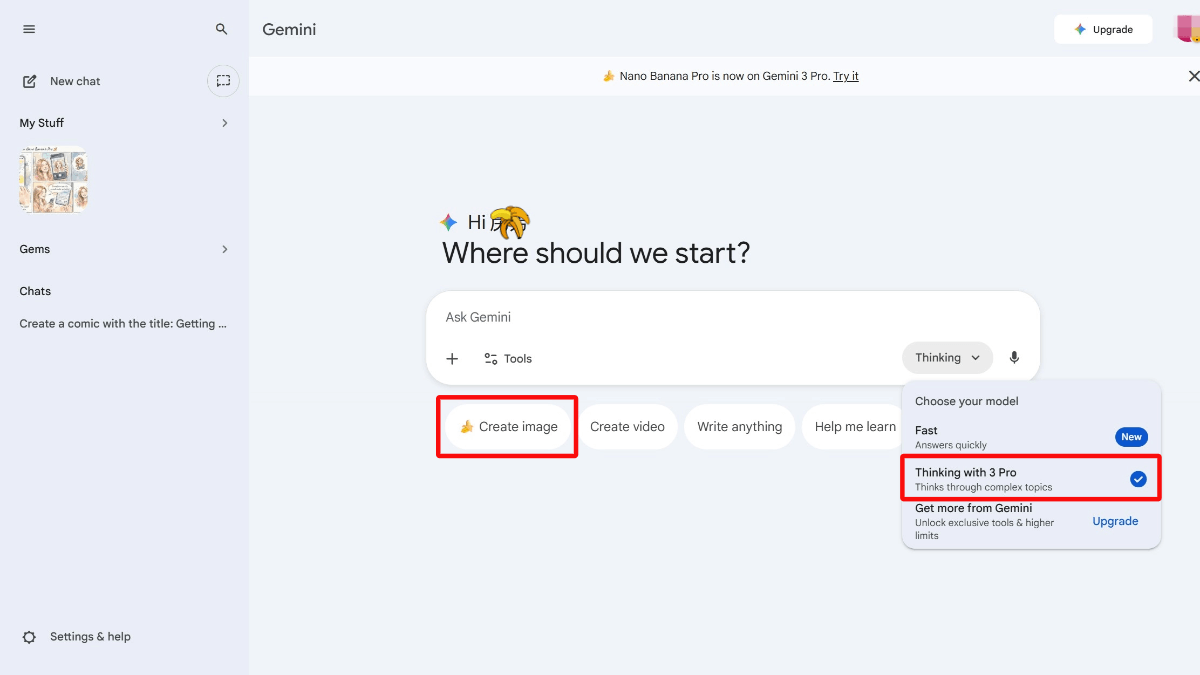
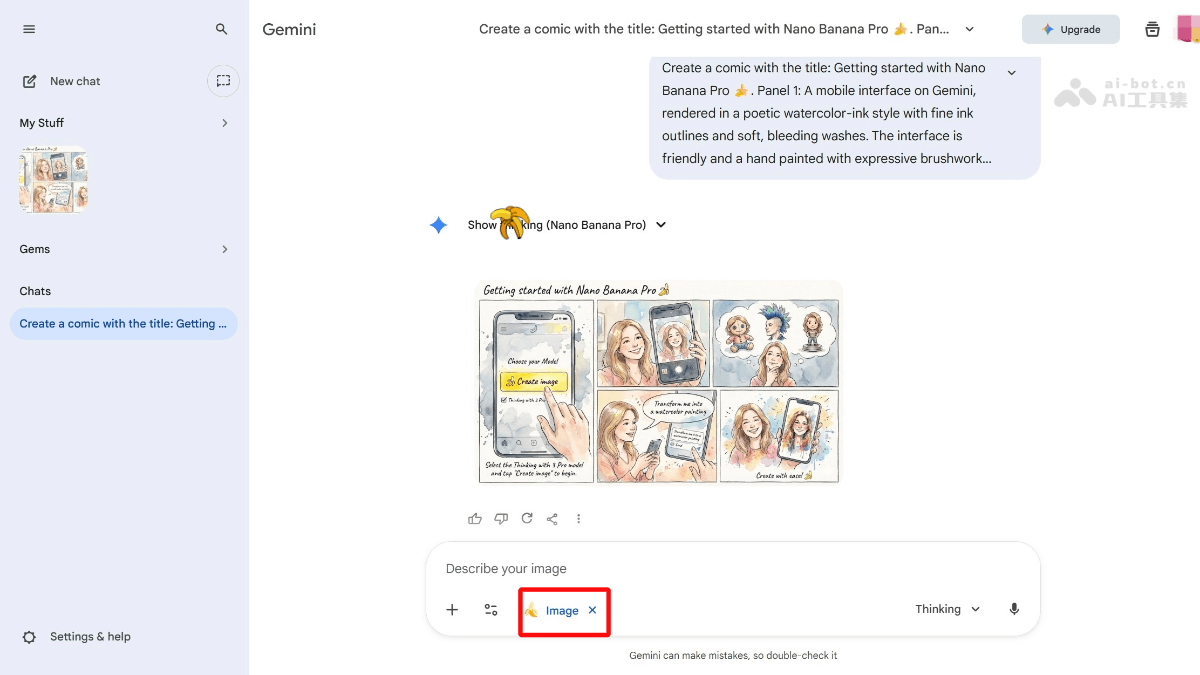
In the dialog box, select the image generation tool, and also select the thinking model (i.e., Gemini 3 Pro).
-
- Google AI Studio: Official platform, providing 1,500 free API calls per day. Image quality is consistent with the official model, and processing speed is fast.
-
Visit Google AI Studio and log in with a Google account.
-
In the left menu, find the "Get API Key" option and click to create a new API key.
-
After obtaining the API key, you can select "New prompt" in the online interface, find "Gemini 2.5 Flash Image" in the model list, and enter image generation or editing instructions.
-
- Lovart.ai: 2 free credits are given daily. Each credit can generate one image. The editing features are complete, supporting multi-step editing and fine adjustments.
-
Visit Lovart.ai and register an account.
-
After registration, you will receive free credits. Select the Nano Banana model, enter a prompt, and upload an image (if needed) to proceed.
-
- Hailuo Video: Available in China. Non-members can generate 50 images for free per day, and members can use it for free.
-
Visit Hailuo Video, and select Create Image.
-
Select All-in-One Image Pro (Nano Banana Pro) to generate images.Hailuo AIThe overseas version is the same
-
- TapNow: Register to get 200 credits. Using Nano Banana Pro to generate an image consumes 20 credits per image.
-
Visit TapNow。
-
Click to add a node, select an image node, and in the node select the model Banana Pro. You can freely choose the image ratio.
-
- ZenMux: Enterprise-level AI model aggregation platform. Models with a Free label are free.
-
Visit ZenMux。
-
In the top menu bar on the homepage, click Models, select Google: Gemini 3 Pro Image (with a Free label), and in Skills at the bottom of the input box, select image generation or image editing capabilities.
-
- YouMind: Get 2,000 free credits every month. Using Nano Banana Pro to generate an image consumes 15 credits per image.
-
Visit YouMind。
-
Create a new project, and below the input box select Generate Image and the Nano Banana Pro model.
-
- Pixlr: Provides 30 free uses per day, supports image upload and text prompts.
-
Visit Pixlr and register an account.
-
Select the Nano Banana model, enter a prompt and upload an image (if needed) to proceed.
-
- OpenRouter: Billed by usage, but provides a certain free quota and supports calls to multiple models.
-
Visit OpenRouter and register an account.
-
After obtaining the API key, call the Nano Banana model via the API for image generation or editing.
-
Who Nano Banana Is For
-
Developers: Can perform image generation through API calls, suitable for scenarios that need to be integrated into applications or websites.
-
Technical teams: Suitable for teams generating fewer than 1,500 images per month, focused on cost-effectiveness and needing automated batch generation.
-
General users: Can be used interactively through the web interface, suitable for users generating more than 2,000 images per month.
-
Designers: Professional photography-grade control features can meet their high requirements for image quality.
-
Photographers: Can finely adjust image details, such as camera angle, scene lighting, depth of field, color grading, etc.
-
Professional creators: Multi-image fusion and character consistency features can be used for brand visual consistency, product line images, storyboard drawing, etc.

