

What is FlowMuse AI
FlowMuse AI is an AI content production platform with a "visual workflow canvas" as its core interaction interface. FlowMuse AI abandons scattered single-function entry points and encapsulates all AI capabilities as "function nodes." Users only need to drag and connect nodes on the canvas to automate complex AI invocation processes, thoroughly solving the core problems of scattered tools, cumbersome operations, and fragmented workflows. It is also a "super aggregator" of top-tier models, centrally providing access to mainstream AI models worldwide and eliminating the hassle of registering and subscribing on multiple platforms. It is suitable for all content creators, marketing teams, and AI enthusiasts who want to improve AI creation efficiency and achieve automated workflows.

Main features of FlowMuse AI
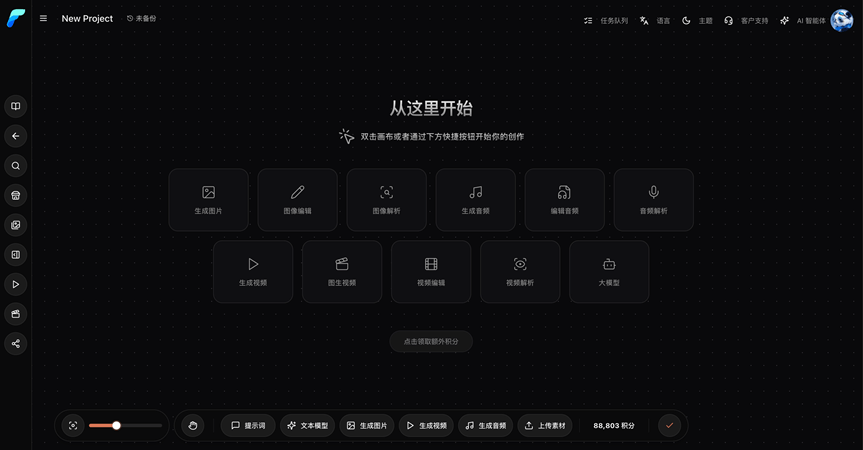
- Unified workflow canvas: As the platform's only interaction interface, users do not need to write any code and can build and reproduce complex AI task flows simply through "drag-connect," achieving intuitive what-you-see-is-what-you-get operation.
- Connecting the entire creative process:From inspiration and ideation, prompt generation, and script creation, to image generation, video generation, image super-resolution, and style consistency, and finally to the finished film and publishing. Relying on the capabilities of hundreds of multimodal models worldwide, it provides creators with full-chain support from idea to content output, making every step more efficient, smarter, and more controllable.
- Text models:The platform supports a variety of top-tier models, including the GPT series; Gemini series; Claude series; Grok series; DeepSeek series; Qwen series, etc.
- Image models:Supports the latest models, such as Google Nano Banana/Nano Banana 2; Google Imagen 4 series; 2 series; Flux.1 Kontext series; Flux 1.1 Pro series; GPT Image 1 series; Dall-E 3; Jimeng 4.0/4.5; Kling Image O1; Tongyi Qianwen Qwen-Image series; Midjourney series; Grok Image; Ideogram series; Recraft series; Stable Diffusion series, etc.
- Video models:Supports top-tier video models, including OpenAI Sora 2/2 Pro; Google Veo3 series; Runway Gen4 series; Tongyi Wanxiang 2/2.5 series; Jimeng Seedance V1 series; Kling 2.1/2.5/2.6/O1 series; Hailuo 02/2.3 series;Grok Imagine; Vidu Q2/2.0 series.
- Audio models:Supports including Suno V5; Minimax series; OpenAI TTS series; ElevenLabs series.
How to use FlowMuse AI
- Visit the platform:Visit the FlowMuse AI official website https://flowmuse.ai , register and log in.
- Create a project:Click "Create New Project Now" to open a new canvas.
- Select functions:Built in 9 major simple modules, including generate image, image editing, image parsing, generate audio, edit audio, audio parsing, generate video, image-to-video, video editing, video parsing, and large model. You can also double-click the canvas to create a new node and combine your own workflow.
- Start creating:Enter your prompt in the prompt node, or upload your materials as prompted, and click the lightning button to start generating.
- Image processing:You can perform the following on images you have uploaded or generated: image quality enhancement, one-click cutout, smart expand, local redraw, and image parsing.
- Video processing:You can perform the following on videos you have uploaded or generated: image quality enhancement, spin frame extraction, watermark removal, video extension, and video parsing.
- Resource Integration:The left toolbar has a built-in mini CapCut, allowing you to edit all generated assets.
- Sharing:After completing your creation, you can share your canvas/creation process via the share button in the toolbar.
- Automated Execution:Writing a workflow is by no means a one-time task. With our automated execution system, operations are intelligently repeated to create a creative solution that is uniquely yours.
FlowMuse AI Product Pricing
- Pay-as-you-go:Complete newcomer tasks to receive up to 900 credits; subsequent top-ups are $1 = 100 credits.
- Trial Edition:800 credits per month, 5 concurrent executions, up to 400 images or up to 8000 seconds of video.
- Creator Edition:3000 credits per month, 10 concurrent executions, up to 1500 image generations or up to 3000 seconds of video.
- Professional Edition:6500 credits per month, 20 concurrent executions, up to 3250 image generations or up to 6500 seconds of video.
- Flagship Edition:14000 credits per month, unlimited concurrent executions, up to 7000 image generations or up to 14000 seconds of video.
After the maximum discount, model usage is priced below official rates, and all credits never expire.
FlowMuse AI Application Scenarios
- E-commerce Marketing:Based on exclusive 8K ultra-HD image nodes and a workflow batch execution system, generate high-precision, high-quality product images and marketing assets with one click, achieving e-commerce workflow automation.
- Short Video Creation:Integrates top-tier models such as Sora 2 and, through the built-in editor, connects the entire creation loop from script and generation to final delivery in one stop, efficiently producing creative short films.
- Digital Human Applications:Enables single-image customization to quickly produce realistic talking-head and marketing videos, suitable for news and knowledge monetization scenarios.
- Image Quality Enhancement:Use intelligent processing nodes to upgrade low-resolution images or video assets to 4K/8K resolution with one click, restoring old footage or optimizing asset details.
- Complex Task Flows:Freely connect hundreds of the world's top models through a visual canvas, enabling complex AI task flows without code.


