
What is Nano Banana Pro
Nano Banana Pro (Gemini 3 Pro Image) is Google's new generation ofimage generationand editing model, combining Gemini 3 Pro technology. The model can generate high-quality, high-resolution (2K and 4K) images, supports multiple aspect ratios, and is suitable for various scenarios from social media to print. The model performs excellently in text rendering, multilingual support, and image consistency (supporting up to 14 input images), and can integrate with Google Search to generate charts and infographics based on real-time information. Nano Banana Pro provides powerful creative control capabilities, allowing users to adjust parameters such as lighting, focus, and color. At the same time, Google has introduced SynthID digital watermarking technology to ensure the traceability and transparency of AI images, bringing users more reliable and more powerful creative tools.
Main features of Nano Banana Pro
-
High-resolution image generation: Supports 2K and 4K resolutions, meeting professional production needs and suitable for multiple platforms such as social media and printed materials.
-
Powerful text rendering capabilities: The model can generate clear and readable text, supports direct rendering in multiple languages, maintains the original design style, and is suitable for creating multilingual content.
-
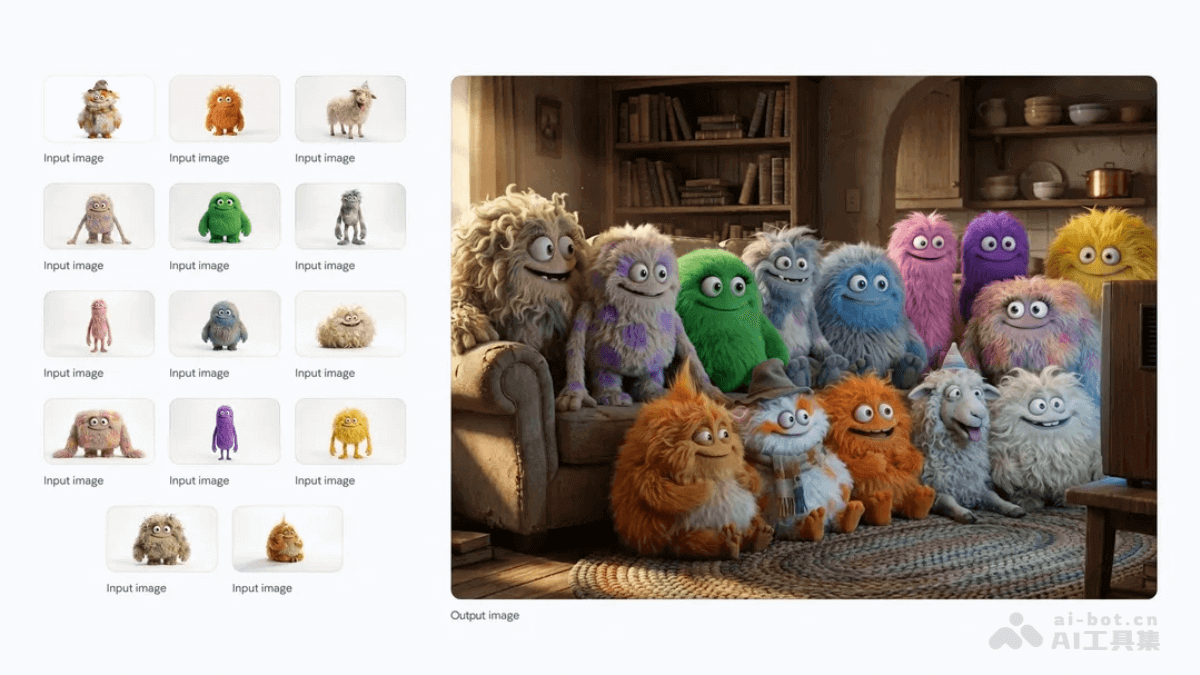
Multi-element fusion and consistency: The model supports up to 14 input images and maintains the consistency of up to 5 characters or elements, making it suitable for creations involving complex scenes and multi-element fusion.
-
Creative control and editing: Provides advanced creative control, allowing users to adjust lighting, focus, color, and camera angles to achieve storyboard-level and visual-director-level creation.
-
Integration with Google Search: Combines with Google Search's knowledge base to generate charts, infographics, and educational content based on real-time information, ensuring the accuracy and practicality of the content.
-
AI image verification: Through SynthID digital watermarking technology, users can verify inGeminiwhether an image was generated by Google AI, improving content transparency.
How to use Nano Banana Pro
- User groups
- Consumers and students
-
Gemini app: Users can select the "Create images" feature in the Gemini app and switch to the "Thinking" model to use Nano Banana Pro. Free users will receive a limited free quota, and after it is used up, they will automatically switch back to the basic version of the Nano Banana model. Google AI Plus, Pro, and Ultra subscribers will enjoy higher quotas.
-
AI Mode in Search: In the United States, Google AI Pro and Ultra subscribers can use Nano Banana Pro through AI Mode in Search.
-
- Professionals
-
Google Ads: Advertisers can use Nano Banana Pro in Asset Studio in Google Ads, leveraging powerful image generation and editing capabilities to create high-quality advertising materials.
-
Google Workspace: Nano Banana Pro has begun rolling out to Workspace users and supports use in Google Slides and Google Vids, helping users quickly generate and edit presentation and video content.
-
- Developers and enterprises
-
Gemini API: Developers can access Nano Banana Pro through the Gemini API and integrate it into their own applications and services. Google AI Studio and Vertex AI also support Nano Banana Pro, and enterprise users can use these platforms for large-scale content creation.
-
Google Antigravity: Google's new AI development platform Google Antigravity integrates Nano Banana Pro, allowing developers to use image generation capabilities to quickly generate detailed UI mockups or new visual assets.
-
- Creative Professionals
-
Flow: Aimed at creative professionals and video production teams, Nano Banana Pro has begun rolling out to Google AI Ultra subscribers and supports use in Flow. Users can generate high-quality shots and scenes with powerful creative control.
-
- Consumers and students
- How to Use
- Choose a Platform: Choose the appropriate platform based on your needs (such as the Gemini app, Google Ads, Workspace, etc.).
- Create an Account: If it is a paid service, you need to register and subscribe to the corresponding Google AI plan (such as Plus, Pro, or Ultra).
- Enter Prompts: When using Nano Banana Pro, users need to enter clear prompts to describe the image content they want to generate or edit.
- Adjust Parameters: Adjust the image resolution, aspect ratio, lighting, focus, and other parameters as needed.
- Generate Images: Click the generate button, and Nano Banana Pro will generate an image based on the prompt.
- Verify Images: If you need to verify whether an image was generated by AI, use the SynthID feature in the Gemini app.
Generation Examples of Nano Banana Pro
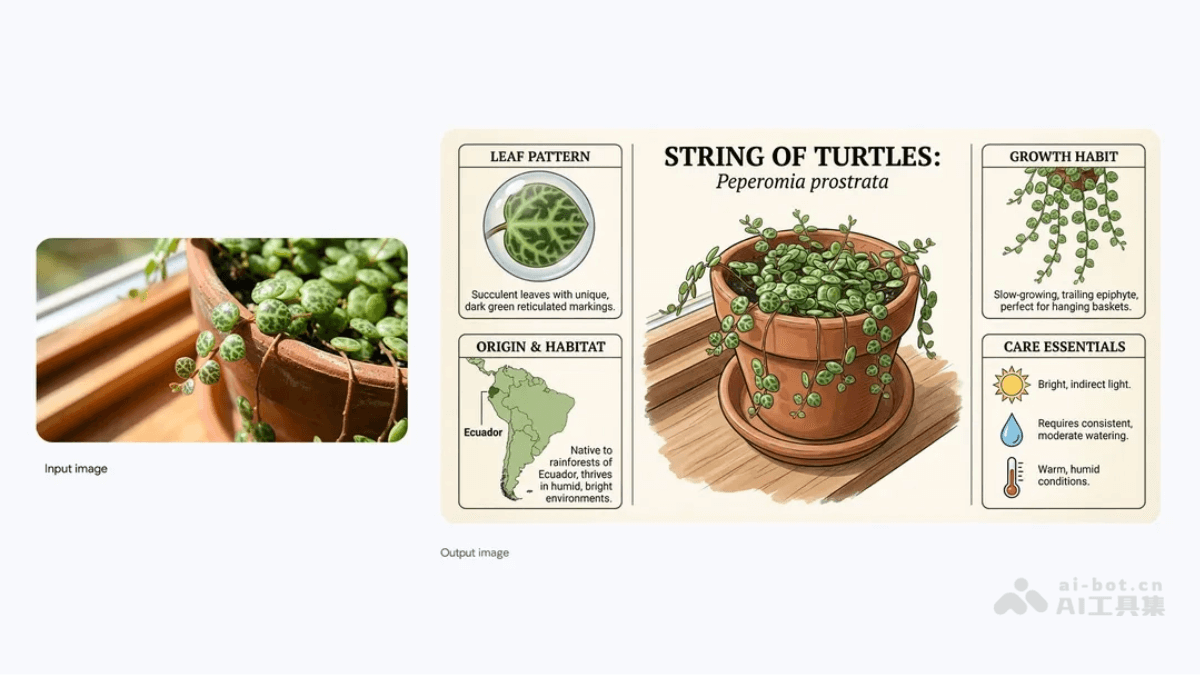
Prompt: Create an infographic about this plant focusing on interesting information. Create an infographic about this plant, focusing on interesting information.
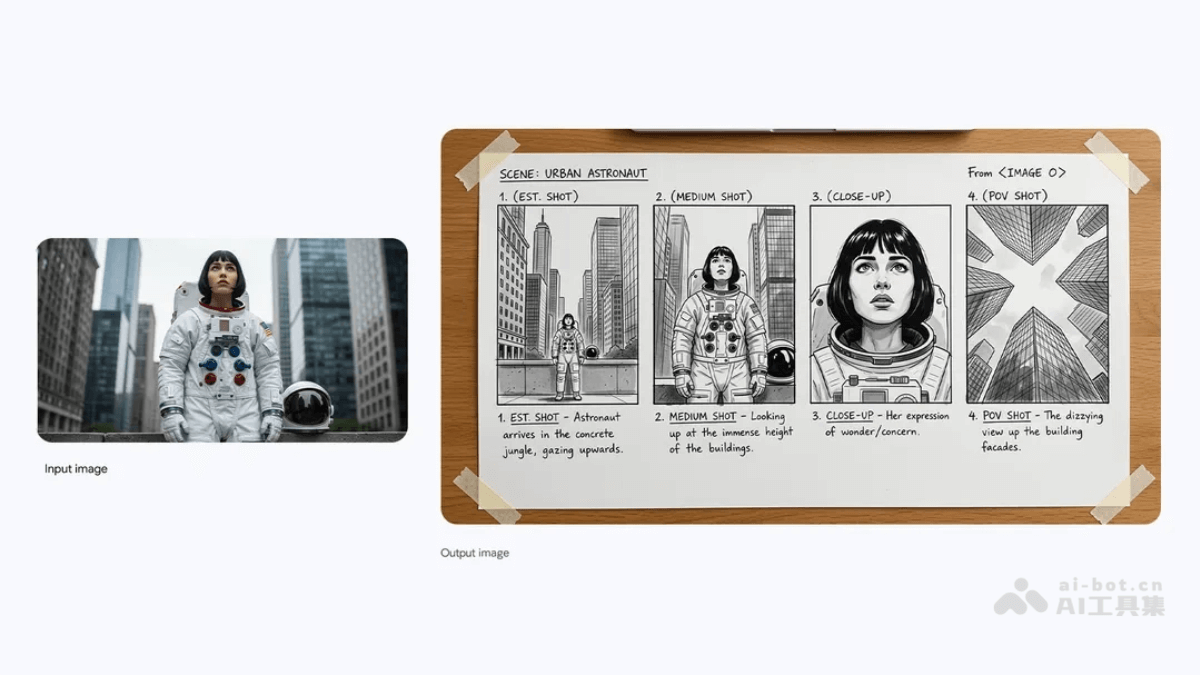
Prompt: Create a storyboard for this scene. Create a storyboard for this scene.
Prompt: A medium shot of the 14 fluffy characters sitting squeezed together side-by-side on a worn beige fabric sofa and on the floor. They are all facing forwards, watching a vintage, wooden-boxed television set placed on a low wooden table in front of the sofa. The room is dimly lit, with warm light from a window on the left and the glow from the TV illuminating the creatures’ faces and fluffy textures. The background is a cozy, slightly cluttered living room with a braided rug, a bookshelf with old books, and rustic kitchen elements in the background. The overall atmosphere is warm, cozy, and amused. A medium shot of the 14 fluffy characters sitting squeezed together side-by-side on a worn beige fabric sofa and on the floor. They are all facing forwards, watching a vintage, wooden-boxed television set placed on a low wooden table in front of the sofa. The room is dimly lit, with warm light from a window on the left and the glow from the TV illuminating the creatures’ faces and fluffy textures. The background is a cozy, slightly cluttered living room with a braided rug, a bookshelf with old books, and rustic kitchen elements in the background. The overall atmosphere is warm, cozy, and amused.
Application Scenarios of Nano Banana Pro
- Concept Design: Designers can quickly transform creative sketches into high-fidelity visual works, for example, turning hand-drawn sketches into realistic product design drawings or architectural blueprints.
- Artistic Creation: Artists can generate paintings, illustrations, or digital artworks with unique styles, or generate a series of images with a consistent style based on a specific theme.
- Graphic Design: The model is used to create design materials such as posters, logos, and brochures, supports multilingual text rendering, and can generate clear and aesthetically pleasing graphic and text designs.
- Ad Creative Generation: Advertisers can quickly generate high-quality advertising images and, with multi-element fusion, combine products with various scenes to enhance the appeal and persuasiveness of advertisements.
- Multilingual Marketing: The model supports multilingual text rendering and can translate advertising copy into multiple languages for integration into designs, facilitating international market promotion.