
What Is Google Antigravity
Google Antigravity is an AIagentdevelopment platform launched by Google that frees developers from "writing code themselves" and shifts them to "directing agents to do the work." Google Antigravity can orchestrate multiple sub-agents simultaneously, completing the full workflow from research and implementation to testing in parallel in the background. With the task-level Artifacts mechanism, users can view every step of the agent's operations and verification results in real time, intervene and course-correct at any time, and ensure the output meets expectations.
Google Antigravity's Main Features
-
Multi-agent orchestration: Can dispatch multiple sub-agents to work in parallel simultaneously, running complex, long-duration task workflows in the background.
-
Task-level Artifacts mechanism: Displays the agent's operation process and verification results on a per-task basis, making every step reviewable and traceable.
-
Real-time feedback and course correction: Users can give feedback directly in any interface and on any Artifact, guiding the agent from "basically complete" to fully meeting expectations.
-
Slash command control: Use /goal to let the agent complete tasks autonomously, /schedule to execute on a schedule or periodically, and /grill-me to ask clarifying questions about requirements before implementation.
-
Multi-entry product forms: Provides a desktop command center (2.0), terminal CLI, Python SDK, and full-featured IDE, adapting to different usage habits.
-
Cross-repository project management: One Project can be associated with multiple local folders or Git repositories, giving the agent complete cross-repository context.
-
Scheduled task automation: Supports setting instructions as one-time or recurring scheduled tasks to automatically execute routine work.
-
Browser and plugin management: Built-in /browser command controls Chrome debugging behavior, and /plugin manages the plugin marketplace and custom plugin packages.
Google Antigravity Usage Examples
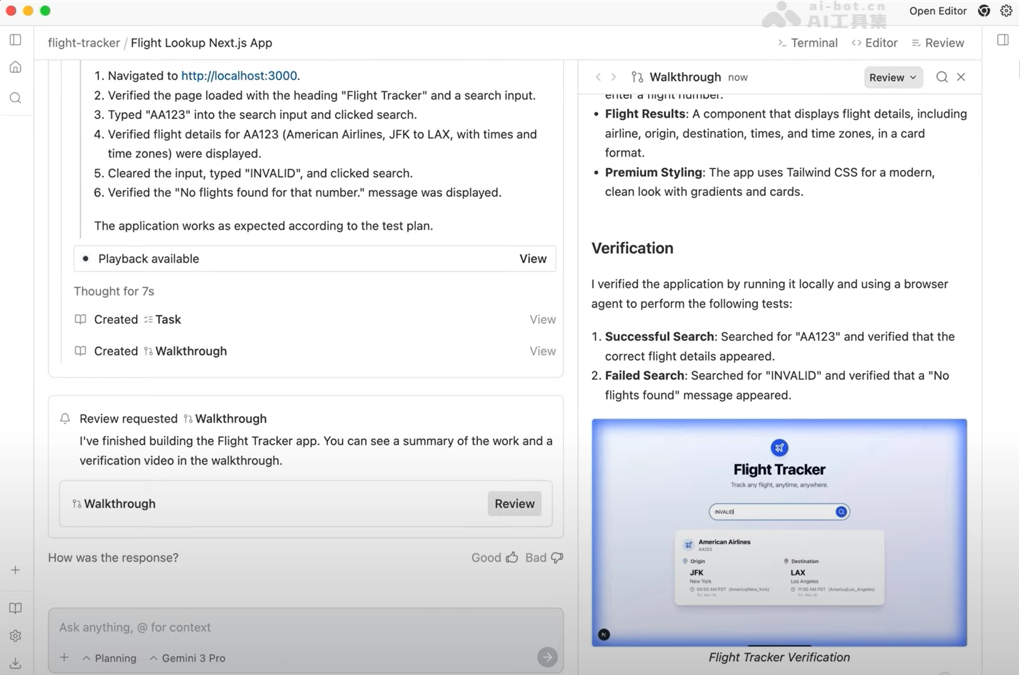
Prompt : Build me a flight lookup nextjs web app where the user can put in a flight number and the app gives you the start time, end time, time zones, start location, and end location of the flight. For now, use a mock API that returns a list of matching flights. Display the search results under the form input. (Build me a Next.js flight lookup web app where the user can enter a flight number, and the app will provide the flight's start time, end time, time zones, start location, and end location. For now, use a mock API to return a list of matching flights. Display the search results below the form input.)
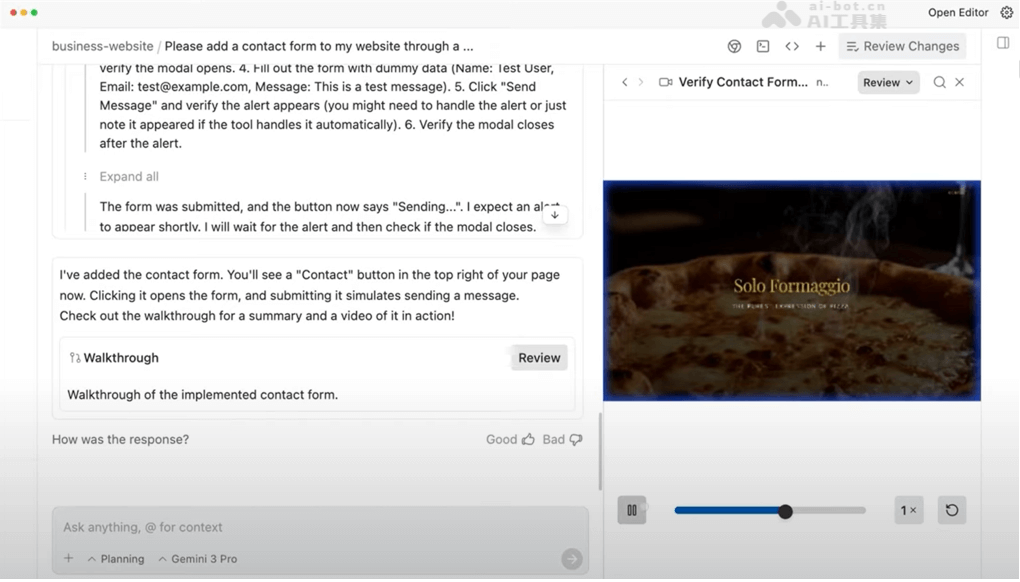
Prompt : Please add a contact form to my website through a button on the top right. (Please add a contact form to my website through a button in the top right corner.)
How to Use Google Antigravity
- Register and download: Visit the Google Antigravity official website https://antigravity.google/ , and download and install the client.
- Create a project: Click the folder "+" icon in the left sidebar → New Project → Add Folder to associate one or more local folders/Git repositories → Create.
- (Optional) Configure the project: Set independent security policies and parameters for the project; each project's configuration is isolated from the others.
- Start the agent: Enter the target instruction in the chat input box (such as "help me add a new feature") and press Enter.
- Choose a run mode: Choose Local mode to let the agent operate directly on the current folder, or New worktree mode to run in an isolated Git workspace.
- Navigation actions: Use ⌘K / Ctrl+K to switch conversations, ⌘P / Ctrl+P to search files, and ⌘L / Ctrl+L to focus the input box.
- Slash command control: Use /goal to let the agent run a task autonomously to completion, /grill-me to have it question you first, /schedule to set up scheduled tasks, and /browser and /plugin to manage debugging and plugins.
Google Antigravity's core advantages
-
Multi-agent parallel orchestration: Manage multiple local agents working in parallel at the same time, greatly improving the execution efficiency of complex tasks.
-
Task-level visualization (Artifacts): Display the operation process and verification results on a per-task basis, so users can see the agent's behavior at a glance and stay in control throughout.
-
Precise correction capability: Support direct feedback on any interface and Artifact, guiding the agent from 90% to 100% completion.
-
Cross-repository context understanding: A project can be associated with multiple folders and Git repositories, giving the agent a complete cross-repository view.
-
Four forms covering all scenarios: Command center, CLI, SDK, and IDE each serve their own role, meeting the different needs of everyone from ordinary users to developers.
-
Both autonomy and collaboration: /goal mode runs autonomously to completion, while /grill-me mode aligns on requirements before starting, flexibly adapting to the task type.
-
Automation capability: Support scheduled and periodic tasks, so routine work can be left to the agent to execute automatically.
-
Backed by the Google ecosystem: Natively integrates Chrome browser debugging capabilities and the Google account system for a seamless, smooth experience.
Comparison of Google Antigravity with similar competitors
| Dimension | Google Antigravity | Claude Code |
|---|---|---|
| Product form | Four forms: desktop command center (2.0), CLI, SDK, IDE | Terminal-first, plus VS Code/JetBrains plugins, with mobile remote control support |
| Multi-agent | Manages multiple local sub-agents in parallel, grouped into Projects | Native sub-agents, can run 10 to hundreds in parallel, support nesting (up to 5 levels deep) and Git worktree isolation |
| Visual review | Task-level Artifacts mechanism, allowing direct feedback and correction on any artifact | Mainly terminal output, sub-agents return only summaries, no graphical artifact interface |
| Scheduled tasks | /schedule slash command, local scheduled/periodic execution | Cloud-based Routines scheduled triggers (can run even when powered off) + local /loop scheduled tasks |
| Model support | Google's own models | Claude model family (Opus/Sonnet/Haiku selectable) |
| Extension capability | /plugin plugin marketplace, /browser controls Chrome | More mature ecosystem: MCP servers (over 9,400 in the registry), Skills, Hooks (about 25 lifecycle events), plugin marketplace |
| Context capability | Cross-repository projects (multi-folder/Git repository association) | 1M token ultra-long context, deep understanding of large monorepos |
| Autonomous mode | /goal runs autonomously to completion, /grill-me asks clarifying questions first | Auto Mode is the default permission mode, where an AI classifier automatically determines the risk level of operations |
Application scenarios of Google Antigravity
-
Full-stack feature development: Enter a requirements instruction, and the agent automatically completes the full development process from code implementation to test verification.
-
Cross-repository maintenance of large projects: Add multiple related repositories to the same project, and the agent can analyze dependencies, make unified modifications, and refactor across repositories.
-
Code review and refactoring: With the Artifacts mechanism, review the agent's modification process task by task, and provide real-time feedback to correct deviations, ensuring code quality.
-
Automation of routine tasks: Use /schedule scheduled tasks to automatically perform daily operations and maintenance work, such as regularly generating reports, cleaning up code, and updating dependencies.
-
Technical research and prototype validation: Multiple sub-agents work in parallel to complete information research, solution comparison, and demo building, quickly validating the feasibility of ideas.

