

What is Qingyan PPT
Qingyan PPT is aAiPPTlaunched in collaboration withPPT generationagent that helps users quickly create PPT outlines and generate beautiful PPTs from text, files, or URLs. Users can generate PPTs through a one-sentence prompt, uploaded text files, URL content, or by directly entering an outline. The feature supports input of up to 20,000 characters and offers a variety of template choices to meet the needs of different scenarios.
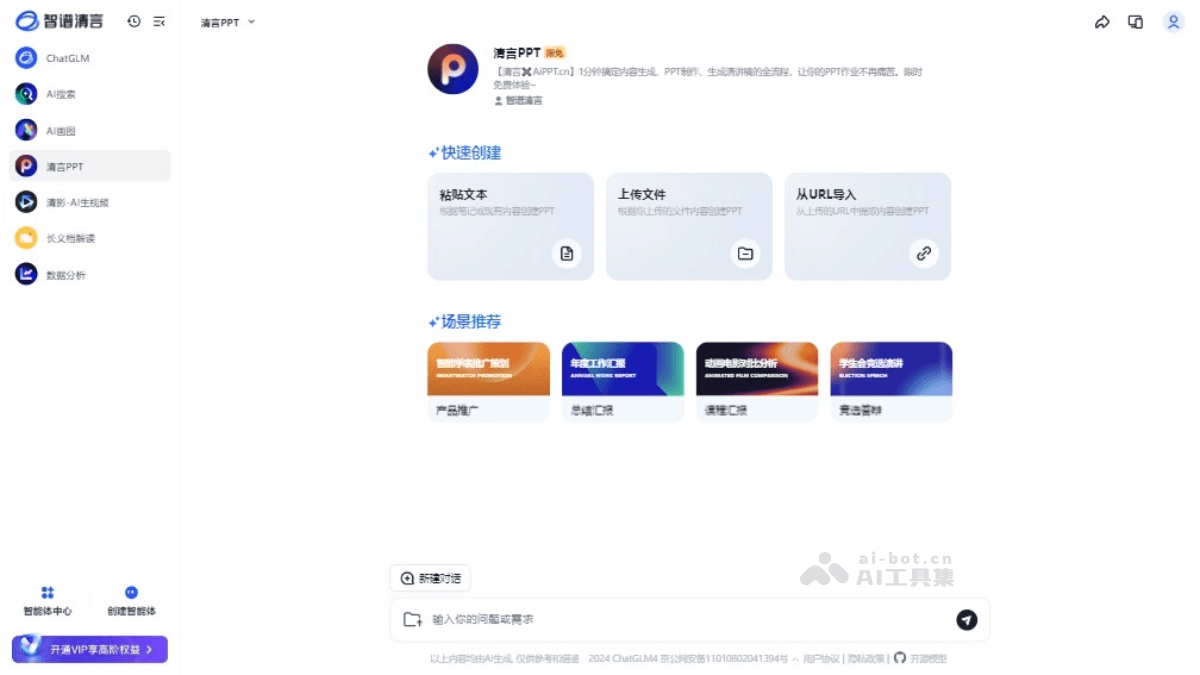
Main features of Qingyan PPT
- Quick PPT creation: Users can quickly generate PPT outlines by pasting text, uploading files (supporting PDF, Word, Excel, TXT, and other formats), or based on URL content.
- Cloud knowledge base: Standard materials can be uploaded to the cloud knowledge base, and these materials can be directly referenced when generating outlines, avoiding repeated uploads.
- Outline editing: After generating an outline, users can manually add or modify content on the outline editing page, such as adding chapters, paragraphs, or adjusting the body text.
- AI follow-up optimization: Based on the outline content, AI will automatically ask follow-up questions to help users expand their ideas and ensure the completeness of the PPT content.
- Text iteration: Users can select part of the content in the outline and use AI to expand, shorten, generate examples, summarize, or translate it to optimize the text content.
- Template selection: A variety of beautiful PPT templates are provided, and users can choose suitable templates according to different usage scenarios and style requirements.
How to use Qingyan PPT
- Visit the Zhipu Qingyan platform: Visit theZhipu Qingyan official websiteand log in to your account.
- Select the "Qingyan PPT" agent: In the Zhipu Qingyan interface, select the "Qingyan PPT" agent.
- Enter or upload content:
- Text input: Enter a one-sentence prompt in the dialog box or paste existing text content.
- File upload: Upload text files (such as PDF, Word, Excel, TXT, and other formats), supporting up to 10 files, with each file not exceeding 20MB.
- URL content: Provide a URL link to generate a PPT outline based on the webpage content.
- Generate PPT outline: Based on the input or uploaded content, Zhipu Qingyan will automatically generate a PPT outline.
- Edit outline: On the basis of the generated outline, make manual edits, add or delete chapters and paragraphs, adjust the order of content, and so on.
- Select PPT template: Choose a suitable PPT template according to the usage scenario and style requirements.
- AI generates PPT: After confirming the outline and template, AI will automatically complete the layout and design of the PPT.
- Online editing and adjustment: On the basis of the generated PPT, perform online editing, such as adjusting details such as text, images, and charts.
- Download PPT: After completing the edits, users can download the PPT source file or image collage for further use or sharing.
Suitable audiences for Qingyan PPT
- Working professionals: Professionals who need to create work reports, project proposals, business presentations, and other PPTs can quickly generate PPT outlines and complete designs.
- Students and teachers: Students can use it to create course reports and graduation defense PPTs, while teachers can use it to create teaching courseware.
- Freelancers: When freelancers or consultants provide services to clients, they can efficiently create proposal or report PPTs.
- Corporate managers: Corporate managers who need to create presentation documents such as company introductions, product promotions, and market analyses.
- Meeting organizers: When planning meetings and events, organizers can use it to create PPTs such as meeting agendas and event schedules.
- Marketing personnel: Create marketing-related PPTs such as marketing reports, case analyses, and market research.


