
What is Online AI Conversion
Online AI Conversion is a platform that provides a variety of AI services, with main features including voice conversion and image processing. In terms of voice conversion, it supports convertingtext to speech, and can convert voice files into text format, suitable for scenarios such as audiobooks and meeting notes. In terms of image processing, it provides image dehazing,lossless upscaling, black-and-white image colorization, stretched image restoration and other functions to help users improve image quality, suitable for fields such as photography and design. Online AI Conversion supports image style transfer,watermark removaland contrast enhancement and other operations, meeting users' needs for image beautification and optimization.
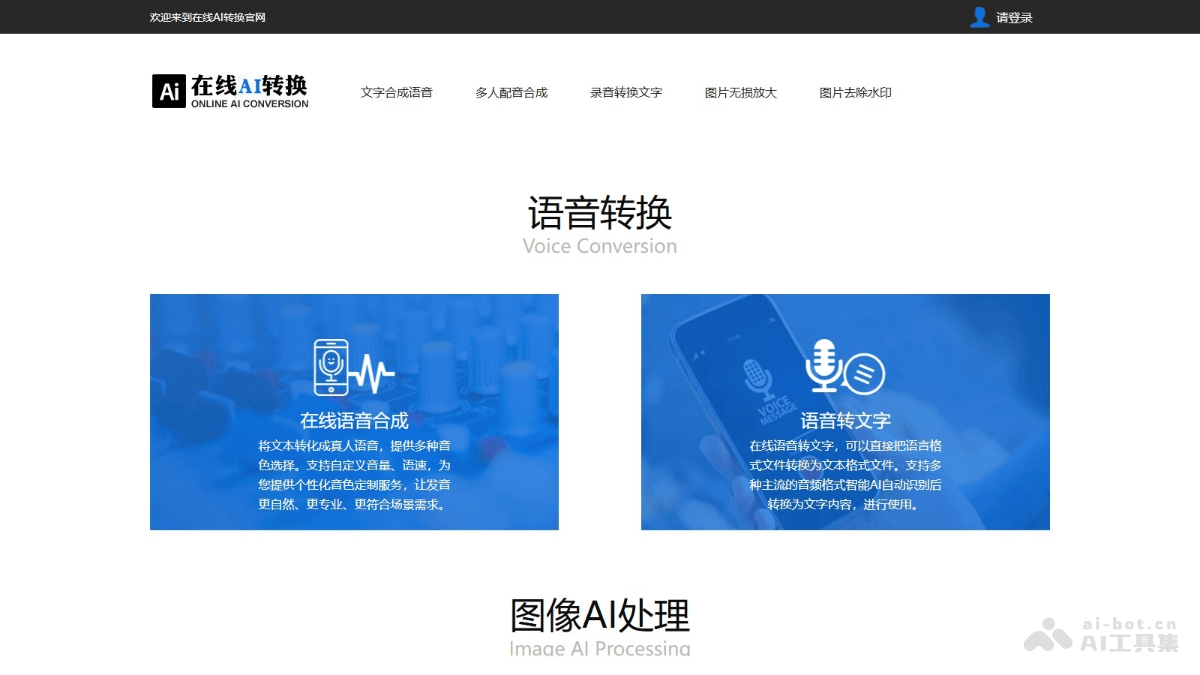
Main Features of Online AI Conversion
- Voice Conversion
- Online Speech Synthesis: Convert text into natural human-like speech, support multiple voice options, and support custom volume and speech rate.
- Speech to Text: Convert audio files into text format, supporting intelligent recognition of multiple mainstream audio formats.
- Recording to Text: Convert recording files into text, suitable for scenarios such as meeting notes and interview organization.
- Image Processing
- Image Dehazing: Perform dehazing processing on images taken in heavy fog weather to improve image clarity.
- Image Lossless Upscaling: Enlarge the image by two times in both length and width while maintaining lossless image quality.
- Black-and-White Image Colorization: Intelligently recognize the content of black-and-white images and fill in colors, making the images vivid.
- Stretched Image Restoration: Automatically recognize and repair excessively stretched images and restore normal proportions.
- Image Style Transfer: Based on convolutional neural networks, convert images into different artistic styles.
- Image Watermark Removal: Remove watermarks, stains and other blemishes from images, and restore high-definition images.
- AI Contrast Enhancement: Adjust the grayscale distribution of the image based on AI algorithms to make the image contrast more balanced.
How to Use Online AI Conversion
- Visit the Official Website: Visit theofficial website。
- Select a Function Module: Browse the list of functions provided by the website, and select the corresponding function module according to your needs, such as speech synthesis, speech to text, image dehazing, image lossless upscaling, etc.
- Upload or Enter Content:
- Voice Conversion Features:
- Speech Synthesis: Enter or paste the text content you want to convert to speech in the text input box.
- Speech to Text and Recording to Text: Click the upload button, select and upload the audio file or recording file to be converted, supporting multiple mainstream audio formats.
- Image Processing Features: Select and upload the image file to be processed, supporting common image formats such as JPG, PNG, etc.
- Voice Conversion Features:
- Set Parameters:
- For the speech synthesis feature, select different voices, adjust parameters such as volume and speech rate.
- For image processing features, use the provided setting options, such as dehazing level, magnification factor, etc., and adjust them as needed.
- View and download results: After processing is complete, download the audio and images locally for use.
Application scenarios of online AI conversion
- Audiobook production: Convert novel text into speech and produce audiobooks, allowing readers to enjoy the reading experience by listening while commuting, exercising, and in other scenarios.
- Meeting notes organization: During meetings, use the speech-to-text feature to record meeting content in real time, and quickly organize meeting minutes afterward to improve work efficiency.
- Language learning assistance: Language learners convert foreign language text into speech for listening practice and pronunciation imitation, or convert speech into text to assist learning and translation.
- Photography post-processing: When photographers take outdoor landscape photos and encounter hazy weather, they use the image dehazing feature to restore clear landscape details and improve photo quality.
- Old photo restoration and enhancement: Convert black-and-white old photos into color to make the photos more vivid and lively, helping people better recall and pass on history, while also repairing stretched and distorted photos to restore their true proportions.