
I wonder if everyone has this feeling: once a meeting drags on, your mind easily starts to wander uncontrollably.
While trying to keep up with the speaker's train of thought, you hurriedly take notes. During the meeting I kept nodding, but afterward, when I tried to recall the details, I had forgotten everything...
Although there are now quite a few meeting audio-to-text tools, either the free duration is relatively limited, or long recordings are processed slowly. The most troublesome thing is that after getting the verbatim transcript, I still have to spend time organizing the meeting's key points and extracting to-dos myself.
This weekend, I simply Vibe Coded a locally running meeting assistant myself.
This is a podcast recording of a multi-person conversation that I downloaded. The meeting assistant not only helped me sort out the verbatim transcript, but also used AI to analyze the meeting's key points, separately extracting the viewpoints of 4 speakers as well as next-step suggestions, all in less than a minute!
I use it myself to sort out meeting content, listen to lectures, podcasts, and analyze long videos. The results are quite satisfying. The entire development process is also very simple and can roughly be divided into 4 steps:
- Sort out requirements
- Choose Vibe Coding tools
- Turn ideas into prompts and hand them to AI to write code
- Let AI fix bugs and improve features
In this article, I will share with you without reservation the entire application's construction approach, tool configuration, and the prompts given to AI. If you also want to completely say goodbye to those expensive subscription-based software, even if you have never written code at all, you can follow this process to develop an application yourself.
01. Developing a local meeting assistant with zero basis
My requirements for the meeting assistant's capabilities are as follows:
- I directly upload the meeting recording, and the ASR model converts speech to text, and it must distinguish speakers.
- After getting the transcript, use an LLM large model to analyze the key points and organize the core content.
Choose tools
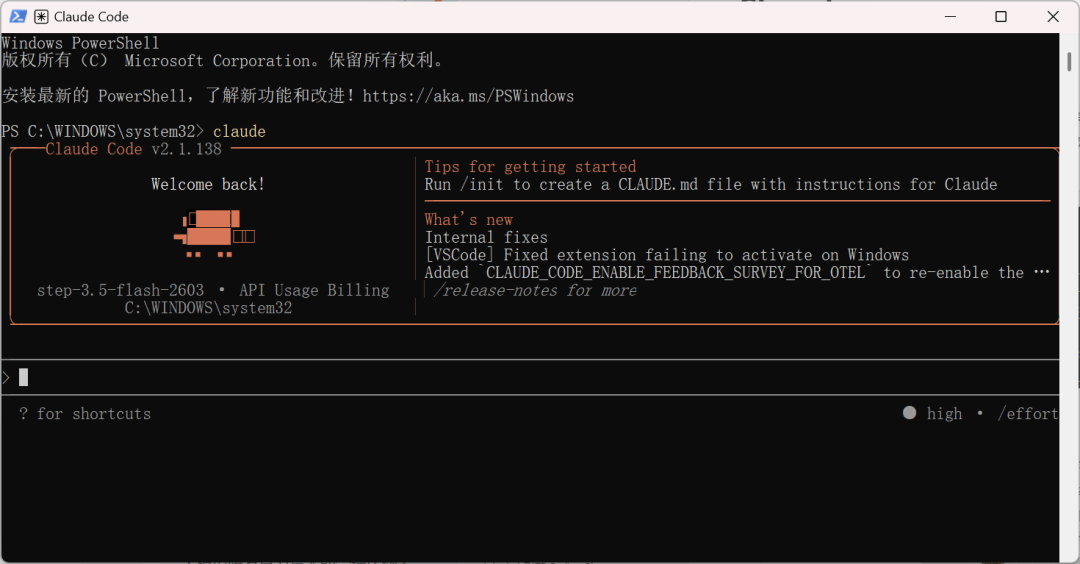
For Vibe Coding application development, choosing the right tools means 80% success. What I used is Claude Code paired with StepFun's Step Plan.
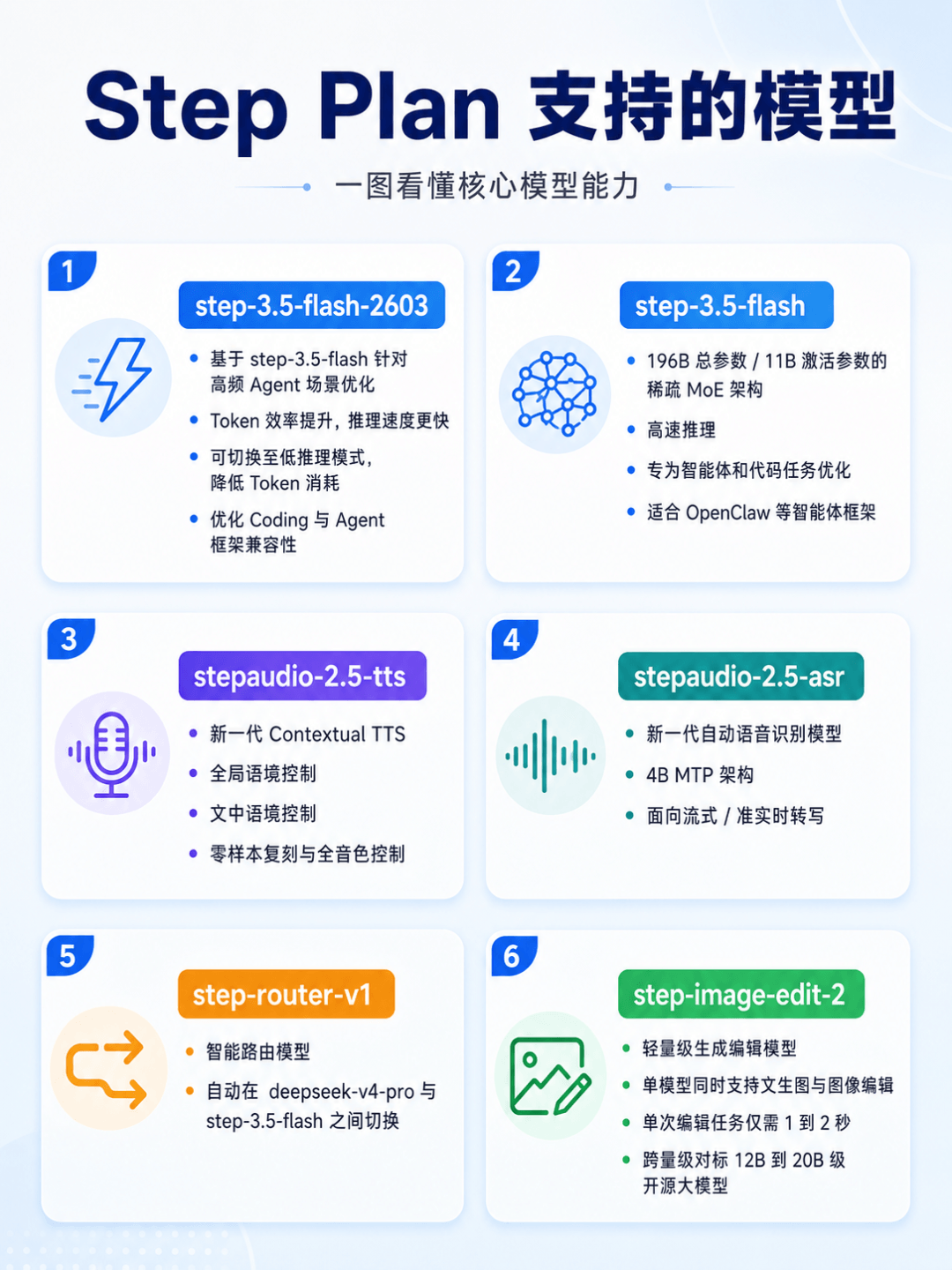
Claude Code is responsible for writing code, fixing errors, and debugging interfaces; Step Plan provides model capabilities. The key point is that Step Plan's model capabilities are relatively comprehensive, including step-3.5-flash, step-3.5-flash-2603, which is suitable for content analysis, and stepaudio-2.5-asr, which is specifically for speech recognition. This exactly meets my development needs.
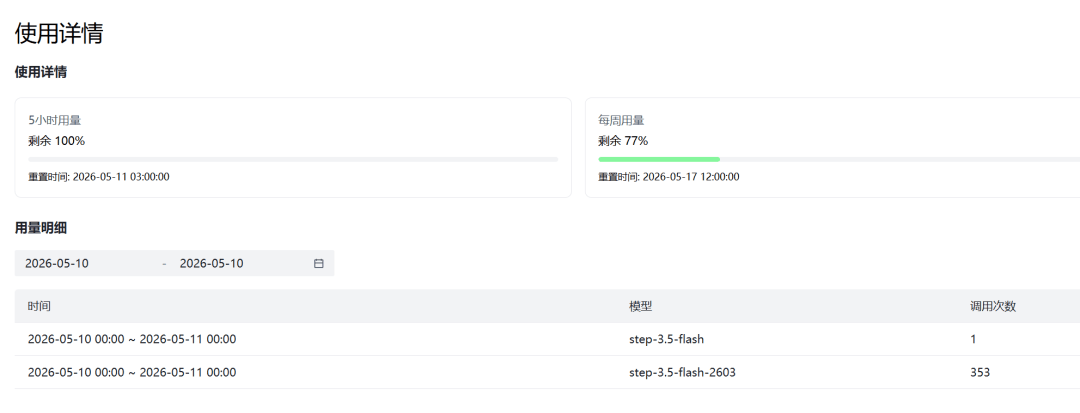
Step Plan usage is still counted by number of prompts: 100 prompts per 5-hour limit, 400 per week. The cost-effectiveness is very good~
Look at the overall cost. I spent half a day debugging like crazy and finished developing the entire application, and I did not even use 25% of the weekly quota.
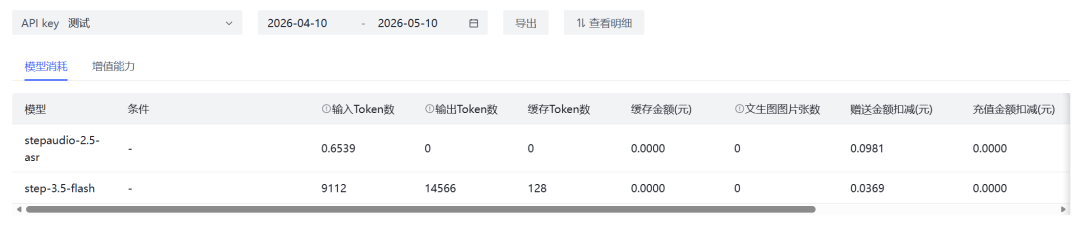
I tested a few audio clips. For about 40 minutes of audio, the API consumption was only 0.135 yuan, which means the subsequent usage cost is almost 0~
Vibe Coding process
Once the tools are chosen, we send the prompt to Claude Code to start generating code.
Prompt: I want to develop an MVP application that runs locally for meeting recording-to-text and meeting analysis. Please directly help me build the project from scratch and write the code.
This application is installed or runs on the user's local computer, and users can open and use it locally. Audio files, meeting records, transcription results, and analysis results are all preferentially saved on the local machine. Speech recognition and meeting analysis capabilities are completed through external API calls.
The application goal is: the user uploads a meeting recording, and the system calls the ASR API to convert the recording into text, and tries to distinguish different speakers. After transcription is complete, the system then calls the LLM API to summarize and analyze the meeting content, generating the meeting topic, core conclusions, action items, risk points, points of disagreement, each speaker's main viewpoints, and next-step suggestions.
The tech stack uses Next.js, TypeScript, and Tailwind CSS. The first version will be a local Web App, running on localhost. Data storage uses SQLite. Audio files are saved in the local uploads directory. Later it can be packaged into Electron or a Tauri desktop application.
Please implement these core features: after users enter the homepage, they can see the historical meeting list, and can create a new meeting and upload audio files. Uploaded files support mp3, wav,m4a, mp4. After upload, the backend saves the audio file to the local uploads directory and creates a meeting record, with the status displayed as processing.
The backend needs to encapsulate the ASR calling module; the file name can be lib/asr.ts. The ASR API provider, API Key, Base URL, and model name are all read from .env.local, making it convenient to switch to different ASR services later. Environment variables include ASR_PROVIDER, ASR_API_KEY, ASR_BASE_URL, ASR_MODEL. The ASR return result must be uniformly converted into the project's internal format, with each segment containing speaker, startTime, endTime, text. If the API temporarily cannot return speaker, the transcribed text must still be retained, and marked by default as Speaker 1.
The backend also needs to encapsulate the LLM calling module; the file name can be lib/llm.ts. The LLM API provider, API Key, Base URL, and model name are all read from .env.local, making it convenient to switch to different large models later. Environment variables include LLM_PROVIDER, LLM_API_KEY, LLM_BASE_URL, LLM_MODEL. After the LLM receives the complete transcript, it needs to output stable JSON, including meetingTitle, summary, keyDecisions, actionItems, risks, disagreements, speakerInsights, nextSteps. actionItems need to include task content, owner, deadline, and priority. speakerInsights need to summarize, by speaker, their main viewpoints, concerns, and attitude.
The frontend needs three main pages: homepage meeting list, upload meeting page, and meeting detail page. The meeting detail page should be divided into two areas: full transcript and intelligent analysis. The full transcript is displayed in chronological order, showing speaker, timestamp, and text content. Speaker names must support manual editing, for example changing Speaker 1 to Zhang San and Speaker 2 to Li Si. The intelligent analysis area displays the meeting summary, core conclusions, action items, risk points, points of disagreement, speaker viewpoints, and next-step suggestions.
Please pay attention to the local application experience. After upload, a processing status must be displayed. ASR failures must display a clear error, and LLM analysis failures must also retain the already completed transcription result. Do not let the entire meeting record be lost because analysis failed. The page style should be simple and clean, suitable for a work tool, with key information understandable at a glance.
Please generate the complete project structure, including package.json, SQLite initialization logic, environment variable example file, API routes, ASR encapsulation, LLM encapsulation, local file saving module, database read/write module, type definitions, and README startup instructions.
Directly create a complete MVP project that can run locally. After completion, please check TypeScript type errors, routing errors, environment variable reading errors, file upload logic, and SQLite storage logic. Finally, tell me how to install dependencies, how to configure .env.local, and how to start locally.
For beginners who can't read code, what we need to do next is just keep pressing Enter in the terminal and selecting Yes to let Claude Code automatically create files and write logic.
In less than ten minutes, the prototype of the app was up and running. The minimalist interface is very clean and looks quite pleasing to the eye.
I excitedly uploaded a recording, and was immediately greeted by an error.
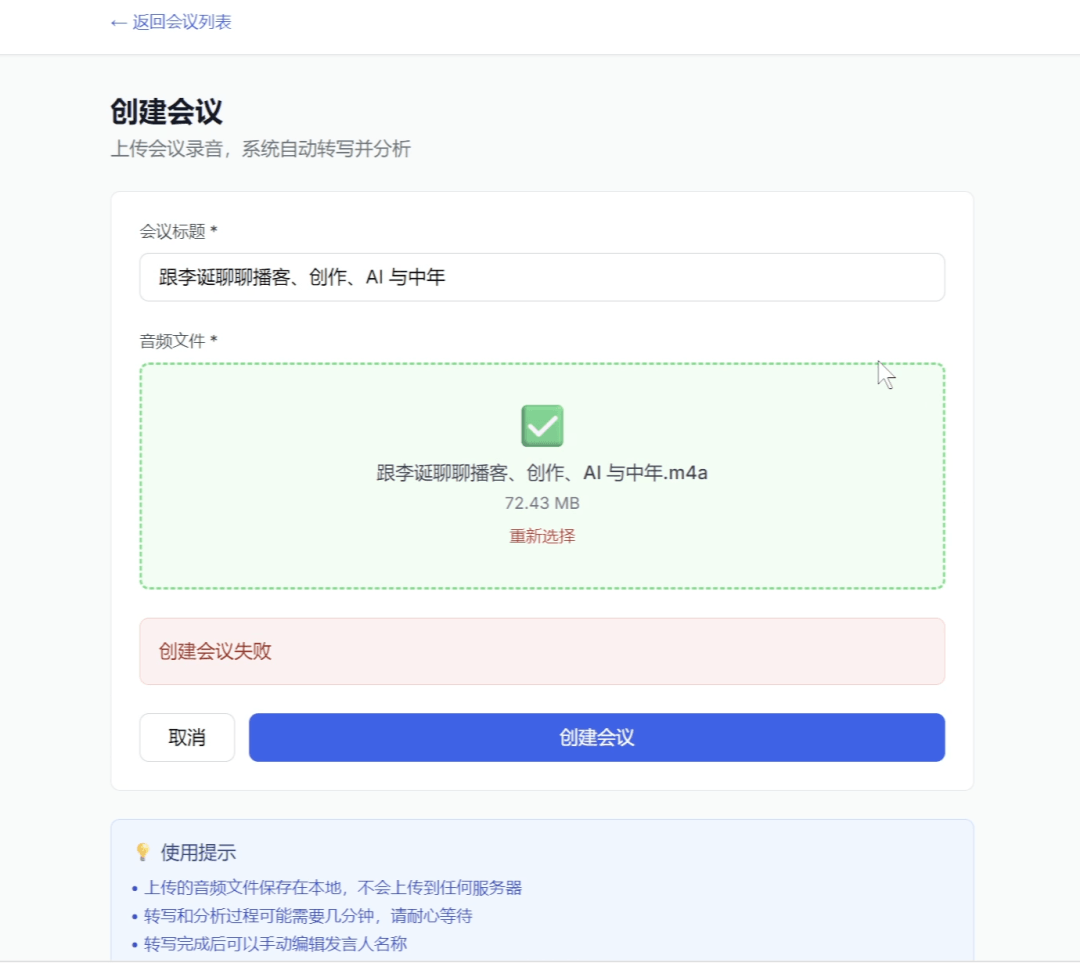
Even though we can't read code, there's no need to panic when we hit an error. We just send the red error text on the frontend page directly to Claude Code.
Why would creating a meeting fail?
Claude Code will automatically troubleshoot the problem and fix it.
Trying again, this time creating the meeting succeeded, but it got stuck again at the audio processing step. And I noticed an awkward problem: every time I upload a test recording, the record is still there, and the homepage has accumulated a bunch of running meeting tasks…
So I temporarily had Claude Code add a new requirement:
Add a delete meeting feature.
As expected, five minutes later when we clicked on the meeting to view the details again, there was an extra delete button in the top right corner of the page.
After cleaning up the junk data, we continued to solve the stuck point. This time, trying to transcribe the recording to text succeeded, but the intelligent analysis showed: Transcription succeeded, but analysis failed: Error: LLM returned empty content.
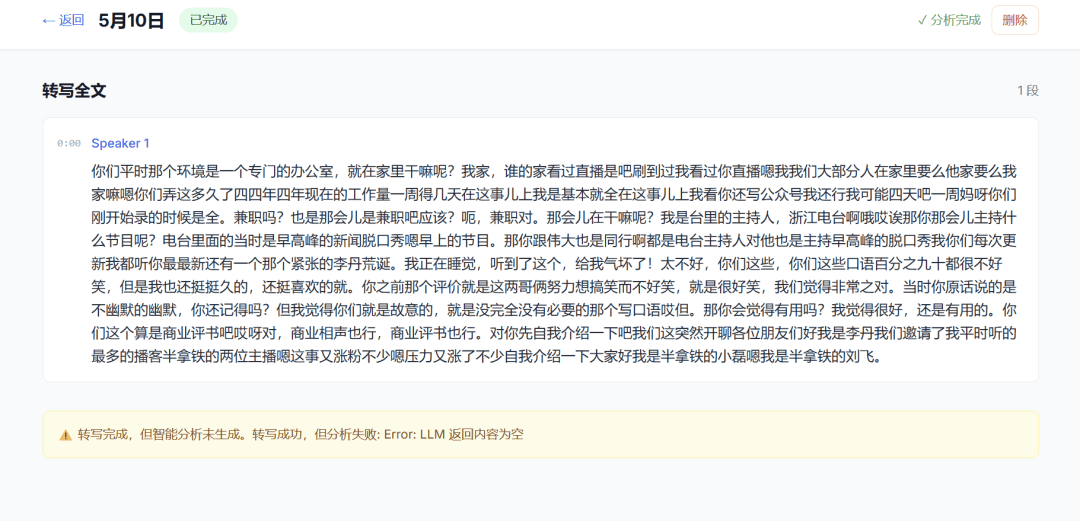
At first I thought some API had errored again, but after investigating, I found it was most likely because the audio was too long and transcription and analysis took too long, making a single request very prone to timing out.
So I had Claude Code look up the duration, size, and transcription word count limits for imported audio files. Sure enough, it was stuck on API request duration.
Claude Code's reply showed that audio processed in a single run should ideally be 10-30 minutes, corresponding to 5000-10000 characters of transcribed text. If it's too long, it needs to be sliced in advance for processing.
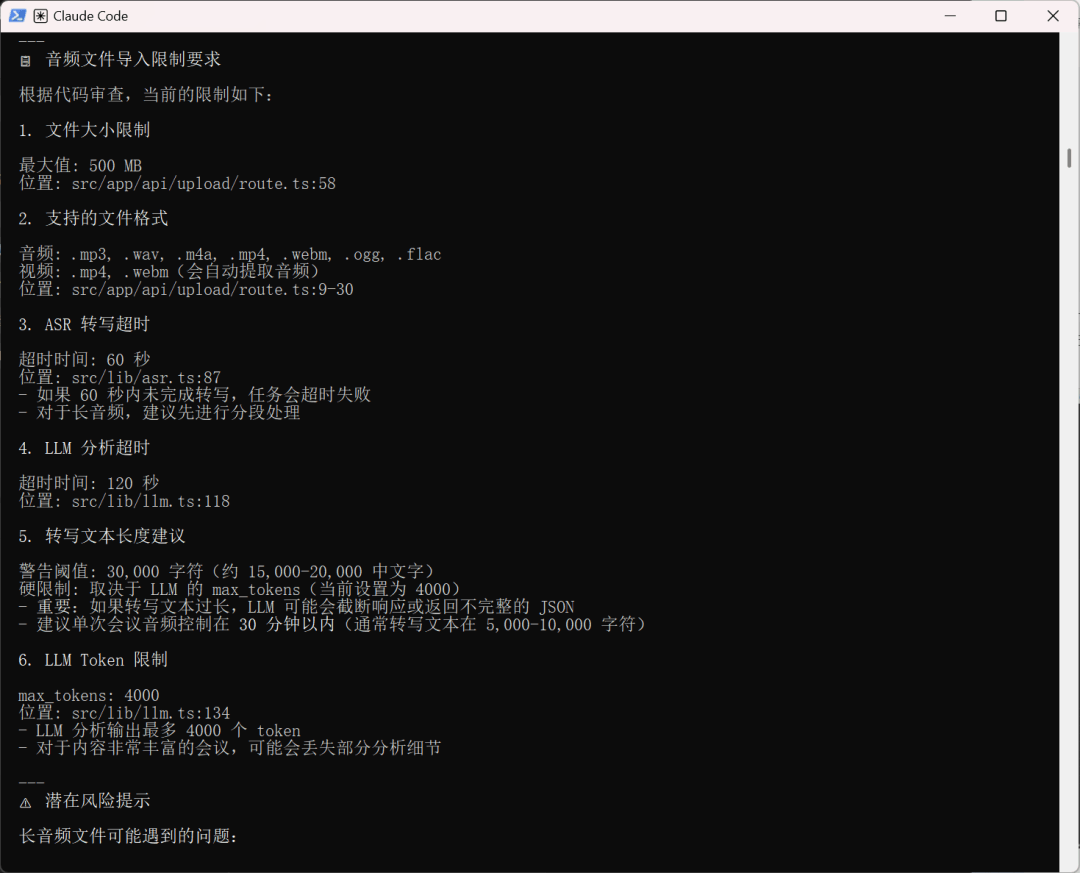
Since it's not a model capability issue, let's continue optimizing. After all, daily meetings generally last more than 30 minutes, and having to pre-process every time would be too troublesome.
Change long audio processing over 10 minutes to asynchronous tasks + slicing. The upload API should only return a jobId, and not make the frontend keep waiting for the request to complete. The backend should asynchronously slice, transcribe, summarize, and merge results by jobId. The frontend should poll the jobId status and display uploading, slicing, transcribing, summarizing, completed, and failed. Keep the maxDuration configuration, but do not rely on a single API request running for a long time.
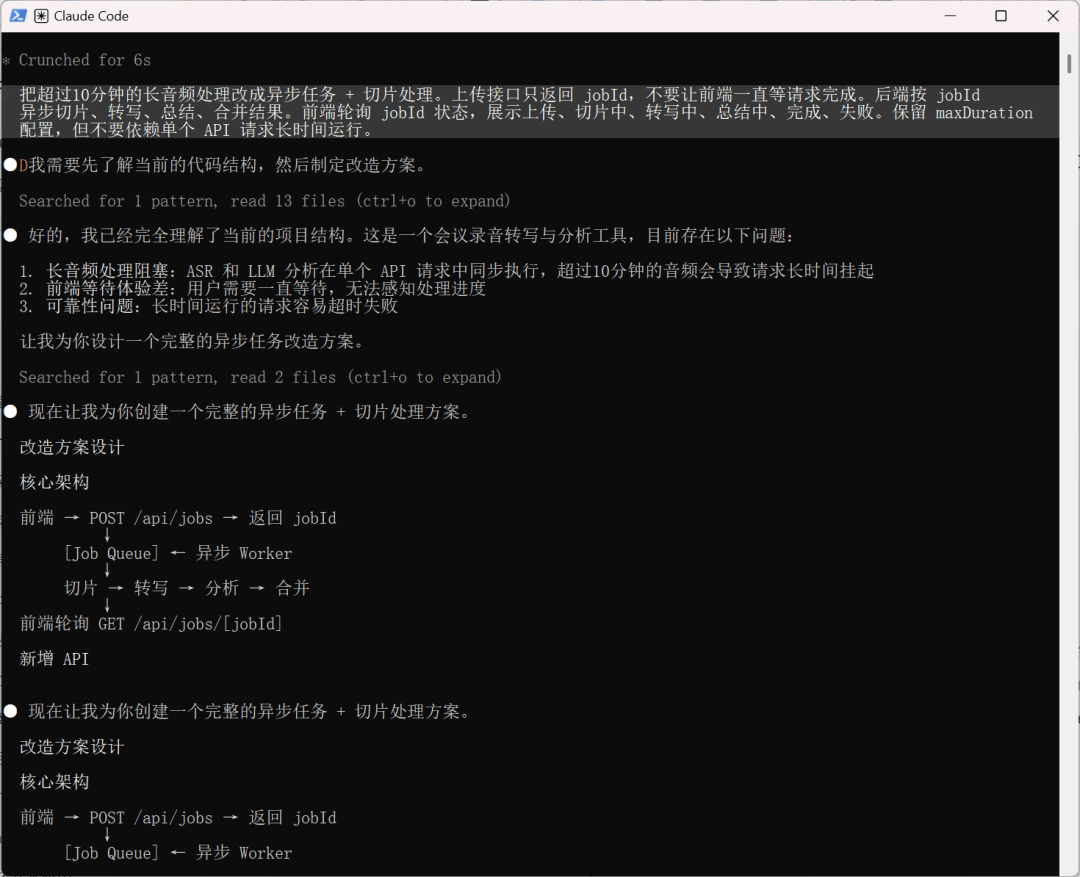
This change took much longer, and we still just kept selecting Yes all the way.
This time I directly uploaded 78 minutes of recording material, and the meeting assistant handled transcription and analysis in one go, with very clear results.
And I found that it's not only suitable for meeting notes, but can also be used to understand and learn from various audio content, such as video interviews, podcasts, and so on.
02. Some sharing
From uploading audio, calling ASR, and generating a verbatim transcript, to then calling a large model for meeting summaries, extracting to-dos, and analyzing speakers' viewpoints, in the past this would have been at least a complete SaaS core function of the tool. But now, with Claude Code and Step Plan, an ordinary user can quickly build their own workflow on a local computer.
More importantly, it's not just something that can run a Demo. I can keep adding features according to my own usage habits, with unlimited freedom.
The truly valuable part of Step Plan is that it lowers the trial-and-error cost of Vibe Coding.
When building this kind of local meeting assistant, what actually costs the most is the repeated debugging in the middle. Interface errors need fixing, the ASR return format needs adapting, LLM analysis failures need troubleshooting, and long audio still needs further optimization. If everything is billed at standard API rates, users can easily feel the cost pain while debugging, and in the end they won't dare to experiment more.
Step Plan is a monthly plan designed specifically for Coding, making model invocation costs predictable, so I can confidently let Claude Code run more rounds, make more fixes, and try more approaches.
For ordinary people, once the cost anxiety is gone, daring to try and daring to use is what matters most.
Original link:Vibe Coding in practice: I built a meeting assistant in half a day