
StepFun released a new model Step 5 Preview, and I've seen everyone praising this model over the past two days, saying it's at the level of the world's top two open-source models.
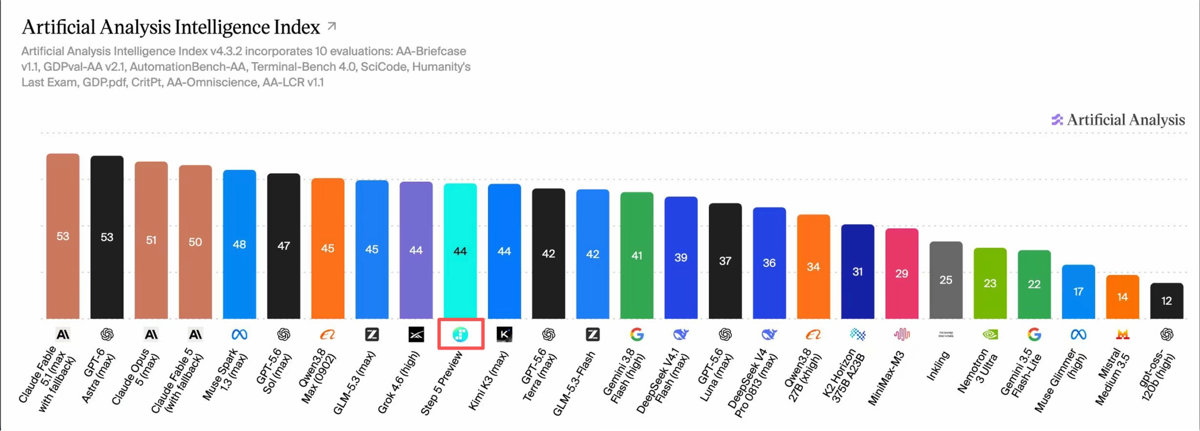
I went and checked the introduction. Step 5 Preview is a flagship model for production-grade Agents, with a total parameter count of 600B, activating 27B parameters per Token, supporting 1M context and text and image input.
InAI programming, software engineering, professional knowledge work, and other tasks, it reaches the frontier level, and shows particularly outstanding capabilities in the financial field.
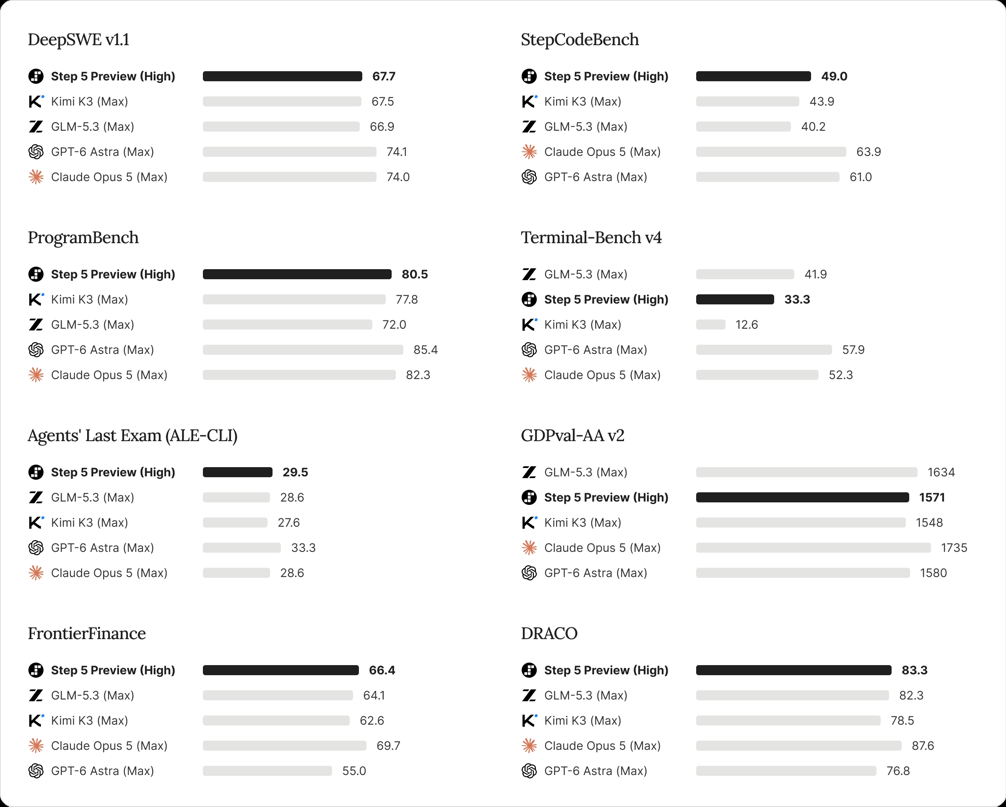
Looking at the official data, it should be about the same as GLM 5.3、Claude Opus 5 when used.
So this time, I brought Claude Opus 5 and GLM-5.3 together for a comparison review, using the same tasks and the same materials, to see its real level.
This time the score is out of 100. Correctness 40 points, requirement completion 30 points, presentation and operation experience 20 points, details and exception handling 10 points.
01. Multi-model hands-on test
case 1 Fix the image compressor
I made an image compression webpage, but there are some bugs in the original version. The maximum width is set to 800, but after processing, both the width and height become 800, and the images are all forcibly stretched into squares. The interface selects PNG, but the actual output uses JPEG encoding, and the background of transparent images directly turns black.
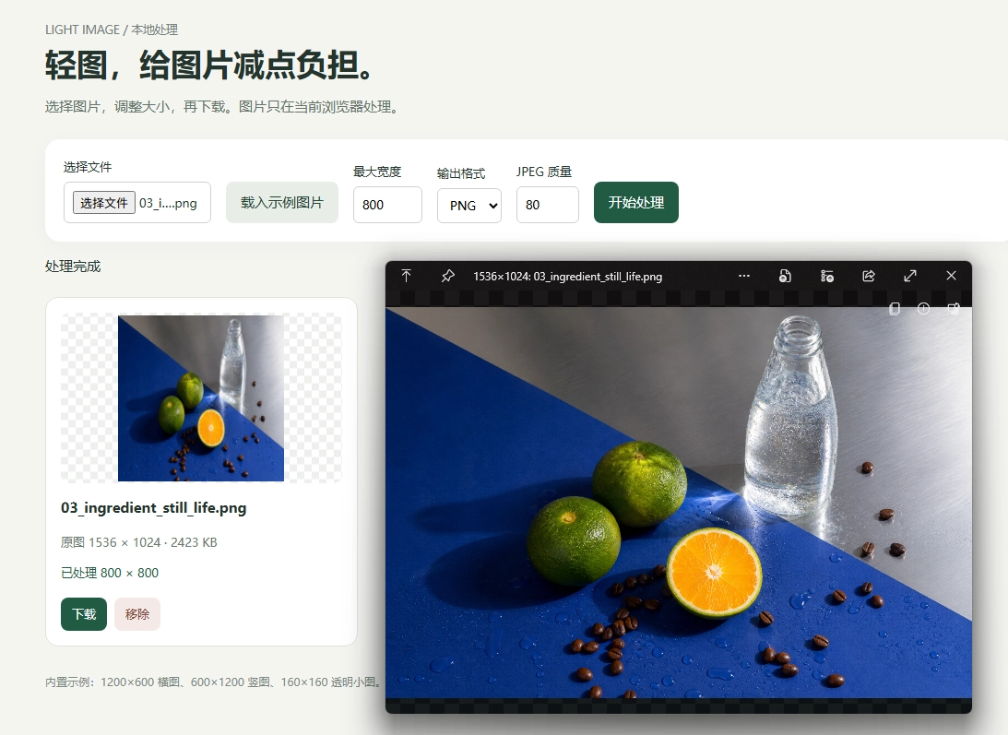
In this round, I'll hand this webpage to three models and have them keep the original interface and fix these problems.
Prompt: The original attachment is read-only; the source file must not be modified, overwritten, deleted, or renamed. First copy "图片压缩器.html" to "图片压缩器_修复版.html", and perform all fixes only on this copy. If the result file name already exists, add incrementing numbers such as _2, _3 after the file name, and do not overwrite existing results. When verifying, use the newly generated result file, and clearly provide its file name or path when delivering.
Task requirements:
Please fix the existing image compressor in the attachment, keeping the page, built-in examples, and individual downloads. Currently, after setting "Maximum Width" to 800, a 1200×600 landscape image, a 600×1200 portrait image, and a 160×160 transparent small image all become 800×800: landscape and portrait images are stretched, and small images are enlarged. After selecting PNG, the actual output format also does not match, and the transparent background turns black.
Maximum width should only shrink overly wide images, maintain the aspect ratio, and not enlarge small images; PNG should preserve transparency, and JPEG should use a white background; the preview and the actual downloaded size, format, and extension should be consistent. During processing, deleting entries must not mix up images, and repeatedly clicking start must not stack batches. Invalid parameters and bad images should have clear prompts.
Default maximum width 800, format PNG. Put the previews, original sizes, output sizes, and actual formats of the three processed images on the same screen, fully visible in a 1200×900 window without scrolling. Unprocessed images should not show false results. Do not replace the built-in examples or fix the problems only in text.
Deliver a single fixed HTML file that can be used by double-clicking. Actually process the built-in examples and download them for verification, and briefly describe the verification results.
GLM 5.3:
The original problems of image distortion, enlargement of small images, and incorrect format were all solved. The interface basically follows the original design, but it lacks output file size, so you still have to download to confirm how much space was saved.
Step 5 Preview:
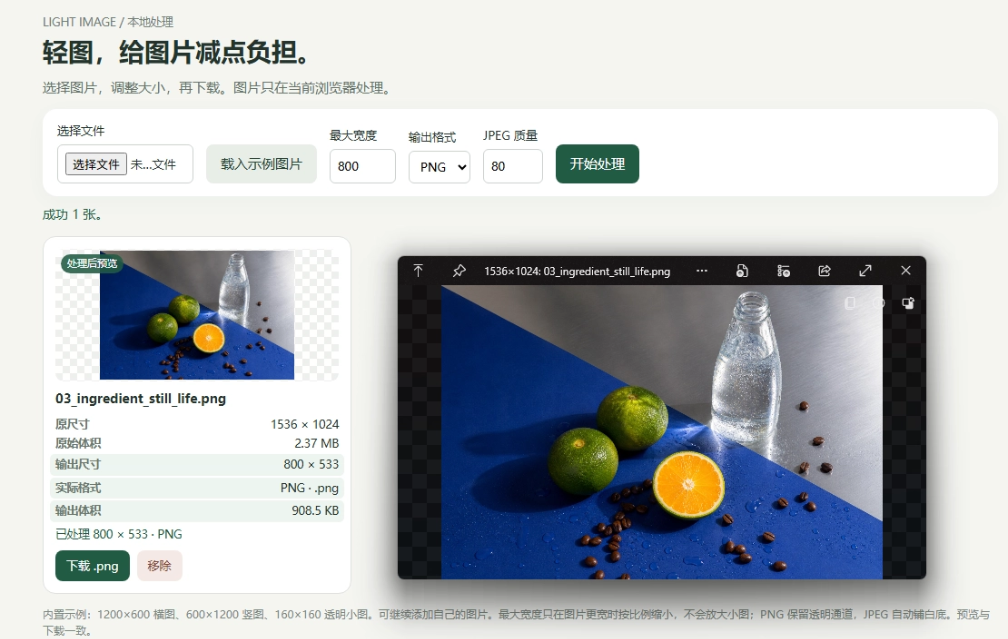
All the problems were fixed. Step 5 Preview also listed the original size, original file size, output size, actual format, and output file size in separate rows and columns. The download button also indicated the extension, so it can be directly compared on the page, very intuitive and clear.
Claude Opus 5:
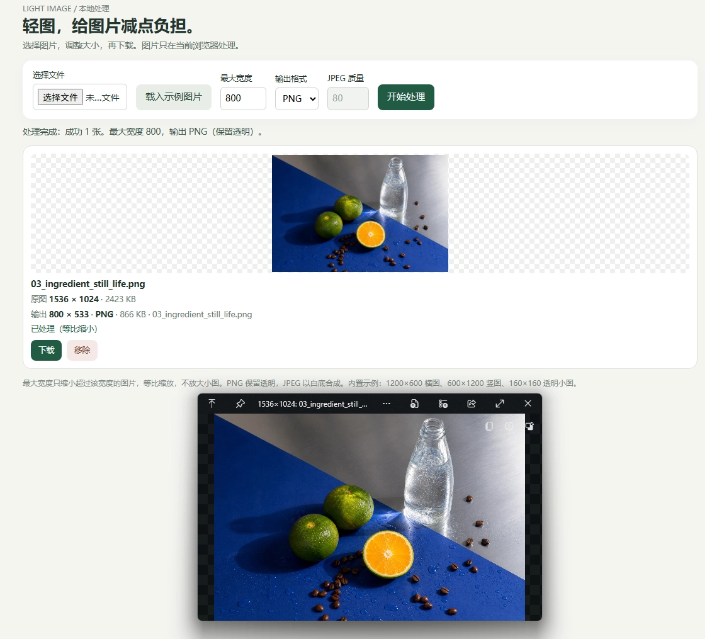
Claude Opus 5 indicates whether the image is scaled down proportionally or not oversized, keeping the original dimensions, and the output file name, dimensions, and file size are all visible. The experience for normal operations is good.
But there are still two problems: when the first image has finished processing and the rest are still being processed, changing the width clears the first image's result; the original webpage's layout was changed, while my prompt only asked for fixes.
Score for this round:
GLM 5.3: 89 points.
Step 5 Preview: 93 points.
Claude Opus 5: 84 points.
case 2 Product Poster Generator
I'm planning to build a product poster generator. By entering the product name, price, tags, and illustration, it can batch-generate images using the same template.
Reference materials:
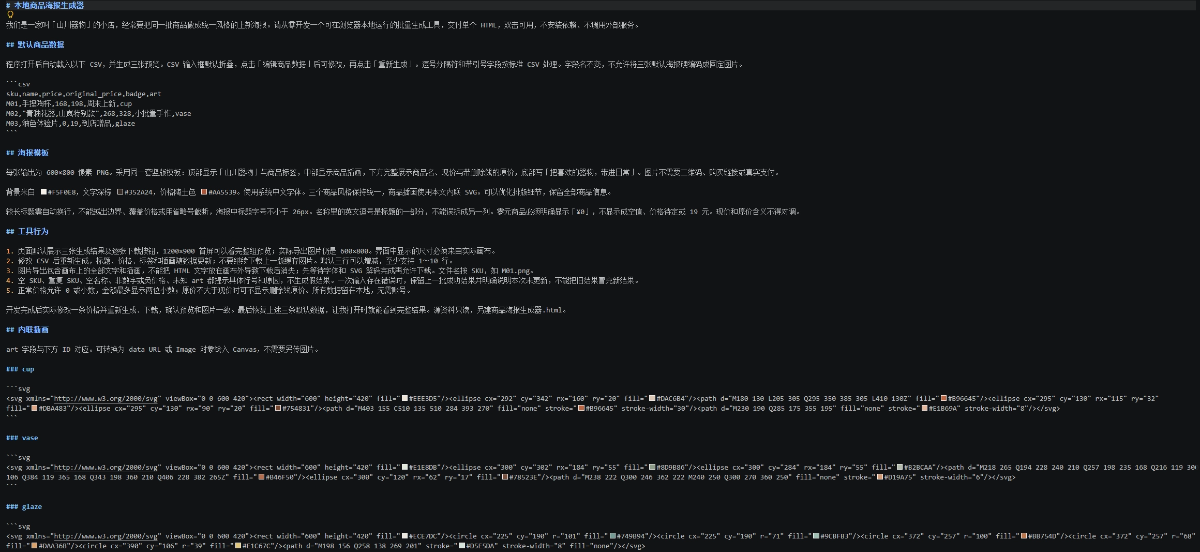
Prompt: The original attachment is read-only; the source file must not be modified, overwritten, deleted, or renamed. After reading "资料.md", create a separate "商品海报生成器.html" as the result file, and do not write or append content to the input material. If the result file name already exists, add an incrementing number such as _2, _3 after the file name, and do not overwrite the existing result. During verification, use the newly generated result file, and when delivering, clearly provide its file name or path.
Task requirements:
Please follow the attached 资料.md and develop a local product poster generator from scratch. After opening, it loads the given three-line CSV, uses a unified template and inline illustrations, and automatically generates three 600×800 posters, supporting regeneration after modifying data and downloading PNGs one by one.
Focus on handling long titles, product names containing commas, zero-yuan prices, consistency between preview and export, and invalid input prompts. By default, the three previews are fully displayed on the first screen at 1200×900. Do not hard-code default images. Deliver an HTML file that can be used by double-clicking. Actually change the data once, download and verify it, then restore the default data.
GLM 5.3:
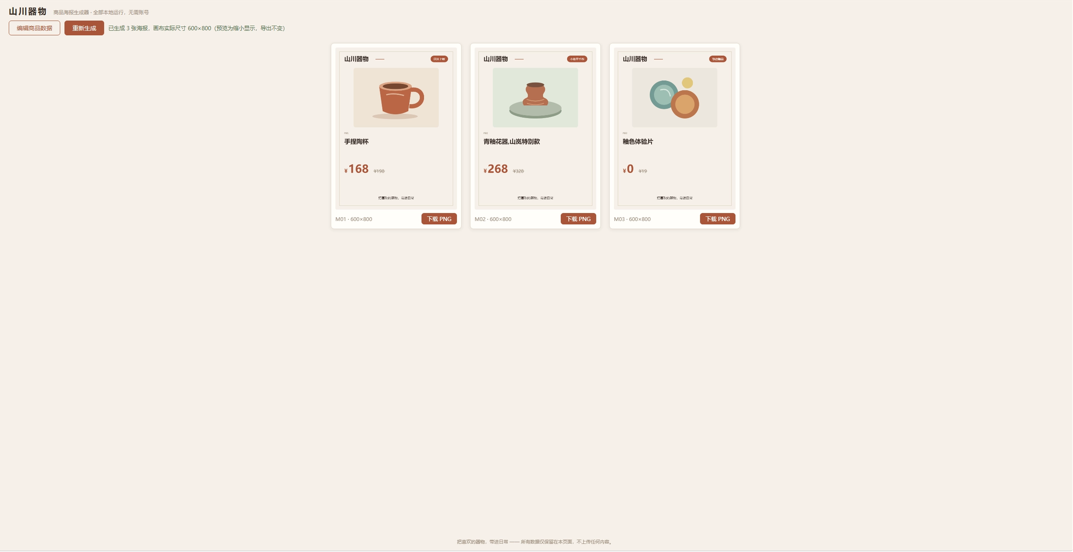
The default posters use thin borders, left-aligned titles, and terracotta-colored prices, with a consistent style, though there is a lot of blank space between the title and price, and the preview is also somewhat small.
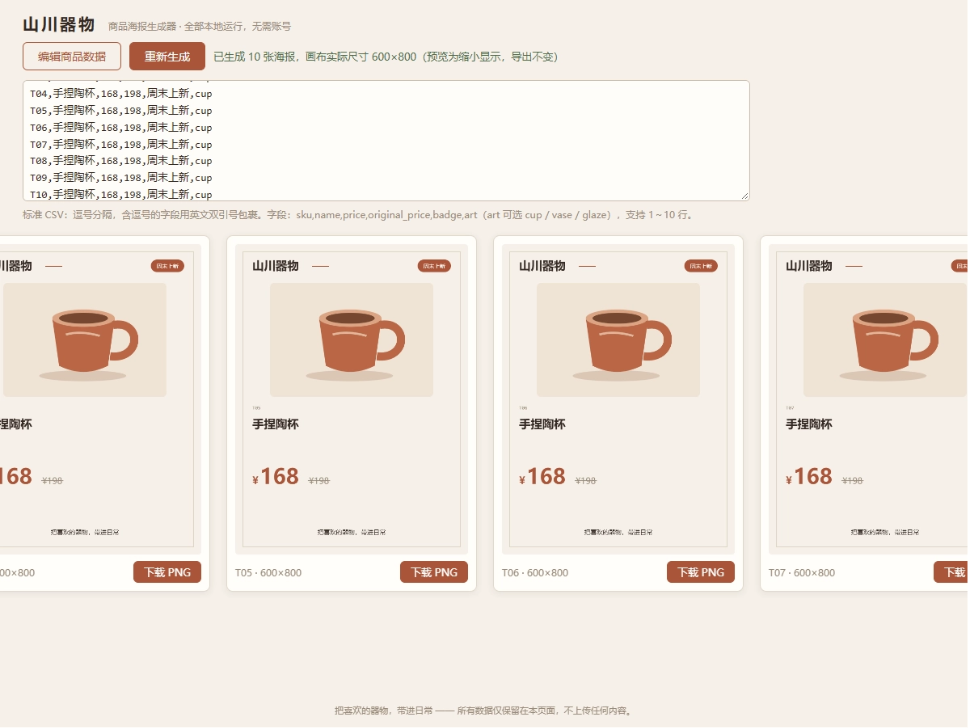
The problem appears after adding products: with 10 products placed in, the cards still line up horizontally in a single row, and the first few are squeezed off the left side of the page.
Step 5 Preview:
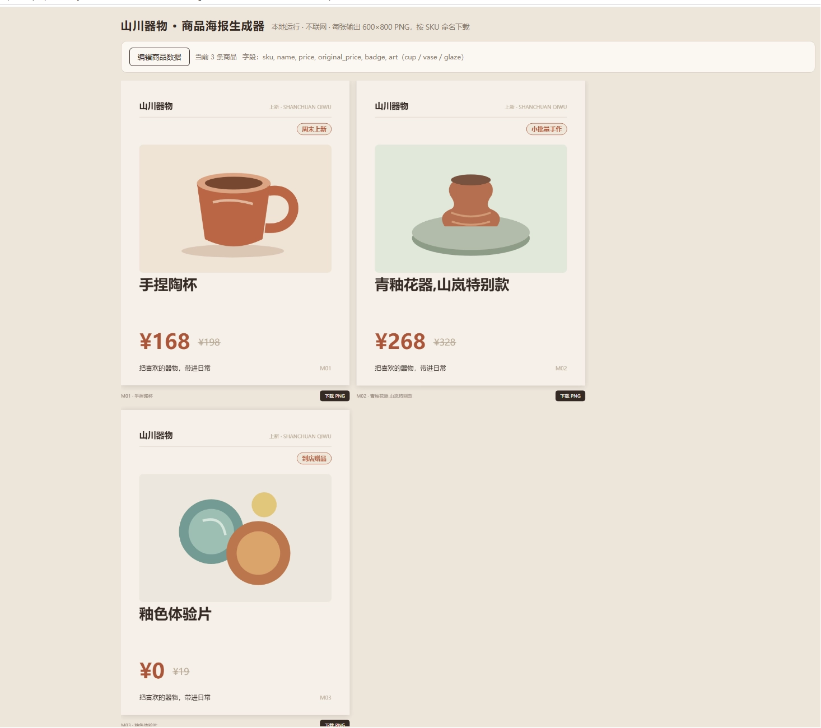
The three posters are spread out more, and the illustrations, product names, and prices are all fairly prominent, so they can be seen clearly even in a direct screenshot.
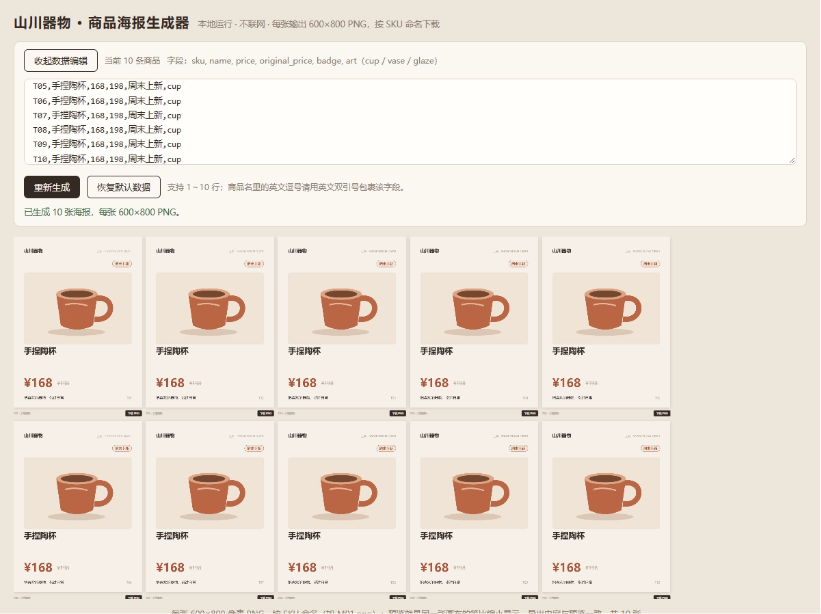
After increasing to 10 products, Step 5 Preview adjusts the rows, columns, and preview size, so the entire batch of results can be displayed.
Claude Opus 5:
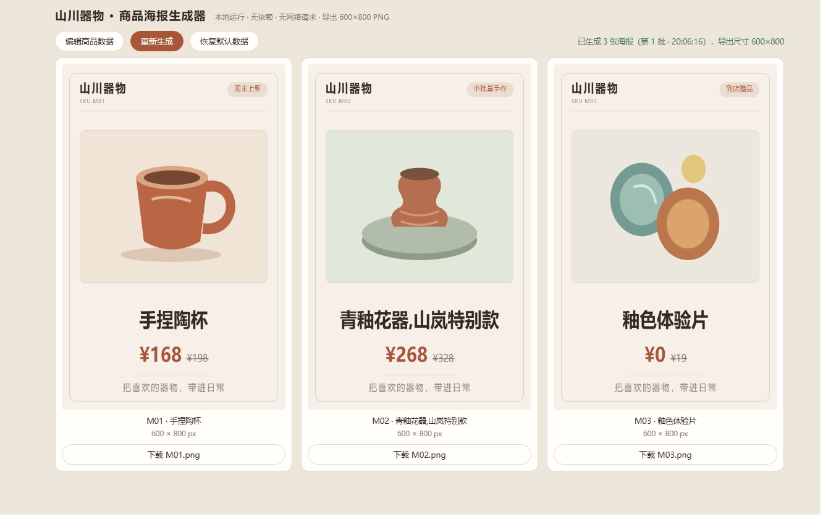
The posters use centered layout, with the product name and price concentrated in the lower half, and the information hierarchy is clear. The page also separately lists the product names, actual dimensions, and download file names, and the button sizes are also fairly appropriate.
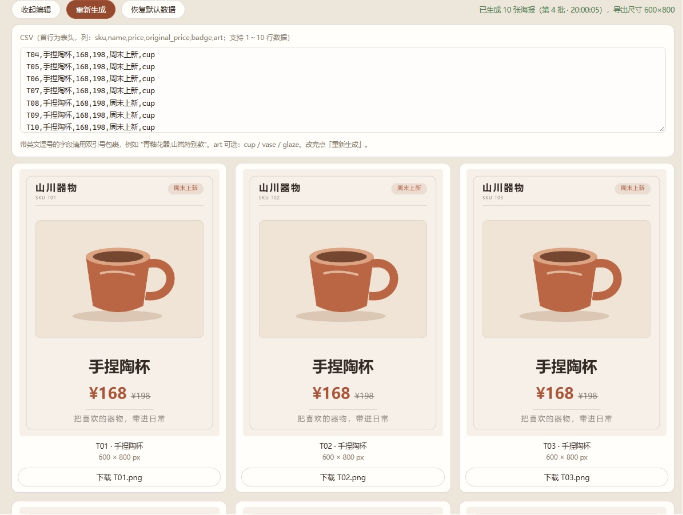
The 10 products are arranged downward in three columns, and can be viewed by scrolling; line breaks in product names are parsed correctly. The trade-off is that once there are more products, scrolling down is required, and it cannot browse the whole batch on one screen like Step 5 Preview.
Score for this round:
GLM 5.3: 82 points.
Step 5 Preview: 86 points.
Claude Opus 5: 94 points.
case 3 Pottery Studio Booking Page
This round, I'm making a course booking page for a pottery studio. The brand copy, data for four classes, and illustrations are all in the same material, and the model can design the layout on its own.
Reference materials:
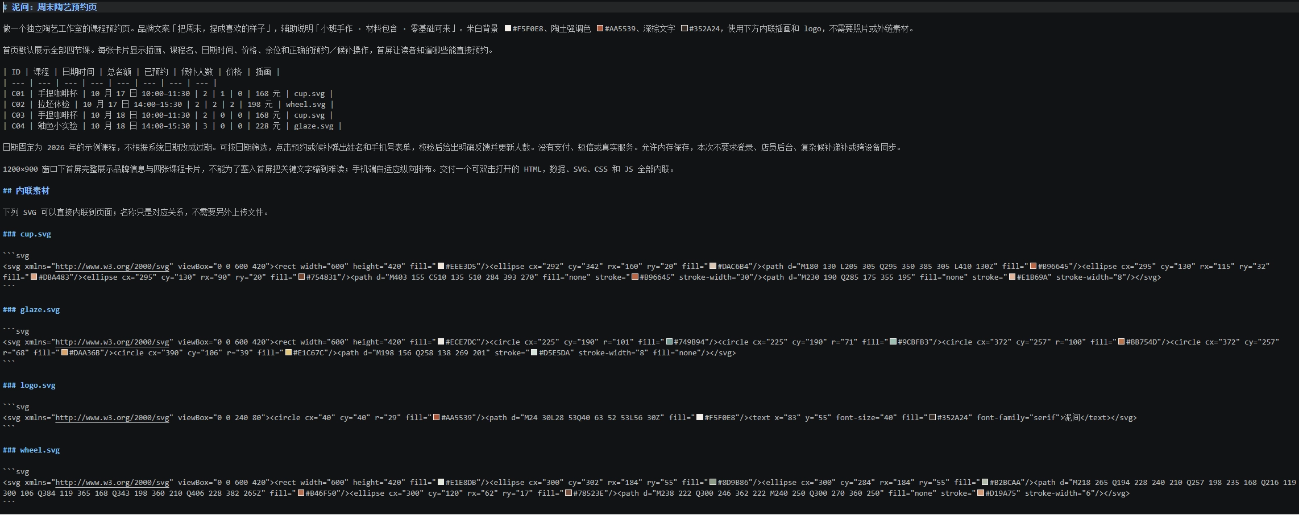
Prompt: The original attachment is read-only; the source file must not be modified, overwritten, deleted, or renamed. After reading "资料.md", create a separate "陶艺预约页.html" as the result file, and do not write or append anything to the input material. If the result file name already exists, incrementally add _2, _3, etc. after the file name, without overwriting existing results. Use the newly generated result file for verification, and clearly provide its file name or path at delivery.
Task requirements: Please create the "泥间" pottery booking page according to the attached 资料.md; the materials and illustrations are all in the file. The homepage displays all four classes by default, and within the 1200×900 first screen clearly presents the brand, illustrations, dates, prices, remaining spots, and booking/waitlist status; also support mobile layout, implement date filtering and a registration form. Deliver a single HTML file that can be opened by double-clicking.
GLM 5.3:

The four class cards are not stuffed with too much content, so price, remaining spots, and buttons are easy to find, and booking and waitlist are also distinguished by different button styles.

On mobile, it switches to image on the left and text on the right, so more classes can be seen in one screen, saving more scrolling space than the other two. However, the illustration cropping is quite obvious.
The basic flow was completed, but after submission there is only a brief success message, with no registration record that can be reviewed later. Registering again for the same class with the same mobile number will also continue to occupy a spot.
Step 5 Preview:

Step 5 Preview uses color to distinguish booking and waitlist, then uses dots and numbers to show spot occupancy.

More practically, after submission a registration number is generated, a record is kept at the bottom of the page, and a cancel button is provided. I actually canceled both a booking and a waitlist spot, and the remaining spots and waitlist count both recovered correctly, with the mobile number also partially hidden.

The mobile form is changed into a bottom panel, with the class thumbnail, time, and price all inside it, designed separately for mobile operation.
Claude Opus 5:

Date, time, price, and number of people are clearly separated into sections, and remaining spots are placed separately in an information bar with a background color, so you can check at a glance which day, what time, how much it costs, and how many spots remain.

On mobile, large images and large buttons are retained, making reading clear, but the scrolling distance is longer.
However, Claude Opus 5 did not provide registration records and a cancellation entry point, and also wrote in information not present in the original material, such as firing fees included, works can be picked up in about 3 weeks, and a reminder one day before the class starts.
Score for this round:
GLM 5.3: 87 points.
Step 5 Preview: 91 points.
Claude Opus 5: 88 points.
case 4 Solar System Simulation
The materials provide the names, brief introductions, and visual features of the eight planets, and the model draws the page itself. This makes it possible to directly compare how orbits, spheres, labels, and details are organized, and also shows how the model handles Saturn's rings and the spatial hierarchy of the image.
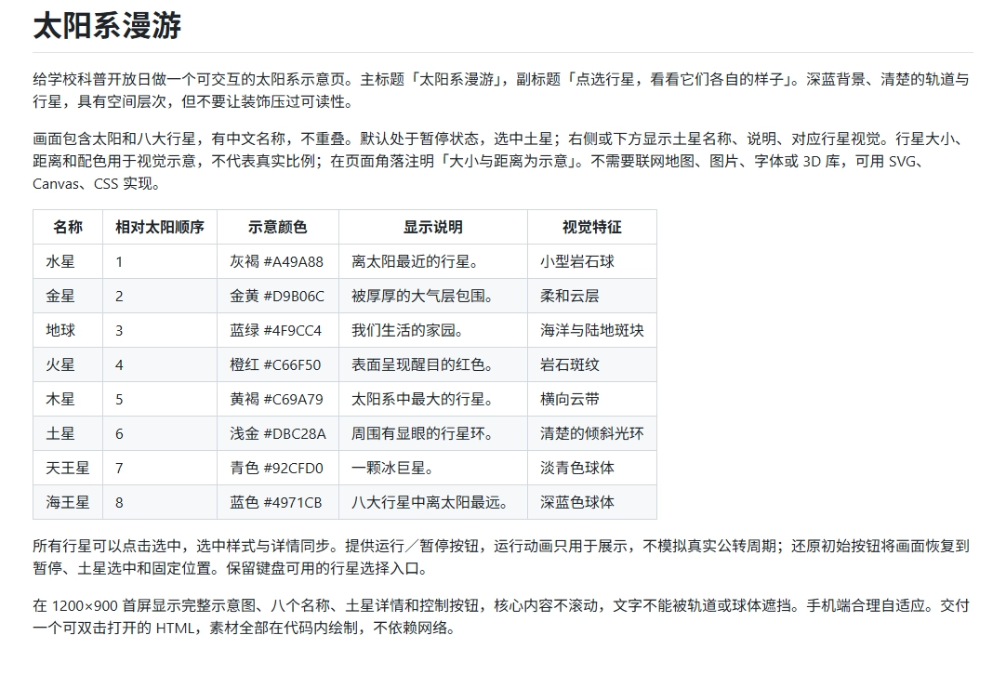
Prompt: The original attachment is read-only; the source file must not be modified, overwritten, deleted, or renamed. After reading "资料.md", create a separate "太阳系科普页.html" as the result file, and do not write or append anything to the input material. If the result file name already exists, incrementally add _2, _3, etc. after the file name, without overwriting existing results. Use the newly generated result file for verification, and clearly provide its file name or path at delivery.
Task requirements: Please create a visually layered "Solar System Tour" interactive popular science page according to the attached 资料.md. Initially paused with Saturn selected, the 1200×900 first screen fully displays the eight planets, Chinese labels, Saturn's rings, and details. Implement planet selection, run/pause, and restoring the initial state, and deliver a single HTML file that can be opened by double-clicking, without relying on external resources.
GLM 5.3:
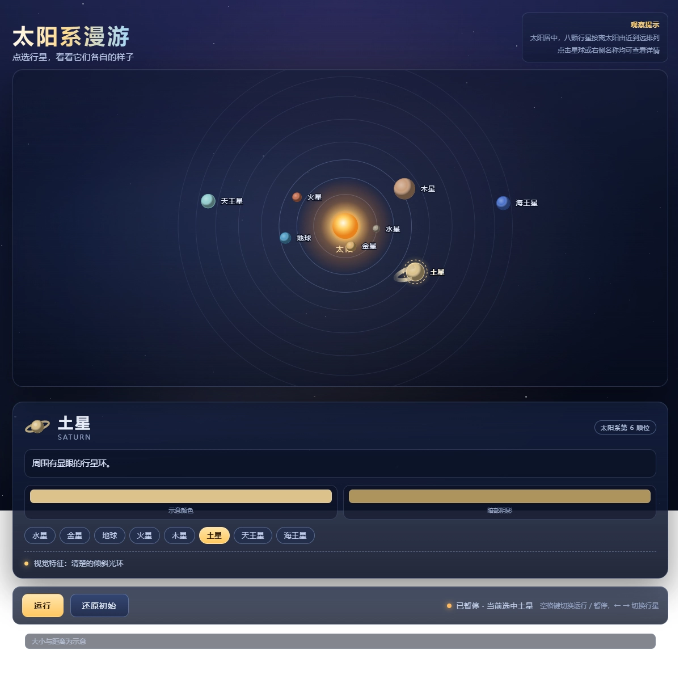
There is a gradient title, a dark blue background, and a sun halo, and the planet also has light and dark shading, so it looks somewhat three-dimensional.
But in the required 1200 × 900 window, the details panel is placed below the main image. The run and restore initial buttons fall outside the first screen and require scrolling down. This is a clear failure to meet the requirement.
Step 5 Preview:

Step 5 Preview arranges the main image, details, and control bar on the left, right, and bottom respectively, so everything can be seen on the first screen. The planet names are also more spread out, making it easier to select and view details.
Claude Opus 5:
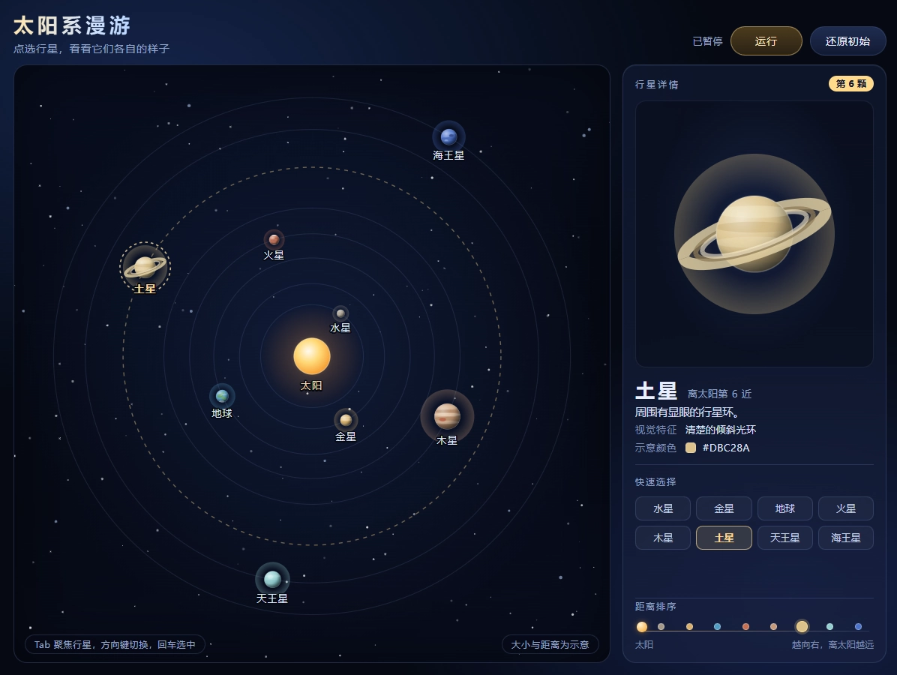
Claude Opus 5 spreads the eight planets across their respective orbits, and when selected, the corresponding orbit is also highlighted, making the positional relationships easy to understand. A large planet preview is provided on the right, and the tilt angle of Saturn's rings, as well as the front-to-back occlusion between the sphere and the rings, can be seen clearly. After clicking, there is indeed content worth observing.
Score for this round:
GLM 5.3: 82 points.
Step 5 Preview: 88 points.
Claude Opus 5: 93 points.
case 5 business dashboard
I prepared weekly operating data for a home goods store, including order updates, successful refunds, refunds in process, and an earlier generated operations briefing.
The model needs to reconcile the accounts clearly and then turn them into a one-page dashboard.
Reference materials:
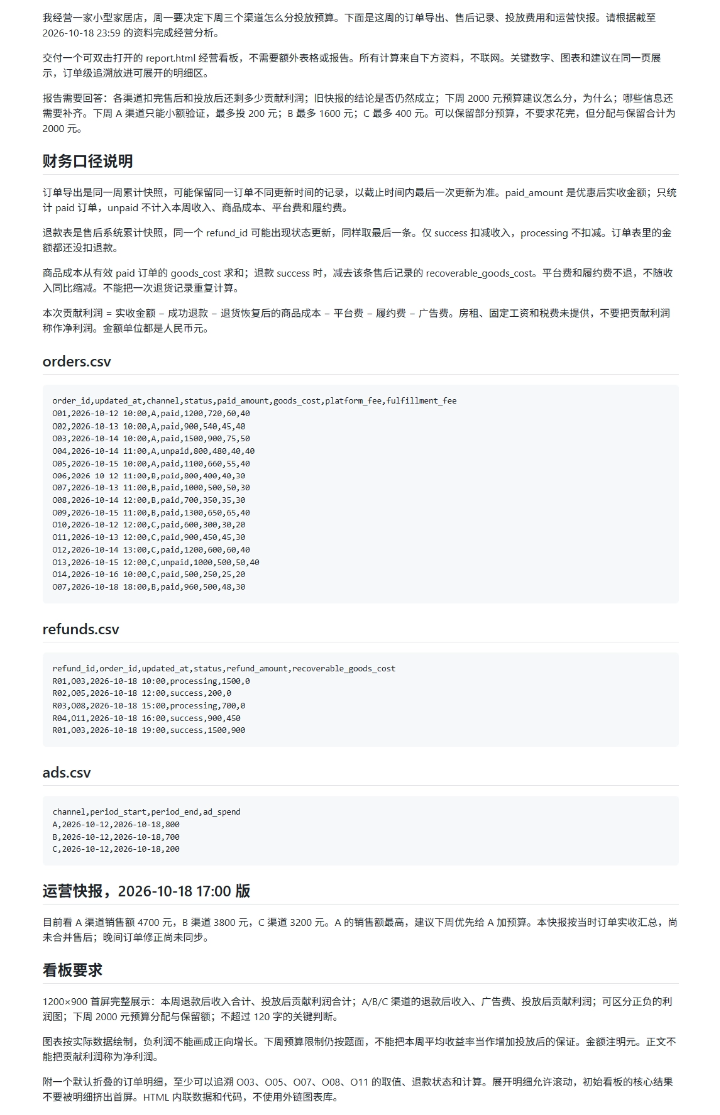
Prompt: The original attachments are read-only; the source files must not be modified, overwritten, deleted, or renamed. After reading "资料.md", create a separate "report.html" as the result file, and do not write or append content to the input materials. If the result file name already exists, append incrementing numbers such as _2, _3 after the file name, and do not overwrite existing results. Use the newly generated result file for validation, and clearly provide its file name or path at delivery.
Task requirements: Based on the attached 资料.md, reconcile the home goods store's orders, refunds, and advertising expenses, and create a one-page report.html business dashboard. The 1200×900 first screen must present key totals, a three-channel comparison, a positive/negative profit chart, and next week's budget recommendations, and the numbers must come from the original materials. Order-level evidence should be placed in a collapsed section by default. Deliver only one HTML file that can be opened by double-clicking, and do not create three separate files.
GLM 5.3:
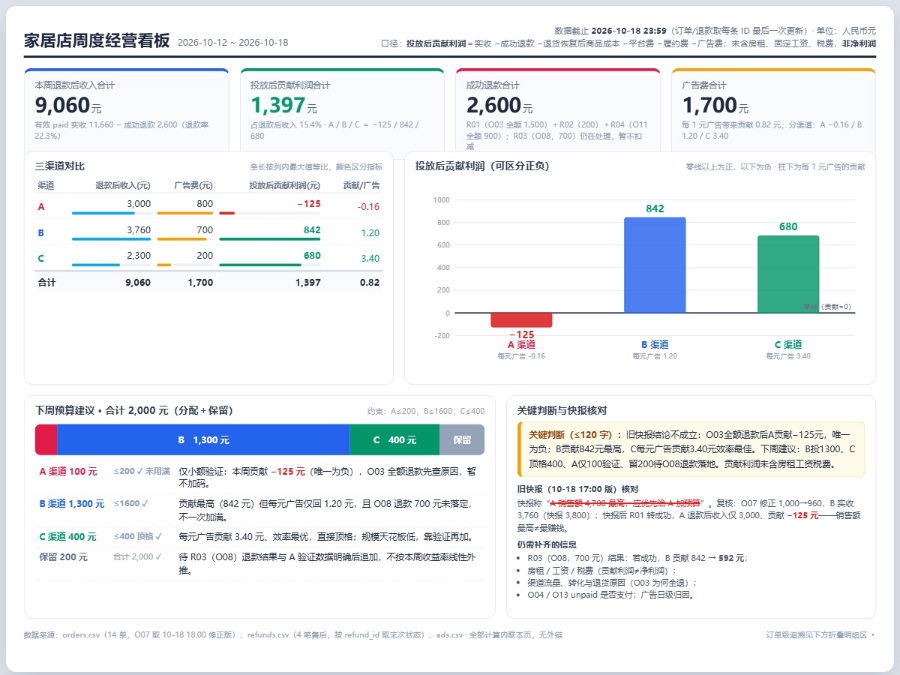
The metric cards, channel comparison, positive/negative profit chart, and budget recommendations are clearly sectioned, and A's loss is also correctly drawn below the zero line. Order deduplication, the evening amount correction, and successful refunds are all reflected in this week's totals.
The problem lies with O08. GLM 5.3 wrote the recoverable product cost of this order as 450 yuan, and this error will underestimate the impact of the pending refund.
Step 5 Preview:
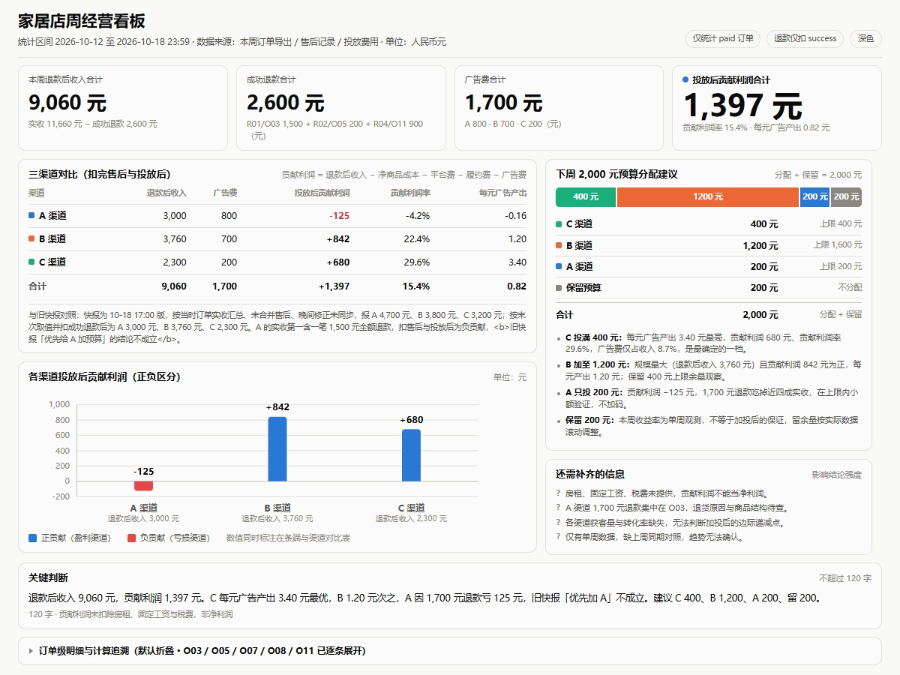
Step 5 Preview highlights the total contribution profit, and the five key orders also each have their calculation process. Under the current snapshot, refunds, cost recovery, and expense deductions are all handled correctly.
However, O08 still has a 700 yuan refund in process, and this will affect B's profit ranking.
Claude Opus 5:
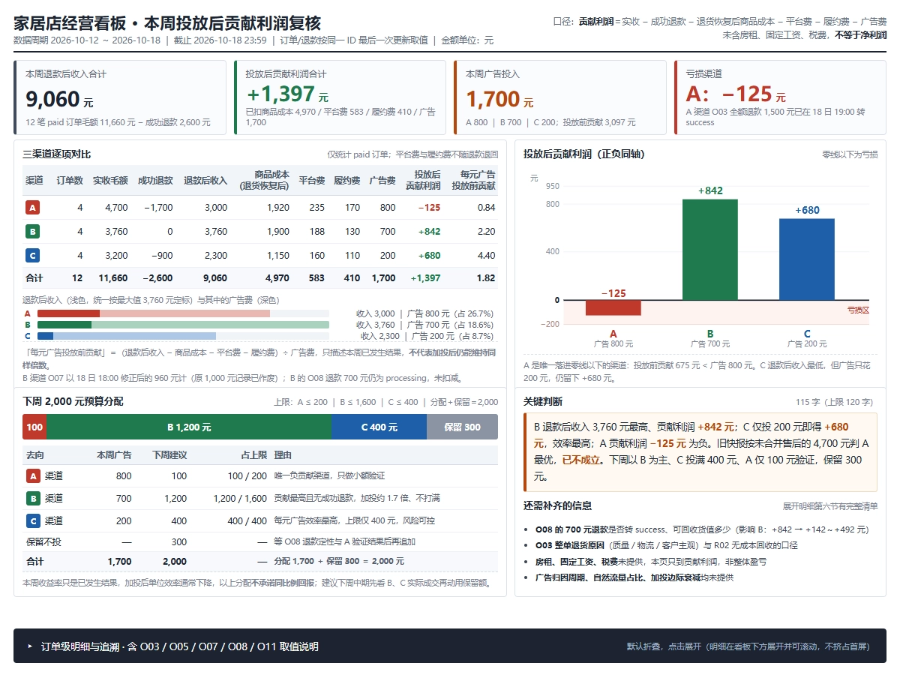
Claude Opus 5 lists the various costs and expenses more completely, and after expanding it, you can also see overwritten orders and old refund records, making it easier to verify why this number was chosen.
But in the collapsed explanation, it again wrote that A's post-refund revenue of 3,000 yuan is the lowest among the three channels. In fact, the lowest is C's 2,300 yuan.
Score for this round:
GLM 5.3: 81 points.
Step 5 Preview: 83 points.
Claude Opus 5: 84 points.
case 6 activity scheduling
The final case is a handmade workshop for 24 people. All three groups of trainees must first take the basic course and then the advanced course; teachers, classrooms, and transition times all have constraints, and in between they also need to attend a sharing session at a fixed time.
Reference materials:

Prompt: The original attachment is read-only; you must not modify, overwrite, delete, or rename the source file. After reading "资料.md", create a separate "plan.html" as the result file, and do not write or append anything to the input material. If the result filename already exists, append incrementing numbers such as _2, _3 after the filename, and do not overwrite the existing result. When verifying, use the newly generated result file, and when delivering, clearly provide its filename or path.
Task requirements: Based on the attached 资料.md, directly provide the final executable schedule for this workshop. The venue maintenance and backup classroom conditions are already in the material; there is no need to wait for further messages. Deliver plan.html, showing on one screen the three timeline groups, the time/teacher/room for each class, total cost, and balance. The schedule must satisfy the order, transitions, fixed sharing, resource constraints, and budget, and the 1200×900 core content must not scroll.
GLM 5.3:
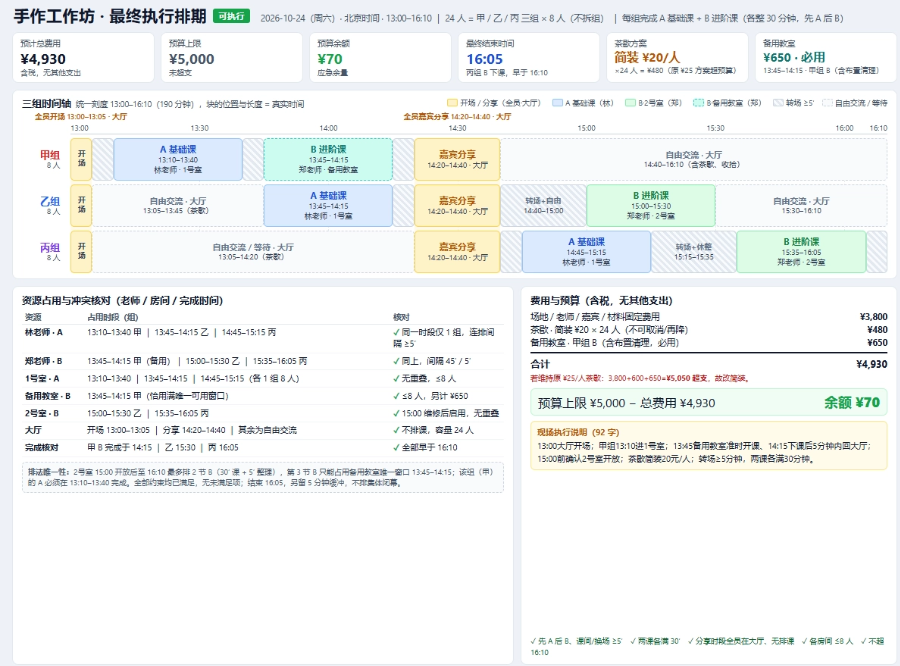
The GLM 5.3 version is quite clean. The three timelines are at the top, and teachers, rooms, and costs can be checked below. The opening, sharing, classes, and transitions are clearly distinguished, making information easy to find. It also clearly explains why the backup classroom must be rented and why the tea break needs to be downgraded.
But it schedules Group B in the hall for free interaction until 13:45, while the first class also starts at 13:45 in Room 1, missing the transition in between.
Step 5 Preview:
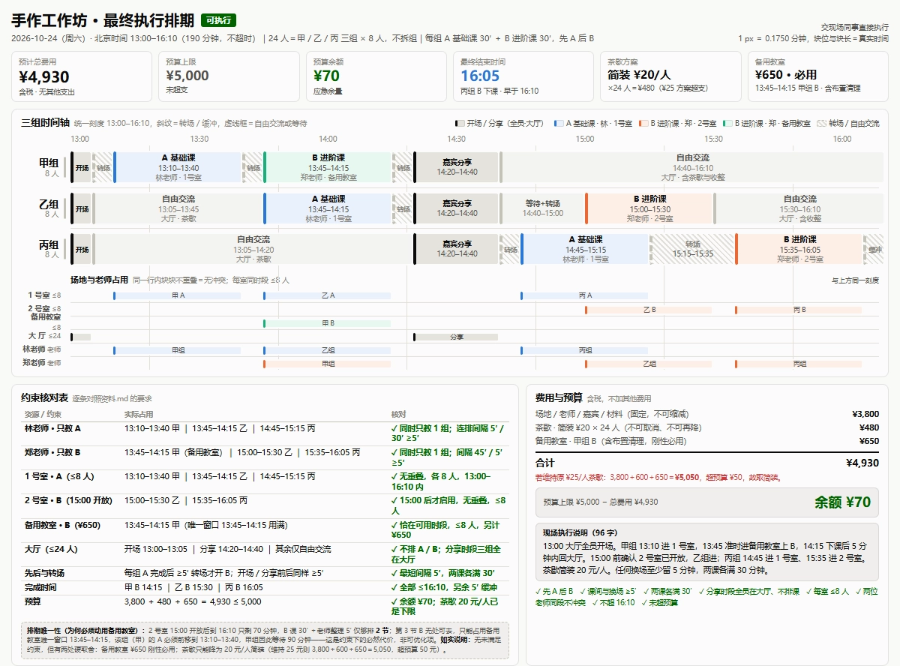
Step 5 Preview adds an extra layer of teacher and classroom occupancy timelines. You can check whether teachers have class conflicts and whether classrooms have overlapping occupancy by following the corresponding row, which is very practical for the person in charge of coordination. The classes and costs are all correct, and hovering the mouse also lets you view the complete time and location.
Group B likewise omits the transition before the first class.
Claude Opus 5:

Claude Opus 5's main image is the most eye-catching. The three groups each occupy a wide timeline, the class blocks are large, and the color distinctions are obvious. The lower right corner also lists the lead nodes, as well as matters such as booking classrooms, changing the tea break, and preparing materials.
However, there are concrete contradictions in the execution notes: Group B is fully scheduled to wait in the hall from 14:40–15:00, and then starts class directly in Room 2 at 15:00, with no transition explained. The hall is exactly at full capacity of 24 people from 14:40–14:45, but its own timeline already schedules Group C to leave the hall at this time.
Overall score:
GLM 5.3: 87 points.
Step 5 Preview: 87 points.
Claude Opus 5: 82 points.
02. Test summary
After testing six cases, Step 5 Preview's average score is 88.0 points, Claude Opus 5 is 87.5 points, and GLM 5.3 is 84.7 points. Overall, their performance is very close.
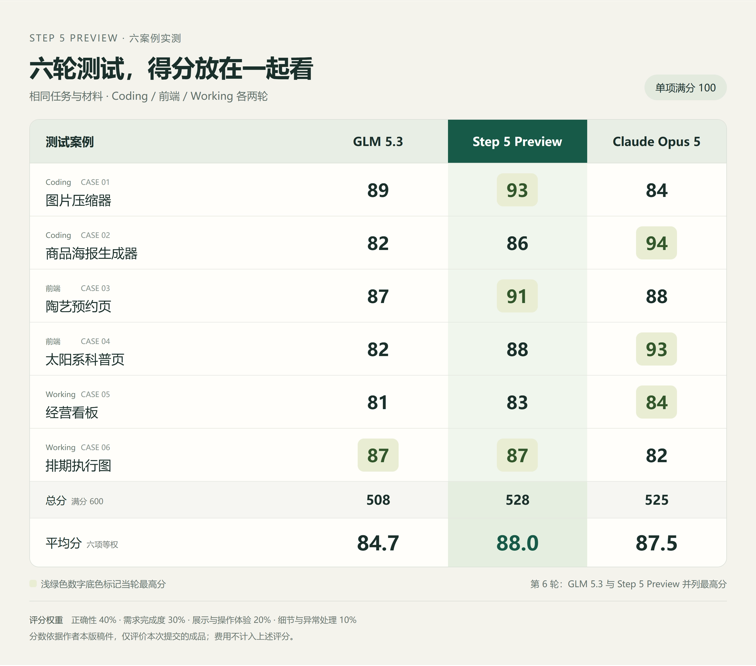
Step 5 Preview scored higher in the three rounds of image compressor repair, pottery booking page, and event scheduling.
Claude Opus 5 led in the three rounds of product poster, solar system popular science page, and business dashboard. In particular, it did better on batch use of posters and the visual presentation of the solar system.
GLM 5.3 can also complete most basic tasks, but the layout after adding products, the presentation of the specified first screen, and the calculation of the refund scenario lowered its score this time.
Based on my own experience using them, Step 5 Preview and Claude Opus 5 are not much different from GLM 5.3.
For me, the most important thing is still cost. Based on my actual cost for running the same cases this time,Step 5 Preview is about one-third of GLM 5.3 and one-eighth of Claude Opus 5。
03. Some sharing
I think model selection can be more pragmatic. Fixing a webpage, making a small tool, and organizing a business dashboard all have clear delivery requirements for these daily tasks. Running your own materials through them once and seeing whether the results are usable and how much still needs to be changed makes it easier to decide than just looking at leaderboards.
After trying Step 5 Preview, I am willing to keep using it, mainly because of the combination of results and cost. For individual developers, small merchants, or teams with limited manpower, if a first draft can be completed at a lower cost, they can try more layouts and add more features.
So, I suggest everyone keep a few fixed test cases for themselves. When a new model comes out, try it with the same materials, and also record the actual cost and number of revisions. Over time, you will gradually know which one is more suitable for your work.
As far as this experience goes, Step 5 Preview is already worth adding to my daily options. Those who want to try it can call it on the domestic and overseas StepFun open platforms, or try it in StepFu's Studio.
Original link:What level is StepFun Step 5 Preview really at? I did a horizontal comparison with Opus 5 and GLM-5.3