

What is Gaigaoya
Gaigaoya is a free online AI image editor focused on "conversational photo editing." Users describe their needs in Chinese or paint over marked areas, and it can remove passersby,change backgrounds, change clothing colors, edit text in images,remove watermarks. Gaigaoya includes free ID photo creation, batch watermark removal, e-commerce product images, HD restoration, and portrait beautification, covering practical scenarios such as one-inch and two-inch background color changes, pixel adjustment, and KB compression. It is suitable for e-commerce operators, new media professionals, designers, and individual users with no photo editing background, producing images quickly with zero barrier to entry.
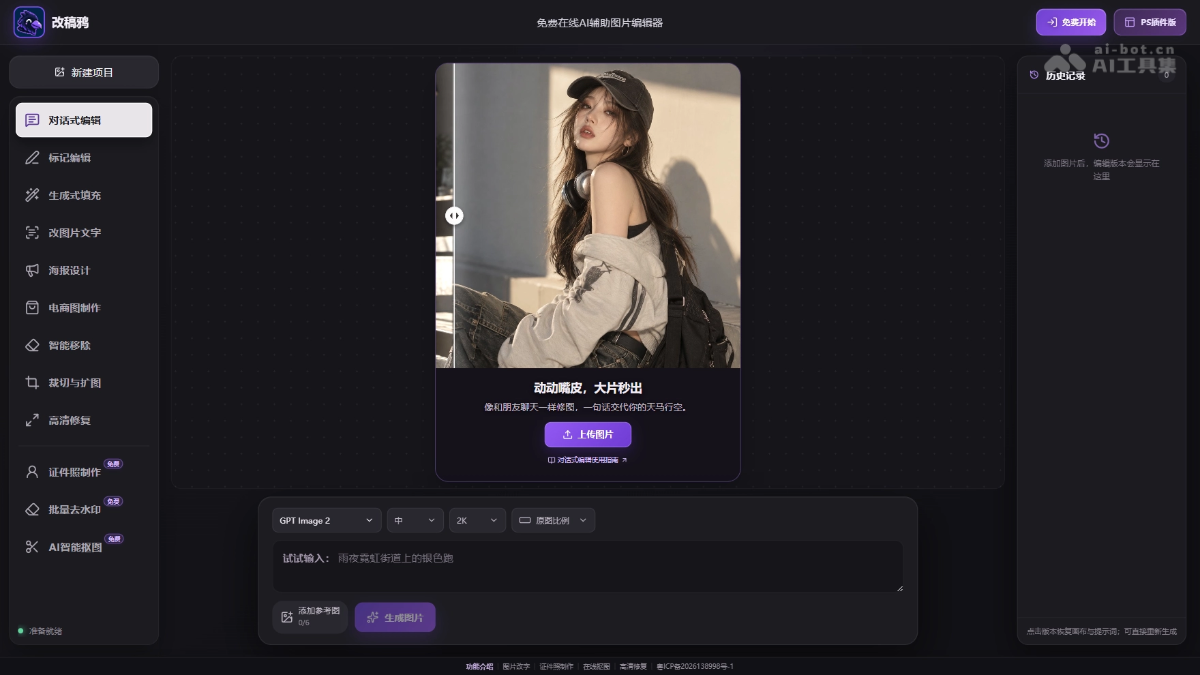
Main features of Gaigaoya
-
Conversational AI image editing: Describe your needs in one sentence in Chinese to remove passersby, change backgrounds, change clothing colors, and adjust lighting and atmosphere.
-
Markup editing and local modifications: After painting over the target area, enter your requirements and the AI processes only the specified range, suitable for retouching product or clothing details.
-
Generative fill and smart removal: Erase people, text, and clutter with automatic background completion, and also supports cropping and outpainting to adjust proportions.
-
Modify text in images: Paint over the text location on posters, menus, or e-commerce images and directly replace it with new content, with no need to redo the entire image.
-
Free online ID photo creation: Supports automatic cutout, free switching to white/blue/red backgrounds, and common sizes such as one-inch and two-inch plus pixel, KB, and DPI adjustments.
-
Free batch image watermark removal: Add multiple images at once and automatically identify and repair watermark areas (you must ensure you have lawful rights to use the images).
-
AI e-commerce image creation: Quickly create product main images, change backgrounds, remove clutter, and extend the frame, with no need to rebuild a photography setup.
-
HD restoration and portrait beautification: Improve the clarity of blurry images and naturally optimize skin tone, makeup, and facial dimensionality while avoiding excessive skin smoothing.
How to use Gaigaoya
-
Open the official website: Visit the Gaigaoya official website https://lovepsai.com/ to enter the Gaigaoya-AI-assisted editor homepage.
-
Choose a feature: Click the corresponding tool entry such as conversational editing, ID photos, or watermark removal according to your needs.
-
Upload an image: Upload the local image you need to process into the editor.
-
Enter modification requirements: Describe the modification requirements in Chinese in the input box, such as "remove the passersby in the background."
-
Or paint over the marked area: When precise modification is needed, use the brush to paint over the target location and then enter the requirements.
-
Wait for AI generation: The AI automatically processes the image, and the modified result will be available shortly.
-
Preview the result: Check whether the generated image meets expectations; if not satisfied, adjust the description and regenerate.
-
Download and Save: After confirming the result, download the processed image to your local device for use.
Core Advantages of Gaogaoya
-
Zero-Barrier Conversational Photo Editing: Describe your needs in Chinese like chatting to edit photos; no need to learn complex software, and even those without a design background can get started.
-
Core Features Free to Use: High-frequency features such as changing the background color of ID photos, adjusting dimensions, compressing KB, and removing watermarks are all free, reducing usage costs.
-
Full Coverage of Features and Scenarios: From removing passersby, changing backgrounds, and editing text to e-commerce main images and ID photos, it meets various photo editing needs in one stop.
-
Precise Control of the Editing Area: Supports brushing to mark local areas, and AI only processes the specified locations, avoiding accidental changes to other parts of the image.
-
Dedicated Toolchain for E-commerce: Generate product main images, replace backgrounds, and clean up clutter without setting up a photography studio, greatly saving on product shooting costs.
-
Natural and Realistic Portrait Processing: HD restoration and portrait beautification preserve real skin texture, avoiding the plastic look caused by excessive skin smoothing.
-
High Batch Processing Efficiency: Supports batch watermark removal for multiple images, automatically identifies watermark areas, and is suitable for processing large amounts of image materials.
Comparison of Gaogaoya with Similar Competitors
| Comparison Dimension | Gaogaoya (lovepsai.com) | Meitu Design Studio |
|---|---|---|
| Product Positioning | A free conversational AI image assistance editor | An AI-driven commercial design platform, leaning professional design |
| Core Interaction | Chinese conversation + brushing marks, zero barrier | AI tools + template editing, requires a certain design foundation |
| Charging Model | Core features are free (ID photos, watermark removal, etc.), AI retouching/outfit changes are paid enhancements | Membership subscription system; commercial materials and advanced features require payment |
| ID Photos | Free background color change, dimension/KB/DPI adjustment, photo paper layout | Supported; some size and layout features require membership |
| Watermark Removal | Free batch watermark removal, automatic recognition + manual brushing | Supports an eraser pen feature, mainly for single-image processing |
| E-commerce Scenarios | Product main images, background replacement, clutter cleanup, no photography studio needed | Rich e-commerce templates, but more focused on poster design rather than photo editing |
| Conversational Editing | Supported (remove passersby, change background, change color, etc.) | Has AI image editing capabilities, but the conversational level is relatively weak |
| Text modification | Paint over to replace text in the image | Requires editing via text layers, not direct AI image editing |
Application scenarios of Gaogaoya
- E-commerce product image creation: Merchants can skip building a photography studio and, with one click, replace product backgrounds, clean up clutter, and generate display scenes in different styles, quickly producing main image and detail page materials.
- Social media content creation: New media operators and bloggers use conversational editing to remove passersby, change backgrounds, and adjust lighting atmosphere, or to outpainting and edit text on posters and accompanying images, efficiently producing eye-catching content.
- Emergency ID photo creation: When an ID photo is urgently needed for job applications, exams, or visas, free automatic cutout, switching to white/blue/red backgrounds, and adjusting dimensions, KB size, and DPI according to specifications such as 1-inch and 2-inch, for direct use in electronic submission or printing.
- E-commerce/promotional material text replacement: When prices, dates, and event information on menus, posters, and promotional images need to be updated, painting over the original text can replace it with new content, saving the time and cost of redesigning the entire image.
- Old photo restoration and portrait optimization: Individual users restore blurry, low-resolution old photos or selfies, performing HD enhancement, skin tone evening, and makeup optimization while preserving real skin texture, suitable for refreshing treasured photos or finely retouching resume photos.


