

What is PixoLet
PixoLet is an AI product image and video creation tool launched specifically for e-commerce sellers. Powered byGPT-image-2.5model, users only need to upload one product image and describe their needs in natural language to quickly generate product main images, scene images,model images, detail page images, marketingposters, and viral product replication images, and other full sets of e-commerce materials. PixoLet supports multi-turn conversation modifications, can retain more than 90% of product details, and renders text clearly. PixoLet is especially suitable for small and medium-sized sellers with fast product launches, insufficient graphic design resources, or those who want to test images at low cost.
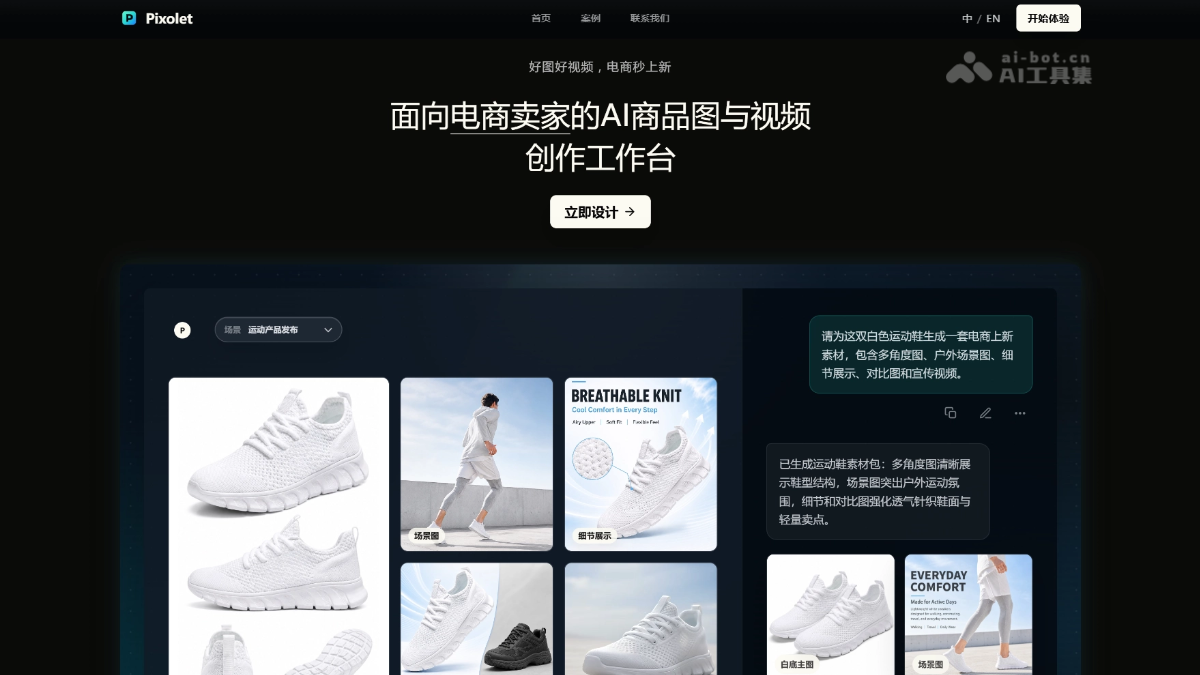
PixoLet's main features
-
Product main image generation: Upload a product image to quickly generate high-quality e-commerce main images, replacing traditional graphic design shooting and retouching.
-
Model display images: No real-person shooting required; automatically generate model wearing images, with support for specifying gender, scene, full-body or half-body close-ups.
-
Viral product replication: Upload a viral image + your own product image to replicate the same eye-catching product image.
-
Multi-turn conversation modification: Continue adjusting based on the previous version, support changing models, changing backgrounds, adding or removing elements, and changing copy fonts, saying goodbye to repeated random draws.
-
High-fidelity details: Retains more than 90% of the lighting, shadow, and material texture details of the reference image, avoiding generated images that are "not as described".
-
Clear text rendering: Labels and small text in the image are basically clear and recognizable, with no need for manual secondary text retouching.
-
Multi-size adaptation: Provides ratios such as 1:1, 3:2, 4:3, 16:9, and 9:16, as well as 1K/2K/4K clarity, adapting to different display positions on various platforms.
How to use PixoLet
- Visit the official website: Visit the PixoLet official website https://www.pixolet.ai/ , register an account to log in and use it.
- Upload reference image: Upload a product image; white-background images or casually taken photos are both fine.
- Describe your needs: Directly say the image you want in natural language, such as "generate two foreign model images, full-body and half-body close-ups".
- Wait for generation: Wait for AI to automatically fill in the details.
- Multi-turn fine-tuning: If unsatisfied, directly continue stating modification requests based on the previous version, such as "change to an Asian female model", "partially change the background", or "modify the copy".
- Select specifications and generate: Choose aspect ratios such as 1:1 and 16:9 and 1K/2K/4K clarity as needed.
- Download and use: After confirming the effect, download it and use it for main images, detail pages, posters, and other platform materials.
PixoLet's core advantages
- Zero-threshold onboarding: No need to know PS, no need to write complex prompts; just describe your needs in plain language to start creating images.
- Fast image generation: Upload one product image to quickly produce a full set of e-commerce materials, catching up with new product listings and viral product windows.
- Stable multi-turn editing: Supports continuous modifications based on the previous version, saying goodbye to "change one place and collapse the whole image" and repeated random redraws.
- High-fidelity details: Can retain more than 90% of the lighting, shadow, and material texture details of the reference image, so generated images are not distorted and the goods match the image.
- Clear text renderingLabels and small text in the image are basically clear and recognizable, with almost no need for manual secondary modification.
- Full-scenario coverage: One-stop solution for main images, scene images, model images, detail pages, posters, and viral hit replication, with multi-size adaptation for various platforms.
PixoLet's Comparison with Similar Competitors
| Comparison Dimension | PixoLet | Meitu Design Studio |
|---|---|---|
| Product Positioning | An AI image-making tool built specifically for e-commerce sellers, focusing on "generating a complete set of materials from one image" | A comprehensive AI design platform covering multiple design scenarios such as e-commerce, posters, and social media |
| Underlying Model | Powered by GPT-image-2.5, with a strong world knowledge base and better natural language understanding | Based on Meitu's self-developed AI model, with deep accumulated expertise in portrait beautification |
| Ease of Use | No prompt engineering skills needed; plain language descriptions are enough | Mainly template-based operation; some functions still require manual design adjustments |
| Multi-round Modification | Supports conversational continuous modification; changing backgrounds/models/copy without breaking down | Mainly template application and local tools; continuous conversational image editing is weaker |
| Product Detail Retention | Retains over 90% of details in lighting, shadows, and material textures | Focuses on portrait beautification; product detail restoration is not a core selling point |
| Text Rendering | Small text and labels in images are clear and recognizable | Text relies on templates or must be added manually |
| Viral Hit Replication | Supports direct replication by uploading viral hit images + product images | No directly corresponding viral hit replication function |
PixoLet's Application Scenarios
-
Cross-border Apparel New Arrivals: Uploading white-background images can generate on-model images with foreign models, saving cross-border sellers high model shooting costs.
-
Urgent Image Creation for Major Promotions: During major promotions such as Double 11 when designer schedules are tight, sellers can quickly generate main images and posters on their own to catch the campaign timing.
-
Rapid Testing of Viral Hit Products: Upload competitor viral hit images and their own product images for replication, quickly producing materials in the same style for listing and click-through rate testing.
-
E-commerce Conversion of Factory Images: Reconstructs actual factory workshop photos into professional product scene images, helping 1688 factories transition to retail at low cost.
-
Omnichannel Material Distribution: Generates multiple specifications of images such as 1:1, 9:16, and 16:9 at once, meeting omnichannel placement needs for livestreams, short videos, detail pages, and more.


