

What is LightX2V Studio
LightX2V Studio is a one-stop AI creation platform from inspiration to production. The product started as a lightweight, high-performance open-source image and video generation inference framework, and is currently building an AI visual production platform that connects models, computing power, developers, and creators.
The platform integratesdigital humans、video generation、image creationand sound processing, coveringlip sync, text-to-video, image-to-video, character replacement, motion transfer,AI dubbingandvoice cloningand other creation stages.
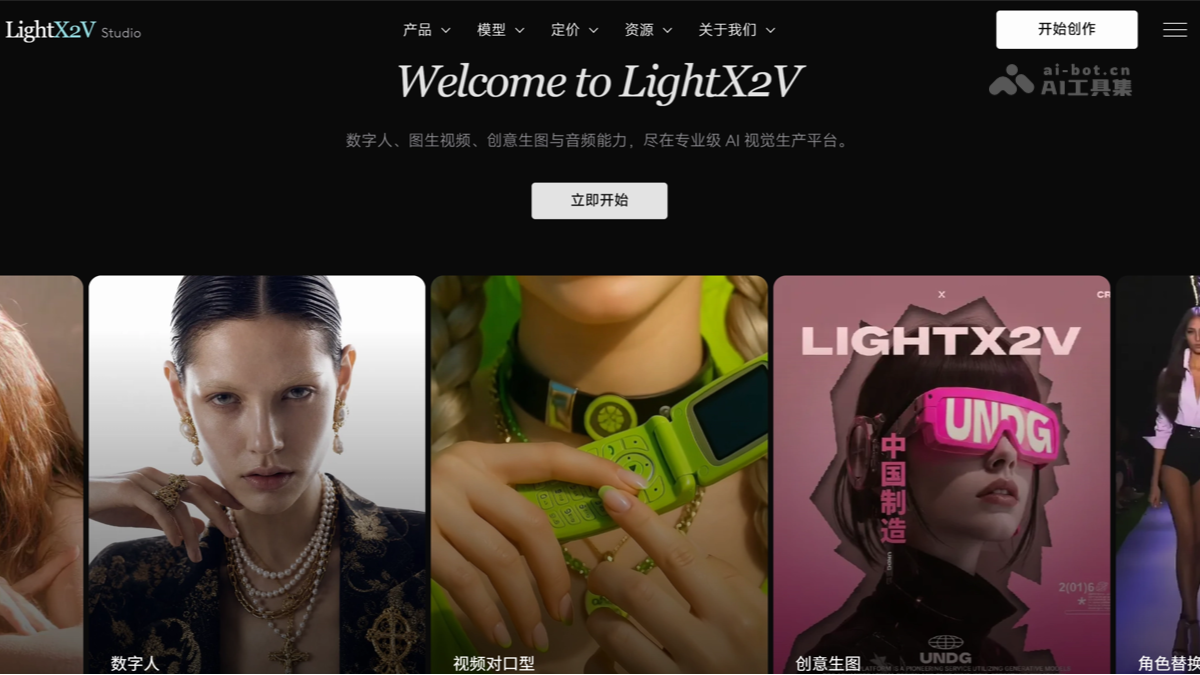
Main features of LightX2V Studio
- Multimodal Creation Agent
- LightX2V Agent can understand images, videos, audio, and text materials, and use natural language to complete script analysis, prompt writing, model invocation, and generation task orchestration. Specifically, it includes:
- Multi-task concurrent generation: Submit image, video, digital human, and voice tasks in the same conversation, and continuously view task progress.
- Material understanding and script creation: Analyze reference images or videos, and extract prompts, voiceover copy, and storyboard scripts.
- Workflow generation and modification: Automatically build a Canvas workflow based on creation goals, modify node parameters, and execute tasks.
- Continuous result reuse: Use already generated images, videos, or audio directly for the next task without re-uploading.
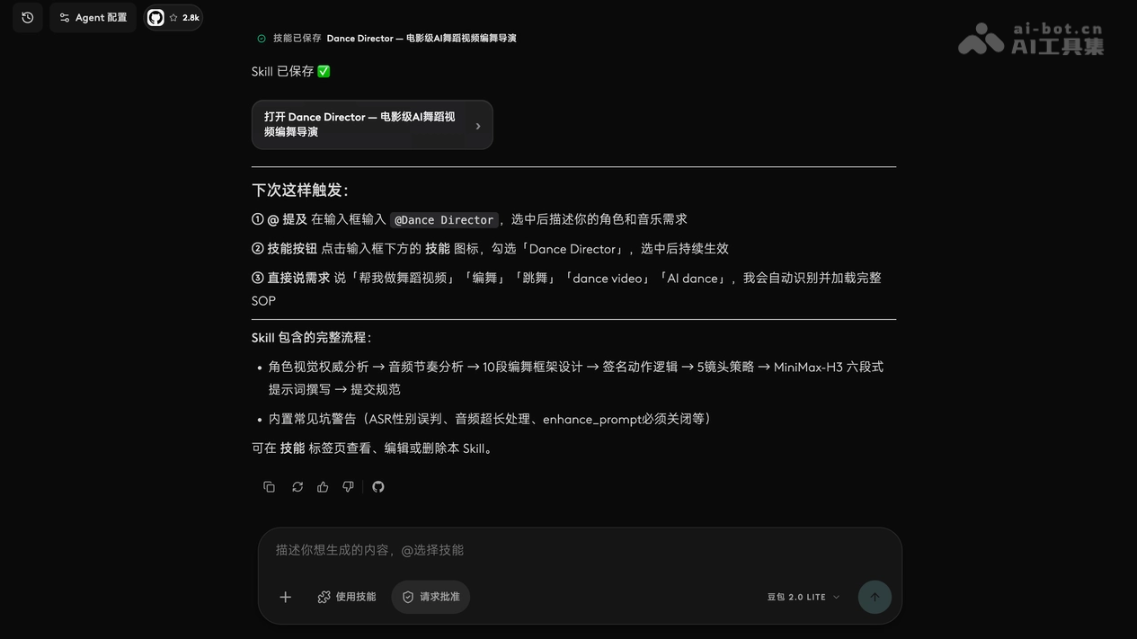
- Skill invocation and saving: Use platform presets, user-defined, or open-source Skills, and also save mature creation workflows as your own Skill.
- Creation preference memory: Record commonly used languages, aspect ratios, styles, timbres, and delivery methods to reduce repeated settings.
- For detailed features, see Introduction to LightX2V Agent
- LightX2V Agent can understand images, videos, audio, and text materials, and use natural language to complete script analysis, prompt writing, model invocation, and generation task orchestration. Specifically, it includes:
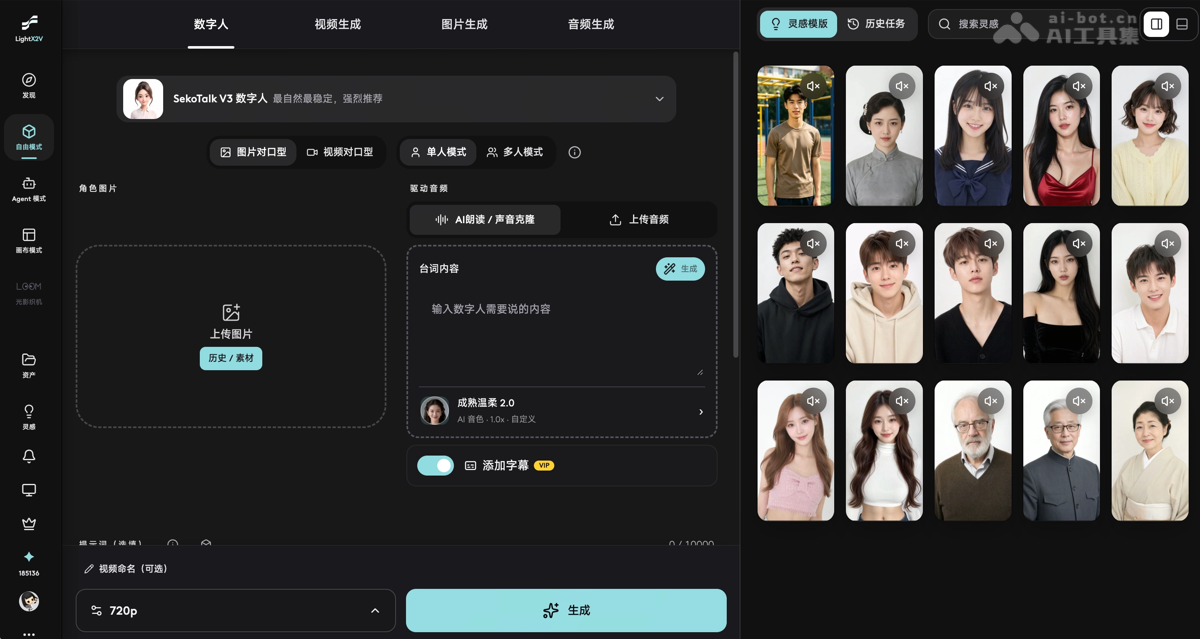
- AI digital human SekoTalk: Supports precise lip sync for single and multiple people, and can be used for digital human voiceovers, multi-person dialogues, podcasts, and digital human singing. A single segment can be up to 60 seconds, the platform has over 200 built-in timbres, and it supports multilingual dubbing. After generation is complete, you can extract frames and redo segments you are not satisfied with, without regenerating the entire video.
- Selected practical Skills: The platform provides curated practical Skills covering digital humans, product advertisements, short video creativity, and popular visual effects. Users can directly invoke Skills to replicate content structures, and can also modify the prompts, characters, products, and visual styles within them.
- Replicate the same style from a reference video: Enter a reference video URL, and the Agent will analyze the original video's shot structure, visual style, action rhythm, and content logic, then combine it with the characters, products, or scene materials provided by the user to regenerate a new work with a similar presentation.
- AI video generation: Supports text-to-video, image-to-video, first and last frame, and multi-keyframe generation. Users can choose different models, video ratios, durations, and resolutions according to their creation needs.
- Video creative processing: Offers character replacement, motion transfer, video quality enhancement, and control over character and visual style consistency. Suitable for creating ads, narrative short films, character performances, and batch content.
- AI Image Generation: Supports image output at up to 4K resolution, multi-reference image editing, character design sheets, infographics, and e-commerce product image creation.
- AI Voice Tools: Supports text-to-speech, AI dubbing, and voice cloning. Users can upload a piece of audio to extract the timbre, then use it for digital human presentations, video narration, and multilingual content creation.
How to Use LightX2V Studio
How Free Creators Use LightX2V Studio
- Visit the LightX2V Studioofficial website, register, and log in to your account.
- Choose digital human, text-to-video, image-to-video, image generation, or voice tools according to your needs.
- Enter prompts and upload character images, reference videos, or audio materials.
- Select parameters such as model, aspect ratio, duration, and resolution.
- Submit the generation task, preview the result, and then continue adjusting or download the finished product.
- For repetitive tasks, you can use Canvas to save workflows, or let the Agent analyze materials, write prompts, and arrange generation steps.
How Agent Developers Use LightX2V Studio
- Open the LightX2V API and Skills documentation, create an API Key, and save it properly.
- Install the LightX2V Skill according to the documentation, so that agents compatible with Agent Skills, such as Codex, can connect to LightX2V.
- Use natural language to describe generation requirements, and the Agent will call the LightX2V API to submit, query, and download image or video tasks.
- Before formally submitting, you can call the quotation API to estimate credit consumption, and then obtain generation results according to task status.
- Note that API tasks are currently billed at 2 times the credit rate of the web version, and the specific consumption is subject to the real-time quotation before submission.
How Local Deployment Players Use It
- The LightX2V open-source inference framework can be obtained from GitHub or Hugging Face .
- Developers can follow thedeployment documentationto configure the runtime environment, download model weights, and start the local inference service. This method is suitable for users who have a graphics card and deployment experience and wish to manage models, computing power, and generated data themselves.
Core Advantages of LightX2V Studio
- Detailed Editing in Free Mode: Users can choose models themselves, adjust prompts, aspect ratio, video duration, resolution, and generation parameters, and continue modifying based on the results.
- Build a Dedicated Skill Repository: Commonly used prompts, parameter combinations, and creative workflows can be saved as Skills. In the future, you only need to issue instructions in natural language to call them repeatedly.
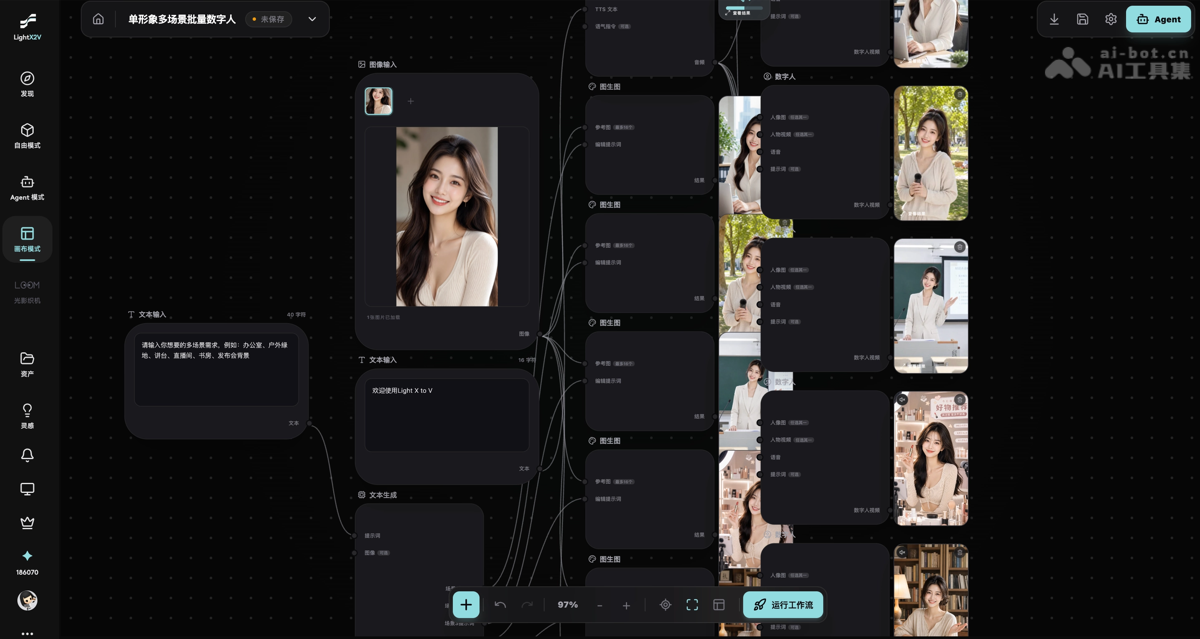
- Batch Generate Multi-Scenario Digital Humans from a Single Image: After uploading one character image, you can change the script, voice, language, background, and video aspect ratio to batch generate digital human content for different scenarios.
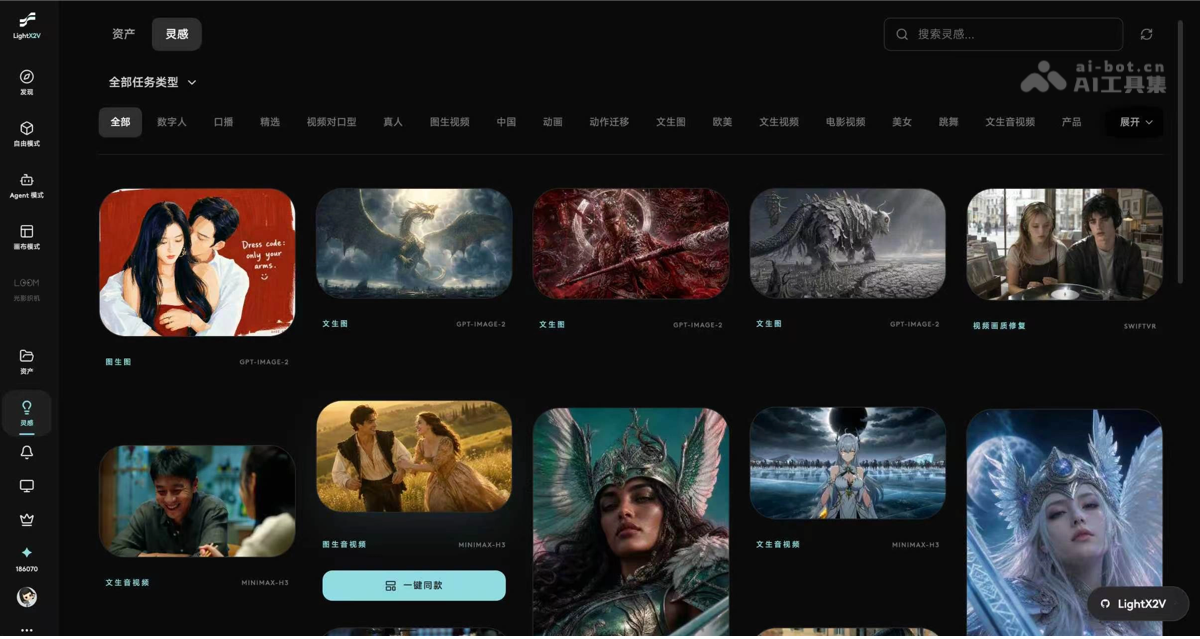
- One-Click Same-Style Creation from the Inspiration LibraryThe platform inspiration library provides digital human, advertising, short video, and visual creative cases. Users can select a case and replace the character, product, or text assets to generate similar content.
LightX2V Studio Product Pricing
LightX2V Studio offers a free trial, monthly membership, quarterly membership, and annual membership. Credits for different plans are issued monthly; quarterly and annual plans are one-time payments and do not auto-renew.
- LiteProvides 15,000 credits per month at ¥29/month. Suitable for self-media and everyday creators, supporting up to 3 active tasks, 10 cloned voices, 120-second digital human tasks, 20-second character replacement, 120-second video quality restoration, Canvas mode, and two-person podcasts
- StandardChoose from 30,000, 50,000, 110,000, or 175,000 credits, corresponding to prices of ¥59, ¥99, ¥199, and ¥299/month respectively. Supports up to 6 active tasks, 30 cloned voices, 300-second digital human tasks, 30-second character replacement, 300-second video quality restoration, Canvas mode, API access, and two-person podcasts.
- ProfessionalProvides 300,000 credits per month at ¥499/month. Supports up to 12 active tasks, 100 cloned voices, 300-second digital human tasks, 60-second character replacement, unlimited-duration video quality restoration, and includes Canvas mode, API access, audio generation, and two-person podcasts.
LightX2V Studio Competitor Comparison
| Comparison Dimension | LightX2V Studio | LibTV(LiblibAI) |
|---|---|---|
| Product Positioning | Evolved from a lightweight, high-performance open-source inference framework, connecting models, compute, Agents, and creative tools, covering the complete AI visual production chain for digital humans, video, images, and audio. | Professional AI video creation platform, "one-stop AI video factory," focused on the single category of video |
| Core Interaction | Free mode for fine-grained control, Agent natural language orchestration, and Canvas reusable workflows for collaborative creation. From inspiration analysis and content generation to batch delivery, everything can be completed on the same platform. | Infinite canvas + node-based workflow, dual entry design for humans and Agents |
| Digital Human Capabilities | SekoTalk supports precise lip sync for single and multiple people, digital human singing, and multilingual spoken delivery, with over 200 built-in voices, a single shot up to 60 seconds, and the ability to extract frames from local segments and redo them. | No standalone digital human product line |
| Video Generation | Supports text-to-video, image-to-video, first and last frame, and multi-keyframe generation, and provides character replacement, motion transfer, quality enhancement, and multi-model scheduling capabilities. | Aggregates 30+ mainstream models (Seedance 2.0, Kling 3.0, Wan 2.6), with engines that can be switched freely |
| Series Episode Creation | Through Agent preference memory, exclusive Skills, and Canvas workflows, it locks in characters, voices, styles, and generation parameters, supporting single-character multi-scene, series content, and batch digital human production. | Supports long-video project-based management, not an automatic连贯 mode for multiple episodes |
| Consistency/Character Control | Combines multiple reference images, first and last frames, multiple keyframes, and consistency control to support cross-shot character and style consistency, and can accomplish character replacement and motion transfer. | 3D director's console, multi-camera nine-grid, lighting and camera movement, character three-view, and 20+ film-grade features |
| Image/Sound | Supports up to 4K image generation, multi-reference image editing, infographic and e-commerce product image creation, while also providing text-to-speech, AI dubbing, and voice cloning, covering both visual and sound production stages. | Coverage through integrated models (Midjourney V7, Mureka, etc.), not self-developed |
| Workflow Reuse | Supports platform presets, custom and open-source Skills. Mature processes can be saved as personal exclusive Skills and repeatedly invoked through natural language, gradually building your own creative capability library. | Node workflows can be saved as templates, Skill Hub has over a hundred director-level Skills |
| Developer/Enterprise Services | Simultaneously provides an open-source inference framework, generation API, Agent Skill, and enterprise private deployment, covering individual creation, developer integration, and enterprise-scale production. | Cloud API + Skill interface (callable by OpenClaw), private deployment not supported |
Application Scenarios of LightX2V Studio
- Short Video Creation: Generate talking-head and narrative videos, helping creators reduce shooting costs and improve update efficiency.
- E-commerce Marketing: Create product images and sales videos, enhancing product display effects and driving sales conversion.
- Self-media Operations: Produce daily content in batches, ensuring stable and high-frequency updates across multi-account matrices.
- Brand Marketing: Create digital human endorsements and brand promotional videos, unifying visual tone and expanding communication reach.
- Content Going Global: Generate multilingual digital human videos, achieving low-cost localized distribution of content in global markets.


