

What is AgnesCode
AgnesCode is a desktop Agnes AI launched by AI codingworkbench that supports Mac and Windows. AgnesCode connects local projects, multi-model scheduling, and tool extensions through a single input box, offering intelligent/expert dual modes, Skills capability packaging, and MCP app connections. It covers the entire process from requirement input to deliverable output, reducing tool switching and letting AI integrate directly into the daily development environment.
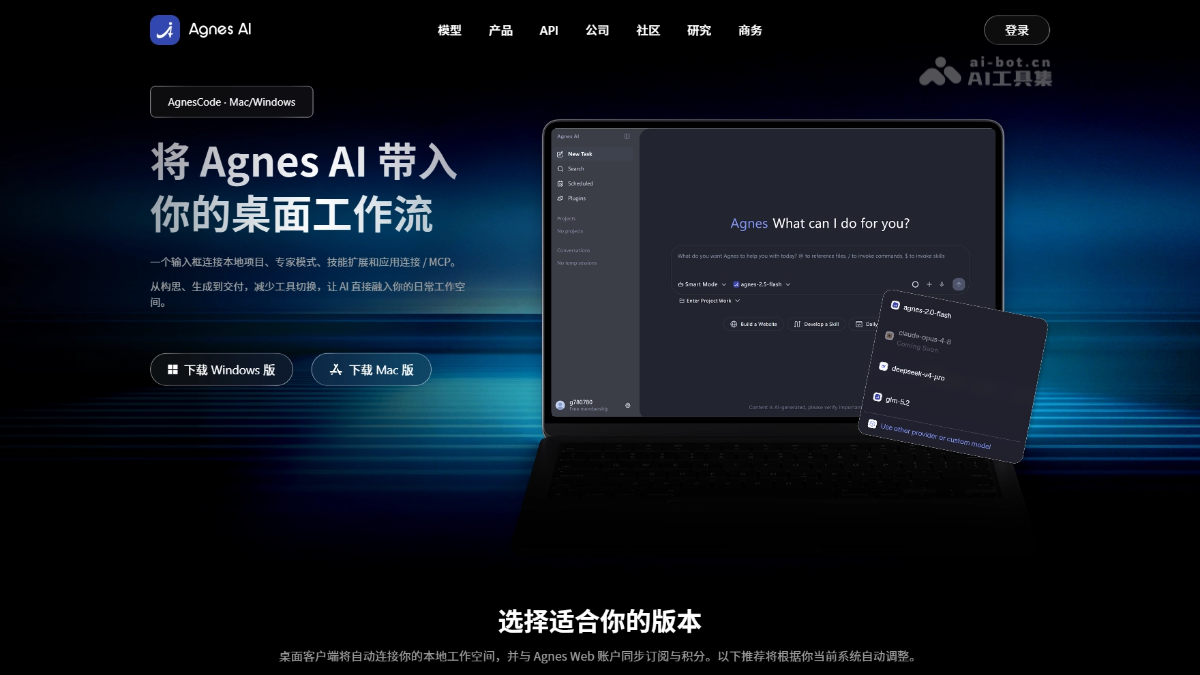
AgnesCode's main features
- Single input box interaction: Initiate tasks through a natural language input box; the system automatically understands requirements, breaks down steps, and calls tools to execute them.
- Intelligent/expert dual modes: Intelligent mode automatically selects the execution path; expert mode opens up control permissions for models, parameters, tools, and context.
- Local project space: Organize folders, context, and generated outputs independently by project, preventing results from being scattered across chat sessions.
- Multi-model scheduling: Supports free switching between Agnes's own models and external models, with automatic routing to balance generation quality, response speed, and cost.
- Skills capability extension: Encapsulate standard operating procedures, industry knowledge, and toolchains into reusable capability packages, handed over to Agnes for automatic scheduling and execution.
- App Connect / MCP: Connect browsers, design tools, documents, spreadsheets, and internal systems, making the desktop a unified operation entry point.
- Centralized output management: Code, images, videos, documents, and other deliverables are uniformly archived, supporting continued editing, downloading, and sharing.
How to use AgnesCode
- Download and install: Visit the AgnesCode official website https://agnes-ai.com/agnescode , download the version for your system, and complete the installation.
- Log in to your account: Log in with your Agnes account; subscriptions and credits remain consistent with the Web version.
- Authorize directories: On first launch, select a local workspace and grant access to the project folder.
- Enter requirements: Describe the development task in natural language in the input box; the system automatically breaks it down and calls tools.
- Select mode: Intelligent mode executes automatically; expert mode allows manual switching of models and adjustment of parameters and context.
- View outputs: Code, documents, and multimedia outputs are automatically archived to the project space, supporting continued editing and sharing.
AgnesCode's core advantages
- Local project space: Organize folders, context, and generated outputs independently by project, preventing results from being scattered across chat sessions.
- Intelligent/expert dual modes: Intelligent mode automatically selects the optimal execution path; expert mode opens up deep control permissions for models, parameters, and tools.
- Multi-model scheduling: Supports free switching between the Agnes series and external models, with automatic routing to balance generation quality, response speed, and invocation cost.
- Skills capability extension: Encapsulate standard operating procedures and industry knowledge into reusable capability packages, handed over to Agnes for automatic identification, scheduling, and execution.
- MCP ecosystem connection: Access browsers, design tools, documents, and internal systems through App Connect, making the desktop a unified operation entry point.
- Secure and controllable: Pre-confirmation for sensitive operations, strictly controllable access scope for local projects, and complete audit records retained for key changes.
Comparison of AgnesCode with Similar Competitors
| Dimension | AgnesCode | Claude Code |
|---|---|---|
| Product Form | Standalone desktop workbench, supporting both Mac and Windows. | Terminal/desktop command-line tool, deeply integrated with the Claude ecosystem. |
| Interaction Entry Point | A single natural language input box that automatically decomposes tasks and schedules tools for execution. | Terminal conversational interaction, performing file-level operations through commands and the model. |
| Local Projects | Independent project spaces manage files, context, and artifacts, avoiding results being scattered across sessions. | Directly reads and writes the local file system, with project context carried continuously along with the session. |
| Model Strategy | Supports free switching between the Agnes series and external models, with automatic routing to balance quality and cost. | Only supports the Claude series of models, with top-tier capabilities but no external model options. |
| Extension Capabilities | Skills encapsulate standard processes and toolchains, while App Connect / MCP connects to external systems. | Built-in rich tool invocation, capable of executing terminal commands and batch file reading and writing. |
Application Scenarios of AgnesCode
- Daily Coding: Describe requirements in the input box to automatically generate code snippets, function implementations, and unit tests, reducing manual writing.
- Bug Fixing: After importing an existing project, describe the abnormal symptoms; the model quickly locates the root cause and generates a fix patch, which can be verified locally.
- Cross-file Refactoring: Coordinate modifications to interfaces and calling logic across a dozen interdependent files, maintaining consistency in the project structure.
- Prototype Development: Build a runnable web application or tool from scratch, with artifacts automatically archived to the project space and verifiable by double-clicking.
- Team Collaboration: Share project context and deliverables through a unified account system, maintaining consistency in multi-person development environments.

