

What is agent-browser
agent-browser is a browser automation CLI tool for AI Agents launched by Vercel Labs. It is written in native Rust and directly controls a real Chrome browser based on the Chrome DevTools Protocol (CDP). Through a compact accessibility tree Snapshot and Ref reference mechanism, the tool provides LLMs with context-efficient web interaction capabilities, supporting 50+ browser operation commands, multi-session isolation, cloud browser access, and a real-time observability Dashboard.
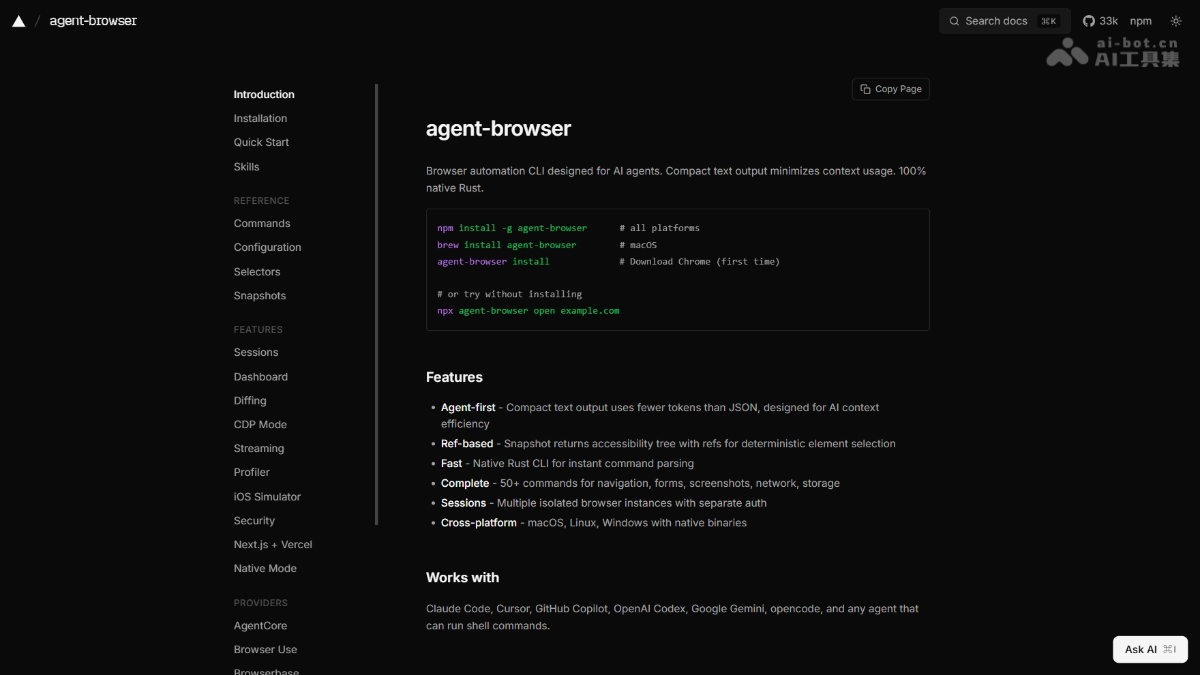
Main features of agent-browser
-
Snapshot accessibility tree capture: Outputs a compact web page accessibility tree structure, with deterministic Ref references such as
@e1、@e2, for AI to precisely locate elements. -
Ref-driven interaction: Executes operations such as clicking, filling, scrolling, and screenshotting based on the Ref references returned by the Snapshot, without the need to repeatedly query the DOM.
-
50+ browser operation commands: Covers complete browser control capabilities such as navigation, forms, mouse, keyboard, clipboard, network interception, tab management, and PDF export.
-
Semantic element location: Supports finding and operating elements through semantic methods such as ARIA roles, text content, labels, placeholders, and alt text.
-
Multi-session isolation: Supports running multiple browser sessions in parallel, each with independent cookies, storage, authentication, and navigation history.
-
Network monitoring and interception: Can intercept, block, and mock network requests, supports HAR recording, and filtering requests by resource type, status code, and method.
-
Screenshots and visual Diff: Supports full-page/viewport screenshots, screenshots with numbered annotations, pixel-level visual comparison, and Snapshot text Diff.
-
React / Web Vitals introspection: Built-in React DevTools hooks can output the component tree, Fiber render records, Suspense boundaries, and performance metrics such as LCP/CLS/TTFB.
-
Real-time streaming and Dashboard: Pushes the browser viewport in real time via WebSocket, and the local Dashboard provides an activity stream, console output, and an AI Chat panel.
-
AI natural language control: Integrates with Vercel AI Gateway, supports
agent-browser chatto drive the browser to complete complex tasks with natural language instructions.
How to use agent-browser
-
Install the CLI: Execute
npm install -g agent-browserto globally install the native Rust binary. -
Initialize the browser: Run
agent-browser installto automatically download Chrome for Testing, or reuse an existing Chrome/Brave installation. -
Open the target page: Execute
agent-browser open example.comto launch the browser and navigate to the target URL. -
Get the page Snapshot: Run
agent-browser snapshot -ito output the interactive element accessibility tree and Ref references. -
Perform interactive operations: Use Ref references to execute operations such as
agent-browser click @e2、agent-browser fill @e3 "test@example.com". -
Screenshot or export: Execute
agent-browser screenshot page.pngoragent-browser pdf report.pdfto save the result. -
Close the session: Run
agent-browser closeto end the current browser session.
Core advantages of agent-browser
-
AI Context Efficiency First: Compact text output drastically reduces LLM context usage compared to JSON or full DOM, designed specifically for Agent workflows.
-
Real Browser Anti-Detection: Operates a real Chrome via CDP instead of a headless browser, naturally carrying user profiles and reducing the probability of being blocked by risk controls.
-
Zero Node.js Dependencies: Pure Rust native binary, no Playwright or Node runtime required, lightweight installer and extremely fast startup.
-
Cross-Platform Native Support: Provides native compiled versions for all platforms: macOS (ARM64/x64), Linux (ARM64/x64), Windows (x64).
-
Enterprise-Grade Security Mechanisms: Offers optional security layers including encrypted authentication vault, content boundary markers, domain whitelist, action policy files, sensitive operation confirmation, and output length limits.
-
Seamless Cloud Browser Integration: Supports one-click integration with cloud browser infrastructure such as Browserless, Browserbase, Browser Use, Kernel, AWS AgentCore, and supports Serverless deployment.
agent-browser project address
- Project Website:https://agent-browser.dev/
- GitHub Repository:https://github.com/vercel-labs/agent-browser
Comparison of agent-browser with similar competitors
| Dimension | Agent-Browser | Browserbase Skills (browser) |
|---|---|---|
| Developer | Vercel Labs | Browserbase |
| Ecosystem Affiliation | Vercel Skills (skills.sh) | skills.sh / Claude Code Plugins / OpenClaw |
| Install Command | npx skills add vercel-labs/agent-browser |
npx skills add browserbase/skills --skill browser |
| Project Stars | 32.7K | 1,557 (entire skills suite) |
| Underlying Runtime | Rust native binary,zero Node.js | Node.js + browse CLI / stagehand CLI |
| Agent Invocation Method | Generates Shell commands (agent-browser open) |
Generates Shell commands (browse open / stagehand open) |
| Token Overhead | Extremely low (~300–500 tokens, loaded on demand) | Low (~1K–3K tokens, compact snapshot) |
| Context Mode | On-demand (expands Skill instructions when needed) | On-demand |
| Element Location | Ref reference (@e1, @e2) + semantic location |
Ref reference (@0-5) + semantic location |
| State Management | Rust Daemon with multi-Session isolation | Daemon persistent connection, supports local/remote switching |
| Browser Connection | Local Chrome/CDP direct connection | Local + cloud dual mode(browse env remote one-click switching) |
| Cloud Browser Integration | Requires manual Provider configuration (Browserbase/Kernel, etc.) | Native deep integration, stealth/proxy/captcha out of the box |
| Core Features | 5 built-in Skills (core/electron/slack/sandbox/agentcore), supports Electron desktop application control | 13 Skill suite(browser/fetch/search/functions/site-debugger, etc.), including AutoBrowse self-improvement loop |
| Anti-Detection Capability | Strong (direct connection to real Chrome CDP, multi-session isolation) | Extremely strong(cloud stealth mode, residential proxy, automatic CAPTCHA solving, fingerprint randomization) |
| Applicable Scenarios | Custom Agent foundation, Electron automation, multi-session parallelism, local privacy first | High-risk-control website automation, e-commerce/booking processes, requiring proxies and anti-bot, cloud elastic scaling |
agent-browser use cases
-
AI Agent web automation: Enabling LLMs to autonomously complete end-to-end web tasks such as information retrieval, form filling, data scraping, and competitor monitoring.
-
End-to-end testing and regression: Using Snapshot Diff and screenshot pixel comparison for UI regression testing, combined with semantic locators to reduce test fragility.
-
Headless data collection: Executing structured data scraping and report generation in CI/CD or Serverless environments (Vercel, AWS Lambda).
-
Mobile web testing: Controlling Mobile Safari via iOS simulators or real devices to verify mobile page compatibility and interaction flows.
-
Frontend performance monitoring: Automatically collecting Web Vitals metrics and React component rendering data, integrated into monitoring pipelines.


