
What is MiniMax Hub
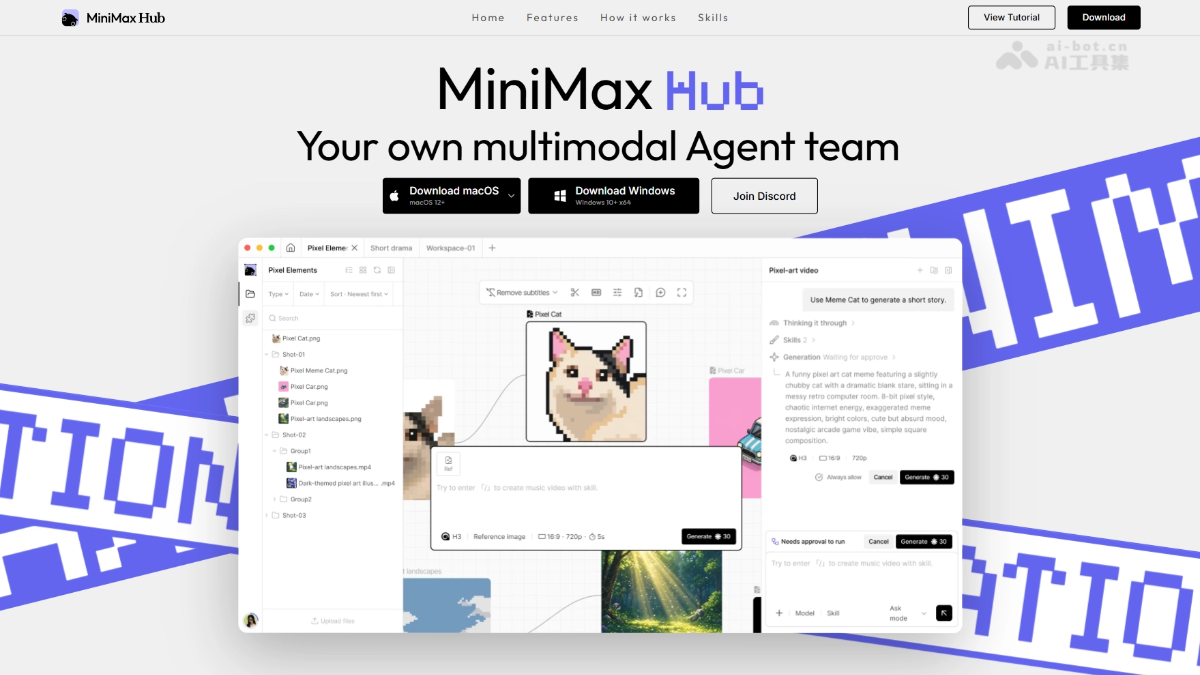
MiniMax Hub is a desktop AI creative workstation launched by MiniMax, positioned as a new-generation multimodal AI Agent platform. It integrates AI Agents, multimodal generation, a visual canvas, workflow views, and reusable Skills into a native desktop application, supporting full-chain creative production from copy and images to video and audio, and greatly shortening content production cycles through multi-Agent parallel collaboration.
MiniMax Hub's main features
-
Multimodal content generation and editing: Supports the creation and editing of images, video, audio, and text, covering the complete creative pipeline.
-
Multi-Agent parallel workflow: Built-in copywriting Agent, image Agent, video Agent, and audio Agent can process tasks simultaneously in parallel rather than serially.
-
Visual canvas and project management: Provides a central creative canvas where the progress of each Agent can be monitored in real time; the project navigator supports unified management, quick switching, and search across all creative projects.
-
Local file processing: Can directly read and process local file resources and integrate them into the creative workflow.
-
Multi-track timeline editing: The multi-track timeline at the bottom supports precise editing and adjustments.
-
Automatic packaging and multi-format export: Supports one-click export in multiple platform-adapted formats, completing the loop from idea to finished video.
-
Natural language driven: Complex creative workflows can be automated and executed through natural language descriptions.
How to use MiniMax Hub
-
Download and install the desktop client: Visit the MiniMax Hub official website https://hub.minimax.io , download the native desktop application for the corresponding system, and log in to your account after installation.
-
Create or open a creative project: Create a new project through the project navigator on the left, or quickly search and switch between existing projects to manage all creative assets in one place.
-
Enter the creative brief and requirements: In the project, describe the creative goals in natural language (such as the theme of a short video, the style of a brand poster, the mood of audio, etc.), and the system will automatically break down the tasks accordingly.
-
Configure a multi-Agent collaborative workflow: Enable the copywriting Agent, image Agent, video Agent, and audio Agent as needed, and set up parallel tasks so that multiple Agents work at the same time.
-
Import local material resources: Drag images, videos, audio, or documents from your computer directly into the workspace to serve as references or materials for Agent generation and editing.
-
Monitor progress in the visual canvas: View the generation status and output results of each Agent in real time in the central canvas area, intuitively controlling the overall creative progress.
-
Fine-tune with the multi-track timeline: Drag the generated materials into the multi-track timeline at the bottom for editing, alignment, duration adjustment, and layer arrangement.
-
Review and iterative optimization: Preview the finished video effect in a unified desktop environment, and for unsatisfactory parts, re-enter instructions to have the corresponding Agent partially redo them.
-
Automatic packaging and export for publishing: After confirming the finished video, export it with one click, choosing formats and specifications adapted to different platforms (such as Douyin, Xiaohongshu, Bilibili, etc.), completing the loop from idea to publishing.
MiniMax Hub's core advantages
-
End-to-end integration: Integrates creative generation, asset processing, editing, and export into a single desktop workspace, reducing the cost of repeatedly switching between different tools.
-
Parallel acceleration: Multiple professional Agents work simultaneously, significantly compressing the waiting time from creative brief to first draft.
-
Native desktop experience: Designed for heavy creators, providing stability, immersion, and performance that web tools struggle to match.
-
No-code workflow: Build complex multimedia creation pipelines without programming, lowering the professional threshold.
-
Free to use: A free option is currently available, suitable for individual creators and small teams to quickly validate ideas.
Comparison of MiniMax Hub's Similar Competitors
| Comparison Dimension | MiniMax Hub | Focal | ReelMind.ai |
|---|---|---|---|
| Product Positioning | Desktop AI creative workstation, multimodal creation Agent platform | AI film studio, end-to-end story-driven video creation platform | Multi-model aggregation AI video platform, AI Agent director |
| Developer | MiniMax (China) | FocalML | ReelMind |
| Product Form | Native desktop application (macOS / Windows) | Online platform + desktop client (Mac / Windows) | Cloud-based web platform, supports desktop workstation access but is not a native application |
| Multimodal Support | Native full-chain integration of copy, images, video, and audio | Video, images, audio, and speech, integrating external models such as Veo / Kling / Runway / Flux / ElevenLabs | Video, images, audio, and speech, aggregating 101+ AI video models |
| Agent Collaboration | Multi-Agent parallel workflow (copy / image / video / audio Agents working simultaneously) | AI-assisted script adaptation and chat-based editing, with no clear multi-Agent parallel architecture | Nolan AI Agent Director (the world's first AI Agent director) provides intelligent scene composition and narrative suggestions |
| Desktop Experience | Native performance, supports direct reading and processing of local files, emphasizing stability and immersion | Provides a desktop client, but core rendering relies on the cloud, with the local side mainly serving as the operation interface | Platform-agnostic design, can leverage local GPU acceleration, but is essentially a browser-first cloud architecture |
| Workflow Mode | Creative brief → intelligent task decomposition → multi-Agent parallel processing → merged editing → automatic packaging and export | Script / idea → AI-generated video → chat command editing → traditional timeline fine-tuning | Nolan director planning → model selection → video generation → multi-image fusion and fine-tuning |
| Local File Processing | Native support for local asset import, processing, and offline resource management | Supports importing external assets (such as clips generated by Kling, Hailuo, etc.) for mixed editing | Mainly based on cloud upload, while the desktop side can use local computing power to assist with previews |
Application Scenarios of MiniMax Hub
-
Industrialized short video production: Input a creative brief, and multiple Agents collaborate to complete the script, storyboard, voiceover, and editing, quickly delivering the final video.
-
Full-service brand marketing: Based on the same brand brief, simultaneously produce posters, videos, copy, and adapted assets for each platform.
-
Social media matrix operations: Batch-generate differentiated content for multiple platforms with a unified style and tone.
-
Education and knowledge monetization: Automatically convert course handouts into multimedia courseware with voiceover and illustrations.
-
Team collaborative creation: Multiple people can view Agent progress and collaboratively review footage in a unified desktop environment.


