

What is Impeccable
Impeccable is an open-source AI front-end design skill pack (Apache 2.0 license) created by Paul Bakaus. It is not a component library or CSS theme, but an "AI design vocabulary layer." Through 7 domain reference files, 23 slash commands, and 25 deterministic anti-pattern rules, it teaches your AI to write real design code rather than cookie-cutter "AI slop" aesthetics. Supports 11+ mainstream AI coding tools including Cursor, Claude Code, Gemini CLI, Codex CLI, and more.
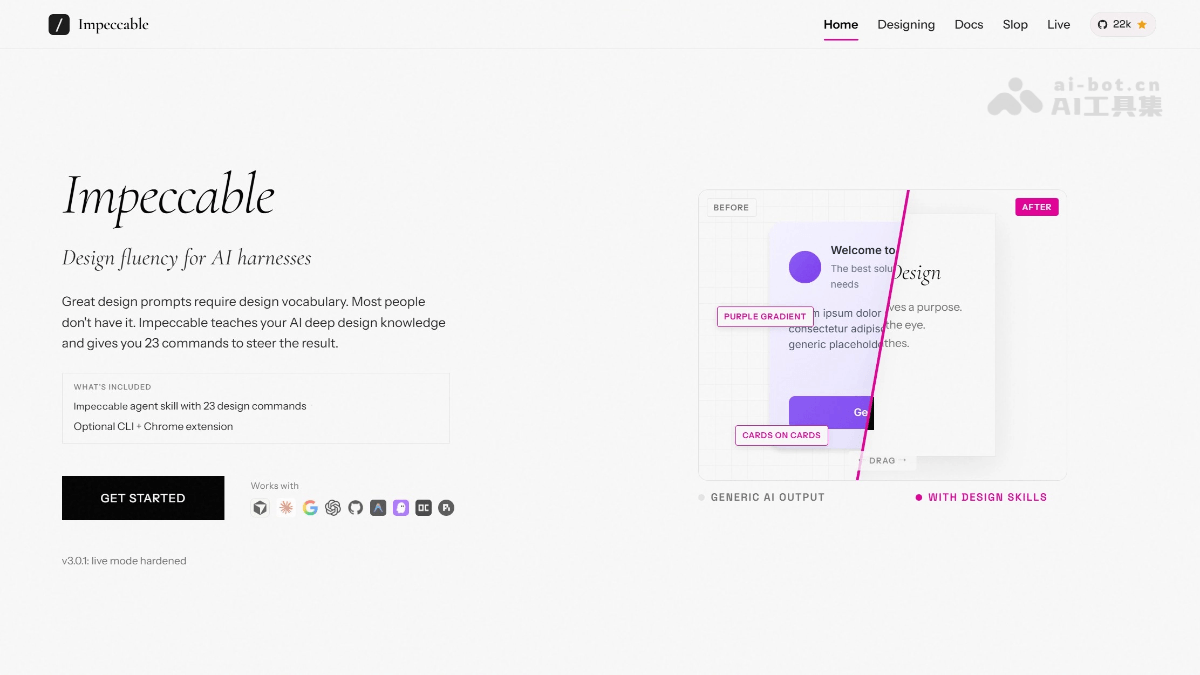
Main features of Impeccable
-
23 design commands: Form a shared design vocabulary with AI, covering
/polish(texture enhancement),/audit(design audit),/critique(heuristic scoring),/typeset(typography optimization),/colorize(color scheme optimization),/layout(layout spacing),/distill(structure simplification),/animate(motion optimization),/bolder//quieter(enhance/reduce visual emphasis),/shape(brand toolkit generation),/craft(design-to-code),/live(real-time browser iteration),/document(generate DESIGN.md),/harden(production readiness check), etc. -
7 in-depth reference files: Covering typography, OKLCH color and contrast, spatial design, motion, interaction, responsive layout, and UX copy, automatically loaded each time AI writes code
-
25 anti-pattern detection rules: Deterministic rules (no LLM required), covering font, color, layout, motion, and quality dimensions, automatically identifying "AI slop" design
-
Live Mode(Alpha): Select any element directly in the browser, annotate modification suggestions, and AI generates 3 production-grade variants and replaces them in real time via HMR; after acceptance, automatically writes back to the source code
-
Chrome extension: One-click detection of anti-patterns on any web page (gradient text, AI color schemes, nested cards, low contrast, etc.), supporting localhost, staging, and production environments
-
CLI tool:
npx impeccable detect src/scans projects, supports CI/PR checks, outputs JSON format, and can be integrated into build gates -
PRODUCT.md / DESIGN.md generation:
/impeccable teachone-click creation of project design context files (audience, brand personality, anti-references);/impeccable documentgenerates design specification documents according to Google Stitch standards
How to use Impeccable
-
Install the skill pack
-
Automatic installation:
npx skills add pbakaus/impeccable(automatically recognizes tools such as Cursor, Claude Code, Gemini CLI, Codex CLI, etc., and places the files). -
Claude Code plugin:
/plugin marketplace add pbakaus/impeccable。 -
Manual installation: download the universal ZIP and extract it to the project root directory (at the same level as
package.json).
-
-
Initialize project design context: Run
/impeccable teach, generatingPRODUCT.md(brand positioning, audience, anti-references) and.impeccable.md(design context);after that, these files will be automatically read each time any command is used. -
Use commands
-
Direct call:
/impeccable audit checkout(audit checkout page) -
Automatic selection:
/impeccable redo this hero(let the skill automatically choose the best method) -
Fixed shortcut commands:
/impeccable pin audit→ then you can directly use/audit
-
-
Browser real-time iteration (optional): run
/impeccable live, select elements in the browser, annotate, generate variants, and automatically write back to source code after acceptance, supports Vite, Next.js (including monorepo), SvelteKit, Astro, Nuxt, and automatically handles CSP restrictions. -
Install detection tools (optional)
-
Chrome extension: highlight anti-patterns on any page with one click.
-
CLI:
npm i -g impeccable, runnpx impeccable detect src/to scan the project.
-
-
Stay updated:
npx impeccable skills updateregularly pull the latest commands and anti-pattern definitions.
Impeccable's key information and usage requirements
-
Product positioning: AI front-end design skill pack (skill), not a component library or CSS theme, but an "AI design vocabulary layer" used to correct the homogeneous "AI slop" aesthetic when AI generates interfaces
-
Founder: Paul Bakaus (founder of jQuery UI, former head of Google Chrome DevTools)
-
Open-source license: Apache 2.0, completely free
-
Supported tools: Cursor, Claude Code, Gemini CLI, Codex CLI, VS Code Copilot, Kiro, Trae, Rovo Dev, OpenCode, Pi, Google Antigravity, and 11+ others
-
Performance data: Tessl benchmark composite score improved to 0.82/1.00, OKLCH color coverage 12/12 scenarios, overall improvement about 1.59x
-
Installation requirements:
-
Recommended:
npx skills add pbakaus/impeccable(automatically detects AI tools and places files) -
Claude Code:
/plugin marketplace add pbakaus/impeccable -
Manual: download the universal ZIP and extract it to the project root directory (at the same level as
package.json)
-
Impeccable's core advantages
-
Eradicates "AI design homogeneity": through the Anti-attractor mechanism, forces AI to list and reject its reflexive default options before generation (such as Inter font, purple-blue gradients), greatly improving output font and color diversity
-
Dual registration of brand and product (Register): automatically distinguishes "brand design" (marketing sites, landing pages, where design is the product) from "product design" (app UI, dashboards, where design serves the product), and commands automatically adapt to the corresponding vocabulary
-
Data-validated effectiveness: Tessl third-party benchmark testing shows that after use, the composite score improves from the baseline to 0.82/1.00, OKLCH color usage coverage goes from 0 to 12/12 scenarios, with an overall improvement of about 1.59x
-
Zero intrusion, fully open source: Apache 2.0 license, does not depend on external tools or IDE extensions, injects AI context through the standard skill mechanism
-
Full-chain coverage: from brand strategy interview (
/shape) → high-fidelity prototype → real code (/craft) → browser real-time iteration (/live) → design audit (/audit) → specification documents (/document)
Comparison of Impeccable with similar competitors
| Comparison dimension | Impeccable | v0 by Vercel | Bolt.new |
|---|---|---|---|
| Product positioning | AI design skill pack (skill), through a design vocabulary layer and anti-pattern rulescorrects the design output of AI coding assistants | AI front-end component generator, directly generates production-grade React components from prompts/screenshots | AI full-stack app builder that generates complete applications (frontend and backend) through a conversational interface |
| Core Mechanisms | 23 slash commands + 7 design reference files + 25 deterministic anti-pattern rules, injected into the AI context | Text/image prompt → multi-version React component preview → select and export | Natural language conversation → real-time execution in the browser via WebContainer → full-stack code generation |
| Design Quality Control | Rule-driven: Forces the AI to enumerate and reject default options (Anti-attractor), constraining output with specific instructions such as OKLCH color and fluid typography | Component-driven: Based on the shadcn/ui + Tailwind CSS design system, outputs consistent, accessible components | Speed-driven: Prioritizes rapid full-stack application output, with design quality relying on subsequent iterative optimization |
| Output Scope | Does not directly generate code, but ratherelevates the design quality of code generated by tools such as Cursor/Claude Code/Gemini | Frontend only: React + Tailwind components, with no backend, database, or authentication | Full-stack: Frontend such as React/Next.js/Vue + Node.js backend + database + authentication |
| How to Use | Enter /impeccable audit and other commands in an existing AI coding tool to audit/polish/refactor existing code |
Enter a prompt on the v0 platform, generate components, then manually integrate them into an existing codebase | Converse in a browser IDE to generate a complete project, and deploy to Netlify with one click |
| Supported Platforms | Cursor, Claude Code, Gemini CLI, Codex CLI, VS Code Copilot, and 11+ other AI coding tools | Vercel ecosystem (Next.js, React) | React、Next.js、Vue、Svelte、Astro、Remix、React Native |
Impeccable Use Cases
-
SaaS product interface optimization: Use
/polishand/auditto improve the visual quality and usability of dashboards, settings pages, and checkout flows. -
Marketing site and landing page design: Use
/shapeto generate a brand toolkit (color palette, fonts, mood board), then use/craftto turn it into a real responsive page. -
Design mockup to code: Turn high-fidelity reference images generated by GPT Image 2 / Imagen 4 Ultra directly into deliverable HTML/CSS/JS.
-
Rapid in-browser iteration: Select a button or card in an existing project, use
/liveto generate 3 variants, compare instantly, and adopt one. -
Design specification consolidation: Use
/documentto automatically scan an existing project's tokens, components, and rendered output, and generate a standard DESIGN.md. -
Anti-pattern self-check: Use the Chrome extension or CLI to scan your own website or a competitor's, identifying issues such as low contrast, nested cards, and default fonts.


