
What is UI/UX Pro Max
UI UX Pro Max is an open-source AI Skill that provides professional-grade design intelligence support for AI coding assistants such as Claude Code, Cursor, Windsurf, and GitHub Copilot. It has a built-in searchable design database covering UI styles, color schemes, font pairings, UX guidelines, and other resources, and can automatically generate a complete design system based on natural language descriptions and output code for the corresponding tech stack.
Main features of UI/UX Pro Max
-
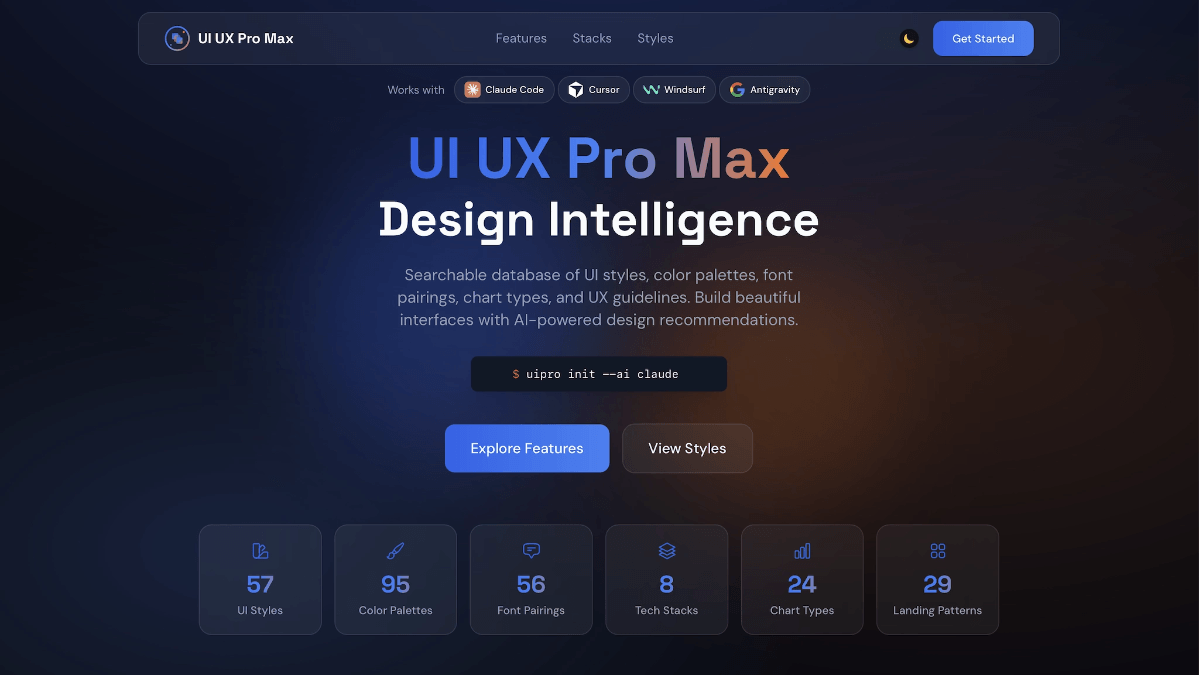
Intelligent design system generation: The v2.0 flagship feature, the AI reasoning engine generates a complete customized design system within seconds through 5 parallel searches (product type, style, color scheme, landing page pattern, font combination).
-
Massive design database: Includes 57+ UI styles (glassmorphism, claymorphism, minimalism, brutalism, neumorphism, etc.), 95+ industry color schemes, 56+ font pairings, 24+ chart types, and 98+ UX guidelines.
-
Industry reasoning rules: Covers 100 product categories, providing customized design recommendations for industries such as SaaS, e-commerce, healthcare, and fintech.
-
Multi-tech stack support: Native support for HTML/Tailwind CSS, compatible with React, Next.js, Vue, Svelte, SwiftUI, React Native, Flutter, and more.
-
CLI tool integration: Provides
uipro-clicommand-line tool to install and initialize the skill for a specified AI assistant with one click.
How to use UI/UX Pro Max
-
Quick install via CLI tool: Run
npm install -g uipro-clito globally install the command-line tool, then executeuipro init --ai <助手名称>to deploy the skill for a specified AI assistant (such as claude, cursor, windsurf, copilot, kiro, etc.) with one click, or directly useuipro init --ai allto configure all supported assistants in batch. -
Manual installation to the configuration directory: Copy the skill folder to the corresponding AI assistant's configuration directory (such as Claude Code's
.claude/skills/or Cursor's.cursor/skills/) to complete skill mounting. -
Ensure the prerequisite environment is ready: Install a Python 3.x environment to support the normal operation of the built-in search scripts.
-
Direct activation via natural language (Skill mode): In assistants that support automatic activation, such as Claude Code, Cursor, Windsurf, and Gemini CLI, simply describe your UI/UX requirements to trigger the skill, for example "build a dark-themed dashboard for my SaaS product".
-
Slash command invocation (Workflow mode): In assistants such as GitHub Copilot, Kiro, and Roo Code, enter
/ui-ux-pro-maxfollowed by specific requirement instructions, for example/ui-ux-pro-max 为我的 SaaS 产品构建一个着陆页。 -
Generate a complete design system: Execute
python3 skills/ui-ux-pro-max/scripts/search.py "query" --design-system -p "Project Name"to automatically generate a complete design system including style, color scheme, fonts, and layout through 5 parallel searches. -
Domain-specific refined search: Use the
--domainparameter to specify the search domain (style / ux interaction / typography fonts / color scheme / chart), combined with the--stackparameter to limit the tech stack (such as react, vue, tailwind), to obtain more precise design references. -
Review and iterate on existing code: Submit existing UI code snippets to the AI assistant, requesting a review of usability, accessibility, and visual consistency based on UI/UX Pro Max design specifications, and automatically refactor based on the feedback.
-
Export reusable design system: Have the AI assistant output standardized design tokens (color variables, typography specifications, spacing standards) based on the generated solution, for building a team-level reusable component library.
Key information and usage requirements for UI/UX Pro Max
-
Product positioning: An open-source AI Skill (skill plugin), not a standalone design tool; it must be used with AI coding assistants such as Claude Code, Cursor, Windsurf, and GitHub Copilot, providing AI with a design knowledge base and reasoning capabilities.
-
Database scale: Built in 57+ UI styles, 95+ industry color palettes, 56+ font pairings, 24+ chart types, and 98+ UX guidelines, covering 100 product categories.
-
Core version: The v2.0 flagship feature is equipped with an AI reasoning engine, supporting 5 parallel searches (product type, style, color scheme, landing page pattern, font combination) and generating a complete design system within seconds.
-
Tech stack compatibility: Natively supports HTML/Tailwind CSS, and is also compatible with mainstream front-end frameworks such as React, Next.js, Vue, Svelte, SwiftUI, React Native, and Flutter。
-
Open-source license: Open-sourced under the MIT License, completely free, and supports personal and commercial use。
-
Community popularity: GitHub stars have exceeded 22,000+, with continuous updates and maintenance.
-
Environment requirements: Python 3.x must be installed in advance to support the normal operation of the built-in search scripts and design system generator.
-
Installation method: You can install the CLI tool globally via
npm install -g uipro-cliand then executeuipro initfor one-click deployment, or manually copy the skill folder to the AI assistant's configuration directory (e.g.,.claude/skills/)。 -
Differences in activation methods: Claude Code, Windsurf, Gemini CLI, etc. support automatic Skill activation, so you can simply describe your needs; GitHub Copilot, Kiro, Roo Code, etc. require using the
/ui-ux-pro-maxslash command to trigger manually. -
Special adaptation: Trae users need to switch to SOLO mode and use front-end-specific instructions to trigger the skill.
-
Usage threshold: No professional design background is required; developers can obtain senior-designer-level UI/UX solutions and runnable code by describing their needs in natural language.
Core advantages of UI/UX Pro Max
-
Massive professional design database: Built in 57+ UI styles, 95+ industry color palettes, 56+ font pairings, 24+ chart types, and 98+ UX guidelines, covering mainstream design languages from minimalism to brutalism.
-
Intelligent reasoning engine: The v2.0 flagship feature supports 5 parallel searches (product type, style, color scheme, landing page pattern, font combination), automatically generating a complete customized design system within seconds, with no need to manually browse documentation.
-
In-depth industry adaptation: Built-in industry reasoning rules for 100 product categories, providing precise design suggestions for different fields such as SaaS, e-commerce, healthcare, and fintech.
-
Native support for multiple tech stacks: Supports HTML/Tailwind CSS, and is also compatible with mainstream frontend frameworks such as React, Next.js, Vue, Svelte, SwiftUI, React Native, and Flutter.
-
Full coverage of mainstream AI assistants: Supports 10+ AI coding assistants such as Claude Code, Cursor, Windsurf, GitHub Copilot, Kiro, and Gemini CLI, offering two integration modes: Skill auto-activation and Workflow slash commands.
-
One-click CLI installation: Via the
uipro-clicommand-line tool, skill initialization can be quickly completed for a specified AI assistant, greatly lowering the deployment threshold. -
Completely open source and free: Open source under the MIT license, free for personal and commercial projects, with an active community and GitHub stars exceeding 22,000+.
-
Zero design barrier: Developers only need to describe requirements in natural language to obtain UI/UX solutions and runnable code at the level of a senior designer, without needing a professional design background.
Comparison of UI/UX Pro Max with similar competing products
| Comparison dimension | UI/UX Pro Max | UI Design Brain | kj-ui-ux-pro-max (OpenClaw Skill) |
|---|---|---|---|
| Product positioning | A general-purpose AI Skill providing design intelligence for 15+ AI coding assistants | A UI component knowledge base Skill built specifically for Cursor | A UI/UX design guidance Skill within the OpenClaw ecosystem |
| Supported platforms | 15+ assistants including Claude Code, Cursor, Windsurf, GitHub Copilot, Kiro, Gemini CLI, and Trae | Only supports Cursor | Supports AI assistants within the OpenClaw ecosystem |
| Database scale | 67 UI styles, 161 color palettes, 57 font pairings, 25 chart types, 99 UX guidelines, 100 industry categories | Best practices and layout patterns for 60+ interface components | The quantity is not explicitly disclosed; covers layout, color schemes, components, microcopy, and accessibility |
| Core features | AI reasoning engine performs parallel searches to generate a complete design system; includes industry reasoning rules and anti-pattern detection | Component recognition + best practice matching + design direction application; outputs production-grade code | Layout generation, UX flow mapping, design system tokens, component specifications, microcopy, and accessibility audits |
| Tech stack support | 13 kinds: React, Next.js, Vue, Nuxt, Svelte, Astro, SwiftUI, React Native, Flutter, Jetpack Compose, HTML+Tailwind, shadcn/ui, and Nuxt UI | The tech stack is not explicitly limited; based on Cursor's default output | Covers web and mobile platforms, without limiting to specific frameworks |
| Design directions | 67 styles freely combinable (glassmorphism, brutalism, AI-native UI, spatial computing, etc.) | 5 preset directions: Modern SaaS, Apple Minimal, Enterprise, Creative, and Data Dashboard | The number of preset styles is not explicitly stated |
| Installation method | One-click CLI installation (uipro init --ai all) or manual copy to the skills directory
|
Git clone to ~/.cursor/skills/ or within the project .cursor/skills/ directory
|
clawhub install or npx clawhub command-line installation
|
| Activation method | Skill mode auto-activation / Workflow mode slash commands /ui-ux-pro-max
|
Automatically activated after installation, no explicit reference required | Activated after pasting the repository link into the assistant conversation or installing via CLI |
| Open Source License | MIT License, completely free | Open source (public GitHub repository) | Open source (public GitHub repository) |
Application scenarios of UI/UX Pro Max
-
SaaS product interface design: Quickly generate complex interfaces such as dashboards, admin management systems, and user workbenches for enterprise-grade SaaS applications. Built-in industry reasoning rules can precisely match B2B product requirements.
-
E-commerce and retail platforms: Build core e-commerce pages such as product display pages, shopping carts, checkout flows, and order management, and use the color scheme and layout system to improve conversion rates.
-
Fintech applications: Generate secure and trustworthy UI solutions for financial scenarios such as banking, payments, wealth management, and insurance, meeting data-intensive and compliance-oriented visual requirements.
-
Healthcare and health technology: Design patient-side and doctor-side interfaces, and ensure usability for elderly users and groups with special needs through accessibility-first rules.
-
Marketing landing pages: Generate product official websites, campaign promotion pages, and brand display pages with one click, supporting 57+ visual styles (glassmorphism, brutalism, minimalism, etc.) to quickly match brand tone.
-
Mobile app development: Output code for cross-platform/native mobile frameworks such as React Native, Flutter, and SwiftUI, covering iOS and Android interface specifications.


