

What is the AiPPT plugin?
The AiPPT plugin is AiPPT an AI PPT creation tool launched by AiPPT. Powered by advanced large models such as DeepSeek, it supports one-click generation of complete PPTs by entering a topic or uploading a document. The AiPPT plugin includes 5 major design resource libraries, covering a vast collection of premium templates, single pages, images, icons, and illustrations, as well as more than 30 intelligent design tools, enabling one-click unification of fonts and color schemes and batch insertion of logos and watermarks. The AiPPT plugin comes with a rich offline toolkit and can be used normally even without a network connection. It integrates 27 self-developed efficiency tools and more than 60 native features, providing workplace professionals with a one-stop professional presentation solution from AI creation to intelligent design.
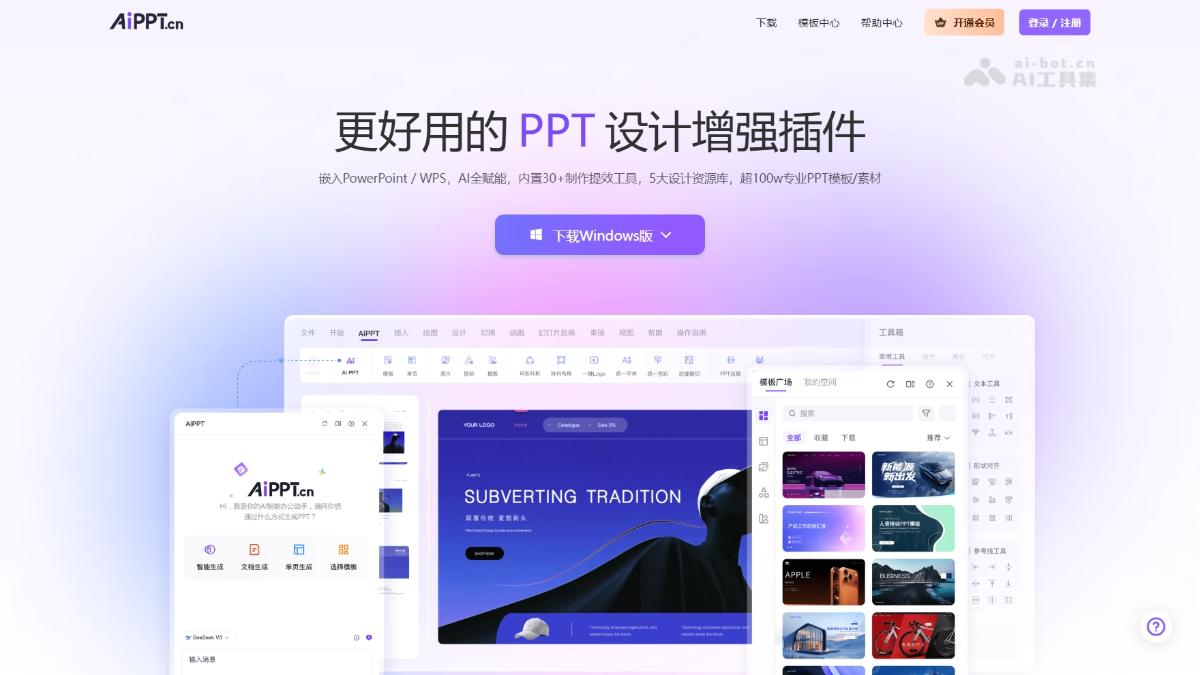
Main features of the AiPPT plugin
-
AI intelligent creation: Powered by advanced large models such as DeepSeek, users only need to enter a topic or upload a document to automatically generate a structurally complete and professionally written PPT presentation with one click.
-
Massive resource library: Built in are 5 major professional asset libraries covering premium templates, single-page designs, high-definition images, vector icons, and creative illustrations; all resources are updated in real time and support commercial use.
-
Intelligent design tools: Provides more than 30 one-click intelligent beautification tools that can quickly unify the font, color scheme, and theme style of an entire PPT, and support batch insertion of logos and watermarks.
-
Offline use capability: Equipped with a rich offline design toolkit, users can still normally edit and create PPTs in environments without a network connection.
-
Native feature integration: Deeply integrates 27 self-developed efficiency tools and more than 60 native PPT features, enabling seamless professional layout operations such as circular layouts and intelligent alignment.
How to use the AiPPT plugin
-
Install and launch: Visit the AiPPT plugin official website https://www.aippt.cn/plugin , download the installation package to complete installation, and click the AiPPT icon in the Office or WPS menu bar to launch the plugin.
-
Log in to your account: For first-time use, you need to register or log in to your AiPPT account to unlock all features and access to the online resource library.
-
AI generation: In the sidebar, select "Smart Generate," enter a topic, or upload a Word/PDF/outline document, and AI will automatically generate the complete PPT structure and content.
-
Apply resources: Browse the 5 major resource libraries in the "Template Plaza"; click the desired template, single page, image, icon, or illustration to insert it directly into the current presentation.
-
Intelligent beautification: Use "One-click Skin Change" to batch unify fonts, color schemes, and themes, or use more than 30 design tools to quickly insert logos/watermarks and optimize the layout.
-
Offline editing: After downloading the required materials in advance, you can normally use the offline design tools to edit and create PPTs in a no-network environment.
Key information and usage requirements of the AiPPT plugin
- Product positioning: An AI PPT creation efficiency tool embedded in Office and WPS, providing a one-stop intelligent presentation solution.
- Core capabilities:
-
Powered by advanced large language models such as DeepSeek, it supports one-click PPT generation from topics/documents.
-
Built in are 5 major resource libraries (templates, single pages, images, icons, illustrations), worry-free for commercial use.
-
Equipped with 30+ intelligent design tools, 27 self-developed efficiency tools, and 60+ native feature integrations.
-
- Offline Features: Equipped with a rich offline design toolkit, basic editing functions can be used normally without a network environment.
-
Software Environment: Requires installation of Microsoft Office or WPS Office.
Core Advantages of the AiPPT Plugin
- AI Deep Empowerment for Creation: Relying on advanced large language models such as DeepSeek, input a topic or upload a document to generate a complete, professionally structured PPT with one click, greatly reducing the production threshold and time cost.
- Massive Resources Ready to Use: Built-in 5 major online design resource libraries (templates, single pages, images, icons, illustrations), with materials updated in real time and worry-free commercial use.
- One-Click Intelligent Beautification: 30+ intelligent design tools support one-click unification of fonts, color schemes, and themes, batch insertion of logos/watermarks, saying goodbye to tedious manual layout.
- Offline Capability Guarantee: Equipped with a rich offline design toolkit, core editing functions can still be used normally without a network environment, adapting to various office scenarios.
- Native Deep Integration: Deeply integrated with Office/WPS, equipped with 27 self-developed efficiency tools and 60+ native functions, allowing the entire production process to be completed without switching software.
Comparison of AiPPT Plugin with Similar Competing Products
| Comparison Dimension | AiPPT Plugin | WPS AI | iSlide |
|---|---|---|---|
| Product Form | Office/WPS third-party plugin | WPS built-in native feature | Established Office/WPS plugin |
| AI Generation | Supports one-click generation of a complete PPT from a topic/document | Generates outline + complete PPT from one sentence | Mainly AI generation of single pages/intelligent layout |
| Resource Library | 5 major online resource libraries (templates, single pages, images, icons, illustrations) | Relies on Docer's massive resources | Case library + diagram library + smart charts |
| Platform Compatibility | Dual-platform support for Office + WPS | WPS only | Office + WPS dual platform |
| Offline Capability | Supports offline editing | AI functions require internet connection | Some functions support offline use |
| Design Tools | 30+ smart tools + one-click skin change/unified style | AI beautification, smart image matching, layout optimization | One-click optimization, design tools, matrix layout |
| Core Differences | Focuses on one-stop AI creation + resources + design; dual platform + offline | Seamless integration with the WPS ecosystem, suitable for heavy WPS users | More mature resource library, richer diagrams and charts, established professional plugin |
Application Scenarios of the AiPPT Plugin
-
Business Reporting: Based on the DeepSeek large model, professionals can input a reporting topic or upload business documents to generate work summaries, quarterly reports, or project proposal PPTs with clear structure and detailed data in one click.
-
Education and Training: Teachers and trainers can use the massive template library and single-page materials to quickly create richly illustrated teaching courseware and training handouts, and unify the overall visual style with one click.
-
Academic Defense: Researchers upload a paper outline or thesis proposal, and AI automatically organizes the logical framework to generate a defense PPT that meets academic standards, greatly saving formatting time.
-
Product Roadshow: Entrepreneurs and product managers use premium business templates and icon libraries, combined with intelligent layout tools, to efficiently create product launch and roadshow presentation decks for investors or clients.
Frequently Asked Questions About the AiPPT Plugin
Q1: On which systems and Office versions can the plugin be used?
-
Windows Version: Supports Windows 7 and SP1 or later, with software Office 2010 or later / WPS
-
macOS Version: Supports macOS 12.0 and later, and software Office 16.89 and later
Q2: Can the plugin be used offline?
Yes. Apart from the resource library, AI features, and functions that require an internet connection, other design features can be used offline; downloaded templates, single pages, and icons can be edited offline.
Q3: Does the plugin require additional payment to use?
The plugin and other AiPPT platforms share account access. If you have already activated an AiPPT membership, you can use it directly without additional payment.
Q4: After successful installation, when starting PowerPoint/WPS, what should I do if I cannot find "AiPPT" in the top menu bar?
Check whether the plugin is enabled by following these paths:
- PowerPoint (2010 or later): File → Options → Add-ins → Go → Confirm that "AiPPT" is checked
- WPS:
- File → Options → Trust Center → Check "Enable all third-party COM add-ins"
- Tools → COM Add-ins → Confirm that "AiPPT" is checked (if it cannot be found, click "Click here to manage" → enable "AiPPT")
- If the issue still cannot be resolved, you can contact online customer service for help.

