

What is Ribbi
Ribbi is a self-evolving creative AI Agent built for designers, with no local deployment required. Compared to OpenClaw , it saves 73% of Token consumption with zero system permission risk. The core feature Pond automatically saves reference images and reverse-engineers prompts. Ribbi supports the entire workflow of social media operations, video creation, visual design, and more, and supports using @ to call tools,/ to select skills, and generate multi-platform adapted materials with one click.
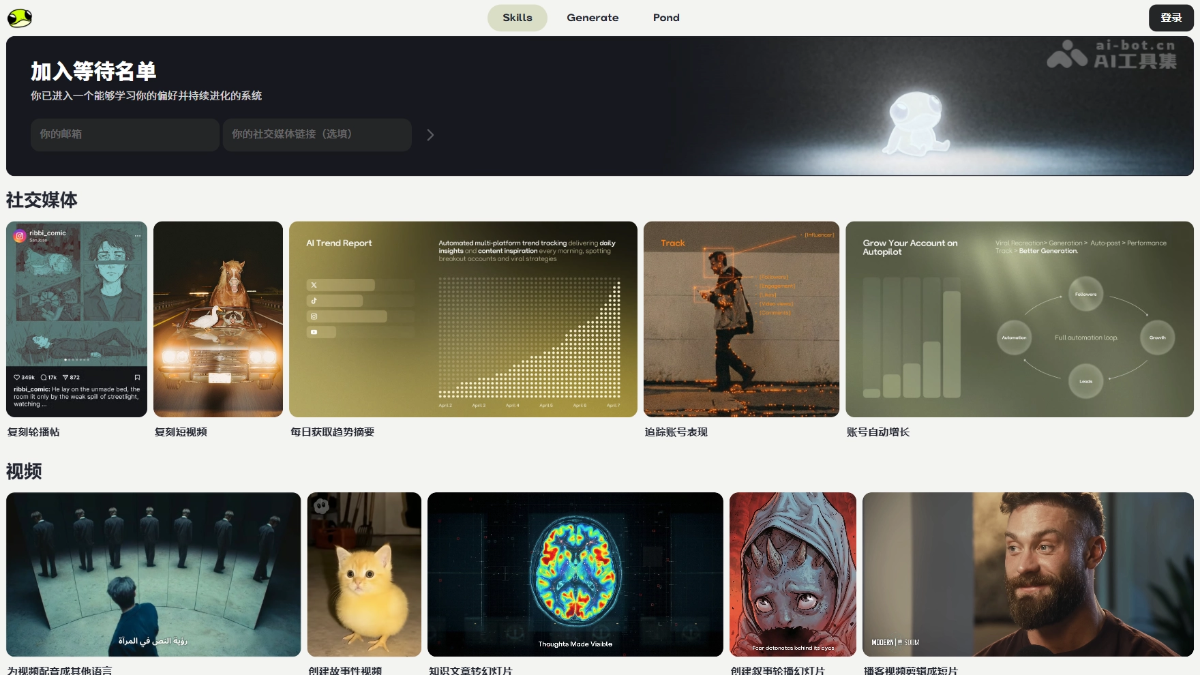
Ribbi's main features
- Social media: Supports replicating carousel posts/short videos, daily trend summaries, account tracking, and automated growth.
- Video creation: Supports multilingual voiceovers, narrative video generation, converting knowledge articles into slides, and podcast clip shorts.
- Editor: Supports image enhancement, resizing, batch background removal, and social video downloading.
- Audio and music: Supports song covers, converting articles into podcasts/songs, and generating songs.
- Pond (core feature): The AI material library automatically saves images, reverse-engineers prompts, and continuously evolves based on personal aesthetics. The more images saved, the better it understands the user's style preferences.
- Interaction methods:
@Call tools (such as @Midjourney),/select skills (such as /Behance link to design).
Ribbi's key information and usage requirements
- Product positioning: Self-evolving creative AI Agent, a browser-based alternative to OpenClaw
- Core advantages: Zero deployment, high security, 73% Token savings, strong aesthetic evolution
- Exclusive feature: Pond - AI material library + self-training, the more it is used, the better it understands the user's style
- Interaction methods:
@Call tools //select skills - Environment: Modern browser, no installation required, ready to use upon opening
- Permissions: No system-level permissions required, does not access local files
- Cost: Billed by Token consumption, with costs significantly lower than similar tools
Ribbi's core advantages
- Zero deployment: Ready to use upon opening in a browser, no installation or configuration required, eliminating complex environment setup
- High security: Data does not leave the domain, no need to grant system-level permissions, no access to local sensitive files, zero privacy risk
- Cost savings: Under the same tasks, Token consumption is reduced by about 73% compared with OpenClaw, significantly lowering long-term usage costs
- Strong aesthetics: Built for designers, with professional visual understanding capabilities, not a general-purpose tool
- Self-evolving: The Pond feature continuously self-trains by storing reference images, better understanding the user's exclusive style the more it is used, solving the pain point of difficulty in unifying styles with traditional AI
- Full workflow: Connects the entire process of material collection, generation, and multi-platform adaptation, not just a single-point generation tool
How to use Ribbi
- Access and login: Visit the Ribbi official website https://ribbi.ai/ , apply for beta access; once approved, log in to your account to start using it.
- Basic interaction: In the chat box, enter
@to invoke various AI tools (such as @NanoBanana Pro, @FLUX 2, @Midjourney), enter/to select preset skills (such as /Behance link to design, /generate poster). - Pond usage: After installing the Ribbi browser extension, when browsing reference images on a webpage, right-click and select "Save image to Ribbi", and the system automatically reverse-engineers the prompt.
- Workflow example: First upload a reference image and @ an image model to generate a consistent-style character, quote the image and combine it with the /Behance link to design skill, enter the design link and instructions, and you can get a complete IP solution.
Comparison of Ribbi's similar competitors
| Comparison dimension | Ribbi | Xingliu AI | Lovart |
|---|---|---|---|
| Positioning | A self-evolving creative AI Agent, focused on social media marketing automation | One-stop AI design and creation tool, optimized for Chinese users | The world's first design Agent, automatic design from concept to multimodal |
| Core functions | Social media content automation (carousels, trend tracking, follower growth), multilingual video dubbing, storytelling videos, e-commerce product images | AI image/audio/video generation, intelligent image editing (upscaling/outpainting/erasing), Xingliu Agent one-sentence design generation | Automated full design workflow, Edit Elements layered pixel-level editing, ChatCanvas co-creation |
| Agent capabilities | 23+ workflow skills, self-evolving, automatically executes social media operations tasks | Xingliu Agent: one-sentence design generation, multi-turn dialogue understanding, infinite canvas editing | Dual mode: Thinking (complex task planning) + Fast (quick response), automatically completes images/videos/3D |
| Editing capabilities | Medium — mainly automation, with less manual intervention | Strong — HD upscaling, intelligent outpainting, erasing, retouching, image replacement, composition changes | Extremely strong — Edit Elements layered editing |
| Chinese support | Average | Optimized specifically for Chinese users | Average (global version) |
| Output formats | Images, videos | jpg, png, svg, mp4, glb, 3D, etc. | Images, videos, 3D |
Ribbi's application scenarios
- IP design and brand visuals: The platform can quickly generate consistent-style character three-view sheets, multi-scene standing illustrations, and costume systems, and automatically output display sizes for each platform, suitable for designer toy blind boxes and brand mascot design.
- E-commerce Visual Assets: Based on the brand tone locked in by Pond, batch-generate Amazon product images, e-commerce posters, and detail pages, maintaining a consistent visual style across the entire store.
- Social Media Operations: The platform can automatically replicate viral carousel posts and short videos, deliver daily trend summaries across multiple platforms, track account data performance, and achieve automated content publishing and account growth.
- Video Content Production: Supports converting knowledge articles into narrative slides with one click, dubbing videos into multilingual versions, and precisely editing long podcasts into short video clips, adapting to distribution across different platforms.


