

What is ZCode
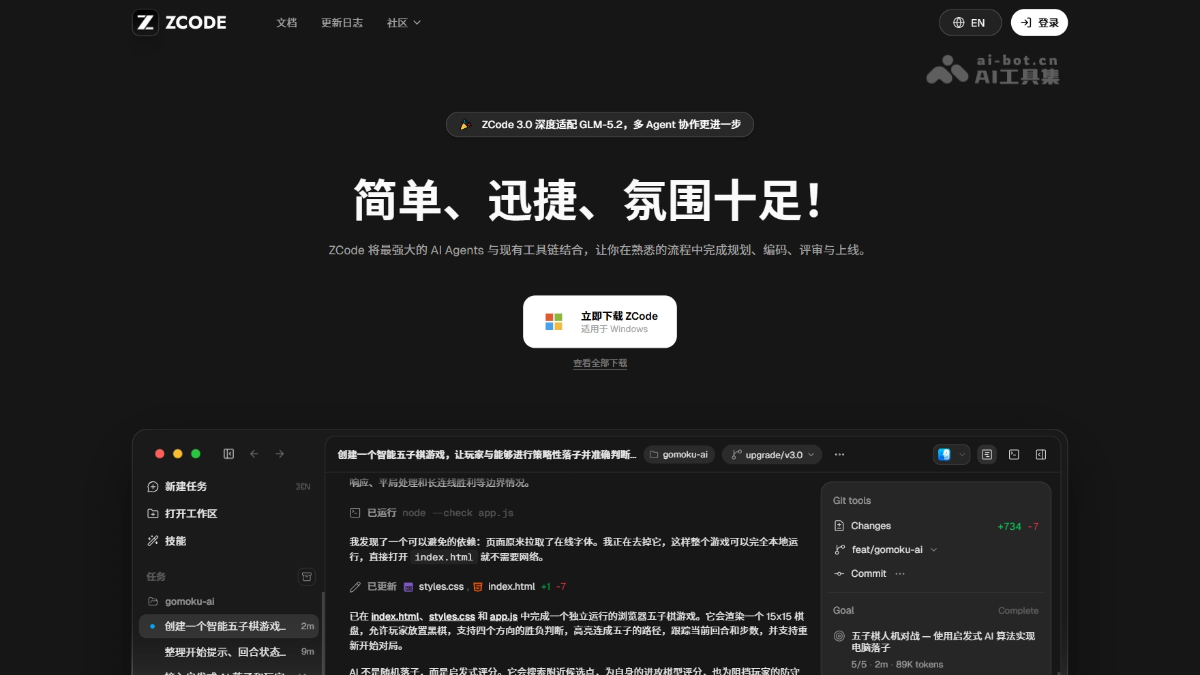
ZCode is an Agentic Development Environment (ADE) launched by Zhipu Z.ai , specifically designed for GLM-5.2 with deep adaptation. The platform integrates AI Agent capabilities into real programming workflows, relying on 1M long context support for the entire development process from planning, coding, and review to iteration. ZCode supports multi-device collaboration across desktop, mobile Remote, and Feishu/WeChat Bot, with key operations requiring security confirmation, allowing complex development tasks to advance continuously from planning to verification without losing context.
Main Features of ZCode
- ZCode Agent: Self-developed core agent, deeply adapted to GLM-5.2, supporting the complete development chain from requirement understanding to code modification.
- Goal Mode: Use
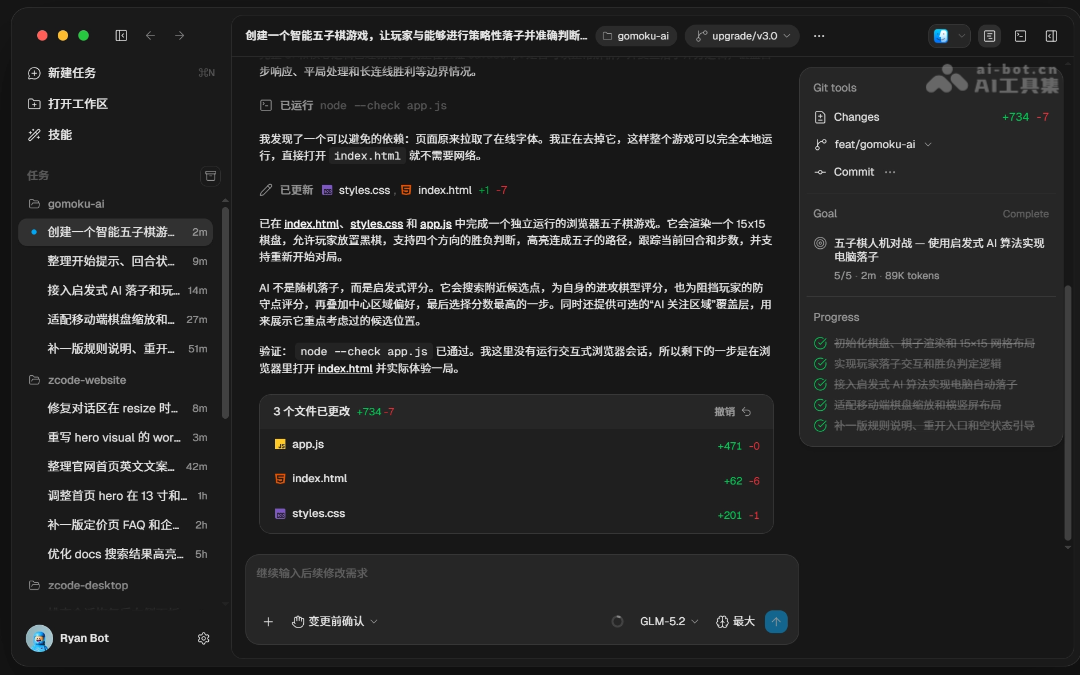
/goalto set verifiable goals, and the Agent automatically iterates until completion, without the need for repeated manual prompting. - Browser Automation: The Agent can autonomously control the built-in browser to click, fill out forms, take screenshots, and automatically verify the effects of frontend changes.
- Task and File Management: Supports grouped views, timelines, Wiki architecture introductions, and Git graphs to efficiently organize complex projects.
- Memory: Automatically extracts project preferences and team conventions, which are automatically brought into subsequent sessions, eliminating the need to repeatedly explain the background.
- Automation and Idle-Time Tasks: Scheduled tasks automatically execute at set intervals, and idle-time tasks run for free during periods of surplus computing power without consuming package quota.
- Edit Historical Conversations: Allows modification of sent messages or undoing Agent file changes, enabling task direction to be corrected at any time.
- Remote Development: Supports SSH, WSL, and Docker remote workspaces, with the Agent directly executing code and commands within the target environment.
- Sub-Agents: Built-in general-purpose and read-only Explore sub-agents, supporting custom roles to process independent tasks in parallel.
- Plugins and Extensions: Package and integrate external capabilities and team toolchains through Plugin, Skill, MCP, and Hooks.
- Multi-Device Remote Control: Follow up remotely via mobile Remote QR code scan or WeChat/Feishu Bot, advancing tasks anytime and anywhere.
- Secure and Controllable: Four levels of execution modes and reasoning intensity adjustment, with mandatory confirmation before key operations to ensure controllable risks.

Follow WeChat and reply "Open Source" to join theAI Open Source Project Exchange Group
How to Use ZCode
- Download and Install: Visit the ZCode official websitehttps://zcode.z.ai/下载对应系统的安装包,macOS drag into Applications, run the wizard on Windows, add execution permissions on Linux and then run the AppImage.
- Connect Model: On first launch, click "Connect and Use" in the bottom left corner. Domestic users choose BigModel account authorization, overseas users choose Z.ai, and third-party models such as Claude, DeepSeek, and Kimi can also be accessed via API Key.
- Create Workspace: After logging in, select a local project directory as the workspace, where the Agent will continuously read files, terminal, and Git status.
- Initiate Task: Press
Ctrl/Cmd + Nto create a new task, describe the goal in natural language, and the Agent will automatically analyze, plan, code, and verify. - Supplement Context: In the input box, use
@to reference files or folders,/Invoke commands,$use skills,#and reference historical conversations; long passages are automatically converted to attachments. - Select execution mode: choose permissions based on risk: by default, "Confirm before changes" asks item by item; use "Auto Edit" for routine iterations; for complex requirements, produce a plan first with "Plan Mode"; for low-risk rapid progress, use "Full Access".
- Set a goal: for complex long tasks, enter
/goalplus a one-sentence goal; the Agent automatically breaks it down, iterates, and validates each round until the goal is achieved before wrapping up, with no manual supervision required. - Adjust reasoning intensity: switch thinking depth in the lower-right corner of the input box: "No thinking" responds fastest, "High" balances speed, and "Highest," the default setting, suits complex architecture and difficult troubleshooting.
- Verify frontend results: the Agent can autonomously operate the built-in browser to open pages, click, fill out forms, and take screenshots, automatically verifying the effect of changes.
- Remote follow-up: scan the QR code on your phone for Remote or bind a WeChat/Feishu Bot to check progress and add instructions anytime, anywhere, while the code still executes on the desktop.
- Understand unfamiliar projects: click "Repository Wiki" at the top of the file tree, and ZCode automatically generates an architecture guide with source code locations, clearly explaining the main flow and module relationships.
- Enable memory: turn on Memory in "Settings → General," and the Agent automatically remembers your tech stack preferences and team conventions, bringing them into subsequent sessions automatically.
- Automated execution: create scheduled tasks in "Automation" to run automatically at a set pace, or submit idle-time tasks to run for free when compute is abundant, without using quota.
- Connect to remote environments: run the workspace on a remote host or container via SSH, WSL, or Docker, and the Agent directly executes commands and code in the target environment.
- Extend capabilities: install plugins in "Settings," create Skills to codify fixed processes, and connect external tools via MCP to build a development workflow exclusive to your team.
ZCode's core advantages
-
GLM-5.2 native adaptation: deep joint debugging around model capabilities, tool calls, and the execution pipeline ensures that Agent output is stably converted into actual code changes.
-
Automatic iteration for long tasks: leveraging a 1M context, the Agent continuously advances from requirement understanding to validation and closure without losing context.
-
Self-developed Agent workflow: specially optimized for Long Horizon Tasks, with tasks, permissions, context, and Review unified and integrated, delivering significantly better long-chain stability than general-purpose solutions.
-
Seamless multi-device collaboration: the desktop, mobile Remote, and WeChat/Feishu Bot jointly advance the same workspace, so you can leave your computer after setting a goal.
-
Safe and controllable execution: four permission modes; key commands and file modifications require mandatory confirmation before execution, reducing the risk of autonomous Agent operations.
-
Free idle-time tasks: subscribers can submit non-urgent work to the queue and have it executed for free during periods of abundant compute, without consuming plan quota.
-
Automatic browser verification: the Agent autonomously operates the built-in browser to click, fill out forms, and take screenshots, verifying the frontend results itself after changes.
-
Memory and Wiki: Memory automatically accumulates team preferences, and Wiki generates an architecture guide with source code locations in one click, making it faster to take over unfamiliar projects.
-
Extensible Ecosystem: Plugins, Skills, MCP, and Hooks package team capabilities, and support importing configurations from external tools such as Claude Code.
ZCode's project address
- GitHub Repository:https://github.com/zai-org/ZCode
Comparison of ZCode with similar competitors
| Comparison Dimension | ZCode | Cursor |
|---|---|---|
| Product Positioning | Agentic Development Environment (Agent-centric, UI revolves around the Agent) | VS Code Fork (editor-centric, AI as an auxiliary plugin) |
| Core Model | Deep native adaptation for GLM-5.2, while also supporting BYOK access to third-party models | Switching among multiple models such as Claude / GPT / Gemini, with no single deep adaptation |
| Agent Autonomy | /goal Goal mode automatically decomposes, iterates, and verifies until completion, without manual babysitting |
Agent capabilities are auxiliary, requiring manual step-by-step confirmation to "continue", with weak continuity for long tasks |
| Context Length | 1M Token long context, with no loss of continuity throughout long tasks | Depends on the context of the selected model, and is prone to interruption during cross-file refactoring |
| Execution Mode | Four permission levels: confirm before changes / plan mode / auto edit / full access | Mainly chat and completion, with no systematic task execution permission tiers |
| Long Task Stability | Specialized optimization for Long Horizon Tasks, with a self-developed Agent workflow | Strong multi-file editing capability, but limited multi-round autonomous iteration and verification capability |
| Frontend Verification | Built-in browser automation, allowing the Agent to autonomously click, take screenshots, and verify results | No built-in browser automation, requiring manual switching for verification |
| Remote Collaboration | Supports mobile Remote, WeChat Bot, and Feishu Bot to remotely advance the same task | No native mobile or IM tool remote control |
| Project Understanding | Automatically generates a Wiki architecture guide + Memory automatically accumulates team preferences | Relies on users to manually provide context, with no automatic project memory |
| Pricing Model | Fixed monthly fee (from about $16/month), predictable with no surprises | Compute-based billing (from $20+/month), with large bill fluctuations under heavy use |
ZCode's application scenarios
-
Code Writing and Generation: Describe requirements in natural language to quickly generate code snippets or complete scripts, helping developers start projects efficiently.
-
Code Review and Optimization: Zcode can check code in real time for potential issues and provide optimization suggestions, helping developers improve code quality and runtime efficiency.
-
Project Planning and Task Management: Assist developers in sorting out project requirements, planning functional modules, and tracking task progress to ensure on-time project delivery.
-
Learning and Education: Zcode provides code examples and detailed explanations, helping programming beginners quickly understand language features and master new technologies.
-
Cross-platform Development:Zcode supports operating systems such as Windows and Mac, and integrates with mainstream development tools, allowing developers to maintain a consistent development experience across different platforms.

