

What is ChatExcel
ChatExcel is an AI-driven intelligent office tool that, through natural language processing technology, allows users to process Excel spreadsheets and performdata analysisby chatting. The platform is equipped with multiple office AI agents such as AI Excel, AI PPT, AI spreadsheet creation, AI Data, AI documents, and data dashboards, paired with the Yuankong AI Claw lobster exclusive employee team, online 24/7, creating an efficient and uninterrupted intelligent office data experience for users.

ChatExcel's main features
-
AI Excel: Accurately understands complex natural language instructions, automatically completes function writing, data pivoting, chart generation, and outlier detection, directly handling ultra-long Excel reports and multi-sheet related data.
-
AI PPT: Describe requirements in natural language or directly import Excel/Word/PDF/images, generate high-quality PPT ready for reporting in 10 minutes, supporting custom master slides and 1:1 lossless export.
-
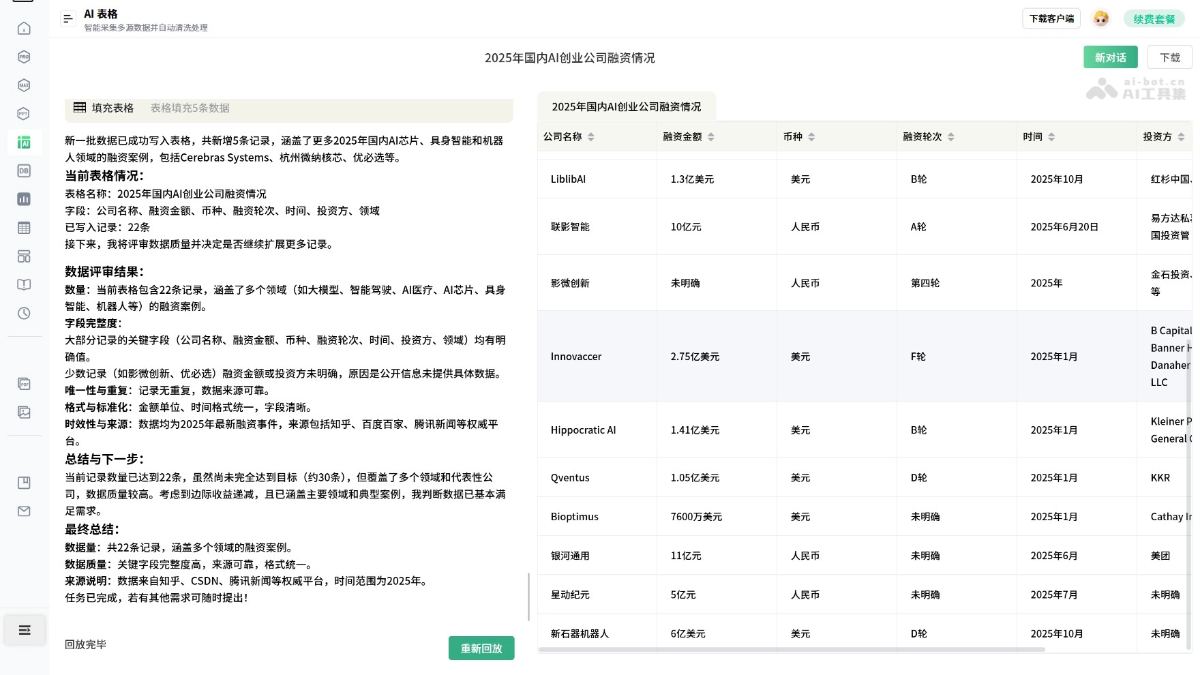
AI spreadsheet creation: Upload images, PDFs, Word documents, chat screenshots, etc., automatically generate a complete spreadsheet in 10 seconds, and with one click link to ChatExcel for data analysis and PPT generation.
-
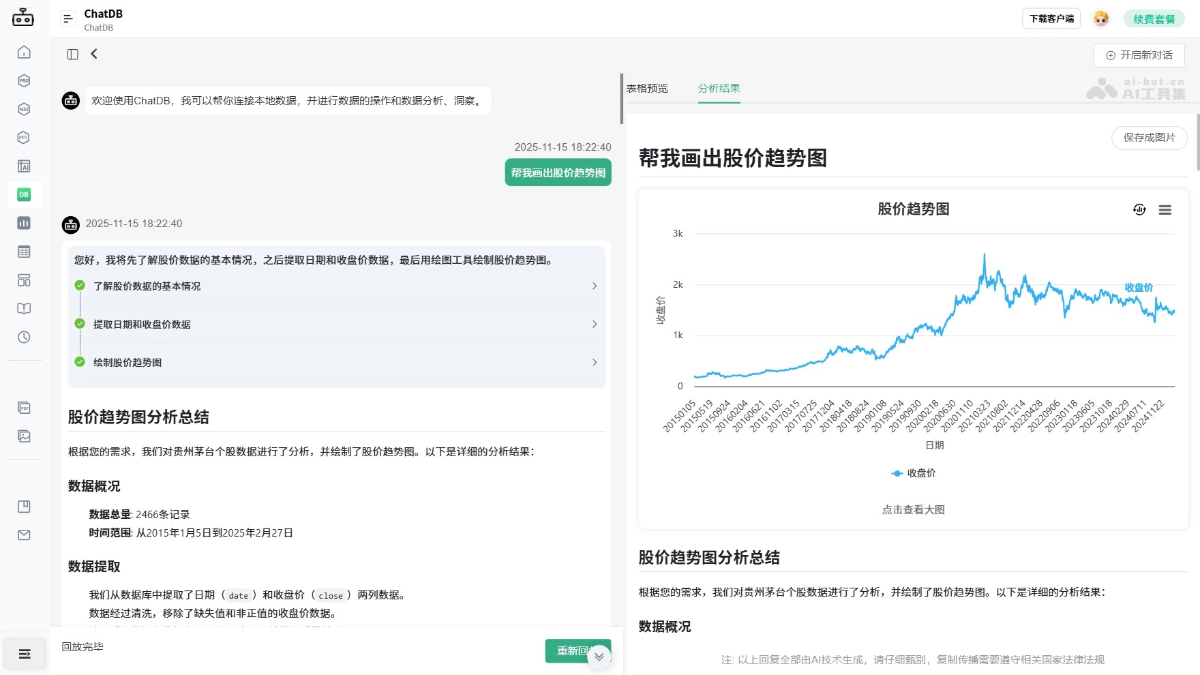
AI Data: No need for SQL or complex BI tools; connect to a database in one sentence, analyze thousands of data records through conversation, accurately extract insights and generate visual reports.
-
AI Claw (Office Shrimp): Breaks down the functional barriers of traditional AI tools, deeply integrates into the entire daily office workflow, and achieves full-chain efficient empowerment from content creation and data analysis to document processing.
-
AI Claw (Stock Trading Shrimp): Real-time market monitoring, news aggregation, fundamental and technical analysis, strategy reminders, serving as a true AI advisor who understands trading.
-
AI Desktop Pet Yuanyuan: A super cute desktop AI assistant that supports "select to use" and "screenshot to understand", enabling instant responses for translation, polishing, and information extraction, and deeply linking with core tools such as ChatExcel.
-
AI documents: With one sentence, let information from across the web write for you, covering academic papers, work reports, marketing plans and other full text types, supporting the generation of logic diagrams and beautiful illustrations, multi-format downloads with complete layout preservation.
-
AIPC client: With data security, localized deployment, and on-device intelligent processing as its core, it opens a new intelligent office experience while ensuring core data does not leave the local device.
How to use ChatExcel
-
Visit the official website: Open the ChatExcel official website https://www.chatexcel.com/, complete user registration and login。
-
Upload files: Click the upload button and select files such as Excel, images, PDF, and Word.
-
Enter instructions: Describe your requirements in natural language in the dialog box, such as "calculate the sum of column X" or "generate a pivot table".
-
Execute operations: Press Enter or click execute, and the AI automatically parses the instructions and completes data processing.
-
View results: View the updated spreadsheet, charts, or generated PPT/report in the interface.
-
In-depth editing: Continuously optimize content through multi-turn conversations, supporting downloads and exports in multiple formats.
Key information and usage requirements of ChatExcel
- Development team: Beijing Yuankong Intelligent Technology Co., Ltd.
- Product positioning: An AI-native office data processing platform that helps users build their own dedicated AI employee team through natural language conversation, enabling 7×24 uninterrupted intelligent office and data processing services.
- Access method: Users need to access the official ChatExcel website (chatexcel.com) through a browser and can use it online without downloading a client; if local deployment is needed, the AIPC client can be installed to ensure that core data does not leave the local device.
- File format requirements: Uploaded files need to be in common office formats. Excel files support .xlsx or .xls formats; the AI table creation feature supports importing unstructured files such as images, PDFs, Word documents, web links, and chat screenshots.
ChatExcel's core advantages
-
Natural language interaction: Fully conversational operation, zero-threshold use of complex data processing features, no need to memorize formulas and functions.
-
Multimodal input support: Supports one-click import and conversion of multiple formats such as Excel, Word, PDF, images, web links, and chat screenshots.
-
Full-chain office loop: Complete coverage from data collection (AI table creation) → data processing (AI Excel) → analysis and insights (AI Data) → reporting and presentation (AI PPT).
-
Dedicated AI Agent team: Role-based Agents such as Office Shrimp and Stock Shrimp, with long-term memory and capability evolution, understanding user needs better the more they are used.
-
Localized secure deployment: The AIPC version implements on-device intelligent processing, with core data retained locally, meeting enterprise-level security and compliance requirements.
Examples of using ChatExcel
AI Table— Data collection
ChatDB— Stock data analysis
Comparison of ChatExcel with similar competing products
| Comparison dimension | ChatExcel | Aichart | Beiji Jiuzhang |
|---|---|---|---|
| Core positioning | AI employee team, covering full-chain office automation for Excel, PPT, Data, and documents | AI data visualization tool, focused on chart generation and data reports | AI data analysis platform, focused on enterprise-level data insights and intelligent reports |
| Excel processing capability | Deeply native, supporting complex function writing, multi-sheet association, ultra-large data processing, outlier detection, and natural language driving | Supports Excel/CSV upload, natural language analysis, and one-click chart generation | Supports Excel/CSV analysis, natural language queries, basic table processing and cleaning |
| Database analysis | Connect to a database with one sentence, analyze thousands of records through conversation, zero SQL threshold, and generate visualized reports | Mainly based on file upload analysis; direct database connection and conversational analysis capabilities are limited | Supports database connection and natural language queries, oriented toward enterprise-level data insights |
| Multimodal input | Supports automatic conversion of images, PDFs, Word documents, chat screenshots, etc. into complete tables in 10 seconds | Mainly supports Excel/CSV file upload, with partial support for image recognition and conversion to tables | Mainly supports uploading structured data files (Excel/CSV) |
| PPT/report generation | Generates high-quality PPTs ready for presentation in 10 minutes, supporting multi-file import, custom master slides, and 1:1 lossless export | Focuses on data analysis reports and chart export; PPT generation capability is relatively weak | Intelligent report and visualization report generation, limited PPT support |
| Agent/role-based | Equipped with dedicated Agents such as Office Shrimp and Stock Trading Shrimp, featuring long-term memory and capability evolution | No role-based Agent, general data analysis assistant mode | No role-based Agent, general data analysis assistant mode |
| Deployment method | Ready to use on the web, the AIPC version supports on-device local deployment, keeping core data local | SaaS web platform, primarily cloud-based processing | SaaS web platform + enterprise private deployment |
| Pricing strategy | Free version with daily credits + VIP packages (1 year 149 yuan / 3 years 298 yuan / lifetime 598 yuan) | Free trial + subscription (specific tiers subject to the official website) | Enterprise-level pricing, usually offering a free trial |
ChatExcel's product pricing
- Free version: You can receive 1500 credits by logging in daily, with 10M of personal cloud space, and access to some basic platform features. It does not support purchasing additional credit top-up packs, downloading original PPT files, early access to Beta features, or using the dedicated task generation channel.
- Lifetime VIP: Priced at 598 yuan, it grants 58000 credits per month plus an additional 1500 credits for daily login, provides 2G of personal cloud space, supports purchasing additional credit top-up packs, allows full access to all Agent features including Excel, PPT, documents, and DB, supports downloading original PPT files, and grants early access to Beta features.
- 3-year VIP: Priced at 298 yuan, it grants 58000 credits per month plus an additional 1500 credits for daily login, provides 1G of personal cloud space, supports purchasing additional credit top-up packs, allows full access to all Agent features including Excel, PPT, documents, and DB, supports downloading original PPT files, and grants early access to Beta features.
- 1-year VIP: Priced at 149 yuan, it grants 58000 credits per month plus an additional 1500 credits for daily login, provides 1G of personal cloud space, supports purchasing additional credit top-up packs, allows full access to all Agent features including Excel, PPT, documents, and DB, supports downloading original PPT files, and grants early access to Beta features.
ChatExcel application scenarios
-
Financial analysis: ChatExcel can be used to calculate and analyze financial data, automatically calculating the total sales amount of a specific department exceeding a certain amount.
-
Human resource management: In the human resources field, it helps analyze the salary proportion of each department and generate visual charts, such as doughnut charts, for a more intuitive understanding of the data.
-
E-commerce data analysis: The e-commerce industry draws line charts based on time series and product categories to analyze sales trends and product performance.
-
Education and training assessment: Education and training institutions extract the scores of specifically ranked students and draw them as stacked area charts to evaluate student performance and teaching effectiveness.
-
Government and enterprise data reports: Governments and enterprises draw combination charts, such as displaying GDP data with stacked column charts while using line charts to show growth rates, facilitating policy-making and business planning.

