

WinkStudio is a desktop application launched by Meitu in June 2023AI video editing tool, an extension based on the features of the mobile Wink APP. It supports video editing functions such as video beautification and image quality restoration, and provides a video toolkit with cinematic-level image rendering, improved video production efficiency, and AI assistance. Compared with traditional video editors with complex interfaces, WinkStudio adopts a more efficient and intuitive operating interface, making video editing and beautification easy and simple.
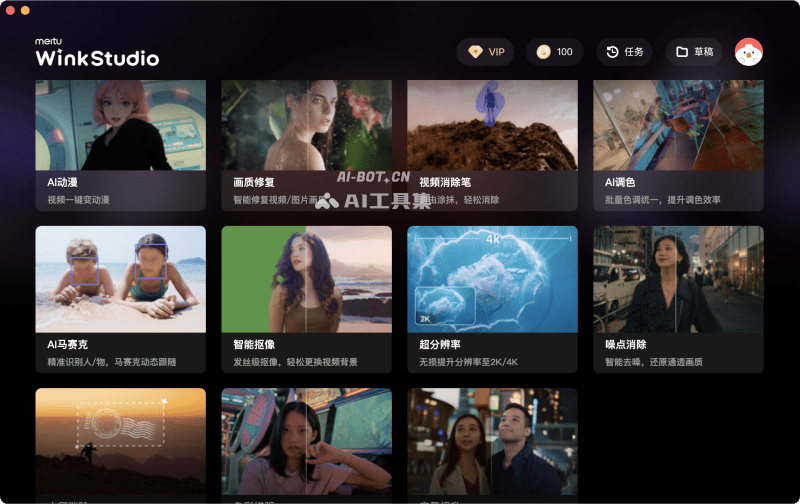
Main features of WinkStudio
- Video beauty: one-click beautification, makeup, shape enhancement, hairstyling, and whitening for fast, high-quality portrait processing
- AI anime: one-click anime conversion of real-person videos for virtual transformation
- Image quality restoration: one-click HD restoration for blurry and low-resolution videos
- Video eraser: freely paint over objects in the frame for intelligent removal
- AI color grading: one-click batch color tone unification to improve color grading efficiency
- AI mosaic: accurately identifies people/objects, with dynamic mosaic tracking
- Smart matting: hair-strand-level matting, with effects comparable to a green screen
- Super resolution: losslessly upscales video resolution to 2K/4K
- Noise removal: intelligently removes video noise and restores clear image quality
- Watermark removal: intelligently identifies watermarks in the frame and quickly removes them
- Color enhancement: intelligent color enhancement to improve image quality
- Night scene enhancement: improves night scene brightness and enhances color clarity
How to use WinkStudio
- Visit the WinkStudio official website (wink.meitu.com) and click the corresponding PC download software
- After downloading and installing, open the software interface and click the AI feature you want to use
- Import a video/photo, then select the feature you want to edit with
WinkStudio product pricing
- Free version: new users can receive 100 MeiDoud after registering and logging in, and can use some features for free
- Membership version: 50 yuan per month (39 yuan for continuous monthly subscription), 398 yuan per year (298 yuan for continuous annual subscription). After subscribing, 300 MeiDoud are gifted each month
Frequently asked questions
Does WinkStudio charge a fee?
Some WinkStudio features are free, while some advanced features are paid.
Which platforms does WinkStudio support?
WinkStudio supports Windows and macOS desktop platforms, and also provides the Wink APP for iOS and Android.
Does WinkStudio support batch processing?
WinkStudio supports adding batch video processing, but this feature requires payment.


