

What is Tencent Hunyuan
Tencent Hunyuan is a multi-functional large language model launched by Tencent, with powerful natural language processing and generation capabilities. It supports a variety of application scenarios, such as conversational interaction, visual generation, code assistance, document editing, knowledge Q&A, etc., and can help users complete tasks efficiently and improve content creation efficiency. Tencent Hunyuan provides model access services, making it convenient for developers to integrate it into various applications and achieve intelligent upgrades. With strong technical strength and rich features, Tencent Hunyuan provides efficient and intelligent solutions for various industries, helping to enhance business value.
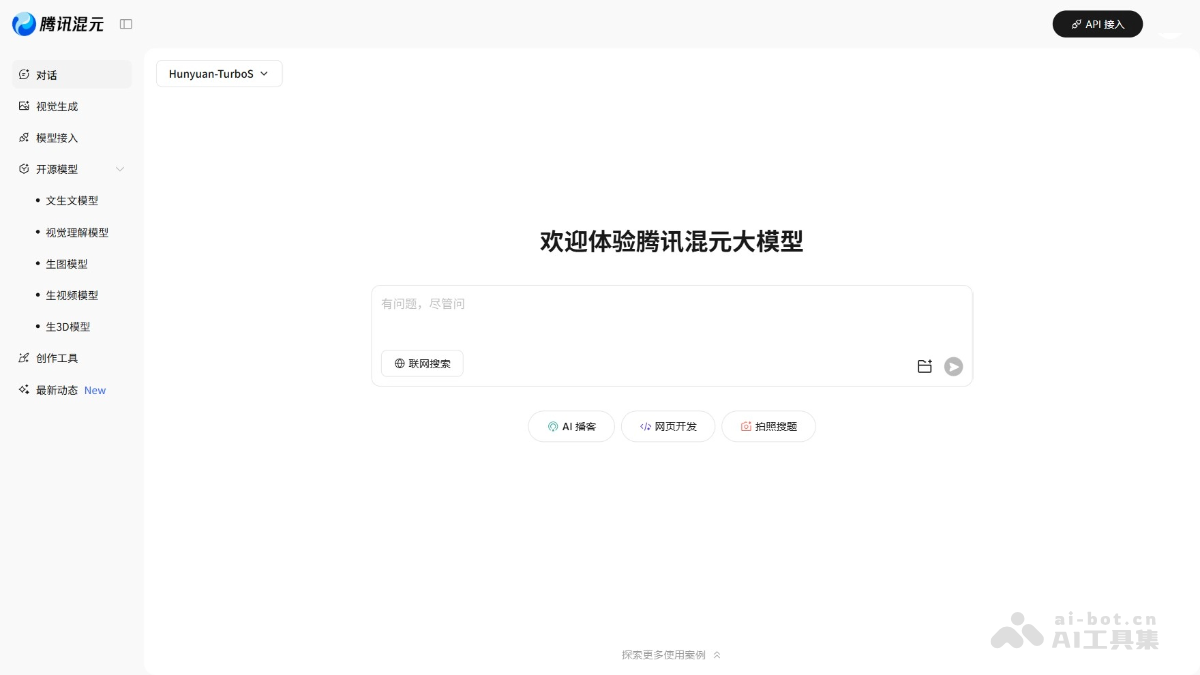
Main features of Tencent Hunyuan
- Conversational interaction: Supports natural language dialogue, enabling multi-turn communication and context understanding, suitable for scenarios such as customer service robots and chat assistants.
- Visual generation: Generates images, videos, and other content based on text descriptions, used in content creation, advertising design, etc.
- Code assistance: Helps developers generate and complete code, conduct code reviews, and improve development efficiency and quality.
- Document processing: Supports document generation, editing, and beautification, lowering the writing threshold and improving content creation efficiency.
- Knowledge Q&A: Builds a knowledge base, provides accurate Q&A services, and supports input of files in multiple formats.
- Model access: Provides API interfaces, making it convenient for developers to integrate Hunyuan into their own applications and achieve intelligent upgrades.
AI Podcast: Automatically generates podcast content, synthesizes speech, and analyzes listener feedback based on AI technology. - Web development: AI-assisted code writing, design suggestions, and user experience optimization.
- Photo-based question search: By taking a photo and uploading an image of a question, AI recognizes it and provides answers and explanations.
Models integrated with Tencent Hunyuan
- Hunyuan-TurboS: A fast-thinking model, suitable for text-to-text and general models, with a maximum input of 28k and a maximum output of 16k.
- Hunyuan-T1: An ultra-large-scale reasoning model, suitable for text-to-text, slow thinking, and general models, with a maximum input of 28k and a maximum output of 64k.
- Hunyuan-A13B: A hybrid reasoning model, supporting switching between fast and slow thinking modes, suitable for text-to-text, hybrid reasoning, and general models, with a maximum input of 224k and a maximum output of 32k.
- Hunyuan-7B: A hybrid reasoning model, suitable for scenarios such as text-to-text continuation, post-pretrain, and fine-tuning, with a maximum input of 16k and a maximum output of 32k.
- Hunyuan-4B: A hybrid reasoning dense model, with slow thinking mode by default, supporting switching between fast and slow thinking modes, with a maximum input of 32k and a maximum output of 32k.
- Hunyuan-1.8B: A hybrid reasoning model, with significantly improved capabilities in mathematics, science, long-text understanding, and agent abilities, with a maximum input of 32k and a maximum output of 32k.
- Hunyuan-0.5B: A hybrid reasoning model, suitable for downstream scenarios such as text-to-text continuation and fine-tuning, with a maximum input of 32k and a maximum output of 32k.
How to use Tencent Hunyuan
- Visit the official website: Visit the Tencent Hunyuan official website and complete registration and login as prompted.
- Select a model: In the upper left corner of the interface, select different models, for example "Hunyuan-TurboS".
- Dialogue function: In the input box in the center of the interface, enter text to converse with the model. After entering a question or instruction, press the Enter key or click the send button, and the model will give a corresponding answer.
- Visual Generation: If you need to generate images or videos, perform the operation in the corresponding functional area.
- Model Integration: If you are a developer and want to integrate the model into your own application, click the "API Access" button in the upper right corner to obtain the API key and integration guide.
- Open Source Models: Click "Open Source Models" in the left menu to view and download the open source model code provided by Tencent Hunyuan.
- Creation Tools: In the "Creation Tools" section, find various tools that assist content creation, such as copywriting generation, image editing, etc.
Application Scenarios of Tencent Hunyuan
- Document Scenarios: Provide capabilities such as document creation, text polishing, text proofreading, and table formula and chart generation, improving creation efficiency and enhancing the creation experience.
- Meeting Scenarios: Provide capabilities such as in-meeting Q&A, meeting summaries, and meeting to-do item organization, simplifying meeting operations and improving meeting efficiency.
- Advertising Scenarios: Provide intelligent advertising material creation and AI multimodal generation capabilities, improving the work efficiency of marketing content creation.
- Marketing Scenarios: Build an intelligent shopping guide to help merchants improve service quality and service efficiency.

