

What is PaddlePaddle AI Studio
PaddlePaddle AI Studio is launched by BaiduArtificial intelligence learningand practical training community, based on Baidu's deep learning platform PaddlePaddle. It provides developers with an efficient cloud-based learning environment, supporting online programming, free GPU computing power, and massive open-source algorithms and datasets, helping developers quickly get started with deep learning. The platform provides a built-in Jupyter Notebook environment, supports PaddlePaddle project case collections and model libraries, making it convenient for users to conduct model development and experiments. It provides full-process development tools, supporting the complete process from model development to deployment, including tools such as PaddleX, PaddleCV, and PaddleInference, as well as the PaddleServing service-oriented deployment framework.
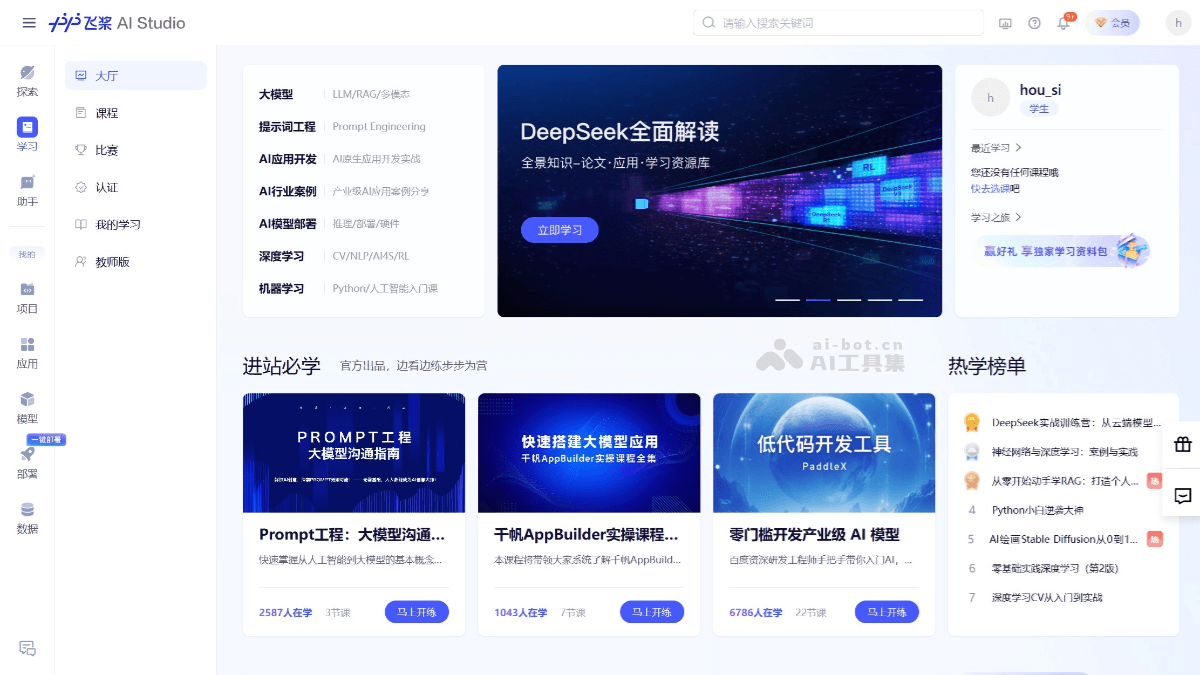
Main features of PaddlePaddle AI Studio
- Online programming environment: Provides a built-in Jupyter Notebook environment, supporting PaddlePaddle project case collections and model libraries.
- Free GPU computing power: Provides free GPU resources for developers, reducing the cost of deep learning development.
- Massive open-source algorithms and datasets: Provides real project cases and massive datasets, helping users better understand and apply deep learning technology.
- Full-process teaching support: For each stage of the full teaching process—preparation, teaching, practice, management, evaluation, and examination—it provides teaching-related resources and a practical training programming platform.
- Full-process development tools: Provides tools such as PaddleX, PaddleCV, and PaddleInference, supporting the full process from model development to deployment.
- Distributed training support: A PaddlePaddle recommendation-oriented model library that supports distributed training.
- Service-oriented deployment framework: Provides the PaddleServing service-oriented deployment framework, facilitating rapid model deployment.
- Competitions and practice: Provides competition activities such as beginner practice competitions and elite algorithm competitions, helping developers improve their practical abilities.
How to use PaddlePaddle AI Studio
-
Visit the official website: Visit PaddlePaddle AI Studio'sofficial website, register or log in with an account and password.
- Create a project
- Enter the homepage: After logging in, enter the homepage of PaddlePaddle AI Studio.
-
Create a project: Click the "New Project" button in the upper right corner of the page, and choose "Blank Project" or "Create Project from Template".
-
Blank project: Suitable for users with a foundation, allowing them to freely create and edit code.
-
Create project from template: You can choose from various official templates to quickly start learning and development.
-
- Use the online programming environment
- Choose a programming environment: On the project page, click the "Start" button and choose an appropriate programming environment (such as Python 3.8 + GPU).
- Enter Jupyter Notebook: After startup, enter the Jupyter Notebook interface, where you can start writing and running code.
- Write code: In Jupyter Notebook, create a new Notebook and write code. You can directly use the PaddlePaddle framework for deep learning model development.
- Run code: Click the "Run" button to execute the code. The platform provides free GPU computing power, which can accelerate model training.
- Using Datasets and Models
- Datasets: On the project page, click the "Datasets" tab to upload your own datasets or use public datasets provided by the platform.
- Model Library: Click the "Model Library" tab to view and use various pre-trained models provided by the platform, such as PaddleCV, PaddleNLP, etc.
- Taking Courses
- Go to the Course Page: On the homepage, click the "Courses" tab to enter the course page.
- Select a Course: Choose an appropriate course according to your learning needs. Courses are divided into basic courses, advanced courses, practical courses, etc.
- Study the Course: Click a course to enter the learning page and study according to the course schedule. Courses usually include video explanations, code examples, and practical projects.
- Participating in Competitions
- Go to the Competition Page: On the homepage, click the "Competitions" tab to enter the competition page.
- Select a Competition: Choose an appropriate competition project according to your interests and abilities.
- Register for the Competition: Click the "Register" button and complete the registration process according to the prompts.
- Submit Your Work: On the competition page, upload your code and result files to participate in the competition.
- Community Communication
- Go to the Community Page: On the homepage, click the "Community" tab to enter the community page.
- Questions and Answers: In the community, you can ask questions or answer other users' questions, and exchange learning insights and development experience.
- Follow Updates: Follow community updates to learn about the latest technology trends and platform updates.
- Project Management
- Save Project: On the project page, regularly save your project to avoid data loss.
- Export Project: After completing the project, you can export it locally for future use.
- Delete Project: If a project is no longer needed, you can delete it to free up storage space.
Application Scenarios of PaddlePaddle AI Studio
- Personal Learning and Development: It provides individual developers with an online learning and development platform that does not require configuring a complex local environment, making it convenient for them to quickly get started with training and experimenting with deep learning models.
- Enterprise Development and Application: It helps enterprises combine artificial intelligence technology with industrial applications, providing technical support and solutions.
- Education and Teaching: It provides an education edition for teachers at universities and institutions, supporting them in easily implementing AI teaching.
- Competitions and Cooperation: It holds various AI competitions, such as international big data competitions, CVPR challenges, etc., promoting academic exchange and cooperation and driving the innovation and development of artificial intelligence technology.


