

What is Operator
Operator is OpenAI's first AI agent. An AI tool that can operate a web browser like a human, it can automatically complete various online tasks, such as booking restaurants, buying plane tickets, filling out forms, and more. Operator is powered by a new model called Computer-Using Agent (CUA), which combinesGPT-4o's visual capabilities with advanced reasoning capabilities from reinforcement learning. It "observes" web pages through screenshots and operates using a virtual mouse and keyboard. Operator is currently in the research preview stage and is only available to ChatGPT Pro users in the United States. In the future, OpenAI plans to expand it to more user groups and integrate it into ChatGPT.
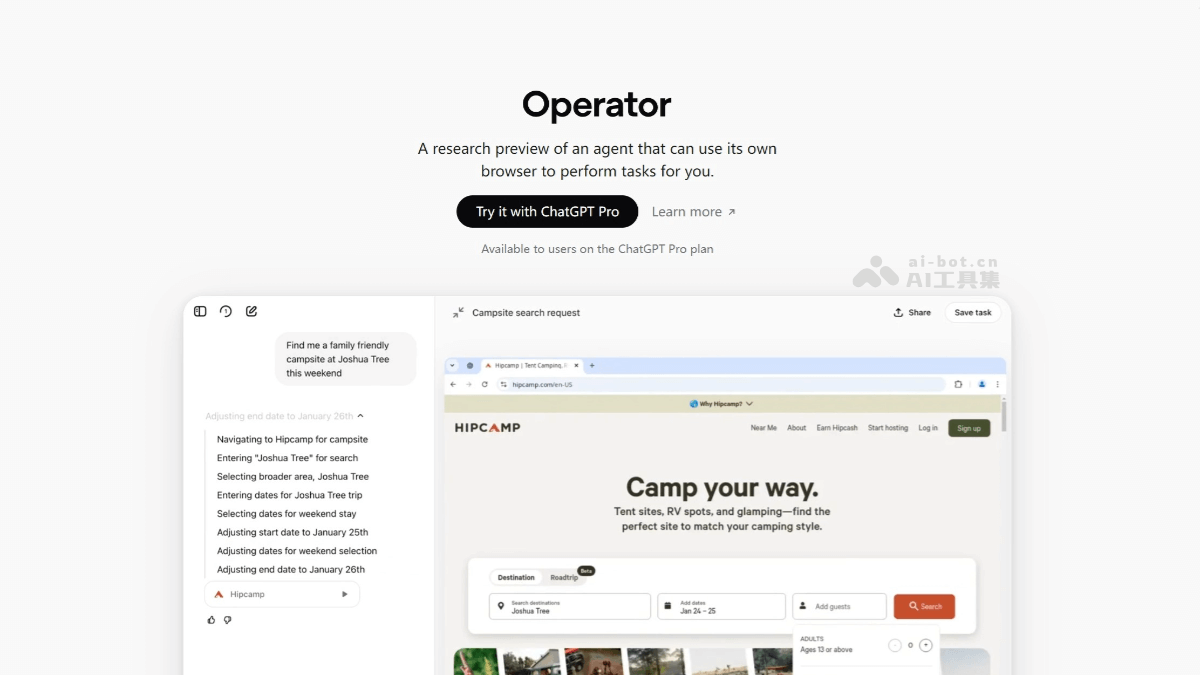
Operator's main features
- Automated task execution: Operator can automatically complete a variety of online tasks, such as booking restaurants, purchasing plane tickets, shopping online, filling out forms, and more.
- Multi-task processing: Supports running multiple tasks simultaneously, such as booking travel and shopping on different websites.
- Personalized settings: Users can set preferences (such as preferred airlines) and save frequently used tasks for quick execution.
- Self-correction and reasoning capabilities: When encountering problems, Operator can adjust itself through reasoning, and if it cannot resolve them, it returns control to the user.
- Security and privacy protection: When sensitive information is involved (such as login or payment), Operator will ask the user to take over and refuses to perform high-risk tasks.
Operator's technical principles
- Computer-Using Agent (CUA) model: The model combines GPT-4o's visual recognition capabilities with advanced reasoning capabilities acquired through reinforcement learning. Operator can understand and interact with graphical user interfaces (GUI) and operate web pages like a human user.
- Perception: Operator obtains information about the current interface through screenshots. It uses GPT-4o's visual capabilities to analyze screenshots and identify interface elements such as buttons, menus, and text boxes.
- Reasoning: Based on reinforcement learning reasoning capabilities, Operator plans the next action. Through an "inner monologue" mechanism, it evaluates observations, tracks intermediate steps, and dynamically adjusts.
- Action: Executes operations such as clicking, scrolling, or typing. It stops operating when the task is completed or user input is needed.
- Visual capabilities: Operator "sees" web page content through screenshots. It recognizes and understands GUI elements without relying on a specific operating system or web API.
- Reinforcement learning: Through reinforcement learning, Operator acquires advanced reasoning capabilities. It can self-correct, and when encountering challenges or making mistakes, it can adjust itself based on its reasoning capabilities.
- Self-correction and learning: During task execution, if an error occurs, Operator can detect where the problem is. By retrying or prompting the user for confirmation, Operator can correct the error.
How to use Operator
- Visit the platform: Visit the Operator official website https://operator.chatgpt.com/ 。
- Clarify your needs: Before using Operator, determine the task you want to complete, such as booking a restaurant, purchasing goods, or filling out a form.
- Briefly describe the task: In the Operator interface, describe your task in clear and concise language, such as "Book a table at XX restaurant for 19:00 tonight."
- Monitor task progress: Operator will automatically handle the task, but when sensitive operations such as login, payment, or CAPTCHA are involved, it will request the user to take over.
- Feedback and adjustment: After the task is completed, observe the problems in the execution process and provide feedback to help optimize Operator's work efficiency.
Operator's security mechanisms
- User control takes priority: When Operator users need to enter sensitive information in the browser, it will request the user to take over.
- Takeover mode: When the user needs to enter sensitive information (such as login credentials or payment information) in the browser, it will request the user to take over. In takeover mode, Operator will not collect or screenshot the information entered by the user.
- User confirmation: Before completing any important operation (such as submitting an order or sending an email), Operator needs to request user approval.
- Task restrictions: Operator will refuse certain sensitive tasks, such as bank transactions or tasks requiring high-risk decisions (for example, deciding on a job application).
- Monitoring mode: On particularly sensitive websites (such as email or financial services websites), Operator requires the user to closely supervise its operations so that the user can directly discover any potential errors.
- Data privacy management: Users can choose to opt out of model training, delete browsing data and conversation history with one click, and log out of all websites.
- Defense against malicious websites: OpenAI has built defensive mechanisms to prevent malicious websites from misleading Operator through hidden prompts, malicious code, or phishing attempts. To detect and ignore prompt injection. A dedicated "monitoring model" watches for suspicious behavior and pauses tasks when anomalies occur. Automated and manual review processes continuously identify new threats and quickly update security measures.
Operator's performance
- Benchmarks:
- In the WebArena test, CUA's success rate was 58.1%.
- In the WebVoyager test, it achieved an 87% success rate in navigating real websites.
- In the OSWorld test, CUA's success rate was 38.1%, lower than the human level of 72.4%.
- Task success rate:
- For basic web operations and repetitive tasks, such as search filtering, creating shopping lists and music playlists, the success rate reached 10/10.
- When searching for products on e-commerce websites, it also maintained a high success rate of 9/10.
- When handling complex tasks such as property searches, the success rate dropped to 3/10.
Operator's application scenarios
- Automated shopping: Users can instruct Operator to purchase specific products, such as "Buy a pair of Nike sneakers, budget around 500 yuan." Operator will automatically search shopping websites, compare prices, and choose the most cost-effective product to complete the purchase.
- Form filling: When registering an account or applying for a service, Operator can automatically fill out forms, reducing the user's manual input workload.
- Multi-turn dialogue support: In complex customer service scenarios, such as product recommendations or after-sales service, Operator can conduct multi-turn dialogues and dynamically generate responses.
- Data analysis: Operator can use big data processing tools such as Spark to perform data analysis and data cleaning. Users can execute specific data processing tasks by submitting a Spark job configuration file.
- Schedule Arrangement: Operator can help users coordinate meeting times, book meeting rooms, and send meeting notifications.
- File Management: Operator can quickly find the needed files, organize folders, and group similar files together.


