
What is OpenMuse
OpenMuse is CopilotKit an open-source personal AI assistant. OpenMuse gives the Agent a computer, a persistent browser, an optional Linux container and file system, tasks can run continuously in the background, and can be paused or taken over at any time. OpenMuse supports Gmail/Calendar, PDF form filling, web page monitoring, expense analysis, etc. It targets iOS/Android/Web, requires you to configure models and keys yourself, and is suitable for developers doing secondary development.
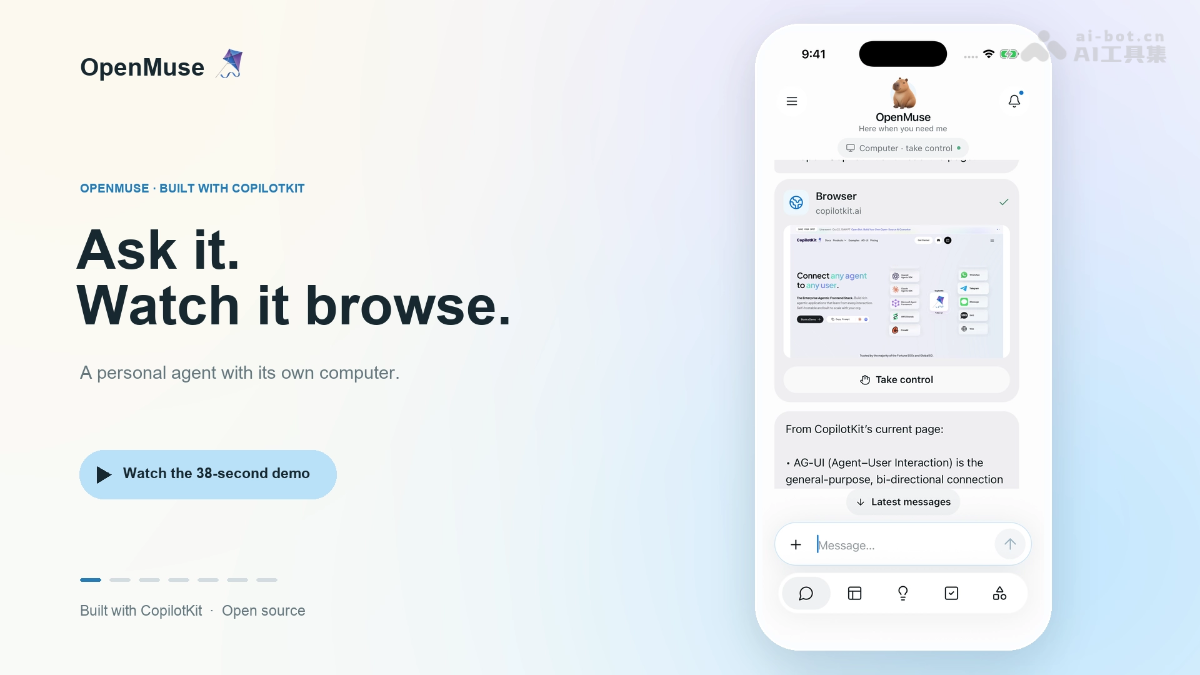
Main features of OpenMuse
- Chat interaction: CopilotKit headless chat, AG-UI event streaming responses, supports email search, a combined send/stop input box, and email, browser, and PDF results displayed as inline cards.
- Agent computer: Built-in persistent Chromium browser and optional Linux Docker container, the Agent can browse web pages, run commands, and process files and PDFs.
- Human takeover: Open the browser or terminal at any time to view the Agent's real-time operations, and use "Take control" to directly take over the same session and continue working.
- Task management: Tasks come with plans, progress, and approval nodes, support pause, resume, cancel, and retry, and tasks can still run on the server after the frontend is closed.
- Document processing: Read PDF email attachments, ask you for the form fields, generate a filled copy for review, and prepare a reply draft.
- Gmail and Calendar: Integrated via Google OAuth, supports full email threads, drafts, and the creation/modification/deletion of calendar events, with human confirmation required for every write.
- Goal tracking: Goals can be broken down into milestones, and can also regularly check public web pages for content changes, restock status, and price thresholds, with alerts automatically deduplicated.
- Expense analysis: Import transaction CSVs and automatically generate category summaries and savings goal suggestions.
- Personal memory: Editable name, tone, avatar, and memory preferences, persistently retained across tasks.

Follow WeChat and reply "Open Source" to join theAI Open Source Project Communication Group
How to use OpenMuse
- Clone the project locally: In the terminal, run
git clone https://github.com/CopilotKit/OpenMuse.git openmuse, then runcd openmuseto enter the project directory. - Install project dependencies: In the project root directory, run
pnpm install --frozen-lockfileto install all dependencies according to the lockfile. - Create the environment variable file: Run
cp .env.example .envto copy the example configuration into the actual environment variable file to use. - Log in and select a CopilotKit project: Run
npx copilotkit@latest loginin sequence to complete login, then runnpx copilotkit@latest project selectto select or create an Intelligence project. - Write the Intelligence key: Copy the
CPK_INTELLIGENCE_API_KEYgenerated after login into.envfile, this is the key required for the conversation persistence feature. - Start the backend API service: run
pnpm devto start the API service. After startup, you can check the health status at localhost:8787/api/health. - Start the web frontend: open another terminal and run
pnpm dev:web, then visit localhost:8081 in your browser to open the application interface. - Try the built-in features: send “Complete the permission slip” in the chat window to try the PDF form filling workflow, or create a web monitoring task in Goals → Track to test alerts.
- Configure a real model: in
.env, setAGENT_BACKEND=model、MODEL=provider/model-id, and enter the API key for your chosen provider (OpenAI, Anthropic, or Google). - Connect Gmail and Calendar: create an OAuth client in Google Cloud Platform and enable the Gmail and Calendar APIs, then enter the Client ID and Secret into
.env, and complete account authorization on the Apps page in the application. - Start the browser worker: first run
pnpm --dir apps/worker exec playwright install chromiumto install the browser, then runpnpm dev:browserto start the browser service. - Enable the Linux workspace: run
docker build -t openmuse-computer:local apps/computerto build the container image, then useCOMPUTER_ENABLED=true pnpm devto start the API and enable the workspace. - Run the mobile app: on iOS devices run
pnpm --dir apps/mobile ios, and on Android devices runpnpm --dir apps/mobile android. Note that Xcode or the Android toolchain must be installed on your machine.
OpenMuse's core advantages
- A true Agent workspace: with a built-in persistent browser and an optional Linux container, the Agent can truly browse web pages, execute commands, and handle files.
- Visible and controllable throughout: users can open the browser or terminal at any time to view Agent operations and immediately take over the session to continue working.
- Tasks continue uninterrupted in the background: task plans, progress, and execution records are persistently saved. After the frontend is closed, the server can continue running, and work can resume after interruptions.
- Clear security boundaries: write operations such as sending email and modifying calendars require manual confirmation, credentials are stored encrypted, and there are no hidden automatic retries.
- One codebase for multiple platforms: based on CopilotKit React Native, it covers iOS, Android, and Web at the same time.
- Decoupled and replaceable architecture: Connect frontend and backend via the AG-UI protocol; the Agent backend can be swapped for any compatible harness.
- Features work out of the box as a system: Common personal assistant scenarios such as email, calendar, PDF forms, web monitoring, and expense analysis are fully connected.
OpenMuse's project address
- GitHub repository:https://github.com/CopilotKit/openmuse
Comparison of OpenMuse with similar competing products
| Dimension | OpenMuse | OpenClaw |
|---|---|---|
| Positioning | A personal assistant application with a "visual workspace" | A unified gateway-style AI execution engine, focused on multi-channel connections |
| Open-source license | MIT | MIT |
| Interface | Native iOS/Android/Web app, Rich Threads rich conversations | No native main interface, driven by chat channels, companion app optional |
| Interaction entry point | Proprietary App | 50+ messaging platforms (WhatsApp, Telegram, Discord, Feishu, etc.) |
| Agent workspace | Persistent Chromium browser + optional Linux container + files/PDF, fully visualized | Shell commands, file operations, browser control (Puppeteer/Playwright) |
| Human takeover | Supports Take control for real-time takeover of browser/terminal sessions | No equivalent mechanism, more oriented toward "assign the task and wait for results" |
| Security model | Each write requires manual confirmation, containers are non-root, network isolation, commands are time-limited | Two modes: sandbox/full access, requiring self-configuration |
| Ecosystem extension | Built-in scenarios such as Gmail/calendar/PDF/monitoring/finance | ClawHub skill marketplace with 5000+ community skills |
| Continuous task execution | Server-side task engine + SQL leases, uninterrupted even when the frontend is closed | 7×24 autonomous operation, can be triggered on schedule (Cron) |
| Model integration | OpenAI/Anthropic/Google (via CopilotKit) | Extremely broad: Claude, GPT, Gemini, DeepSeek, Kimi, local models, etc. |
OpenMuse's application scenarios
- Email transaction processing: The assistant automatically searches through emails, opens the relevant email, reads the attached PDF, then asks you for additional information, fills out a copy of the form, and drafts a reply to await one-click confirmation to send.
- Web research and information gathering: Browses Hacker News and researches a topic; the browser and summary results are inlined directly in the chat, and you can Take control at any time to intervene and correct the direction.
- Price and inventory monitoring: After setting a target, it regularly checks the product page and automatically alerts when the item is restocked or the USD price falls below the threshold, suitable for flash purchases and price comparison.
- Scheduling and Activity Arrangements: Integrated via Gmail/Calendar OAuth, it can check activity information in emails and create or modify calendar events, with every change confirmed by you.
- Personal Financial Management: Import bank transaction CSVs to automatically generate categorized expense summaries and savings goal suggestions, forming an interactive bookkeeping dashboard.