
What is Multi-Shot
Multi-Shot is an Runway launched by AI video generationapp that supports "one-click video creation." Users only need to enter a scene description, and the system automatically breaks it down into up to 5 coherent shots, simultaneously completing composition, camera movement, dialogue, sound effects, and editing, directly outputting a cinematic short film. The app supports image starting points or plain text input, based on theGen-4.5model, enabling non-professional users to quickly produce complete narrative videos, marking the shift of AI video from asset production to automated narrative creation.
Multi-Shot's main features
-
Intelligent storyboard generation: Enter a scene description, and the app automatically breaks it down into up to 5 logically coherent shot sequences.
-
Automatic dialogue synthesis: Supports generating character dialogue and synchronized lip-sync, with no additional dubbing tools needed.
-
Intelligent sound effect matching: Automatically adds ambient sounds and action sound effects, such as door closing sounds, footsteps, and more.
-
Rhythm-controlled editing: Automatically adjusts shot switching speed and pause duration according to the scene's emotion.
-
Cinematic composition: Automatically handles depth of field, lighting, and aspect ratio, outputting professional-grade visual effects.
-
Dual-mode input: Supports extending creation starting from an image, or generating a video from scratch with plain text.
How to use Multi-Shot
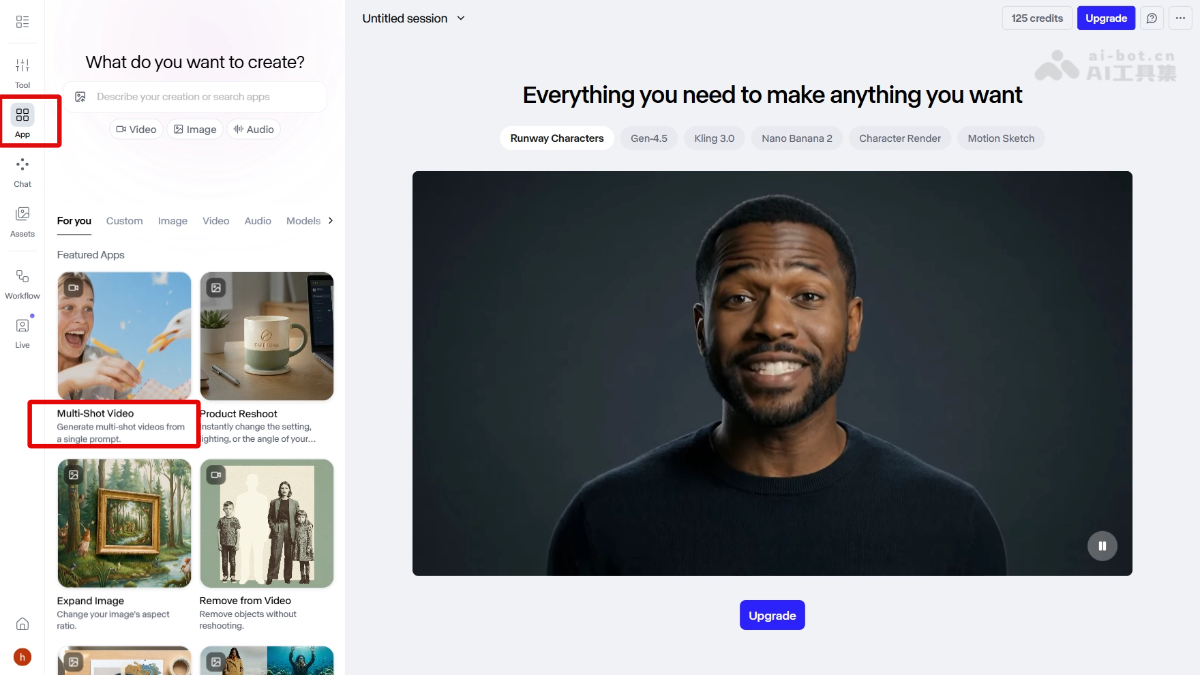
- Access point: Sample Runway official website, find Multi-Shot in the Apps list and enter it.
- Choose input method: Upload an image as the visual starting point, or directly enter a plain text description of the scene.
- Write the prompt: Describe the desired scene content, which may include details such as characters, dialogue, emotion, and camera movement.
- One-click generation: The system automatically breaks it down into up to 5 shots, simultaneously generating dialogue and sound effects and completing editing.
- Get the final video: Directly download a short film with a complete narrative rhythm, with no post-production splicing needed.
Multi-Shot's key information and usage requirements
- Developer:Runway
- Underlying model:Gen-4.5
- Maximum number of shots: 5
- Single shot duration: Up to 10 seconds
- Output resolution: 720p / 4K (some scenes)
- Billing standard: 12 credits/second
- Access method: Runway web version → Apps → Multi-Shot
Multi-Shot's core advantages
- Full-process automation: Compresses the traditional multi-step AI video process (generation, selection, editing, dubbing, music scoring) into one step, directly outputting a complete short film from the input description.
- Professional-grade narrative capability: Automatically handles the logic of cinematic language (wide shots establish the scene, medium shots explain relationships, close-ups capture expressions), enabling non-professional users to produce highly complete works.
- Native multimodal generation: Dialogue, sound effects, and visuals are generated synchronously, with character lip movements automatically aligned with speech, requiring no additional tools for dubbing and lip-sync.
- Intelligent rhythm control: Automatically adjusts shot transition speed and pause duration based on the scene's mood—tense scenes cut quickly, quiet scenes linger.
- Flexible dual-mode creation: Supports extending from an image starting point or generating from scratch with plain text, covering diverse needs from creative exploration to precise control.
Multi-Shot competitor comparison
| Comparison dimension | Runway Multi-Shot | Wan 2.6(Alibaba Wanxiang) | Veo 3.1(Google) |
|---|---|---|---|
| Developer | Runway | Alibaba | |
| Core positioning | One-click generation of complete short films | Multi-shot scripted generation | Synchronized audio-video generation |
| Multi-shot capability | Automatically breaks down up to 5 shots and intelligently edits them | Supports multi-shot scripts (wide shots, close-ups, push-pull, etc.), requires manual planning | Primarily single-shot, no automatic storyboard function |
| Degree of automation | Fully automated process (storyboard + dialogue + sound effects + editing) | Semi-automatic, requires users to write a shot list | Semi-automatic, requires post-production stitching |
| Dialogue generation | Native support, automatic lip sync | Not supported | Not supported |
| Sound effect matching | Automatically generates ambient sounds and action sound effects | Not supported | Native audio generation, but no scene sound effect matching |
| Pacing control | Automatically adjusts shot transition speed and pauses | Not supported | Not supported |
| Single segment duration | Up to 50 seconds (5 shots × 10 seconds) | Up to 15 seconds | Up to 8 seconds |
Multi-Shot application scenarios
- Short video creation: Individual creators quickly produce narrative short films with dialogue and sound effects, without manual editing or stitching, suitable for social media content production.
- Product demo production: Enterprise teams input product usage scenario descriptions to directly generate demo videos with narration and ambient sound, more efficient than traditional filming or outsourcing.
- Advertising prototype development: Advertising practitioners quickly generate creative concept films for proposal presentations or client communication, reducing pre-production costs.
- Film and television previsualization: Directors and producers generate complete scene previews from a single sentence, assisting storyboard planning and visual design decisions.
- Education and training content: Teachers or institutions generate scenario-based instructional videos, enhancing content vividness through character dialogue and scene demonstrations.