
What is Save the Image
Save the Image is an online image processing tool based on AI technology that can quicklyremove image watermarks, repair blurriness,losslessly enlarge, remove mosaics, and supportsone-click cutoutand generating similar images, among other functions. Based on advanced AI algorithms, it can accurately identify and remove various watermarks, including text, graphics, and semi-transparent background watermarks, while maintaining the high-definition quality of the image. It supports downloading in multiple image formats, such as JPG, PNG, PDF, etc. Users can use it directly through a browser extension or the web page. It is simple to operate and suitable for beginners.
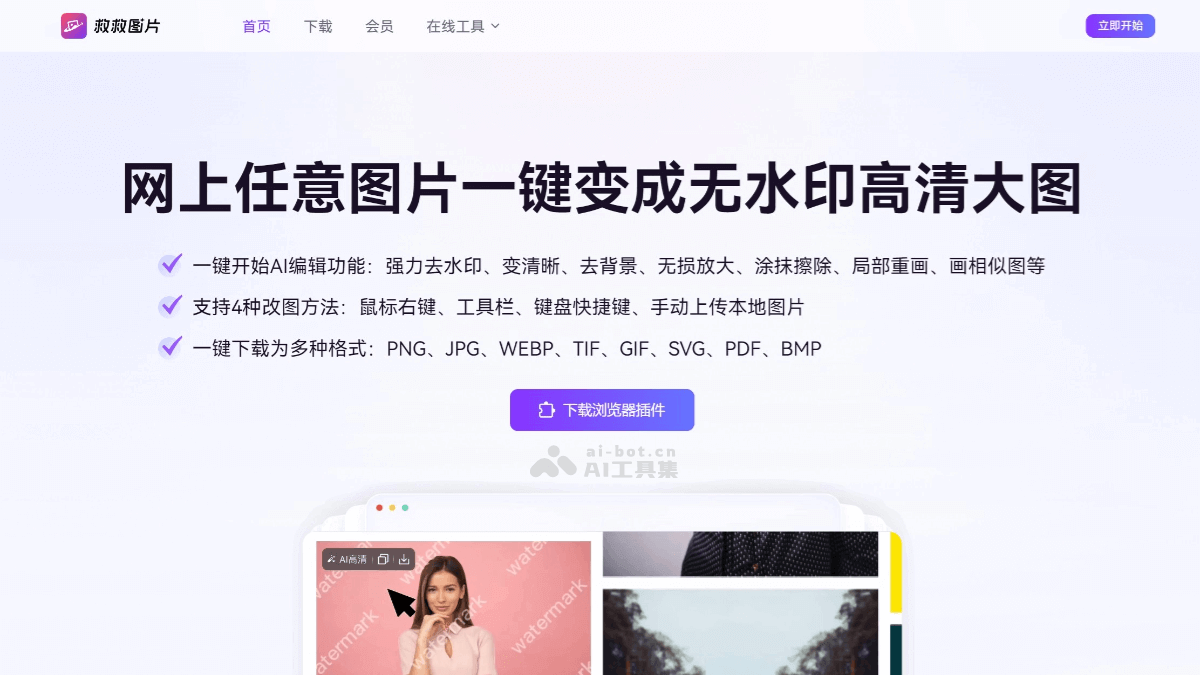
Main Features of Save the Image
- AI Watermark Removal: Based on advanced AI algorithms, it can quickly identify and remove watermarks such as text and graphics in images while maintaining the high-definition quality of the image.
- One-Click Cutout: Automatically identifies the subject in an image and quickly separates it from the background, supporting background replacement and color adjustment.
- Mosaic Removal: Uses AI algorithms to restore high-definition details of images, making blurred or pixelated parts clear.
- Lossless Enlargement: Supports enlarging images up to 4K resolution while maintaining clarity and avoiding blurriness.
- Brush Erase: Easily removes unwanted objects or people from photos. AI automatically fills in the background, and the image transitions naturally.
- Image Clarity Enhancement: Based on AI technology, it improves the clarity of blurred images and optimizes image quality.
- AI Similar Image Generation: Based on the image provided by the user, it generates new images with similar style and elements to meet different creative needs.
- Download in Multiple Formats: Supports downloading processed images in multiple formats such as JPG, PNG, PDF, etc.
How to Use Save the Image
- Visit the Web Version: Visit theofficial websiteof Save the Image. Use the features directly on the web page, or install the extension to use it.
- Install via Browser Extension:
- Visit the official website of Save the Image or a browser extension store (such as the Chrome Web Store or Microsoft Edge Add-ons).
- Search for "Save the Image" and click the "Add to Browser" or "Install" button.
- After installation is complete, the "Save the Image" icon will appear in the browser toolbar.
- Use the Features
- Watermark Removal: Select the "Watermark Removal" feature, upload an image, and click "Process." AI automatically removes the watermark, and the area can be adjusted manually.
- One-Click Cutout: Select the "Cutout" feature, upload an image, and AI automatically identifies and cuts out the subject. You can manually adjust the subject or background, then download when finished.
- Mosaic Removal/Blur Repair: Select the "Mosaic Removal" or "Enhance Clarity" feature, upload a blurred or mosaic image, and click "Process." AI optimizes the details.
- Lossless Enlargement: Select the "Lossless Enlargement" feature, upload an image, choose the target resolution (such as 4K), and click "Process." AI enlarges it while maintaining clarity.
- Brush Erase: Select the "Smudge Erase" feature, upload an image, box-select or smudge the parts to be removed, AI automatically fills in the background, and download when done.
- Save and Export: After processing is complete, click the "Download" button, select the save path and format (such as JPG, PNG, PDF), and save it locally.
Application Scenarios of Save the Image
- Material Optimization: During the creative process, designers may have materials with watermarks or that are blurry. Through the watermark removal and blur repair features of "Save the Image", materials can be quickly cleaned up, making them more suitable for design needs.
- Product Image Processing: E-commerce sellers can obtain product images from the internet and use the watermark removal and one-click cutout features of "Save the Image" to quickly clean up the images, making them more suitable for product display.
- Content Creation: Self-media creators need a large number of high-quality images to enrich article or video content. Through the AI find similar feature of "Save the Image", image materials related to the topic can be quickly found.
- Image Restoration: For blurry or flawed images, using the restoration feature of "Save the Image" can make the images clearer and improve content quality.