
What Is Fish Speech
Fish Speech is a text-to-speech (TTS) tool open-sourced byFish Audio, supporting Chinese, English, and Japanese. Trained on approximately 150,000 hours of multilingual data, it achieves speech synthesis quality close to human level and has now been updated to version 1.2. The tool's features include low VRAM requirements (only 4GB needed), fast inference speed, high customizability and flexibility, allowing users to quickly performvoice cloningwithout complex training. Fish Speech also supports multiple speech generation models, such as VITS2, Bert-VITS2, etc., and is suitable for scenarios such as smart assistants, automated customer service, and language learning.
Fish Speech's Features
- Efficient Text-to-Speech Conversion: Fish Speech uses advanced algorithms to quickly convert input text information into natural-sounding, fluent speech. Through optimized acoustic models and language models, it ensures the naturalness and accuracy of the speech, enabling it to provide high-quality speech output in various scenarios.
- Multilingual Support: Supporting Chinese, English, and Japanese, Fish Speech's multilingual capability can cross language barriers, providing services to users in different countries and regions, and facilitating globalized application scenarios.
- Voice Cloning Capability: Users can upload a segment of their own or someone else's speech as a reference, and Fish Speech uses deep learning technology to learn and imitate the characteristics of that speech, achieving personalized voice cloning. This feature has broad application potential in areas such as personalized voice assistants and audiobook production.
- Low VRAM Requirement: It can run with only 4GB of VRAM, greatly lowering the hardware threshold, enabling more users to use Fish Speech on their own computers without having to invest in expensive hardware equipment.
- Fast Inference Speed: Fish Speech optimizes the inference process, reduces waiting time, and improves the efficiency of speech synthesis. Users can obtain the desired speech output in a short time, enhancing the overall user experience.
- Multiple Speech Generation Models: Fish Speech supports a variety of models including VITS2, Bert-VITS2, GPT VITS, MQTTS, GPT Fast, andGPT-SoVITS, and users can choose the appropriate model according to their needs to obtain the best speech synthesis results.
- Easy to Use: Fish Speech's design focuses on user experience and simplifies the installation and configuration process. Users do not need to deeply understand technical details and can quickly start using it through a one-click startup program, greatly lowering the barrier to use.
- Fine-Tuning Capability: LORA fine-tuning technology allows users to make detailed adjustments to the model to adapt to specific speech styles or expressions, providing users with more creative space.
- Performance Optimization: By adopting advanced technologies such as gradient checkpointing, causal sampling, and flash-attn, Fish Speech achieves significant performance improvements in model training and inference processes, ensuring efficiency and stability when processing large-scale data.
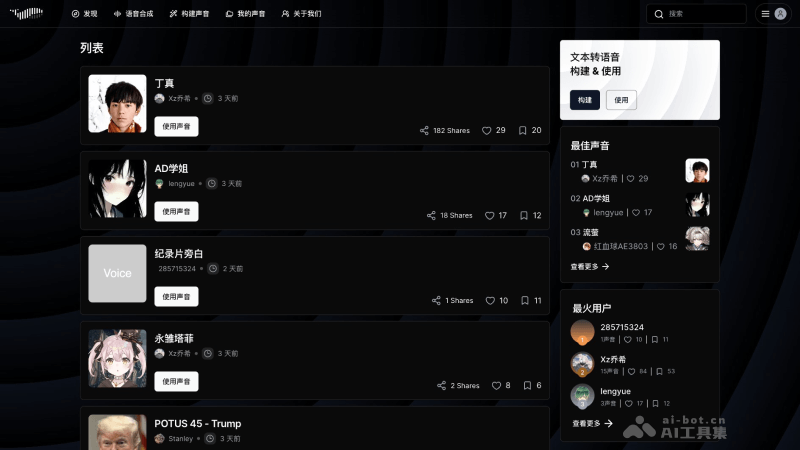
Fish Speech's Official Website Entry
- Official project homepage:https://speech.fish.audio/
- GitHub source code repository:https://github.com/fishaudio/fish-speech
- Hugging Face model address:https://huggingface.co/fishaudio/fish-speech-1.2
How to Install and Use Fish Speech
System Requirements
- GPU memory: 4GB (for inference), 16GB (for fine-tuning)
- Systems: Linux, Windows
Windows Configuration
Windows professional users can consider using WSL2 or Docker to run the codebase.
Windows non-professional users can consider the following basic running method that does not require a Linux environment (with model compilation functionality, i.e. torch.compile):
- Extract the project archive.
- Click install_env.bat to install the environment.
- You can edit the
USE_MIRRORitem in install_env.bat to decide whether to download from a mirror site. USE_MIRROR=falseUse the original site to download the latest stable versiontorchenvironment.USE_MIRROR=trueDownload the latesttorchenvironment from the mirror site. The default istrue。- You can edit the
INSTALL_TYPEitem in install_env.bat to decide whether to enable downloading the compilable environment. INSTALL_TYPE=previewDownload the development version compilation environment.INSTALL_TYPE=stableDownload the stable version without the compilation environment.
- You can edit the
- If INSTALL_TYPE=preview in step 2, execute this step (can be skipped; this step activates the model compilation environment)
- Use the following link to download the LLVM compiler.
- LLVM-17.0.6 (download from the original site)
- LLVM-17.0.6 (download from the mirror site)
- After downloading LLVM-17.0.6-win64.exe, double-click to install it, choose an appropriate installation location, and most importantly, check
Add Path to Current Userto add environment variables. - Confirm that the installation is complete.
- Download and install the Microsoft Visual C++ Redistributable package to resolve potential missing .dll issues.
- Download and install Visual Studio Community Edition to obtain the MSVC++ compilation tools and resolve LLVM header file dependency issues.
-
- Visual Studio Download
- After installing Visual Studio Installer, download Visual Studio Community 2022
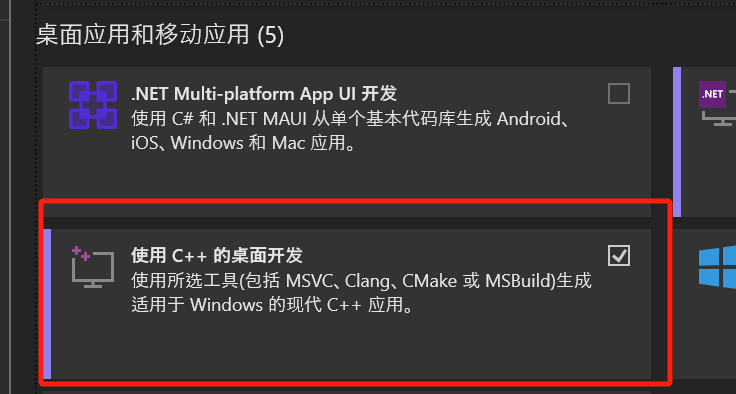
- Click as shown in the figure below
修改button, find the使用C++的桌面开发item, check it and download
-
- Use the following link to download the LLVM compiler.
- Double-click start.bat to enter the Fish-Speech training and inference configuration WebUI page.
- (Optional) Want to go directly to the inference page? Edit
API_FLAGS.txtin the project root directory, and modify the first three lines to the following format:--infer # --api # --listen ... ... - (Optional) Want to start the API server? Edit
API_FLAGS.txtin the project root directory, and modify the first three lines to the following format:--infer # --api # --listen ... ...
- (Optional) Want to go directly to the inference page? Edit
- (Optional) Double-click
run_cmd.batto enter this project's conda/python command line environment
Linux configuration
# 创建一个 python 3.10 虚拟环境, 你也可以用 virtualenv
conda create -n fish-speech python=3.10
conda activate fish-speech

# 安装 pytorch
pip3 install torch torchvision torchaudio

# 安装 fish-speech
pip3 install -e .

# (Ubuntu / Debian 用户) 安装 sox
apt install libsox-dev