
What is dsh-TUI
dsh-TUI is DeepSeek Harness of Claude Code style terminal interface plugin, developed by the community and featured by the official DSH WeChat account. The tool offers a pixel whale top bar, real-time status line, streaming thinking expansion, double-tap Esc session rollback, and other features, with full support for DSH capabilities such as Agent preset, Skills, and MCP. Zero core changes, one-click install via npm, traceless uninstall, optimized for long sessions, and suited to developers pursuing keyboard efficiency.
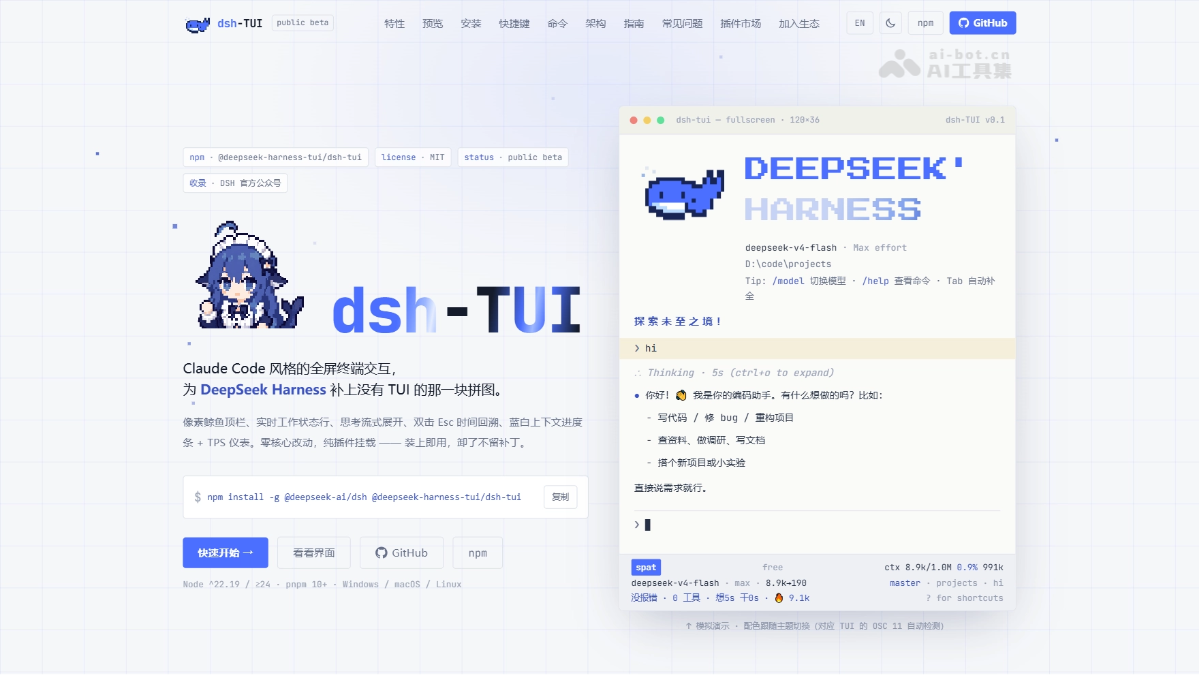
Main features of dsh-TUI
-
Claude Code style interface: Pixel whale top bar + dual-stream large-text title + real-time status line, the terminal can look great.
-
Streaming terminal interaction: Supports Markdown rendering, Tab completion,
@file references, history search, and dual rendering modes. -
Real-time visualization of Agent status: The bottom status bar displays TPS, cache hit rate, context progress, and reasoning level in sync.
-
Complete session workflow: Supports creating, resuming, compressing, exporting, and side queries, double-tap
Escto roll back or fork a session. -
Full DSH capability integration: Seamlessly invokes the official Agent Preset, Skills, MCP, Goals, Todos, and sub-agents.
-
One-click environment diagnostics:
/doctorself-checks the runtime environment,/costchecks usage,/mcpchecks connectivity, and supports custom API endpoints. -
Long-session performance optimization: Through event-driven projection, differential output, and message virtualization, it prevents the terminal from slowing down as the session grows.
How to use dsh-TUI
- Environment preparation: Make sure Node.js (≥24 recommended) and pnpm (≥10) are installed.
- Install the plugin: Globally install the official DSH and dsh-TUI:
npm install -g @deepseek-ai/dsh @deepseek-harness-tui/dsh-tui。 - Configure the key: Export in the terminal
DEEPSEEK_API_KEYenvironment variable (optionally configureDEEPSEEK_BASE_URL)。 - Launch the interface: Enter the project directory and run
dsh-tuito launch the terminal interface. - Environment self-check: Enter
/doctorto check whether the environment, credentials, and session status are normal. - Send a task: Type the first task instruction in the input box and press Enter to send.
- Common commands: Use
/helpto view commands,/modelto switch models,/compactto compress context. - Keyboard shortcut operations: Press
Ctrl+Cto interrupt a turn, double-tapEscto roll back the session,Ctrl+Oto expand thinking details. - Non-interactive mode: In script scenarios, use
dsh --profile headless "指令"to execute one-off non-interactive tasks.
Core advantages of dsh-TUI
- Claude Code style interface: Pixel whale top bar, dual-stream large-text title, and real-time status line make the terminal interface both attractive and practical.
- Zero-intrusion design: Pure plugin mounting, zero core changes; enabled upon installation, leaving no trace after uninstallation.
- Officially recognized and featured: Selected by the official DeepSeek Harness WeChat account as a "featured plugin for beta users", with guaranteed quality and compatibility.
- Full DSH capability integration: Full support for all official core capabilities including Agent Preset, Skills, MCP, Goals, Todos, sub-agents, and more.
- Real-time status visualization: The bottom status bar displays TPS, cache hit rate, context progress, reasoning level, and Git branch information in sync, keeping the Agent status clear at a glance.
- Long-session performance optimization: Using event-driven projection, differential terminal output, message virtualization, and bounded caching technologies, no matter how long the session is, it will not lag or bloat memory.
- Powerful session management: Double-click
Escto rewind/fork (time travel), while also supporting advanced operations such as context compression, history restoration, session export, and side queries. - Terminal-native interaction: Supports streaming Markdown rendering, structured tool cards, Tab autocompletion,
@file references, history search, and dual rendering modes.
dsh-TUI project address
- Project website:https://dshtui.com/
- GitHub repository:https://github.com/ccch1mneyyy/dsh-TUI
Comparison of dsh-TUI with similar competitors
| Dimension | dsh-TUI | Claude Code |
|---|---|---|
| Essential positioning | The DSH ecosystem'sinterface plugin layer | An independentAI coding Agent |
| Model support | Supports multiple models through DSH (DeepSeek/Claude/OpenAI, etc.) | Supports only Claude models |
| Autonomy | Relies on the DSH kernel's Agent capabilities | Native support for autonomous planning, test-fix loops, and sub-agents |
| Cost | Free and open source (pay for API yourself) | Subscription-based ($20~$200/month) |
| Git workflow | Managed through the DSH Agent | Native automatic commit/branch management |
Application scenarios of dsh-TUI
- Terminal-native development: Run directly in iTerm2, the VS Code built-in terminal, or tmux, without ever leaving the command-line environment, suitable for developers accustomed to keyboard-driven workflows.
- SSH remote server operation: Start it after connecting to a remote server via SSH to gain full DSH Agent capabilities in server environments where a desktop GUI cannot run.
- Long-session code review and refactoring: Use
/compactto compress context, double-clickEscrewind/fork session time travel, and, together with differential output and message virtualization, handle large code tasks that require multiple rounds of iteration. - Real-time performance monitoring and debugging: The bottom status bar displays TPS, cache hit rate, segmented context progress, and token consumption in real time, suitable for debugging scenarios that require precise observation of the Agent's running status.
- Fully keyboard-driven efficient workflow: Reject mouse operations, and through Tab completion,
@file references,Ctrl+Oexpand thinking, and shortcut-key model switching, achieve efficient purely keyboard-driven interaction.