
What is DSH Desktop
DSH Desktop is the open-source desktop client for DeepSeek Harness , packaging DeepSeek Harness as a local-first desktop application. DSH Desktop supports macOS and Windows, and can be launched with one click without the command line. It features built-in multi-model adaptation (DeepSeek, OpenAI, Kimi, etc.), retaining the complete project management, Agent, and plugin capabilities of DeepSeek Harness. It comes with a Preset plaza for one-click import of professional work recipes such as image creation and scientific research evidence.
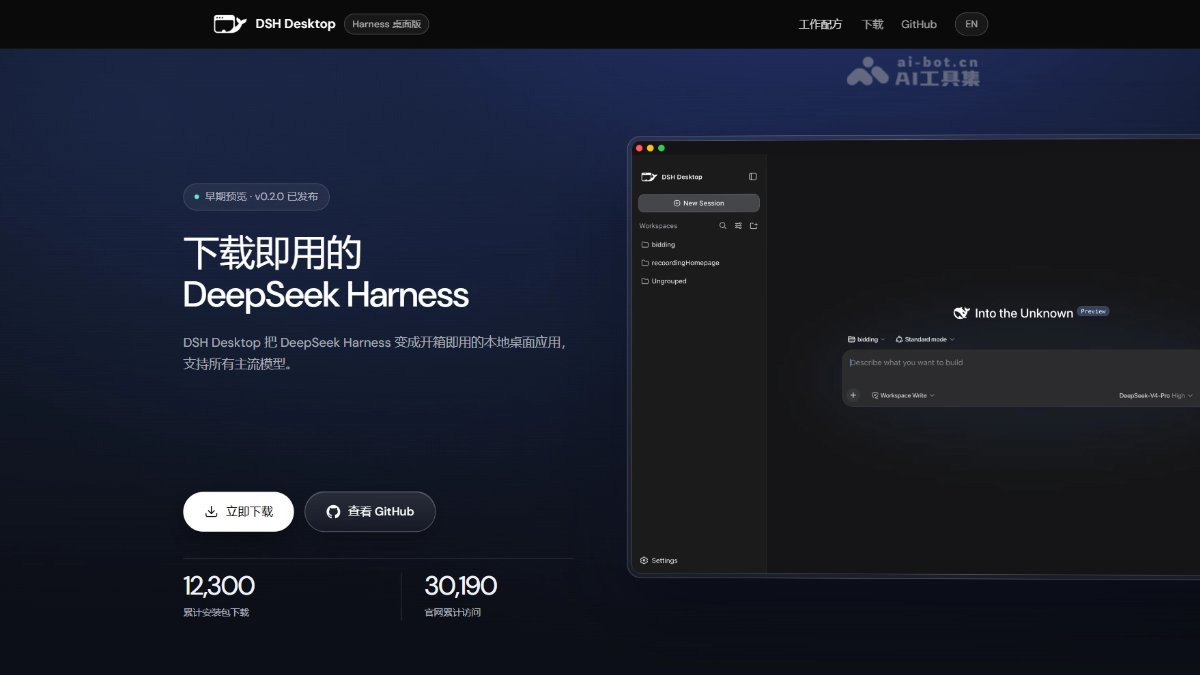
Main features of DSH Desktop
-
Zero command-line launch: Packages DeepSeek Harness as a desktop application that runs with a click on the icon. Harness installation, random local port listening, launch detection, and lifecycle management are automatically handled in the background, with no terminal operations required.
-
Multi-model out-of-the-box adaptation: Supports mainstream model providers such as DeepSeek, OpenAI, Anthropic, Google Gemini, OpenRouter, xAI, Moonshot/Kimi, MiniMax, Zhipu GLM, Mistral AI, Groq, Together AI, and more.
-
Preset plaza (work recipes): Provides scenario-based plugin combinations, such as image creation, scientific research evidence, video production, Apple development, contract review, and more. Copy the installation request with one click to import it into the client, with automatic security verification.
-
Complete Harness capabilities retained: All core Harness features such as project management, Agent conversations, plugin system, and workflows are fully available, with an experience consistent with the official Web version.
-
Independent data storage: Conversations, plugins, and personal settings are stored outside the application installation directory, so updating the application will not clear user data.
-
Security hardening: Only listens on a random
127.0.0.1port and is not exposed to the public internet; removes Node.js renderer permissions and enablescontextIsolationand the sandbox mechanism. -
Mobile control: Supports pairing with a phone over a local trusted Wi-Fi network to continue working across devices.
-
Automatic updates: Automatically checks for new versions after launch and every 6 hours, and prompts to restart and install after the background download is complete.
How to use DSH Desktop
- Regular users:
-
Download and install: Visit the DSH Desktop official website https://www.dshdesktop.com/, to download the installer for your system and complete the installation.
-
First launch: Double-click the icon to launch the application; on first launch, the Harness service is automatically initialized in the background.
-
Configure models: Click "Settings" in the lower-left corner, select a model provider, and enter the API Key.
-
Add a workspace: Click the "+" button next to the workspace and select a project folder as the Agent's working directory.
-
Start a conversation: Click "New Session", select standard mode and a model, enter your request, and press Enter to send.
-
Use Presets: Visit the official website's Preset plaza, copy the installation request, and paste it into the client to import scenario-based recipes.
-
- Developers/source build:
-
Environment preparation: Ensure Node.js 22+, npm are installed, and use macOS or Windows x64 system.
-
Clone the repository: Run
git clone https://github.com/dataelement/dsh-desktop.gitDownload the source code. -
Install dependencies: enter the project directory and run
npm installto automatically apply patches and install the Electron runtime. -
Start development: run
npm run devto start DSH Desktop locally for development and debugging. -
Quality checks: run
npm test、npm run typecheck、npm run buildin sequence to complete testing, type checking, and build verification. -
Package the app: on the corresponding platform, run
npm run package:macornpm run package:winto generate a distribution installer. -
Install and use: install the packaged app, configure the API Key and workspace, and you can start using it.
-
DSH Desktop's project address
- Project website:https://www.dshdesktop.com/
- GitHub repository:https://github.com/dataelement/dsh-desktop
DSH Desktop's core advantages
-
Zero command line, ready out of the box: packages DeepSeek Harness as a desktop app, with no need to install Node.js, no need to run
npx, and no need to manually manage ports; click the icon to launch the full Harness interface. -
Multi-model support out of the box: natively supports more than ten mainstream model service providers, including DeepSeek, OpenAI, Anthropic, Google Gemini, OpenRouter, xAI, Moonshot/Kimi, MiniMax, Zhipu GLM, Mistral AI, Groq, Together AI, and others.
-
Full Harness capabilities preserved without loss: all core Harness features such as project management, Agent conversations, the plugin system, Skills, MCP, and workflows are fully available, with an experience consistent with the official Web version.
-
Preset Plaza (work recipes): a built-in marketplace of scenario-based plugin combinations, including image creation, scientific research evidence, video production, Apple development, contract review, etc.; one-click copy of the installation request can import them, quickly turning a general Agent into a professional Agent.
-
Independent data, no loss on updates: conversations, plugins, and personal settings are stored outside the app installation directory, so upgrading the app will not clear user data.
-
Security hardening, local-first: on each launch, it listens only on a random
127.0.0.1local port and is not exposed to the public internet; Node.js renderer permissions are removed, andcontextIsolationand the sandbox mechanism are enabled. -
Cross-platform support: supports macOS Apple Silicon / Intel and Windows x64; the macOS version has passed Apple code signing and notarization.
Comparison of DSH Desktop with similar competing products
| Dimension | DSH Desktop | OpenAI Codex |
|---|---|---|
| Product positioning | A general-purpose desktop wrapper for DeepSeek Harness, aimed at multi-scenario Agent workflows | OpenAI's official AI coding Agent, focused on software engineering and code tasks |
| Interaction interface | GUI desktop app (Electron), visual operation, zero command-line barrier | Mainly a CLI terminal interface, interacting through the codex command, purely text-driven |
| Model support | Multi-model support out of the box (DeepSeek, OpenAI, Kimi, Gemini, Anthropic, and 10+ others) | Supports only OpenAI models (GPT-4o, o3, etc.), tied to the OpenAI API |
| Deployment mode | Local-first: The Harness service runs locally and only listens on 127.0.0.1 |
Cloud-based: Core reasoning is performed in the OpenAI cloud, with the local side serving only as a CLI entry point |
| Startup method | Double-click the icon to automatically launch the Harness service, with backend management of ports and lifecycle | Execute in the terminal codex command, requiring manual entry into the target directory and configuration of the API Key |
| Workspace management | Add/switch between multiple project folders in the GUI, with sessions independently bound to workspaces | Uses the terminal's current directory as the workspace, with a single session directly operating on the local file system |
| Extension ecosystem | Harness plugin system + Preset plaza (sharing scenario-based work recipes, such as research, video, and contract review) | Built-in sandbox execution environment + tool calling, with no open plugin marketplace or Preset sharing mechanism |
| Security mechanisms | Local sandbox isolation, random loopback port, renderer privilege stripping | Agent sandbox: Code is executed in an isolated environment, sensitive operations require user confirmation, and there is a rate limit reset mechanism |
| Target users | Non-technical users, designers, product managers, researchers, developers | Software developers, engineers, technical users familiar with the terminal |
| Typical scenarios | Content creation, research literature reviews, contract review, image/video production, general programming assistance | Code refactoring, debugging, writing tests, full-stack development, code review, technical architecture design |
| Open source | Fully open source under the MIT license, community-driven, free to modify and distribute | Closed source, maintained officially by OpenAI, providing only a CLI client |
| Cross-platform | macOS(Apple Silicon/Intel)+ Windows x64 | macOS + Windows + Linux (official CLI support on all platforms) |
Application scenarios of DSH Desktop
-
AI-assisted programming and development: Add a workspace to a local code project, letting the Agent automatically read code, generate modules, refactor files, and run tests, replacing manual terminal operations.
-
Content creation and multimedia production: Import image production mode and video production mode through the Preset plaza, completing the full production process from visual brief and generative editing to multi-spec adaptation.
-
Research and academic work: Use research evidence mode for problem decomposition, paper retrieval and comparison, evidence matrix construction, structured literature review, and research gap analysis.
-
Document and contract review: Use contract review mode to complete clause review, version comparison, redline suggestions, negotiation briefs, and final draft verification, retaining traceable review evidence.
-
Project management and office automation: Let the Agent automatically organize files, generate knowledge cards, compile reports, and perform repetitive tasks such as batch renaming or format conversion within a specified workspace.