
What is DeepSeek Harness Desktop
DeepSeek Harness Desktop is a community open-source desktop client based on DeepSeek Harness , supporting Windows and macOS. The tool wraps Harness's Web UI, local service, and plugin system into a native application, ready to use out of the box without installing Node.js. The tool adopts an "everything is a plugin" architecture, where the desktop shell itself is also a plugin, and supports remote Agent control from a mobile phone.
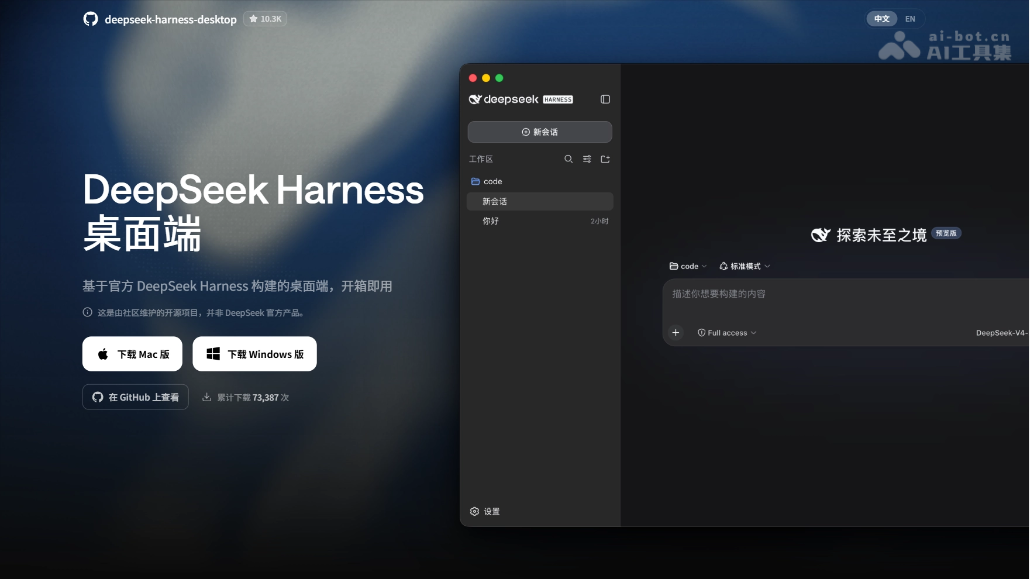
Main features of DeepSeek Harness Desktop
- Native desktop wrapper: Wraps the official DeepSeek Harness's local Web UI into a Windows / macOS native application, automatically managing the start, stop, and recovery of the Harness service, without needing to separately install Node.js or execute command-line instructions.
- Plugin-based architecture: Following the "everything is a plugin" philosophy, the desktop shell itself is a legitimate DSH plugin. Official plugins and third-party plugins follow unified conventions and can be freely combined without interfering with each other.
- Mobile remote control: Supports iOS and Android remote connections to Desktop, allowing you to initiate tasks, view Agent progress, and follow up on your phone.
- Workspace and session management: Supports adding project folders as workspaces, creating and managing multiple sessions, and integrating development environments such as files, terminals, and Git.
- Model configuration: Built-in DeepSeek model integration, allowing you to configure the API Key in settings, and supports switching between different models and Agent presets.
- System-level integration: Integrates system tray, desktop window, automatic updates, and local configuration file management, automatically creating a default Profile on first launch.

Follow WeChat and reply "open source" to join theAI open-source project exchange group
How to use DeepSeek Harness Desktop
- Download the installer: Visit the DeepSeek Harness Desktop official website https://www.dshdesktop.cn/,下载对应系统的安装包(Windows x64 or macOS Apple Silicon).
- Run the installation: Run the installer to complete the installation; macOS users should drag the application into the Applications folder.
- First launch: Launch the application for the first time; it will automatically create a default Profile and start the local Harness service.
- Configure the API Key: Click "Settings" in the lower-left corner, go to the model configuration page, and enter your DeepSeek API Key.
- Add a workspace: Return to the main interface, click the add button next to the workspace, and select a project folder as the workspace.
- Create a new session: Create a new session and keep the default Agent mode, permissions, and model settings.
- Send a task: Enter a task instruction in the input box (such as "read the current directory and tell me which files there are") and send it.
Core advantages of DeepSeek Harness Desktop
- Ready to use, zero environment dependencies: Ordinary users do not need to install Node.js, pnpm, or DSH; they can run it directly after downloading the installer, and it automatically manages the start and stop of the local Harness service.
- Native desktop experience: Wraps the official Web UI into a Windows / macOS native application, integrating the system tray and desktop window, saying goodbye to browser tabs and terminal windows.
- The open "everything is a plugin" architecture: The desktop shell itself is a legitimate DSH plugin; the official Harness source code runs as-is, without any modification; third-party plugins follow a unified convention, can be freely combined, and do not interfere with one another.
- Mobile Remote Control: Supports iOS / Android remote connection to the desktop-side Desktop, allowing you to launch tasks and check Agent progress on your phone at any time.
DeepSeek Harness Desktop's project address
- Project Website:https://www.dshdesktop.cn/
- GitHub Repository:https://github.com/anywhere-labs/deepseek-harness-desktop
Comparison of DeepSeek Harness Desktop with similar competing products
| Dimension | DeepSeek Harness Desktop | OpenAI Codex |
|---|---|---|
| Product Positioning | Community open-source desktop client, packaged based on the official Harness | AI Coding Agent desktop client officially launched by OpenAI |
| Open-Source License | MIT (completely free) | Core is closed-source |
| Usage Cost | ¥0 (only the model API fees are paid by yourself) | $20–$200/month (ChatGPT Plus/Pro subscription) |
| Model Support | Model-agnostic, with native integration of about 40 vendors | Only supports OpenAI's own models (Codex series) |
| Plugin Ecosystem | "Everything is a plugin", co-built by the community, freely combinable and replaceable | Limited extensibility, mainly relying on the official feature iterations |
| Security Sandbox | Relies on the official Harness permission system | Kernel-level Seatbelt (macOS) + AppContainer (Windows) |
Application scenarios of DeepSeek Harness Desktop
- Local zero-configuration AI programming: Individual developers can use it out of the box after downloading the installation package, without installing Node.js, pnpm, or configuring environment variables, and can directly run the AI Coding Agent locally to complete code writing, debugging, and file management.
- Mobile remote control of the Coding Agent: Through iOS or Android remote connection to the desktop-side Desktop, you can launch development tasks on your phone while out or commuting, check the Agent's execution progress, and intervene and follow up in real time when needed.
- Plugin-based custom development workflow: With the "everything is a plugin" architecture, combine different models, tools, interfaces, and workflow plugins as needed to build a dedicated development environment that suits individual or team habits, and the plugins do not interfere with one another.
- Low-cost batch code processing: Paired with low-cost models such as DeepSeek V4-Flash, the cost per task is extremely low, making it suitable for cost-sensitive scenarios such as large-scale code review, batch refactoring, automated testing, or document generation.