
What Is Acrobat Student Spaces
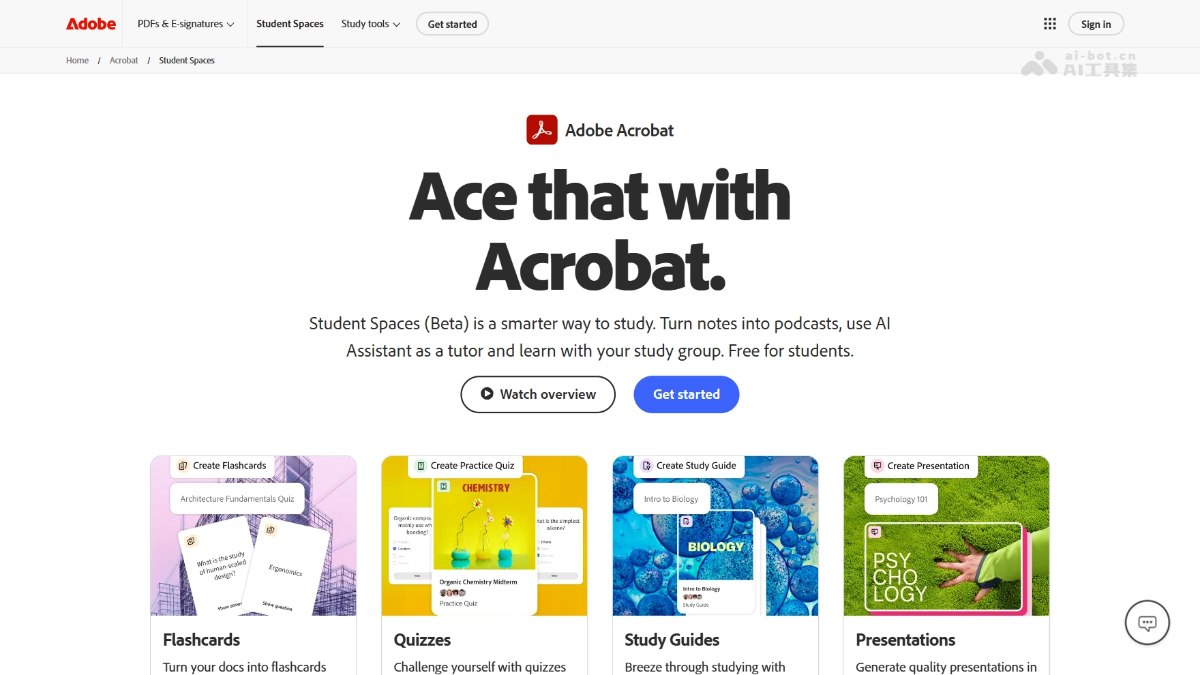
Acrobat Student Spaces is an AI learning platformlaunched by Adobe, designed specifically to help students prepare for exams efficiently. The platform can turn course materials, notes, and other resources into flashcards, quiz questions, and mind maps with one click, and generate podcast and video summaries. The platform has a built-in AI tutor that can hold conversations and answer questions about document content, with all answers citing their sources, and supports creating shared study spaces to collaborate with classmates on review. Acrobat Student Spaces is free for a limited time, and the standard tools can be used without limits.
Main Features of Acrobat Student Spaces
- AI Content Generation: Supports turning uploaded documents (up to 100, each file ≤600 pages) into flashcards, quiz questions, study guides, mind maps, presentations, video summaries, and podcasts with one click.
- AI Tutor Q&A: Ask questions in conversation with AI about course materials and notes, with answers accompanied by citation labels that can be clicked to verify the source.
- Study Space Management: Centrally store all study materials by topic, with a built-in note-taking feature, avoiding switching between multiple apps.
- Collaboration Features: Supports sharing study spaces with classmates, with different access permissions that can be set, to review and discuss together.
- Multi-format Support: Supports Acrobat on the web and can be accessed anytime on mobile phones, tablets, and desktop browsers.
How to Use Acrobat Student Spaces
- Visit the Platform: Visit the Acrobat official website https://www.adobe.com/my_en/acrobat/student-spaces.html(支持手机/平板/电脑),进入 Student Spaces feature page.
- Create an Account: Register for a free Adobe personal account to unlock all features (advanced tools such as podcasts and video summaries require account support).
- Create a Study Space: Create a new Space, name it by course or topic, and use it to centrally manage all materials for that subject.
- Upload Materials: Add study files (up to 100, each ≤600 pages), supporting formats such as course materials, notes, and literature.
- Generate Study Tools: Use AI to turn documents into: flashcards, quiz questions, study guides, mind maps, presentations, and more.
- AI-assisted Learning Chat with the AI tutor and ask questions. All answers include citation labels that can be clicked to verify the source.
- Collaboration and Sharing: Invite classmates to join the Space, set access permissions (view/edit), and review and discuss together.
Key Information and Usage Requirements for Acrobat Student Spaces
- Product Positioning: An AI-driven learning hub launched by Adobe (Beta version), a one-stop exam preparation platform built specifically for students, integrating material organization, AI-assisted learning, and group collaboration features.
- Core Features: Can turn course materials and notes into flashcards, quiz questions, mind maps, presentations, video summaries, and podcast audio; the built-in AI tutor supports conversational Q&A about documents.
- Fee Description: Free for a limited time, standard study tools have fair use limits; advanced features such as generating podcasts and videos require registering for a free Adobe personal account.
- File Limits: A single study space can upload up to 100 files, and each file cannot exceed 600 pages.
- How to Use: Accessed through Acrobat web version, supports mobile phones, tablets, and desktop browsers, with no need to install additional software.
- Collaboration Features: You can create shared study spaces, invite classmates to join, and set different access permissions (view/edit) for reviewing and discussing together.
Core Advantages of Acrobat Student Spaces
- One-Stop AI Learning Workflow: No need to switch between multiple apps. After uploading course materials, you can complete material organization, AI Q&A, generate study tools, and group collaboration on the same platform, greatly reducing distractions during the learning process.
- Diverse Content Generation: The same set of materials can be transformed with one click into flashcards, quizzes, mind maps, presentations, video summaries, and even podcast audio, adapting to different learning styles such as visual and auditory, enabling personalized review.
- Traceable AI Reliability: All answers from the AI tutor include citation annotations. Clicking allows you to view the original source, making it easy to verify the accuracy of information and avoid knowledge misleading caused by AI "hallucinations."
- Zero-Barrier Collaboration: No need for additional registration on a collaboration platform. You can directly invite classmates and set permissions within the study space to achieve material sharing and synchronized discussion, significantly improving group exam preparation efficiency.
- Seamless Access Across All Devices: Runs based on the Acrobat web version and can be used on mobile phones, tablets, and computer browsers, free from device restrictions, allowing learning anytime and anywhere.
Comparison of Acrobat Student Spaces with Similar Competing Products
| Comparison Dimension | Acrobat Student Spaces | Google NotebookLM | Quizcat AI |
|---|---|---|---|
| Product Positioning | Adobe AI Learning Hub (Beta) | Google AI Learning Assistant | Professional Quiz and Flashcard Tool |
| Core Features | AI podcast, video summaries, mind maps, flashcards, quizzes, PPT, AI tutor, collaboration space | AI podcast, video, study guides, mind maps, document Q&A | Quizzes, flashcards, podcast generation |
| Pricing Strategy | Free for a limited time; advanced features require registering an Adobe account | Free tier is friendly; students can get one year of the premium version for free (worth $276) | Monthly fee about $12.88 (promotional $9.66) |
| File Limits | 100 files/space, single file ≤600 pages | No explicit limit, supports large documents | Not specified |
| User Scale | Beta stage | Has established a first-mover advantage | 400,000+ users |
| Unique Advantages | Deep integration with Acrobat PDF, modern interface, well-developed collaboration features | Aggressive free strategy, Google ecosystem integration, high cost-effectiveness | Focuses on quiz scenarios, easy to get started, high satisfaction |
| Best Scenarios | Comprehensive learning projects, group collaboration, heavy PDF users | Budget-sensitive students, those seeking free advanced features | Quick exam preparation, focused question practice and memorization |
| Monthly Fee Reference | Early pricing once reached $24.99/month | Google AI Pro $19.99/month unlocks the full set | $12.88 (promotional $9.66) |
Application Scenarios of Acrobat Student Spaces
- Final Sprint and Exam Preparation: Batch upload a semester's courseware and lecture notes to quickly generate flashcards and quiz questions for self-testing, use the AI tutor for answers on key and difficult points, and use the system-generated mind maps to help organize the knowledge framework.
- Group Collaborative Learning: Create a shared learning space where group members upload materials together, organize notes, divide work to create presentations or study guides, and before exams use Space to sync review progress and discuss difficult questions.
- Literature Reading and Paper Writing: Upload academic papers and reference materials, use AI to assist in extracting core viewpoints and marking citation sources, and generate research reviews or video summaries to quickly grasp the main ideas of the literature and avoid information overload.
- Fragmented-Time Learning: Convert study materials into podcast audio and listen while commuting or exercising; or open the web version anytime in a mobile browser and use waiting time in line to do a few AI-generated quiz questions.
- Multi-Style Knowledge Absorption: Visual learners use mind maps and presentations, auditory learners listen to AI-generated podcasts, and kinesthetic learners actively participate through flashcards and quizzes, satisfying different learning preferences.