
What is WorkSwarm
WorkSwarm is the swarm office agent launched by the open-source AI Agent platform openJiuwen, focused on multi-Agent cluster collaborative office work. It has built-in dual spaces, "Work office" and "Code programming," and supports switching between single Agent and cluster modes on demand, through the HOTS/HITS human-AI collaboration mechanism, allowing humans to deeply participate in AI team work as commanders or members; the system can also automatically distill proven collaboration workflows into reusable Swarm Skills, enabling self-evolving capabilities.
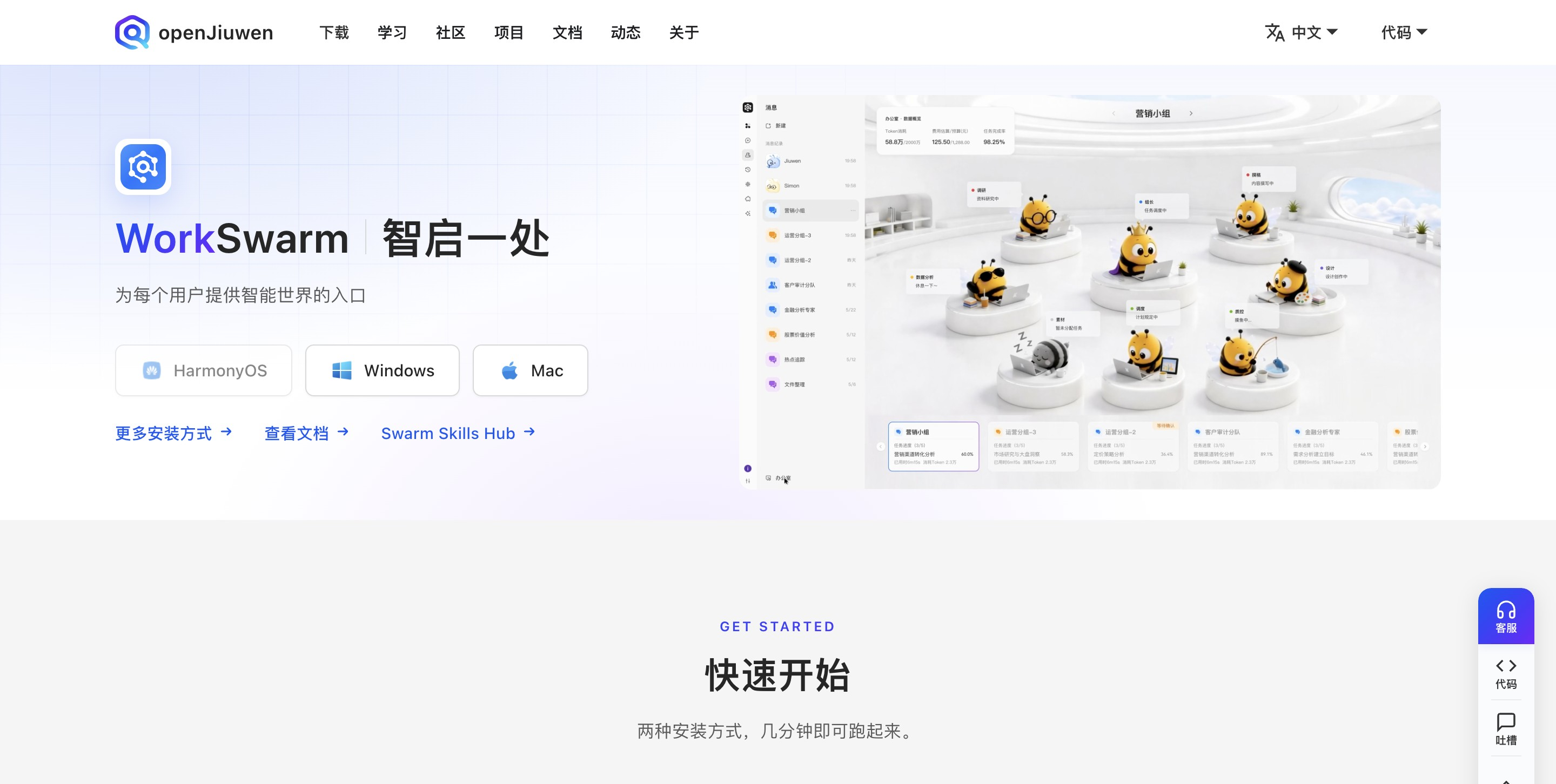
Main features of WorkSwarm
-
Multi-Agent cluster collaboration: With "Swarm" collective intelligence as the core, multiple agents collaborate like a team, automatically decomposing and completing complex tasks in parallel.
-
Dual workspaces: Divided into the two major spaces "Work office" and "Code programming," covering different scenarios such as document creation and application development.
-
Dual-mode switching: Supports both single Agent and cluster modes, allowing free choice according to task complexity.
-
Task planning: Built-in "task manager"-style capabilities automatically plan, decompose, and track the entire task workflow.
-
Human-AI collaboration mechanism: HOTS mode lets people act as commanders to coordinate the overall situation, while HITS mode lets people collaborate side by side with AI as members, enabling deep involvement in the entire AI team workflow.
-
Self-evolving capabilities: Automatically identifies abnormal errors in agent execution traces, distills validated collaboration workflows into standardized Swarm Skills, and can upload them to the Swarm Skills Hub community for sharing and reuse.
-
Context slimming: Through context offloading technology, it ensures stable long-term operation of agents and significantly reduces token consumption (an average reduction of 34.8%).
-
Memory on the go: A layered memory architecture allows agents to remember user preferences and history across sessions, with long-term conversation memory accuracy reaching 85%.
-
Browser control optimization: Performs operations based on the local browser, bypassing human verification restrictions.
-
Multi-channel access (Channel): Supports remote triggering through communication apps such as Xiaoyi and Feishu, for example using Feishu commands to mobilize an AI team on a HarmonyOS PC to produce a PPT.
-
Multi-platform deployment: It has been listed on the HarmonyOS PC AppGallery and is compatible with Windows, Mac, and Ubuntu, and can also be installed via
pip install jiuwenswarminstallation. -
Computing power affinity optimization: Optimized for Ascend and Kunpeng computing power, reducing first-token latency by half and lowering peak inference memory by about 25% under multi-Agent concurrency.
How to use WorkSwarm
- Installation (choose any one method)
-
Windows / Mac / Ubuntu users: Go to WorkSwarm's official website https://openjiuwen.com/workswarm, to download the installation package with one click.
-
Python users: Execute the following command in the command line:
pip install jiuwenswarm
jiuwenswarm-init    # 首次运行或升级后执行
jiuwenswarm-start   # 启动服务
Then visit in the browserhttp://localhost:5173 -
Command-line enthusiasts: You can install the TUI version:
pip install jiuwenswarm-tui, runjiuwenswarm-tui
-
- Connect to everyday communication channels (optional): BindXiaoyiorFeishu, and you can remotely assign tasks through the chat window, for example using Feishu commands to mobilize the AI team on the HarmonyOS PC at home to work.
- Get started: Choose based on task type Work Office Space(writing reports, making PPTs, etc.) or Code Programming Space(application development).
-
Choose a mode based on complexity: useSingle Agentfor simple tasks, andSwarm Modefor complex projects. The AI team will automatically split roles (frontend, backend, testing, coordination, etc.) and collaborate in parallel. Just usenatural language to describe requirements; no prompt engineering required.
- Process participation and accumulation: Intervene at any time through the HOTS (Commander) or HITS (Member) mechanism: review plans, correct direction, and collaborate side by side with AI. After the task runs successfully, the system can automatically consolidate the collaboration process into Swarm Skill, which can be reused with one click for similar tasks next time, and can also be uploaded to the Swarm Skills Hub community for sharing.
WorkSwarm's Core Advantages
-
Industry-leading performance: Achieved industry SOTA with a 94.2% overall score on the PinchBench agent comprehensive capability benchmark, and an 85% memory accuracy rate on the LOCOMO long-term dialogue memory evaluation set.
-
Significantly reduced cost: Context slimming technology ensures long-running agents, reducing average token consumption by 34.8% and protecting users' bills.
-
Swarm collaboration rather than solo combat: Based on the concept of "collaborative engineering," multiple Agents divide work and operate in parallel like an elite team, with a ceiling for complex task capabilities far higher than single-Agent products.
-
Deep human-machine collaboration: Original dual mechanisms of HOTS (human as commander) / HITS (human as team member), allowing humans to intervene at any time in the AI team's full process, rather than "after issuing instructions, you can only wait for results."
-
Self-evolving capabilities: Automatically consolidates successfully run collaboration processes into standardized Swarm Skills, getting stronger with use; with the Swarm Skills Hub community, you can reuse experience accumulated by others.
-
Memory that follows along: A layered memory architecture enables the agent to understand user preferences across sessions, "understanding you better the more it is used."
-
Full-chain domestic computing power optimization: Optimized for affinity with Ascend and Kunpeng computing power, halving first-token latency under multi-Agent concurrency and reducing peak inference storage by about 25%.
WorkSwarm's Comparison with Similar Competitors
| Comparison Dimension | WorkSwarm | Manus | Coze |
|---|---|---|---|
| Product Positioning | Swarm office agent, focused on multi-Agent swarm collaboration | General-purpose AI agent, "turn ideas directly into results" | A collaborative office space for humans and AI Agents, covering 100+ office scenarios |
| Architecture Mode | Single Agent / Swarm dual mode, Work office + Code programming dual space | Multi-agent architecture (planning/execution/verification agents), independently executed on cloud virtual machines | Automatically schedules built-in Agents, exploration mode / planning mode dual mode |
| Human-Machine Collaboration | HOTS / HITS dual mechanisms, allowing humans to deeply intervene in the full process as commander or member | Asynchronous execution "Leave it to Agent", basically no intervention needed after assigning tasks | Planning mode first outputs a flowchart for confirmation, and adjustments can be made at any time during the process |
| Deployment Method | Local installation: HarmonyOS PC App Market, Windows / Mac / Ubuntu, or pip installation | Runs purely in cloud virtual machines | Pure cloud web client |
| Ecosystem integration | Remote invocation via Xiaoyi and Feishu; Swarm Skills Hub skill community | 32 official Playbook templates | 60+ MCP plugins, deeply integrated with local services such as Feishu and Amap |
| Performance | PinchBench 94.2% overall score SOTA, token consumption reduced by 34.8%, LOCOMO memory accuracy 85% | GAIA benchmark surpasses OpenAI Deep Research; third-party tests show a complex task success rate of about 92% | Third-party tests show a complex task success rate of about 81%; generates a 30-page PPT in 3 minutes |
WorkSwarm application scenarios
-
Batch PPT creation: Issue commands remotely via Feishu and mobilize the AI team on HarmonyOS PC to produce a 200-page PPT in 20 minutes, suitable for quickly generating large presentation materials and training courseware.
-
Report and document writing: In cluster mode, multiple Agents divide the work to complete data collection, framework building, content writing, and proofreading, suitable for long documents such as industry research reports and project proposals.
-
Full-stack project development: The Code programming space supports the entire process from requirements analysis to test delivery, and cluster mode can advance the development of multiple modules simultaneously.
-
Code review and testing: The AI team has built-in testing roles, completing quality verification synchronously during development.
-
Mobile office: When traveling on business, remotely direct the computer in the office or at home via Xiaoyi or Feishu to work, and the results are sent directly back to the chat window.