
A new round of practical content is here~
Sharing an article on which Skill or combination of Skills ordinary people should use in different work scenarios.
Skill fixes repeated steps in place. A ready-written work method: when it is triggered, what order to do things in, and what format to output.
So in this article you can directly find your own scenario, install the Skill in it accordingly, and run through a complete task with a prompt.
It can be used on any Agent that supports Skill capabilities to execute tasks
I will use Codex as an example.
Basic and General
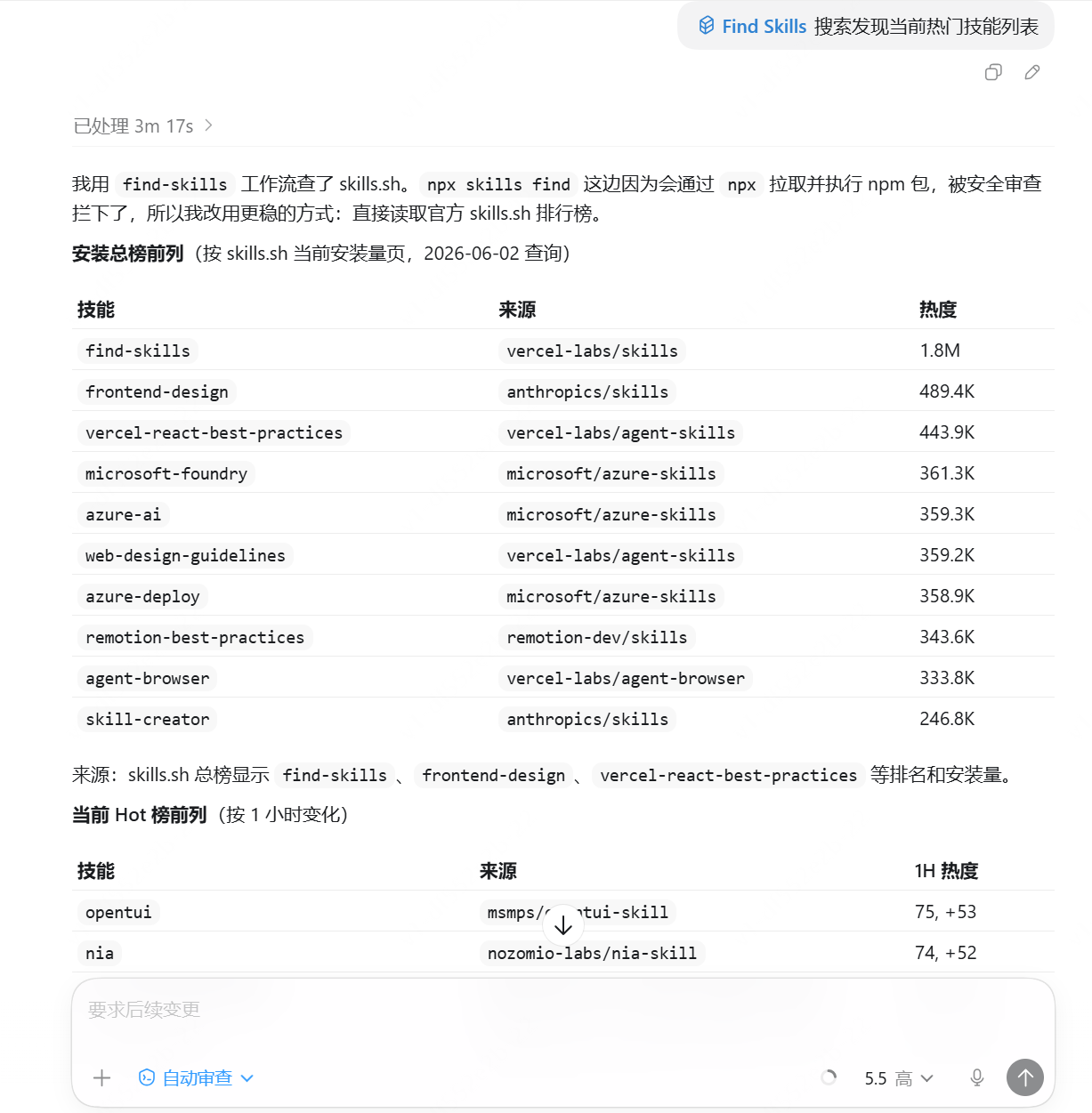
The first thing to install is find-skills ,which can automatically help you find the skill you need, for example, if a task requires specialized capabilities, you can first use find-skills to search for whether there is a more suitable specialized Skill.
Another one to install is skill-creator . One day, if you want to write your own repetitive workflow into a Skill, you can use this skill. It is Claude officially launched, and you can describe it in colloquial language.
Office Efficiency
Suitable for people who need to handle documents, spreadsheets, meeting minutes, and web materials every day, such as administrative and operations colleagues. The entry point is mostly documents or spreadsheets, and the output is usually weekly reports, task tables, reporting materials, etc. This group of Skills is suitable to call:pdf、docx、xlsx、pptx、browser-use/agent-browser、memory。
Reference prompts and SKills:
A small reminder: before using a Skill, you need to install it first. Installation is also very simple. Just tell the Agent in conversation, for example, "Help me install 'skill name’ skill”。
Please process these materials according to my office assistant workflow.
1. Use pdf/docx to read and summarize each document separately; do not mix them together.
2. Use browser-use/agent-browser to open and verify the relevant web pages or backend information, and supplement the context missing from the documents.
3. Use xlsx to organize tasks, risks, owners, and deadlines into a table, with the fields: item, owner, deadline, dependency, risk level.
4. Use pptx to organize the key conclusions into a page outline suitable for reporting.
5. Generate a version of the weekly report suitable for sending to a supervisor, with a concise tone; do not write it like a promotional article.
6. Use memory to remember my weekly report format, reporting tone, and commonly used fields.
If the materials do not clearly specify an owner or deadline, please mark it as "To be confirmed".
After installation, enter the prompt; in addition, each Skill can be used independently.
When you first start using it, it is recommended to operate step by step. First use 1-2 Skills, and after verifying there are no problems, then use them in combination.
The same applies below, and you can also trim it according to your own workflow and needs.
Content Creation
Self-media bloggers and people who write content such as WeChat official accounts and Xiaohongshu for a long time. Content creation is not just about writing one article and being done with it. What really tests and troubles people is topic selection, search, main text, formatting, distribution, etc. The following group of Skills covers the entire workflow.
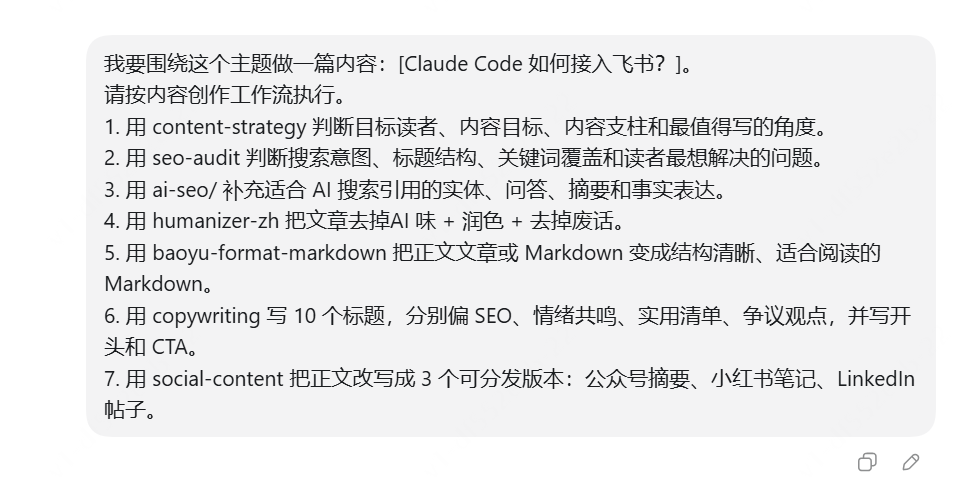
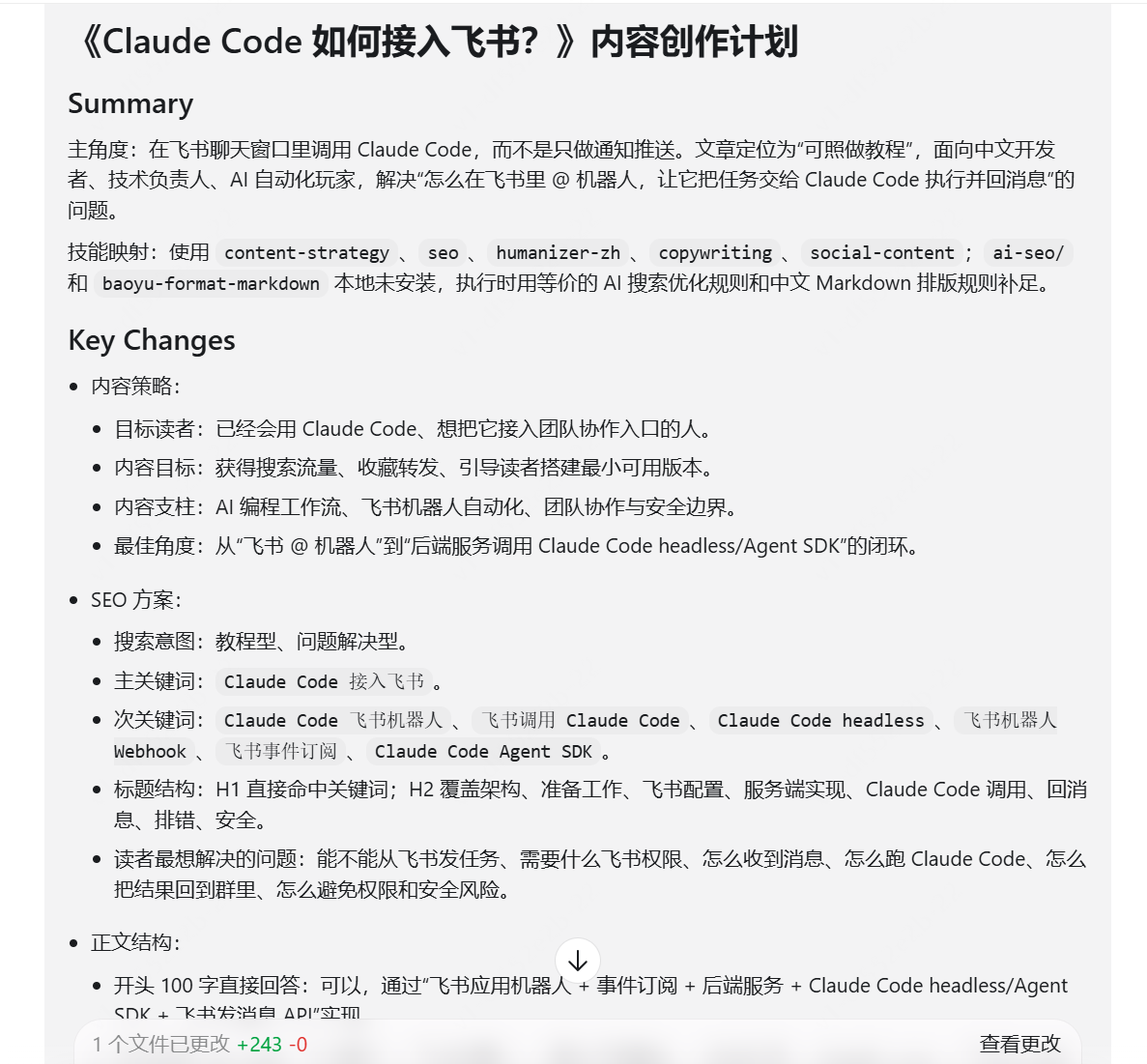
For example, I want to create a piece of content on how Claude Code connects to Feishu.
Reference prompts and Skills:
I want to create a piece of content around this topic: [topic]. Please execute according to the content creation workflow.
1. Use content-strategy Determine the target readers, content goals, content pillars, and the angles most worth writing about.
2. Use seo-audit to determine search intent, title structure, keyword coverage, and the problems readers most want solved.
3. Use ai-seo to add entities, Q&A, summaries, and factual expressions suitable for AI search citations.
4. Use humanizer-zh to remove the AI flavor from the article + polish + remove fluff.
5. Use baoyu-format-markdown to turn the main article or Markdown into clear, readable Markdown.
6. Use copywriting to write 10 titles, respectively leaning toward SEO, emotional resonance, practical lists, and controversial viewpoints, and write the opening and CTA.
7. Use social-content to rewrite the main text into 3 distributable versions: a WeChat public account summary, a Xiaohongshu note, and a LinkedIn post.
When using Codex, turn on plan mode, generate a content creation plan, and after manual review finds no issues or after revisions, begin execution.
Vibe Coding
For people who want to use AI to turn their ideas into a Demo, the Skills in this group are recommended.
Use brainstorming to converge the idea into a minimal Demo.
Use frontend-design / ui-ux-pro-max to handle page and interaction generation, and it will not be the same generic AI blue-purple.
Use web-design-guidelines to check the visuals and layout.
Use test-driven-development to define the most critical behaviors.
Use webapp-testing to verify in the browser.
Use verification-before-completion for the final self-check.
For example, my idea: an e-bike version of ride-sharing.
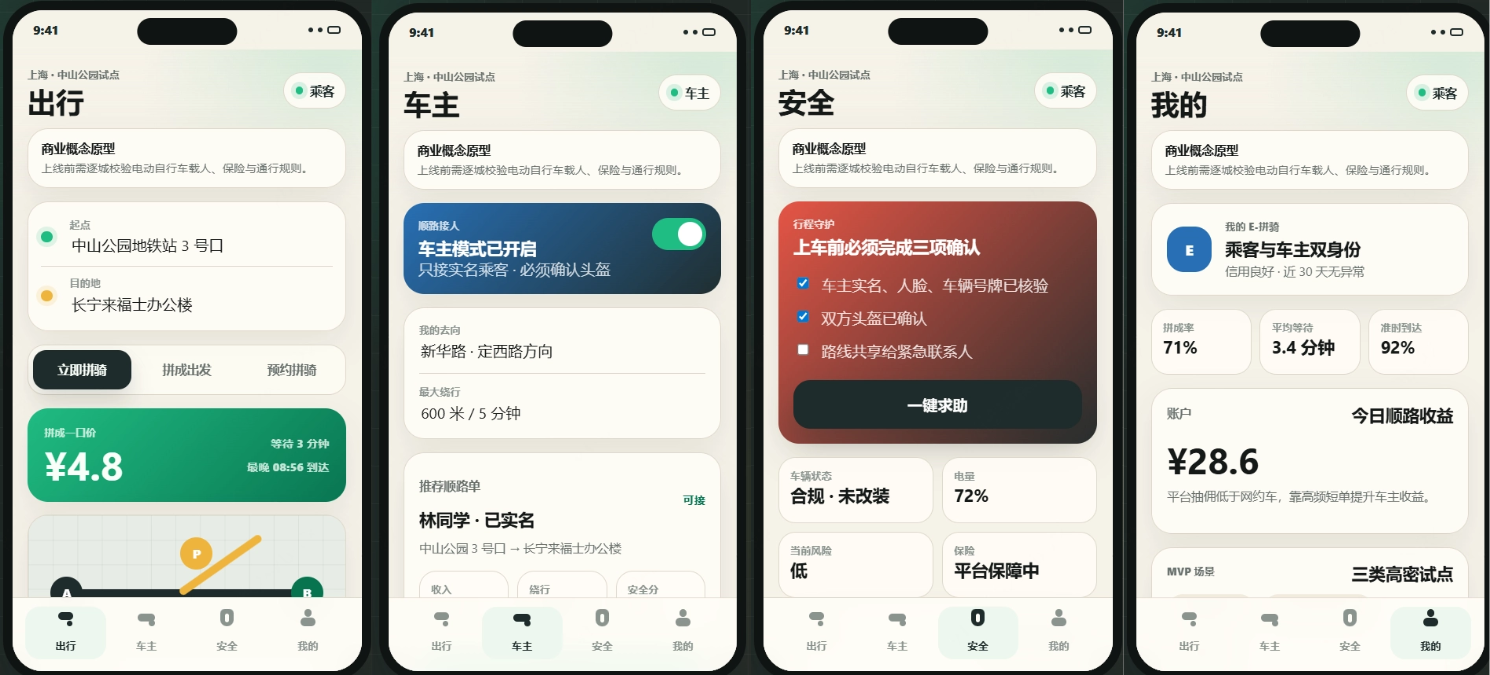
The product features, UI design, and layout are all reasonable, and important reminders are highlighted. The only issue is that recently helmet-wearing and carrying passengers on e-bikes have been strictly enforced, so it counts as a business concept prototype.
Reference prompts and Skills
I want to quickly build a Demo with Vibe Coding: [one-sentence description of the idea].
1. Use brainstorming to first converge the idea into a minimal runnable version, keeping only the most critical user flow.
2. Use frontend-design / ui-ux-pro-max to design the first version of the interface, components, and interactions. Do not make a marketing page; directly make a usable product interface.
3. Use web-design-guidelines to check the layout, visual hierarchy, mobile adaptation, and button states.
4. Use test-driven-development to define the 3-5 most critical behaviors, and first ensure the core flow can run.
5. After implementation, use webapp-testing to check in the browser that the page can open, can be operated, and has no obvious occlusion or blank areas.
6. Finally, use verification-before-completion for a pre-completion self-check, listing what has been verified and what risks have not yet been covered.
Marketing
If you are doing marketing growth, you cannot look only at the copy. You must first know why users are not converting, then decide what to change and how to change it.
This group of Skills covers growth to conversion, page diagnosis, user psychology, pricing, outreach, and advertising.
Look directly at the Case:
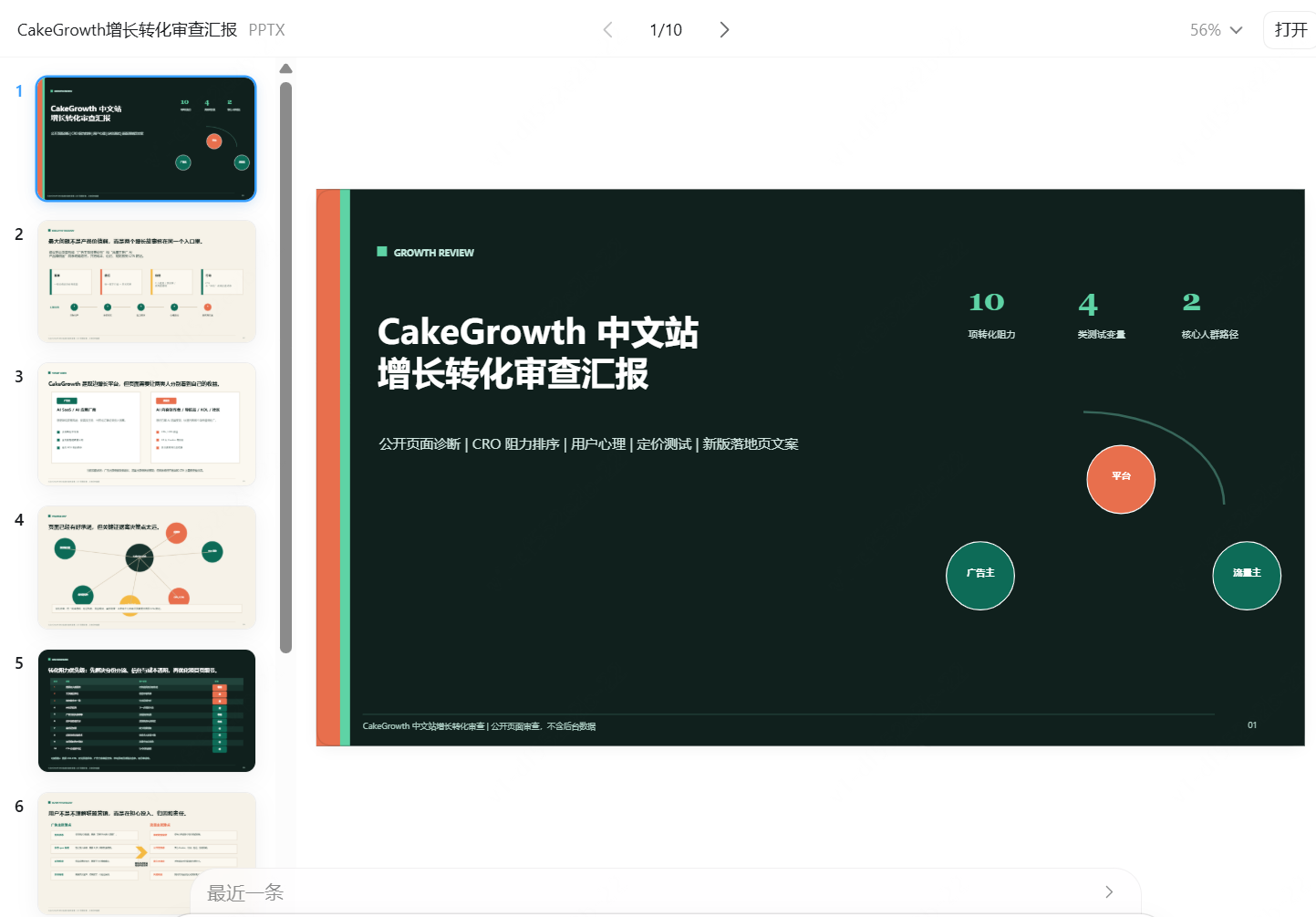
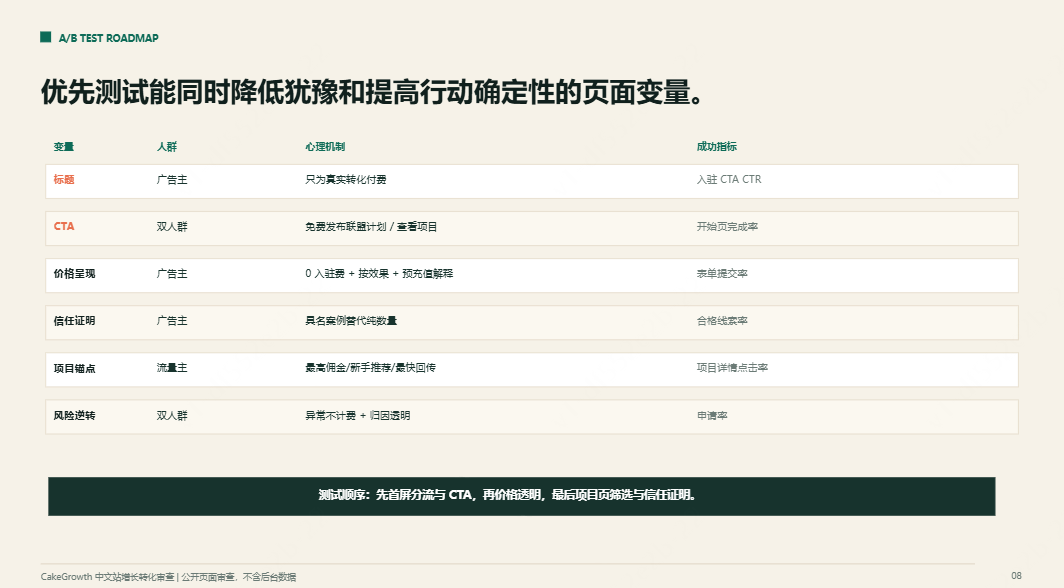
Please treat yourself as a growth consultant and review this page or product introduction: [https://cakegrowth.com/zh]。
Please follow the process below:
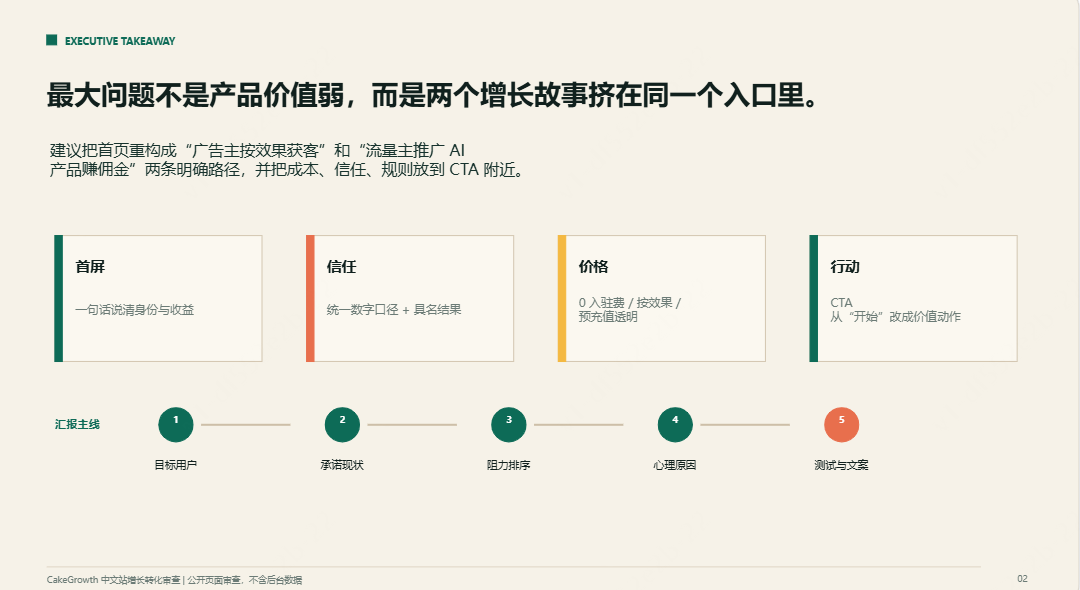
1. Determine who the target users are and what the current page promises.
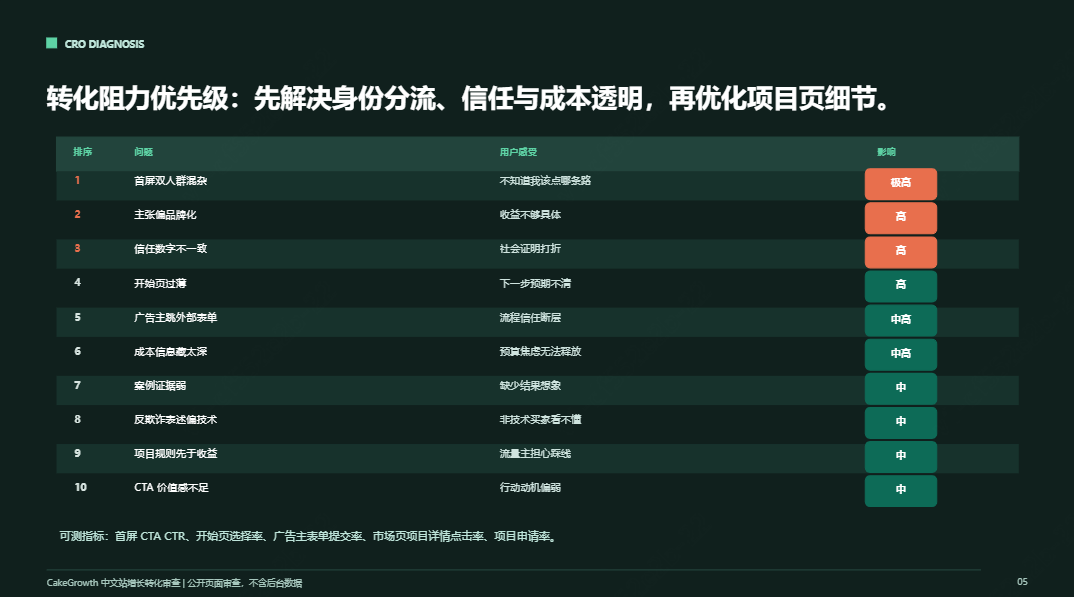
2. Use page-cro to diagnose conversion friction in the landing page, pricing page, or signup flow, identify 10 conversion frictions, and rank them by impact.
3. Use marketing-psychology to analyze user motivation, hesitation points, trust gaps, and objections, and use marketing psychology to explain why users hesitate.
4. Use pricing-strategy to review plans, anchors, trials, and offer design, and provide A/B testing hypotheses, including headlines, CTAs, price presentation, and trust proof.
5. Use paid-ads to rewrite the core selling points into ad creatives and generate a new version of landing page copy. Install and use the skills mentioned above yourself.
6. Finally, use pptx to convert the content into a presentation document.
Recruiting/Interviewing
Recruiting managers, entrepreneurs, team leads, and interviewers can design professional interview plans for positions without bias. Try this workflow Skill.
Please design an interview plan for this position: [job description].
The candidate's resume is as follows: [resume content].
Please execute according to the recruitment evaluation workflow:
1. Use resume-analysis to extract experience evidence, capability clues, and doubts that need verification from the resume.
2. Use interview-designer to distill the position's success criteria and interview strategy.
3. Use question-bank to design structured interview questions, divided into past facts, on-the-spot reasoning, values, and risk points.
4. Use scorecard to generate a scoring sheet, with each item explaining high-score and low-score performance.
After the interview
1. Use meeting-summary to organize the records into a hiring recommendation, but facts, inferences, and uncertainties must be distinguished.
2. Use handoff to generate a handoff summary for the next round of interviewers.
Job seekers can absolutely use this method to test their own resumes and the interview questions they are likely to encounter in the future.
Data Analysis
Local data analysis, use xlsx + pandas-pro 。
xlsx can read and write .xlsx/.xlsm/.csv/.tsv, local reports, and formula validation; use pandas for data analysis, local CSV/Excel/JSON cleaning, transformation, aggregation, and big data optimization, more engineering-oriented data processing; it has vectorization, memory optimization, and validation specifications, and passes security audits.
Reference prompt:
Use xlsx to read the data/file, first check missing values, outliers, and field meanings, use pandas for analysis, then give conclusions.
Some insights
On the surface, Skill is about installing tools one by one, but what it really changes is the way we handle work. Precipitatethe recurring judgments, steps, and standards, and let AI complete tasks along the workflow you already approve of。
The Skills you truly use frequently in practice do not need to be that many, about 10 or so. Do not install your skill library like a department store. Clarifyyour own high-frequency scenarios: which things repeat every week, which processes are always easy to miss, and which output formats you want to reuse stably. Fix them with Skills, and efficiency will go up up~
Also, the stronger the Skill, the more we need to check it: see whether there is a clear SKILL.md; whether it will run scripts or commands; whether it will access external networks or third-party APIs; whether it will access external networks or third-party APIs.
Whenever contracts, medical care, finance, permissions, deletion, payments, sending messages, or production environment changes are involved, have the Agent stop and confirm first, and do not let it execute automatically all the way through.
There is no shortage of AI now, nor of big, comprehensive lists of Skills,It's not about who has collected the most tools, but about who can turn tools into their own methods and turn methods into stable output capability.
Inreal workflows, use Skills that are truly useful.
Original link:A hands-on test of which Skills to use in 7 major mainstream work scenarios—just copy the answers