
What is Wenxiaobai PPT Generation
Wenxiaobai PPT Generation is aWenxiaobaiin collaboration withAiPPTlaunchedone-click PPT generationservice. Users only need to input an outline or requirements, and the platform can quickly generate a complete PPT file, with support for free download. Wenxiaobai AiPPT is based on the fully-powered DeepSeek R1 671B, featuring high stability and zero latency. It is currently completely free and suitable for users who need to quickly create PPTs, such as in scenarios like work reports, speeches, or learning sharing.
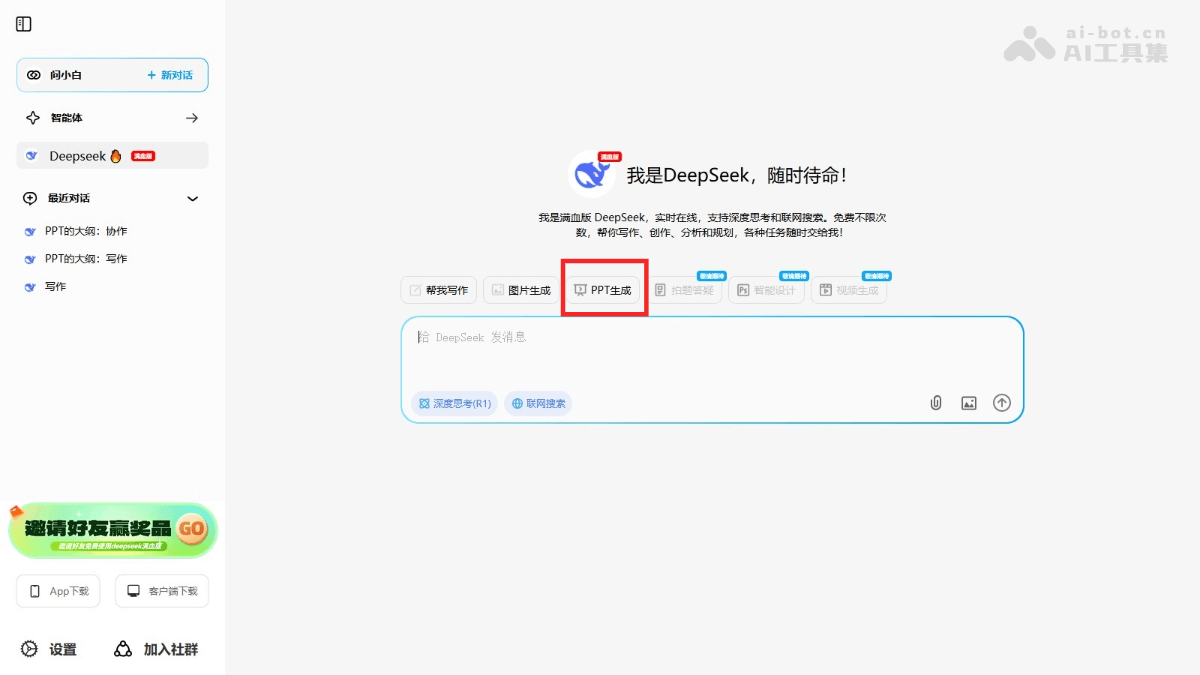
Main features of Wenxiaobai PPT Generation
- One-click PPT generation:Simply input the PPT outline or topic in the dialog box, and the platform automatically generates complete PPT content, including text, layout, and design.
- Efficient and convenient: No manual design required, saving time, suitable for users without design experience or with limited time.
- Customization features: Users can adjust the PPT style, content, and layout according to their needs to meet personalized requirements.
- Support for multiple export formats: Supports downloading standard PPT format files, images, and PDF files.
- Free to use: Currently the features are completely free, with unlimited use.
How to use Wenxiaobai PPT Generation
- Visit the platform: Visit theWenxiaobai official website, register and log in to your account.
- Enter the PPT generation interface: Find and click the "PPT Generation" option in the platform's dialog box.
- Input topic and requirements: Input the topic and specific requirements of the PPT you want to generate in the dialog box.
- Generate content: The platform automatically generates PPT content based on the input.
- Choose a template: Choose a template according to your preference. You can modify the template's style and theme colors. After modification, click to generate the PPT.
- Edit content:
- Modify text: Double-click the text box in the PPT to directly edit the text content, modify the text, adjust the font size, color, etc.
- Adjust layout: Select a page, drag elements, or use the layout tools provided by the software to adjust the page layout.
- Add or delete pages: Add or delete pages as needed.
- Download PPT: After adjustments are complete, click the "Download" button to save the generated PPT file locally.
Application scenarios of Wenxiaobai PPT Generation
- Work reports: Quickly generate PPTs for work reports, showcasing project progress, data analysis, or work summaries, helping save production time and improve efficiency.
- Academic presentations: Prepare PPTs for academic conferences, seminars, or classroom presentations, quickly generating slides with key information and charts to assist with explanation and sharing.
- Business presentations: Create PPTs for business proposals and product introductions, helping quickly organize content and generate professional and visually appealing presentation documents to enhance the presentation effect.
- Education and training: Teachers or trainers can quickly generate teaching courseware for classroom explanations or online courses, helping students better understand and absorb knowledge.
- Personal sharing: For scenarios such as sharing personal interests, travel records, or event planning, quickly generate personalized PPTs for easy presentation in social settings.