
What is Voicebox
Voicebox is an open-source localvoice synthesis tool, a cross-platform desktop application built with Tauri (Rust) and React. The tool providesvoice cloning, text-to-speech, audio post-processing, and multi-track narrative editing features. All models and voice data run locally without going to the cloud, with a focus on privacy-first. The project has gained 17.4K+ Stars on GitHub and is regarded as an open-source alternative to ElevenLabs .
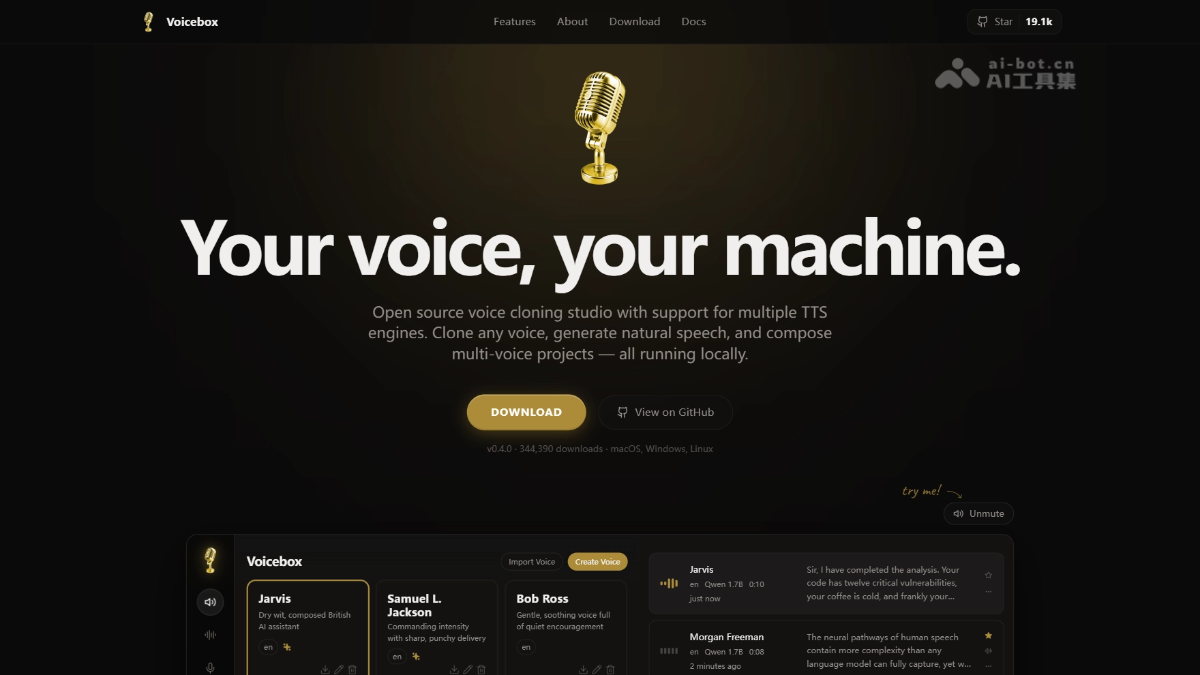
Key Features of Voicebox
- Voice Cloning and Profile Management: Supports creating personalized voice profiles by uploading audio files, real-time recording, or capturing system audio. Cloning can be completed with just a few seconds of clear voice samples.
- Multi-engine Text-to-Speech: Built-in multiple open-source TTS engines such as Qwen3-TTS, LuxTTS, Chatterbox, and TADA, supporting 10-23 languages including English, Chinese, and Arabic, meeting different audio quality and speed requirements.
- Professional Audio Post-processing: Based on the Spotify Pedalboard library, it provides 8 audio effects: pitch shift (±12 semitones), reverb, delay, chorus/flanger, compression, gain adjustment, high-pass/low-pass filters, with real-time preview and preset saving.
- Multi-track Narrative Editor: The Stories feature provides a DAW-like multi-track timeline interface, supporting track arrangement, editing, and mixing of different voice profiles, suitable for dialogue scenes and podcast production.
- Developer API Interface: Provides a complete REST API (default port 17493), supporting voice generation and voice profile management via HTTP requests, making it easy to integrate into third-party applications or automated workflows.
How to Use Voicebox
- Download and Install: Visit the official website
voicebox.shor the GitHub Releases page, and download the version for your system (macOS distinguishes Apple Silicon/Intel, Windows provides an MSI installer, Linux requires building from source). - Initialize Environment: On first launch, the application automatically downloads the required voice models (about 2-4GB, such as Qwen3-TTS). All data is stored locally in the application directory by default, with no need to configure a cloud account.
- Create Voice Profile: Go to the Profiles page, select "Create Voice", collect voice samples via Upload (upload file), Record (real-time recording), or System Audio (capture system audio), and enter reference text to complete profile creation.
- Generate Speech: In the generation interface, select a created voice profile, enter the text to be synthesized, choose the target language and TTS engine (e.g., Qwen3-TTS 1.7B), and click the generate button.
- Post-processing and Export: Arrange multiple tracks in the Stories editor, apply effects to audio clips (e.g., robot, radio, echo chamber presets), and export the finished audio file after adjustments.
Key Information and Usage Requirements of Voicebox
- System Compatibility: Supports macOS 11+ (both Apple Silicon and Intel versions), Windows 10+ (MSI installer), and Linux (requires building from source).
- Hardware Requirements: Minimum 8GB RAM, 16GB or more recommended; at least 5GB of free storage space; a graphics card supporting CUDA/Metal/XPU can greatly speed up inference, and CPU mode is also compatible for running.
- Data Privacy Features: All speech models, voice profiles, and generated audio are stored locally, usable without an internet connection, completely avoiding the privacy leak risk of cloud data transmission.
- Open-source license: The project is open-sourced under the MIT License, free to use for personal and commercial scenarios, and the GitHub repository provides complete source code and Docker deployment solutions.
Voicebox's core advantages
- Privacy-first local architecture: Compared with cloud services such as ElevenLabs, Voicebox completes all data processing locally, suitable for enterprises and individual users sensitive to data security.
- Open-source ecosystem and cost advantages: Completely free and open source, with 17.4K+ community Stars ensuring continuous updates, avoiding the subscription costs and vendor lock-in of commercial SaaS.
- Professional-grade post-production capabilities: Built-in 8 professional audio effects based on Pedalboard and a multi-track editor, providing post-production capabilities rarely seen in similar open-source tools, with no need to export to DAW software such as Audacity for secondary processing.
- Flexible switching among multiple engines: Supports switching among multiple engines from lightweight 350M models to 3B-parameter large models, allowing users to flexibly choose according to hardware configuration and audio quality requirements, balancing quality and inference speed.
- Developer-friendly design: Provides a complete REST API and detailed documentation, making it easy to integrate into scenarios such as games, podcast tools, and accessibility applications, and supports batch generation and management of voice content through code.
Voicebox's project address
- Project official website:https://voicebox.sh/
- GitHub repository:https://github.com/jamiepine/voicebox
Comparison of Voicebox with similar competitors
| Comparison dimension | Voicebox | ElevenLabs | GPT-SoVITS |
|---|---|---|---|
| Deployment method | Local desktop application, completely offline | Cloud SaaS service | Local operation, requires configuring a Python environment |
| Open-source nature | Open source (MIT License) | Commercial closed source | Open source (MIT License) |
| Voice cloning | Supported, requires a few seconds of samples | Supported, with industry-leading results | Supported, with better optimization for the Chinese community |
| Audio post-production | Built-in multi-track editing and 8 effects | Basic speech synthesis, no post-production features | No built-in post-production, requires external tools for processing |
| API support | Complete REST API (local service) | Commercial API (billed by character) | Requires self-deploying the API service |
| Privacy and security | Data is completely local, not uploaded | Data is uploaded to the cloud for processing | Data is processed locally |
| Usage threshold | Ready to use out of the box, with an installer provided | Ready to use upon registration, paid subscription | Requires technical background to configure the environment |
| Cost | Free | Pay-as-you-go, higher cost for high usage | Free |
Voicebox's application scenarios
-
Video content dubbing: YouTube creators and short video producers quickly generate high-quality narration for content, supporting multilingual localization.
-
Podcast and audiobook production: Arrange multi-person dialogue scenes with a multi-track editor, and export a complete audio work with one click.
-
Game development voiceover: Independent game developers generate dialogue audio for characters, with support for real-time adjustment of emotion and tone tags.
-
Accessibility assistive tools: Build localized voice assistants for visually impaired users, or help people with speech impairments communicate through cloned voices.
-
Automated content production: Integrate into CMS systems via API to enable automated voice broadcasting of news articles and weather reports.